

Tracking work from issue to merge
Coordinating development across a growing team means keeping tabs on which ideas have become active code and which code is waiting on review. Constant context-switching between issues, pull requests, labels, timelines, and project boards adds overhead on top of the actual work of building and reviewing changes.
GitHub is rolling out new linking options and interface signals that surface development status where teams already look: on issues, pull requests, issue lists, and project boards.
Linking from both sides
Until now, the primary way to connect a pull request to an issue was by using a closing keyword reference in the pull request description, which is easy to miss. With the new linked pull request section on an issue page, anyone can associate a pull request from the issue itself. Anyone viewing the issue can then immediately see both the state of the development work and the status of its pull request.

Reviewers can also make connections they spot during review. The pull request sidebar now includes a linked issues section, so a reviewer who notices that a pull request should close an unlinked issue can add it right there. These sidebar-linked issues behave exactly like keyword-linked ones, meaning they are closed automatically when the pull request merges.

Development context in lists and boards
The issue page isn’t the only place where teams evaluate workload. Expanded issue cards on project boards now display pull request information and status for issues with an active linked pull request, so you can gauge whether an item is in progress or ready to move columns without opening additional pages.
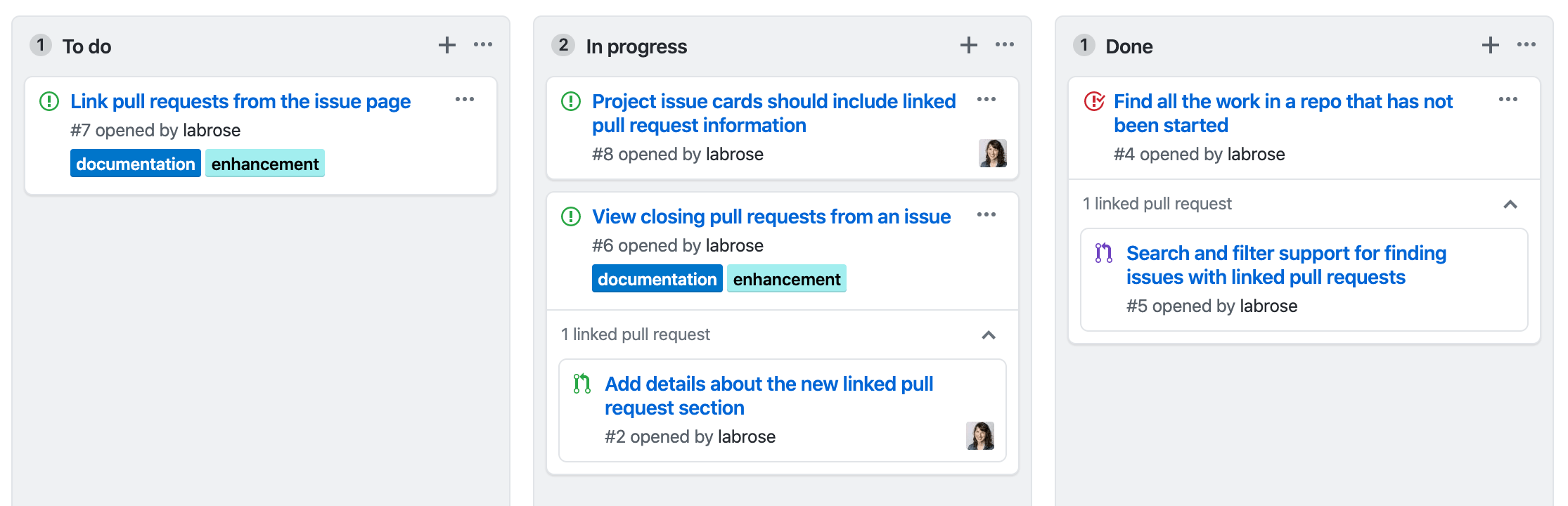
The repository issue list also shows a link count on open issues that have associated pull requests. You can further narrow the view by adding linked:pr to your filter terms, showing only issues that are actively under development.



