Defining First Contentful Paint
First Contentful Paint (FCP) is a performance metric that records the time from the moment a user initiates navigation to the point when any part of the page's content is first rendered on screen. In this context, "content" includes text, images (including background images), <svg> elements, and <canvas> elements that are not entirely white.

In the loading timeline above, FCP occurs in the second frame, which is the first moment text and an image are painted. This measurement captures the initial render, not the completion of the page's primary content. That distinction is what separates FCP from Largest Contentful Paint (LCP), which tracks when the main content of a page has fully loaded.
Target FCP thresholds
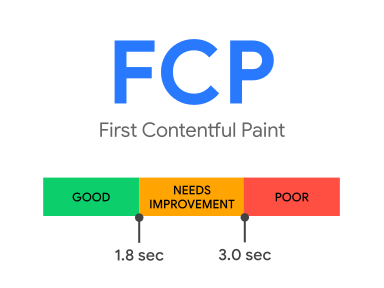
For a good user experience, pages should achieve a First Contentful Paint of 1.8 seconds or less. To confirm most users meet this target, evaluate the 75th percentile of page loads, measuring mobile and desktop performance separately.
Measuring FCP in the field and lab
FCP is supported by both field and lab measurement tools, including:
- Field tools: PageSpeed Insights, Chrome User Experience Report, Search Console's Speed Report, and the
web-vitalsJavaScript library. - Lab tools: Lighthouse, Chrome DevTools, and PageSpeed Insights.
Using the Paint Timing API
To measure FCP directly in JavaScript, use the Paint Timing API. The example below creates a PerformanceObserver that listens for a paint entry named first-contentful-paint and logs it to the console.
new PerformanceObserver((entryList) => {
  for (const entry of entryList.getEntriesByName('first-contentful-paint')) {
    console.log('FCP candidate:', entry.startTime, entry);
  }
}).observe({type: 'paint', buffered: true});
This log entry tells you when the first contentful element was painted. However, the API's raw output isn't always suitable for calculating the FCP metric. Four specific scenarios require adjustment:
- An entry is dispatched for pages loaded in a background tab, but those loads should be ignored; only pages that were in the foreground for the entire navigation should count.
- No
first-contentful-paintentry is reported when a page is restored from the back/forward cache, even though users experience this as a distinct visit and FCP should be recorded. - Paint timings from cross-origin iframes may be absent from the reporting API, yet FCP measurement should aggregate paint events all frames.
- The API measures FCP from navigation start, while prerendered pages should measure from the
activationStarttimestamp, which aligns with the user's experience.
To avoid managing these subtle behavioral differences, the web-vitals library provides an onFCP() helper. It handles the background-tab, back/forward cache, and prerender edge cases for you—though, as the documentation notes, the cross-origin iframe issue remains a known limitation. The library's source code provides a complete reference implementation.
import {onFCP} from 'web-vitals';

// Measure and log FCP as soon as it's available.
onFCP(console.log);
Improving FCP
For site-specific guidance, run a Lighthouse performance audit and review the opportunities and diagnostics sections. For general optimizations applicable to any page, the following practices are the most effective:
- Eliminate render-blocking resources
- Minify CSS and remove unused CSS and JavaScript
- Preconnect to required origins and preload key requests
- Reduce server response times (TTFB) and avoid multiple page redirects
- Keep network payloads small and dependency chains shallow
- Serve static assets with a cache policy and ensure fonts don't block text rendering
- Avoid excessive DOM size and keep request counts low
Tracking metric changes
Bugs in measurement APIs or metric definitions occasionally surface, leading to changes that may appear as gains or losses in internal dashboards. All modifications to FCP's implementation or definition are tracked in the FCP Changelog. Feedback on the metric can be submitted to the web-vitals-feedback Google group.


