
FigJam is now available on iPad, extending the whiteboard to a form factor Figma says users have long requested. Teams can sketch, annotate and iterate on the canvas directly from a tablet, alongside the existing desktop and web experiences.
The case for a dedicated canvas
Figma frames the tablet as an antidote to desktop distraction: notifications and messages from other apps interrupt focus, while a full-screen single-app environment supports sustained engagement. Because a tablet is as tactile and mobile as a notebook, it fits the exploratory part of the design workflow.
The company's interest in tablet editing dates back to Figma's early days, when designers used pen pads for low-fidelity sketches and annotations. After launching FigJam and observing heavy use of the marker, doodle and sketch tools, the team concluded that a tablet complements rather than replaces FigJam on desktop. "I have this infinite canvas where I can draw early concepts and do freeform sketching," said Jacques Krzepkowski, Staff Product Designer at Shopify. Figma adds that it has been surprised by how fluidly users move between form factors since the beta launched.
Working in low fidelity
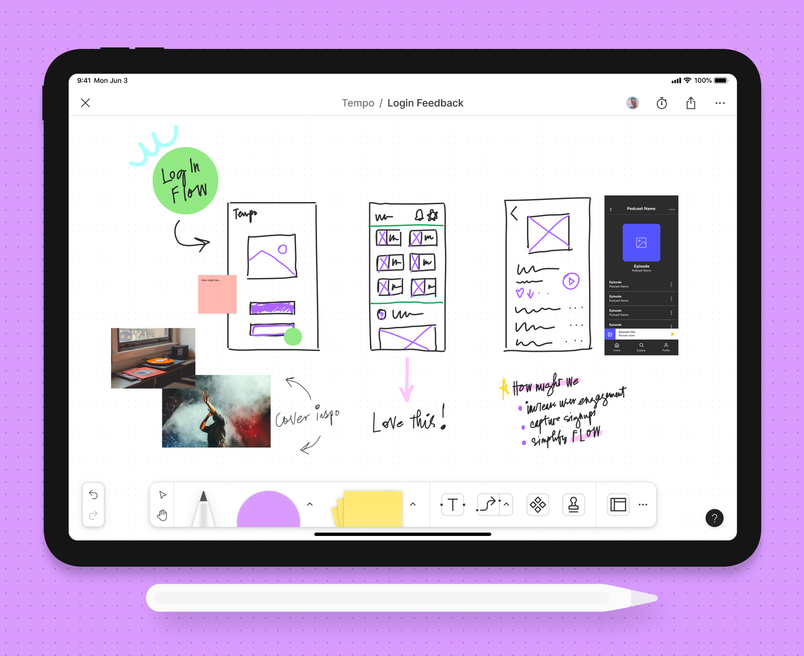
Riffing on a concept is nonlinear, and rough work carries a different social signal than polish: a refined mockup invites critique, while a sketch suggests something to build on together. Designer Bruno Figueiredo, Designer in Chief of OutSystems, described picking up sketches and notes later on a laptop and sharing diagrams for others to draw on top of. "I often encourage [people] to draw on top of my ideas," he said.
Annotations and group sessions
Beyond comments, annotations let users circle, underline and mark up words and sketches in place. Ryan Dotson, Sr. Content Designer at 1Password, leaves handwritten notes directly in FigJam files. "It is a more personal way to approach feedback and brings a level of warmth to that process," he said.
Tablet use isn't limited to solo work. Huiwen Ji, Senior Product Designer at Shopify, displays a FigJam file on a large desktop monitor while using the iPad as a second screen for quick marks during meetings, such as circling a group of stickies or calling out teammates. "It just makes collaboration sessions feel more fluid and natural," he said.
App transition and platform requirements
FigJam for iPad is moving into the Figma app, and the standalone FigJam for iPad app will be retired on January 8, 2026. After that date, FigJam will be available exclusively in the Figma app or on the web. To continue on an iPad, users should download and sign into the Figma app:
- Figma for iOS is supported on devices running iOS 16 or later.
- Figma for Android is supported on devices running Android 8 or later.
Figma describes this release as a first foray into tablet editing and says it is exploring richer and faster low-fidelity design on tablets, including Figma on tablet more broadly, with user input invited through its forum.