

Bringing Parallelism To The Browser
Web Workers, introduced in the HTML5 specification back in 2009, give developers a path around JavaScript's single-threaded execution model. The main thread handles UI rendering, JavaScript execution, and user interactions all in one context. Any sizable task running there — complex calculations, heavy data processing — blocks that thread and freezes the page. Web Workers let you push those tasks into a separate worker thread that runs in the background without touching the UI.
Standing up a worker is straightforward. You start with a dedicated JavaScript file containing the code you want to run in the background; this file cannot reference the DOM since it has no access to it. In your main script, you instantiate the worker with the Worker constructor, passing in the URL of that file, then wire up communication between the two contexts using postMessage and onmessage.
const worker = new Worker('worker.js');
On the main thread, the onmessage event handler receives messages coming back from the worker, while postMessage sends data to it:
worker.onmessage = function(event) {
  console.log('Worker said: ' + event.data);
};
worker.postMessage('Hello, worker!');
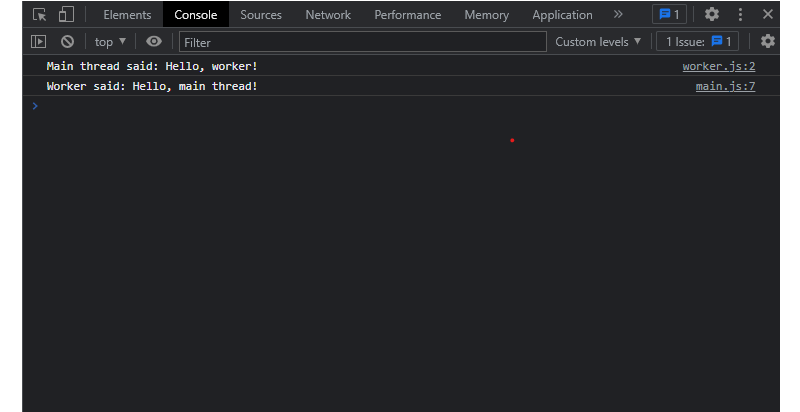
Inside the worker file, you listen for incoming messages via the onmessage property on the self object, accessing the transmitted payload through event.data:
self.onmessage = function(event) {
  console.log('Main thread said: ' + event.data);
  self.postMessage('Hello, main thread!');
};
What Workers Can And Cannot Do
The critical constraint of Web Workers is that they run in a sandboxed environment with no access to the DOM or UI. They cannot alter page elements or interact with the user directly. Workers also lack access to certain browser APIs like localStorage and sessionStorage. Their communication channel back to the main thread is the messaging system, which is how data flows between the two environments. In practice, this makes workers suitable for tasks that don't require direct UI access — data processing, image manipulation, calculations, and similar workloads.
The Payoff: Responsiveness, Stability, And Scale
The primary benefit of offloading intensive work to a background thread is that the main thread stays free to handle user input and keep the interface responsive. That design choice yields several concrete advantages:
- Better resource utilization. Time-consuming data processing or image manipulation runs without degrading the UI experience. Workers can also leverage multiple CPU cores, distributing work across processors for faster execution.
- Improved stability. Isolating heavy computations in worker threads reduces the risk of crashes and errors caused by executing large amounts of code on the main thread, making the application more reliable.
- Enhanced security. The sandboxed execution environment isolates workers from the main thread, preventing malicious code from accessing or modifying data in other contexts.
- Load balancing and scaling. Running tasks in parallel across multiple worker threads distributes the load evenly across available cores, which helps applications handle increased traffic without degrading performance.
Practical Patterns For Offloading Work
CPU-Intensive Computations
When a web application needs to perform a large calculation, running it inline freezes the UI. Moving the work to a worker keeps the page responsive. A simple pattern involves posting a message with a parameter to start the computation and receiving a message back with the result:
// Create a new Web Worker.
const worker = new Worker('worker.js');

// Define a function to handle messages from the worker.
worker.onmessage = function(event) {
  const result = event.data;
  console.log(result);
};

// Send a message to the worker to start the computation.
worker.postMessage({ num: 1000000 });

// In worker.js:

// Define a function to perform the computation.
function compute(num) {
  let sum = 0;
  for (let i = 0; i < num; i++) {
    sum += i;
  }
  return sum;
}

// Define a function to handle messages from the main thread.
onmessage = function(event) {
  const num = event.data.num;
  const result = compute(num);
  postMessage(result);
};
The worker receives the payload, executes the loop in the background, and posts the result back to the main thread, which logs it to the console:
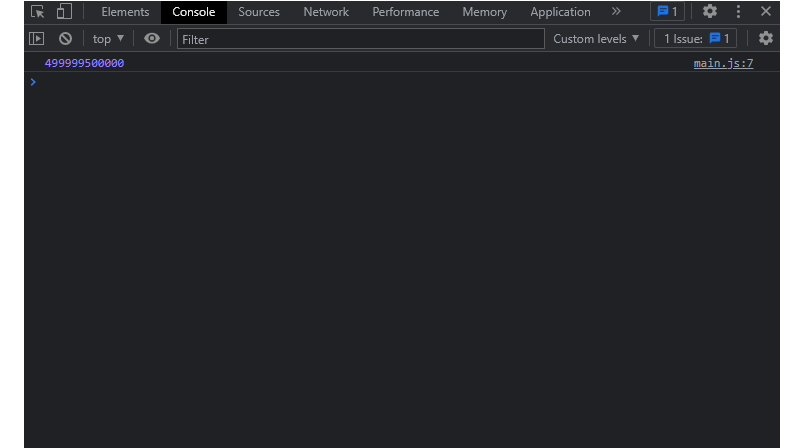
Consider a task that sums numbers from 0 up to a given bound. For small values it is trivial, but the worker example above passes 1000000 — forcing the function to iterate through a million additions. Left on the main thread, that would block input handling and animations. Offloaded to a worker, the UI stays smooth while the computation completes in the background.
Network Requests
Spawning a large number of network requests on the main thread can also hurt responsiveness. Workers can take over that responsibility, using the fetch API to make requests in the background and returning the aggregated results once everything completes:
// Create a new Web Worker.
const worker = new Worker('worker.js');

// Define a function to handle messages from the worker.
worker.onmessage = function(event) {
  const response = event.data;
  console.log(response);
};

// Send a message to the worker to start the requests.
worker.postMessage({ urls: ['https://api.example.com/foo', 'https://api.example.com/bar'] });

// In worker.js:

// Define a function to handle network requests.
function request(url) {
  return fetch(url).then(response => response.json());
}

// Define a function to handle messages from the main thread.
onmessage = async function(event) {
  const urls = event.data.urls;
  const results = await Promise.all(urls.map(request));
  postMessage(results);
};
In this setup, the main thread sends the worker an array of URLs. The worker issues the fetch calls concurrently, collects the responses, and reports back when finished — keeping the main thread available for other tasks the entire time.
Parallel Processing Of Independent Computations
For workloads composed of many independent calculations, sequential execution on the main thread creates avoidable delays. Workers can process the set in parallel and return all results at once:
// Create a new Web Worker.
const worker = new Worker('worker.js');

// Define a function to handle messages from the worker.
worker.onmessage = function(event) {
  const result = event.data;
  console.log(result);
};

// Send a message to the worker to start the computations.
worker.postMessage({ nums: [1000000, 2000000, 3000000] });

// In worker.js:

// Define a function to perform a single computation.
function compute(num) {
  let sum = 0;
  for (let i = 0; i < num; i++) {
    sum += i;
}
  return sum;
}

// Define a function to handle messages from the main thread.
onmessage = function(event) {
  const nums = event.data.nums;
  const results = nums.map(compute);
  postMessage(results);
};
Here the worker receives an array of numbers, applies a transformation to each value with a map call that runs across the worker's execution context, and sends the completed results back to the main thread for logging.
Practical Concerns When Working With Web Workers
While web workers are a solid solution for offloading heavy tasks, they aren’t a free pass. Several constraints shape how and where you can deploy them.
Browser Support And Feature Detection
All modern browsers support web workers, but older or niche environments may not. Before relying on them in production, check compatibility (e.g., via Can I Use) and test thoroughly. Feature detection is a straightforward safeguard:
if (typeof Worker !== 'undefined') {
  // Web Workers are supported.
  const worker = new Worker('worker.js');
} else {
  // Web Workers are not supported.
  console.log('Web Workers are not supported in this browser.');
}
That snippet verifies support and creates a worker only when available, logging a fallback message otherwise.
No Direct DOM Access
Workers run in a separate thread and have no access to the DOM, window, or document. You cannot manipulate page elements directly. The standard workaround is to use postMessage to send data to the main thread, where DOM updates can happen safely. For more ambitious cases, libraries like WorkerDOM let you run DOM operations from within a worker, which can speed up rendering.
Communication Has A Cost
Every message between a worker and the main thread carries overhead. Sending large payloads or firing many small messages can degrade performance, adding latency to otherwise fast operations. Keep exchanges minimal: pass only essential data and avoid high-frequency chatter. Batching helps here.
A queue-based batching approach collects messages and flushes them once a threshold is reached, cutting down the number of round-trips:
// Create a message queue to accumulate messages.
const messageQueue = [];

// Create a function to add messages to the queue.
function addToQueue(message) {
  messageQueue.push(message);

  // Check if the queue has reached the threshold size.
  if (messageQueue.length >= 10) {
    // If so, send the batched messages to the main thread.
    postMessage(messageQueue);

    // Clear the message queue.
    messageQueue.length = 0;
  }
}

// Add a message to the queue.
addToQueue({type: 'log', message: 'Hello, world!'});

// Add another message to the queue.
addToQueue({type: 'error', message: 'An error occurred.'});
This reduces overall message count and keeps the main thread from being overwhelmed.
Debugging Is Harder
Worker code doesn’t have the same debugging ecosystem as the main thread. Tools are more limited, so you often rely on the console API to log from inside the worker and use browser dev tools to inspect inter-thread messages. This is workable but slower than debugging inline code.
Added Code Complexity
Managing a worker means managing asynchronous communication, data serialization, and potential race conditions. That extra complexity can make the codebase harder to write, test, and maintain. Only reach for workers when the performance gain justifies the added structural burden.
Mitigation Strategies
You can reduce the risk of common worker-related issues with a few design choices.
Use Asynchronous Patterns
Synchronous operations block the worker thread and, by extension, can freeze the main thread if messages are queued. Prefer asynchronous methods like setTimeout() or setInterval() for long-running tasks. This keeps the event loop responsive:
// In the worker
self.addEventListener('message', (event) => {
  if (event.data.action === 'start') {
    // Use a setTimeout to perform some computation asynchronously.
    setTimeout(() => {
      const result = doSomeComputation(event.data.data);

      // Send the result back to the main thread.
      self.postMessage({ action: 'result', data: result });
    }, 0);
  }
});
Watch Memory Usage
Workers have their own memory limits, which vary by device and browser. Loading a large array and processing it all at once can exceed those limits.
// In the worker
self.addEventListener('message', (event) => {
  if (event.data.action === 'start') {
    // Use a for loop to process an array of data.
    const data = event.data.data;
    const result = [];

    for (let i = 0; i < data.length; i++) {
      // Process each item in the array and add the result to the result array.
      const itemResult = processItem(data[i]);
      result.push(itemResult);
    }

    // Send the result back to the main thread.
    self.postMessage({ action: 'result', data: result });
  }
});
In that example, the for loop processes the whole dataset in one go, which may spike memory. Using array methods like forEach or reduce processes items sequentially, easing the memory footprint.
Test Across Browsers
Even though support is broad, not every version behaves identically. Run your worker code on multiple browsers and versions, and pair that with the feature detection shown earlier to ensure graceful degradation.
Looking Forward
Web workers aren’t the only multithreading option, with alternatives like SharedArrayBuffer and WebSockets available. But workers offer a clear, well-supported path for offloading CPU-intensive work. Combined with WebAssembly, they open the door to even heavier computation in the browser.
Adoption is also eased by helper libraries. Comlink and Workerize simplify worker communication, hiding much of the boilerplate and making the feature more approachable for everyday use. As the web platform matures, expect workers to remain a core tool for keeping applications fast and responsive.


