
Front-end and back-end work on web applications is loosely coupled: separate teams often build the two halves, and keeping them in sync is hard. Mocking offers a way out — simulate the API server the back-end team would normally write, and develop as if the endpoints already existed. The approach below is framework-agnostic and works in any framework or in vanilla JavaScript.
Why Mirage
The tool used here is Mirage, a relatively new front-end-friendly mocking framework with a modern interface. It runs client-side in the browser and intercepts XMLHttpRequest and Fetch requests. To demonstrate, the examples build a standard to-do application in Vue, though the pattern transfers to any stack.
Installation and folder layout
Install Mirage into the project:
# Using npm
npm i miragejs -D


# Using Yarn
yarn add miragejs -D
The recommended structure puts mock code in its own directory:
/
├── public
├── src
│   ├── api
│   │   └── mock
│   │       ├── fixtures
│   │       │   └── get-tasks.js
│   │       └── index.js
│   └── main.js
├── package.json
└── package-lock.json
Defining the fake server
Inside the mock directory, create an index.js that defines the server:
// api/mock/index.js
import { Server } from 'miragejs';


export default function ({ environment = 'development' } = {}) {
  return new Server({
    environment,


    routes() {
      // We will add our routes here
    },
  });
}
The environment argument is a convention — a different environment can be passed as needed. Next, import createServer in the app bootstrap file (in the Vue case, src/main.js) and invoke it only in the development environment:
// main.js
import createServer from './mock'


if (process.env.NODE_ENV === 'development') {
    createServer();
}
The process.env.NODE_ENV check is what allows Mirage to be tree-shaken from the production bundle. The createServer default above uses development for simplicity; in most real apps it defaults to test, because createServer is typically called once in development mode but many times across test files.
How interception works
Mirage is a client-side framework: all mocking happens in the browser. It does this through the Pretender library, which temporarily replaces the native XMLHttpRequest and Fetch configurations, intercepts every request, and routes it to a small pretend service that Mirage hooks into. Because handling stays inside Mirage, the DevTools Network tab shows no Mirage requests; the framework instead logs all requests itself.
An unmocked request
Issuing a request to /api/tasks with axios (a personal preference — native XMLHttpRequest, Fetch, and other libraries work equally well):
// components/tasks.vue
export default {
  async created() {
    try {
      const { data } = await axios.get('/api/tasks'); // Fetch the data
      this.tasks = data.tasks;
    } catch(e) {
      console.error(e);
    }
  }
};
This produces a Mirage error in the JavaScript console:
Mirage: Your app tried to GET '/api/tasks', but there was no route defined to handle this request.The error confirms Mirage is running but the router has not yet been mocked.
Route handlers
Routes are declared inside the routes() hook of mock/index.js, where handlers specify which URLs the Mirage server should answer:
// mock/index.js
export default function ({ environment = 'development' } = {}) {
    // ...
    routes() {
      this.get('/api/tasks', () => ({
        tasks: [
          { id: 1, text: "Feed the cat" },
          { id: 2, text: "Wash the dishes" },
          //...
        ],
      }))
    },
  });
}
this.get() mocks a GET request. For every request function, the first argument is the URL being handled and the second is a callback that responds with data. Any HTTP request type is accepted, and all share the same signature:
this.get('/tasks', (schema, request) => { ... });
this.post('/tasks', (schema, request) => { ... });
this.patch('/tasks/:id', (schema, request) => { ... });
this.put('/tasks/:id', (schema, request) => { ... });
this.del('/tasks/:id', (schema, request) => { ... });
this.options('/tasks', (schema, request) => { ... });
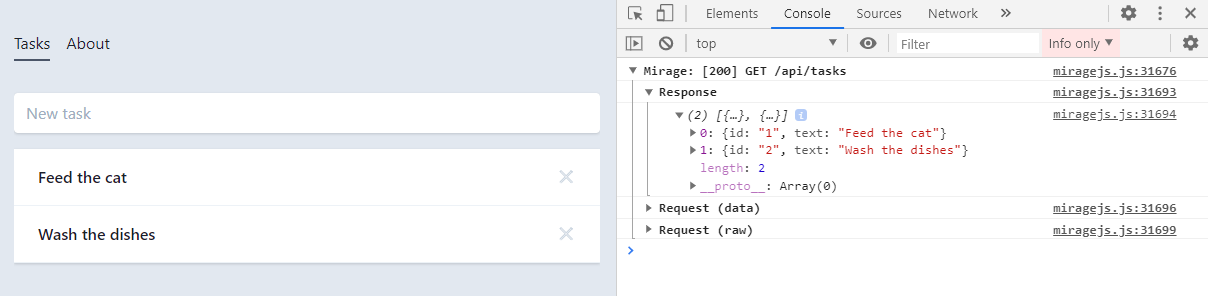
The schema and request callback parameters are covered below. With the route in place, the console shows a successful response:
Dynamic data
Hardcoded values in the GET response block any attempt to add a to-do. Mirage's remedy is a lightweight data layer that behaves like a database. The seeds() hook, alongside routes(), creates initial server data; the static GET data moves there and is pushed into the Mirage database:
seeds(server) {
  server.db.loadData({
    tasks: [
      { id: 1, text: "Feed the cat" },
      { id: 2, text: "Wash the dishes" },
    ],
  })
},
The GET handler then reads from that database. The first argument of any route callback is the schema:
this.get('/api/tasks', (schema) => {
  return schema.db.tasks;
})
Creating tasks now becomes possible with a POST request:
async addTask() {
  const { data } = await axios.post('/api/tasks', { data: this.newTask });
  this.tasks.push(data);
  this.newTask = {};
},
Mock the corresponding POST /api/tasks handler:
this.post('/tasks', (schema, request) => {})The callback's second parameter exposes the incoming request:
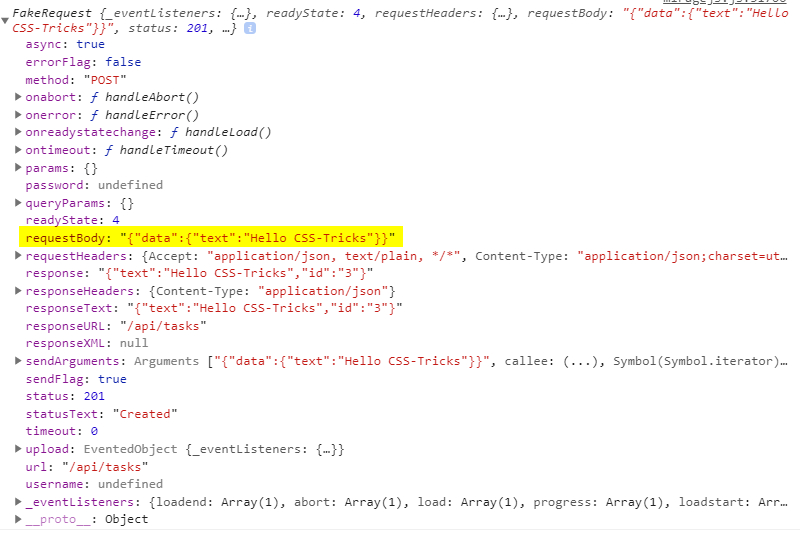
The sent data appears under the requestBody property and is available for creating a task:
this.post('/api/tasks', (schema, request) => {
  // Take the send data from axios.
  const task = JSON.parse(request.requestBody).data


  return schema.db.tasks.insert(task)
})
Task ids are assigned automatically by the Mirage database, just as a real server would — there is no need to track or send them yourself.
Dynamic segments and namespacing
Dynamic routes allow a variable segment in the URL, which is useful for deleting or updating a single to-do. A delete request to /api/tasks/1, /api/tasks/2, and so on is handled like this:
this.delete('/api/tasks/:id', (schema, request) => {
  // Return the ID from URL.
  const id = request.params.id;


  return schema.db.tasks.remove(id);
})
A colon (:) defines the dynamic segment, followed by its name — id here, mapping to a specific to-do's id. The value is readable through request.params, with the property name matching the segment name (request.params.id); the schema then removes the matching item from the Mirage database.
Every route above carries an api/ prefix, which becomes tedious to repeat. The namespace property, declared inside the routes hook, removes the repetition:
routes() {
 // Prefix for all routes.
 this.namespace = '/api';


 this.get('/tasks', () => { ... })
 this.delete('/tasks/:id', () => { ... })
 this.post('/tasks', () => { ... })
}
Adopting Mirage in an existing application
Mirage doesn't require mocking the entire API. When added to an existing app, however, a request the site makes that Mirage does not handle will throw an error. Passthrough mode avoids this by forwarding all unhandled requests:
routes() {
  this.get('/tasks', () => { ... })

  // Pass through all unhandled requests.
  this.passthrough()
}
Mirage can also change the base URL whose requests it captures — useful because a real server is usually not on localhost:3000 but on a custom domain:
routes() {
 // Set the base route.
 this.urlPrefix = 'https://devenv.ourapp.example';


 this.get('/tasks', () => { ... })
}
All requests now point at the real API server, intercepted by Mirage exactly as in the new-app setup. Migrating off the mock is accordingly seamless: delete the route from the mock server and the real endpoint takes over.
How it compares
Other mocking options have drawbacks. JSON-Server, a common choice, is an external process that must run alongside the front end and is often little more than an Express server with utility functions on top — requiring front-end developers to know about middleware, NodeJS, and how servers work. Mockoon presents a complex interface while lacking needed features. Testing-only frameworks such as SinonJS cannot mock regular runtime behavior. Mirage needs no external processes or servers, is simple to set up, and scales from a basic app returning a static array to full-blown back-end scenarios, for new and existing apps alike.
More exists beyond these examples. A working version of what was covered is on GitHub, Mirage also works with GraphQL, and its documentation includes step-by-step tutorials.



