
App error logs for faster Dropbox API debugging
Dropbox has introduced app error logs, a feature that lets developers inspect the API errors their apps encounter. The goal is straightforward: give you a way to address problems before users file support tickets, especially in mobile environments where collecting debugging details is traditionally difficult.
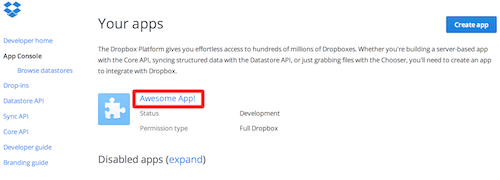
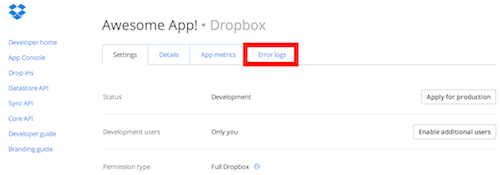
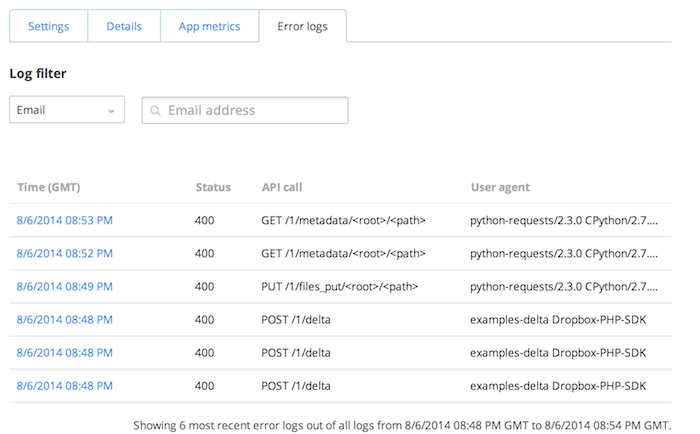
The logs are accessible through the App Console. After selecting your app, open the Error Logs tab to see the errors your app has hit. Each entry is clickable, revealing more detail that can help you pinpoint the root cause of a bug.
The feature also supports targeted searches. If a user contacts support with a complaint, you can filter the logs by that user's email address. Filtering by HTTP status code is also supported, which is useful when you want to isolate a specific class of failures, such as 4xx or 5xx responses.
- Go to the App Console and click on your app.
- Click on the Error Logs tab.
- Calmly inspect some error logs.
- Click on a log entry for further details to help squash the bug.
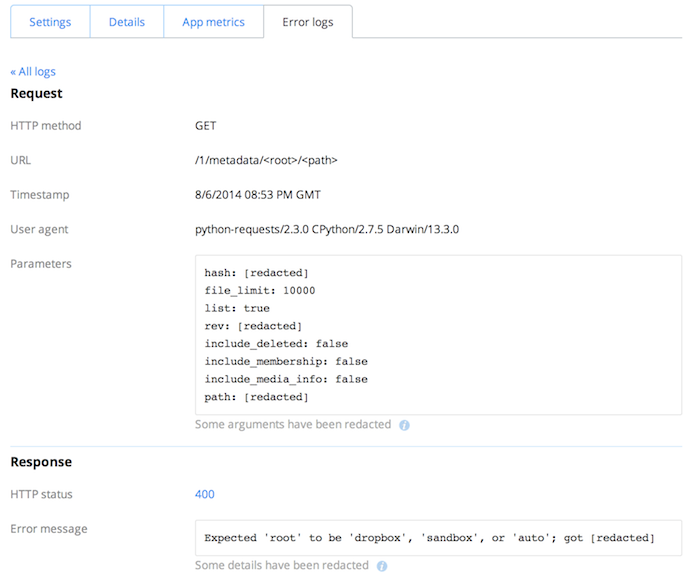
Since the logs are viewable by developers, privacy is a built-in consideration. Dropbox redacts sensitive user information before it appears in the log view, so privately identifying data is not exposed when you review an error.
Note: App error logs are currently disabled while Dropbox retools the underlying infrastructure. Dropbox expects to bring the feature back in the future.


