
When Your Login Breaks for No Reason
A developer's local Rails environment suddenly refused to authenticate users, reporting that the users table was missing a provider column (needed for OAuth). The same code and database schema worked fine in production, and the developer had no memory of touching that table.
Pairing with a colleague turned a frustrating mystery into a quick diagnosis. In about ten minutes, they established two facts:
- The production database had the
providercolumn; the dev database did not. - Running
git log -S providerrevealed that the column had been removed from the dev schema hours earlier — an action the developer didn't recall taking.
The fix was trivial: re-add the missing columns. The likely culprit was a botched Rails migration run via rake db:migrate while recreating the dev database, which corrupted the schema.
The takeaway wasn't the bug itself, but how pairing transforms "this is terrible" frustration into rapid resolution.
Git: Searching for Code Changes by String
The debugging session hinged on a lesser-known git feature: git log -S provider. This command searches the commit history for every commit that added or removed a specific string (here, provider).
A subsequent discussion revealed a subtle detail: git log -S does not actually scan diff content. Instead, it counts occurrences of the string across the whole tree and reports any commit where that count changed. The related git log -G does a proper regex search of the diffs themselves.
Git: Making Diffs Readable
The same pairing session surfaced a tool for dramatically more readable terminal diffs: delta. It installs easily and is configured by adding entries to ~/.gitconfig.
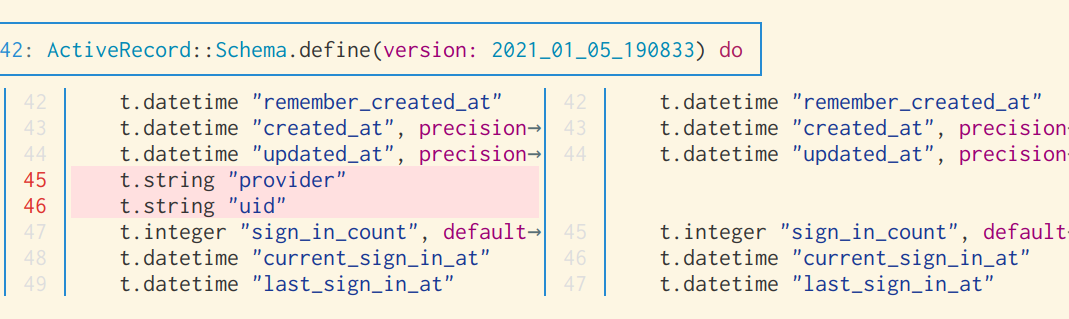
The tool ships with a large number of options, but the default configuration already produces far more legible output with syntax highlighting and inline changes.
[core]
	attributesfile = ~/.gitattributes

[interactive]
    diffFilter = delta --color-only

[delta]
    features = side-by-side line-numbers
    whitespace-error-style = 22 reverse
syntax-theme = GitHub
Git: Log With Patches
A third git tip came from inspecting commit history: git log --patch shows the full diff for each commit directly in the log output. This is a shortcut for the common workflow of copying a commit ID from git log and then running git show COMMIT_ID to see its changes — a habit that can last years before someone points out the built-in option.
Python: Pathlib and Context Managers
The same day's main task was writing a Python script to generate a cloud-init.yaml file by syncing files from a local directory. The pathlib module proved convenient for the file operations.
path = "/home/bork/"
textfile = path.joinpath('x.txt') # /home/bork/x.text
textfile.read_text() # read the contents as a string
textfile.read_bytes() # read the contents as binary
textfile.relative_to(path) # 'x.txt', lets you get the relative version of a path
The script also needed to change into a directory, perform work, and return. This naturally maps to a context manager, and a quick search produced a simple implementation from a GitHub gist that drops directly into code:
import os
from contextlib import contextmanager
@contextmanager
def working_directory(path):
    prev_cwd = os.getcwd()
    os.chdir(path)
    try:
        yield
    finally:
        os.chdir(prev_cwd)
Usage is then straightforward:
with working_directory(directory.joinpath('files')):
    synced = sync_files(cloud_init_yaml['write_files'])
    cloud_init_yaml['write_files'] = list(synced)
There's a particular satisfaction in identifying a small piece of utility code and summoning it with a search — a reminder that many everyday problems already have clean, well-tested solutions waiting to be reused.


