Review time has a way of exposing a gap: the work was done, but nobody wrote it down. Ryan T. Harter calls this "invisible work" in a talk titled "Getting Credit for Invisible Work" — the contributions that slip through the cracks because memory is unreliable over six or twelve months. Julia Evans' proposed remedy is a brag document: a place to record project contributions, help given to others, process improvements, talks and workshops, things learned, blogging and side projects, awards and career progression. Jonny Burch and the Progression team turned that idea into bragdocs.com, but building your own with the static site generator Eleventy is a reasonable alternative.

Prerequisites and tooling
- Node.js version 10 or higher, with the ability to install packages
- Comfort with HTML and CSS
- Optional but useful: Markdown, Nunjucks, JavaScript
- Familiarity with
ifstatements, loops, and reading variables from JSON
Eleventy is a static site generator, which means it processes templating languages — HTML, Markdown, Liquid, Nunjucks, Mustache and others — into static HTML pages rather than running a full front-end/back-end stack. The tutorial repository is called eleventy-bragdoc, and the finished product is referred to as a "bragdoc".
Scaffolding and configuration
Starting from a GitHub repository with a README.md and a Node .gitignore, the project begins with these files:
eleventy-bragdoc
├── README.md
└── .gitignore // .gitignore for node
From inside that directory, the project is initialized with:
npm init -yThat produces a package.json:
eleventy-bragdoc
├── package.json // new file
├── README.md
└── .gitignore
Eleventy is installed next:
npm install @11ty/eleventyLeaving the following files and folders:
eleventy-bragdoc
├── node_modules  // new folder
├── package.json
├── package-lock.json  // new file
├── README.md
└── .gitignore
Two scripts go into package.json: start serves the project in development via Browsersync hot reload, and build generates production-ready HTML for hosting.
{
  // ...
  "scripts": {
    "start": "eleventy --serve",
    "build": "eleventy"
  },
 //  ...
}
A .eleventy.js configuration file declares the custom input and output directories, naming src as the source and public as the destination:
eleventy-bragdoc
├── .eleventy.js  // new file
├── node_modules
├── package.json
├── package-lock.json
├── README.md
└── .gitignore
module.exports = function(eleventyConfig) {
return {
dir: {
input: "src",
output: "public"
}
}
}First page, layouts, and assets
The src directory declared in the config receives its first page, index.md. Eleventy accepts many templating languages that can be mixed freely: HTML, Markdown, Liquid, Nunjucks, JavaScript, Handlebars, Mustache, EJS, Haml and Pug.
eleventy-bragdoc
├── src
│   └── index.md  // new file
├── .eleventy.js
├── node_modules
├── package.json
├── package-lock.json
├── README.md
└── .gitignore
Anything between the --- dashes is front matter. In index.md, a title property of "11ty x Bragdocs" sits above some test content.
---
title: "11ty x Bragdocs"
---

This is the home page.
Templates, which Eleventy calls layouts, live in a _includes folder inside src. The first one goes in a layouts subfolder as base.njk — the .njk extension selects the Nunjucks templating language:
eleventy-bragdoc
├── src
│   ├── _includes  // new folder
│   │   └── layouts  // new folder
│   │       └── base.njk  // new file
│   └── index.md
├── .eleventy.js
├── node_modules
├── package.json
├── package-lock.json
├── README.md
└── .gitignore
An HTML5 boilerplate fills base.njk:
<!DOCTYPE html>
<html lang="en">
<head>
  <meta charset="UTF-8">
  <meta name="viewport" content="width=device-width, initial-scale=1.0">
  <title>Document</title>
</head>
<body>

</body>
</html>
Inside the <title> tags, the front-matter title from index.md is pulled in with double curly braces, {{title}}; the same property sets an <h1> in the body. The rest of the body comes in through the content property, passed through the safe filter so Eleventy renders rather than escapes any HTML inside the Markdown content.
<!DOCTYPE html>
<html lang="en">
<head>
  <meta charset="UTF-8">
  <meta name="viewport" content="width=device-width, initial-scale=1.0">
  <title>{{ title }}</title>
</head>
<body>
  <h1>{{ title }}</h1>
  {{ content | safe }}
</body>
</html>
Back in index.md, a layout property in the front matter references base.njk:
---
title: "11ty x Bragdocs"
layout: "layouts/base.njk"
---

This is the home page.
At build time, the template named by that property wraps the Markdown content, compiling to HTML like this:
<!DOCTYPE html>
<html lang="en">
<head>
  <meta charset="UTF-8">
  <meta name="viewport" content="width=device-width, initial-scale=1.0">
  <title>11ty x Bragdocs</title>
</head>
<body>
  <h1>11ty x Bragdocs</h1>
  <p>This is the home page.</p>
</body>
</html>
CSS and self-hosted images are optional but worth adding, so css and images folders are created under src:
eleventy-bragdoc
├── src
│   ├── css  // new folder
│   ├── images  // new folder
│   ├── _includes
│   │   └── layouts
│   │       └── base.njk
│   └── index.md
├── .eleventy.js
├── node_modules
├── package.json
├── package-lock.json
├── README.md
└── .gitignore
For their contents to be accessible when hosted, .eleventy.js needs two settings. addWatchTarget tells Eleventy to recompile when a file in that directory (such as styles.css) changes, and addPassthroughCopy copies the directory's contents through to public after compilation. Since the project uses Nunjucks, the markdownTemplateEngine property is set to njk so Markdown is processed through Nunjucks first.
module.exports = function(eleventyConfig) {
  eleventyConfig.addWatchTarget("./src/css/")
  eleventyConfig.addWatchTarget("./src/images/")
  eleventyConfig.addPassthroughCopy("./src/css/")
  eleventyConfig.addPassthroughCopy("./src/images/")

  return {
    dir: {
      input: "src",
      output: "public"
    },
    markdownTemplateEngine: "njk"
  }
}
A styles.css file in the css folder provides something to test with:
* {
  color: teal;
}
With those folders configured, the files are referenced through Eleventy's URL filter in the href and src attributes of the CSS and image tags:
<!DOCTYPE html>
<html lang="en">
<head>
  <meta charset="UTF-8">
  <meta name="viewport" content="width=device-width, initial-scale=1.0">
  <title>{{ title }}</title>

  <link rel="stylesheet" href="{{ '/css/styles.css' | url }}">

</head>
<body>
  <h1>{{ title }}</h1>

  <img src="{{ '/images/test_image.jpg' | url }}">

  {{ content | safe }}
</body>
</html>
Running in development
The scripts defined earlier are enough to start the dev server:
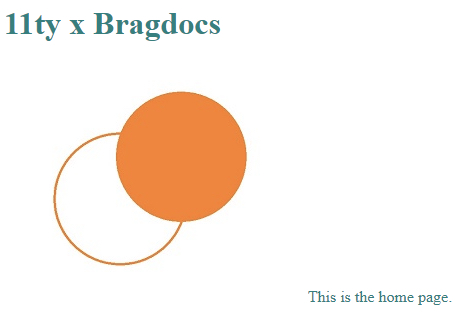
npm startThis compiles index.md from src into an HTML file in public and launches a Browsersync hot-reload server, with the result visible at http://localhost:8080/:
Modeling entries as a collection
Eleventy collections group similar content, so bragdoc entries go into a posts folder, each entry its own Markdown file. Filenames like post-1.md, post-2.md and post-3.md have no effect on what is rendered.
eleventy-bragdoc
├── src
│   ├── posts
│   │   ├── post-1.md  // new file
│   │   ├── post-2.md  // new file
│   │   └── post-3.md  // new file
│   ├── css
│   │   └── styles.css
│   ├── images
│   │   └── test_image.jpg
│   ├── _includes
│   │   └── layouts
│   │       └── base.njk
│   └── index.md
├── .eleventy.js
├── node_modules
├── package.json
├── package-lock.json
├── README.md
└── .gitignore
The custom front-matter properties are:
- Title
- Date — sorted chronologically by default
- Categories — a list of values used to organize entries
- Public / Private — a boolean controlling whether the entry appears on the bragdoc
- Icon — a Notion-inspired design element for visual organization
The entry description is the Markdown body, which allows paragraphs, images, code blocks and even styled HTML rather than being limited to Markdown elements. An example entry:
---
title: Build my own Bragdoc using Eleventy
date: 2021-09-19
categories:
  - Learning
  - Eleventy
public: True
icon: 🎈
---

I learned how to use Eleventy to build my own bragdoc!
Details that matter
- Markdown links do not open in a new blank tab by default. A snippet by Mark Thomas Miller, added just before the closing
<body>tag inbase.njk, addresses this — optional, and not universally liked:
<script>
// Making all external links open in new tabs
// Snippet by Mark Thomas Miller

(function () {
  const links = document.querySelectorAll("a[href^='https://'], a[href^='http://']")
  const host = window.location.hostname

  const isInternalLink = link => new URL(link).hostname === host

  links.forEach(link => {
    if (isInternalLink(link)) return

    link.setAttribute("target", "_blank")
    link.setAttribute("rel", "noopener")
  })
})()
</script>- The
datefront-matter property must use theYYYY-MM-DDformat. - Any number of custom properties can be assigned, but a property read by a template must exist in every Markdown file using that template or the build may break.
- Lists in front matter can be written in more than one way, as an array or on a single line.
Shared properties via a data directory file
Rather than repeating identical front-matter values in every Markdown file, a data directory JSON file assigns the same key-value pair once for the whole collection. It must be named after the collection — posts.json — and placed inside the collection folder, posts:
eleventy-bragdoc
├── src
│   ├── posts
│   │   ├── posts.json  // new file
│   │   ├── post-1.md
│   │   ├── post-2.md
│   │   └── post-3.md
│   ├── css
│   │   └── styles.css
│   ├── images
│   │   └── test_image.jpg
│   ├── _includes
│   │   └── layouts
│   │       └── base.njk
│   └── index.md
├── .eleventy.js
├── node_modules
├── package.json
├── package-lock.json
├── README.md
└── .gitignore


