

Content revision requests are a recurring cost on flat-file sites: when there is no CMS in place, someone has to edit HTML, CSS or JavaScript directly every time text changes. Tabletop.js offers a way around that by turning a Google Spreadsheet into a read-only data store for the front end. It exposes the spreadsheet's rows as JSON, which the page can consume the same way it would consume any other API. The walkthrough below is a step-by-step on wiring the spreadsheet to the markup.
Setting up the spreadsheet
The demonstration project this guide follows is a small site with its source code and the matching spreadsheet published alongside it. A Google account is enough to open the sheet. Create a new spreadsheet and fill in columns the same way as the example: the top cell of each column holds the reference name that the JavaScript will look up, and the cell beneath it holds the content that should appear on the page. In the first column, header is the reference and Please edit me! is the content.

Publishing and permissions
With the data entered, choose File → Publish to the web. The dialog returns a link that is of no use here; what matters is that the spreadsheet and its data are now publicly fetchable by the app.
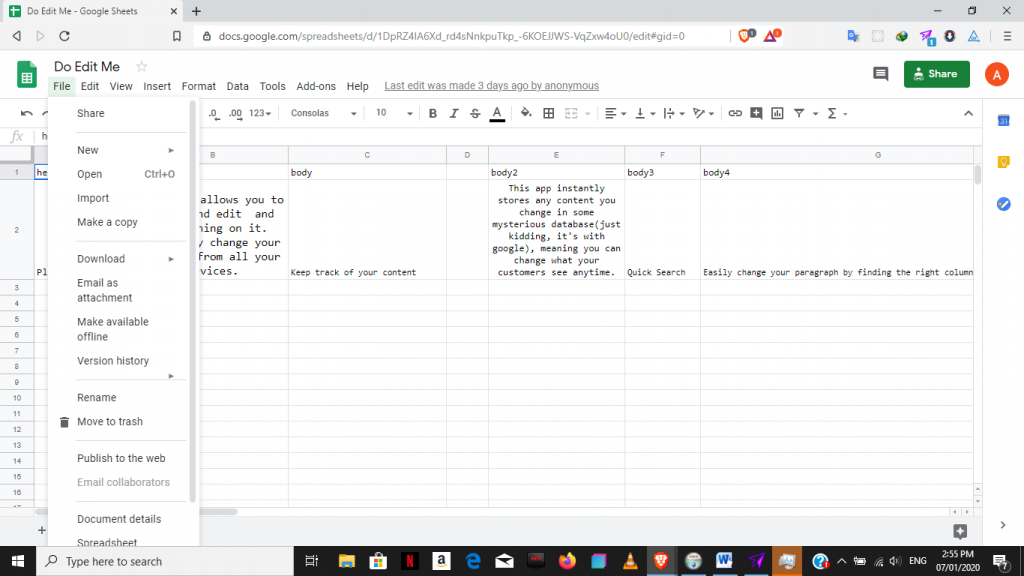
The link we do want comes from the green “Share” button in the upper-right corner, which opens a modal containing a sharable URL and the permission controls. Copy that link and set permissions to anyone-with-the-link-can-view, so that visitors to the app cannot accidentally edit the data.

Bringing Tabletop into the page
Tabletop can be added through the project's hosted minified file, or the same minified code can be copied into a project script and self-hosted. The document below links Tabletop's CDN build and uses code taken from the documentation.
<script src='https://cdnjs.cloudflare.com/ajax/libs/tabletop.js/1.5.1/tabletop.min.js'></script>

<script type='text/javascript'>
  var publicSpreadsheetUrl = 'https://docs.google.com/spreadsheets/d/1sbyMINQHPsJctjAtMW0lCfLrcpMqoGMOJj6AN-sNQrc/pubhtml';

  function init() {
    Tabletop.init( {
      key: publicSpreadsheetUrl,
      callback: showInfo,
      simpleSheet: true
    } )
  }

  function showInfo(data, tabletop) {
    alert('Successfully processed!')
    console.log(data);
  }

  window.addEventListener('DOMContentLoaded', init)
</script>
Substitute the sharable URL from the Share modal into the publicSpreadsheetUrl variable.
Injecting the data
Markup side, give each target element a unique ID and leave its contents empty. Then, inside showInfo, iterate over the spreadsheet columns with forEach() and map each one to the matching ID.innerHTML, so the row's value lands in the element that owns that ID.
function showInfo(data, tabletop) {
  data.forEach(function(data) {
    header.innerHTML = data.header;
    header2.innerHTML = data.header2;
    body.innerHTML = data.body;
    body2.innerHTML = data.body2;
    body3.innerHTML = data.body3;
    body4.innerHTML = data.body4;
    body5.innerHTML = data.body5;
    body6.innerHTML = data.body6;
    body7.innerHTML = data.body7;
    body8.innerHTML = data.body8;
    body9.innerHTML = data.body9;
    body10.innerHTML = data.body10;
    body11.innerHTML = data.body11;
    body12.innerHTML = data.body12;
    body13.innerHTML = data.body13;
    body14.innerHTML = data.body14;
    body15.innerHTML = data.body15;
    body16.innerHTML = data.body16;
    body17.innerHTML = data.body17;
 });
}
window.addEventListener('DOMContentLoaded', init)
The excerpt below is the relevant part of the demo's HTML with the empty tags in place. Creating the elements from JavaScript instead is a further abstraction worth considering.
<!-- Start Section One: Keep track of your snippets -->
<section class="feature">
  <div class="intro-text">
    <h3 id="body"></h3>
    <p id="body2">

    </p>
  </div>
  <div class="track-snippets">
    <div class="snippet-left"><img src="img/image-computer.png" alt="computer" /></div>
    <div class="snippet-right">
      <div>
        <h4 id="body3"></h4>
        <p id="body4">
        </p>
      </div>
      <div>
        <h4 id="body5"></h4>
        <p id="body6"></p>
      </div>
      <div>
        <h4 id="body7"></h4>
        <p id="body8">
        </p>
      </div>
    </div>
  </div>
</section>
At that point, editing a cell in the spreadsheet updates the page's content in real time.



