Unoptimized images are one of the most common sources of excess page weight — httparchive reports they can account for up to half of an average page's total bytes. Small formats are emerging with better quality-to-size ratios, notably WebP (roughly 90% global browser support at the time of writing, with partial Safari support) alongside lightweight SVG. The goal here is to generate and shrink assets in JPG, PNG, WebP, and SVG with a set of Bash scripts, so images are optimized before they ship.


The project files live in the original-images directory of the referenced GitHub repository, with a documented starting point at commit 3584f9b.
Installing the tools
sudo apt-get update
sudo apt-get install imagemagick webp jpegoptim optipng
npm install -g svgexport svgo- ImageMagick handles a wide range of raster formats
- webp provides
cwebpanddwebpfor WebP encoding and decoding - JPEGoptim optimizes JPG/JPEG files
- OptiPNG optimizes PNG files
- SVGO and svgexport are Node packages for SVG assets
Before running any of these, back up whatever images you intend to process. The scripts mutate files themselves, and a wrong command can alter originals irreversibly.
Sorting files by MIME type
Rather than mixing everything in one folder, organize-images.sh takes an input directory, inspects each image file's MIME type, and creates a subdirectory per type, copying each image into the matching folder.
#!/bin/bash

input_dir="$1"

if [[ -z "$input_dir" ]]; then
  echo "Please specify an input directory."
  exit 1
fi

for img in $( find $input_dir -type f -iname "*" );
do
  # get the type of the image
  img_type=$(basename `file --mime-type -b $img`)

  # create a directory for the image type
  mkdir -p $img_type

  # move the image into its type directory
  rsync -a $img $img_type
done
Run it with:
bash organize-images.sh original-imagesEach format now sits in its own subdirectory and can be converted separately.
Generating PNG variants
Three sources get converted to PNG: WebP, JPEG, and SVG. webp2png.sh walks an input directory and decodes each .webp file:
#!/bin/bash

# directory containing images
input_dir="$1"

if [[ -z "$input_dir" ]]; then
  echo "Please specify an input directory."
  exit 1
fi

# for each webp in the input directory
for img in $( find $input_dir -type f -iname "*.webp" );
do
  dwebp $img -o ${img%.*}.png
doneinput_dir="$1"captures the script's first argument.if [[ -z "$input_dir" ]]; thenruns the following block when no directory was passed.find $input_dir -type f -iname "*.webp"drives theforloop over matching files.dwebp $img -o ${img%.*}.pngdecodes each WebP image into PNG.
bash webp2png.sh webpJPEG conversion (jpg2png.sh) uses ImageMagick's convert. The find expression adds -o -iname "*.jpeg" — a logical OR — so both .jpg and .jpeg files are picked up.
#!/bin/bash

# directory containing images
input_dir="$1"

if [[ -z "$input_dir" ]]; then
  echo "Please specify an input directory."
  exit 1
fi

# for each jpg or jpeg in the input directory
for img in $( find $input_dir -type f -iname "*.jpg" -o -iname "*.jpeg" );
do
  convert $img ${img%.*}.png
done
bash jpg2png.sh jpegSVGs follow the same pattern, with one addition: because the format scales, the script accepts a width directive to up- or down-scale output. Conversion goes through svgexport.
#!/bin/bash

# directory containing images
input_dir="$1"

# png image width
width="$2"

if [[ -z "$input_dir" ]]; then
  echo "Please specify an input directory."
  exit 1
elif [[ -z "$width" ]]; then
  echo "Please specify image width."
  exit 1
fi

# for each svg in the input directory
for img in $( find $input_dir -type f -iname "*.svg" );
do
  svgexport $img ${img%.*}.png $width:
done
bash svg2png.sh svg+xmlAll of these PNG outputs are recorded at commit 76ff80a.
Generating JPG variants
PNG to JPG is handled by png2jpg.sh, which introduces a -quality directive for the conversion; the rest follows the earlier pattern.
#!/bin/bash

# directory containing images
input_dir="$1"

# jpg image quality
quality="$2"

if [[ -z "$input_dir" ]]; then
  echo "Please specify an input directory."
  exit 1
elif [[ -z "$quality" ]]; then
  echo "Please specify image quality."
  exit 1
fi

# for each png in the input directory
for img in $( find $input_dir -type f -iname "*.png" );
do
  convert $img -quality $quality% ${img%.*}.jpg
done
bash png2jpg.sh png 90WebP to JPG can't be done in a single step. webp2jpg.sh therefore decodes WebP to an intermediate PNG with dwebp and then converts that PNG with convert, giving the loop two distinct stages.
#!/bin/bash

# directory containing images
input_dir="$1"

# jpg image quality
quality="$2"

if [[ -z "$input_dir" ]]; then
  echo "Please specify an input directory."
  exit 1
elif [[ -z "$quality" ]]; then
  echo "Please specify image quality."
  exit 1
fi

# for each webp in the input directory
for img in $( find $input_dir -type f -iname "*.webp" );
do
  # convert to png first
  dwebp $img -o ${img%.*}.png

  # then convert png to jpg
  convert ${img%.*}.png -quality $quality% ${img%.*}.jpg
done
bash webp2jpg.sh jpeg 90SVG to JPG reuses the SVG-to-PNG script, adding only the JPG quality directive.
#!/bin/bash

# directory containing images
input_dir="$1"

# jpg image width
width="$2"

# jpg image quality
quality="$3"

if [[ -z "$input_dir" ]]; then
  echo "Please specify an input directory."
  exit 1
elif [[ -z "$width" ]]; then
  echo "Please specify image width."
  exit 1
elif [[ -z "$quality" ]]; then
  echo "Please specify image quality."
  exit 1
fi

# for each svg in the input directory
for img in $( find $input_dir -type f -iname "*.svg" );
do
    svgexport $img ${img%.*}.jpg $width: $quality%
done
bash svg2jpg.sh svg+xml 512 90JPG outputs from these runs are captured at commit 884c6cf.
Generating WebP variants
png2webp.sh mirrors the PNG-from-WebP script, swapping dwebp for cwebp.
#!/bin/bash

# directory containing images
input_dir="$1"

# webp image quality
quality="$2"

if [[ -z "$input_dir" ]]; then
  echo "Please specify an input directory."
  exit 1
elif [[ -z "$quality" ]]; then
  echo "Please specify image quality."
  exit 1
fi

# for each png in the input directory
for img in $( find $input_dir -type f -iname "*.png" );
do
  cwebp $img -q $quality -o ${img%.*}.webp
done
bash png2webp.sh png 90JPG has no direct route to WebP, so jpg2webp.sh first converts each JPG to PNG and then encodes that intermediate PNG to WebP.
#!/bin/bash

# directory containing images
input_dir="$1"

# webp image quality
quality="$2"

if [[ -z "$input_dir" ]]; then
  echo "Please specify an input directory."
  exit 1
elif [[ -z "$quality" ]]; then
  echo "Please specify image quality."
  exit 1
fi

# for each webp in the input directory
for img in $( find $input_dir -type f -iname "*.jpg" -o -iname "*.jpeg" );
do
  # convert to png first
  convert $img ${img%.*}.png

  # then convert png to webp
  cwebp ${img%.*}.png -q $quality -o ${img%.*}.webp
done
bash jpg2webp.sh jpeg 90Commit 6625f26 contains the resulting WebP files.
Recombining the outputs
With conversion complete, the variants are gathered back into one directory so later optimization runs need fewer commands. combine-images.sh takes a comma-separated list of input directories as its first argument and the target directory as its second.
#!/bin/bash

input_dirs="$1"
output_dir="$2"

if [[ -z "$input_dirs" ]]; then
  echo "Please specify an input directories."
  exit 1
elif [[ -z "$output_dir" ]]; then
  echo "Please specify an output directory."
  exit 1
fi

# create a directory to store the generated images
mkdir -p $output_dir

# split input directories comma separated string into an array
input_dirs=(${input_dirs//,/ })

# for each directory in input directory
for dir in "${input_dirs[@]}"
do
  # copy images from this directory to generated images directory
  rsync -a $dir/* $output_dir/
done
bash combine-images.sh jpeg,svg+xml,webp,png generated-imagesThe combined output is available at commit ca9e34e.
Shrinking the assets
SVG: optimize-svg.sh calls SVGO. The package exposes many options, but the script keeps to SVGO's default optimization behavior.
#!/bin/bash

# directory containing images
input_dir="$1"

if [[ -z "$input_dir" ]]; then
echo "Please specify an input directory."
exit 1
fi

# for each svg in the input directory
for img in $( find $input_dir -type f -iname "*.svg" );
do
  svgo $img -o ${img%.*}-optimized.svg
done
bash optimize-svg.sh generated-images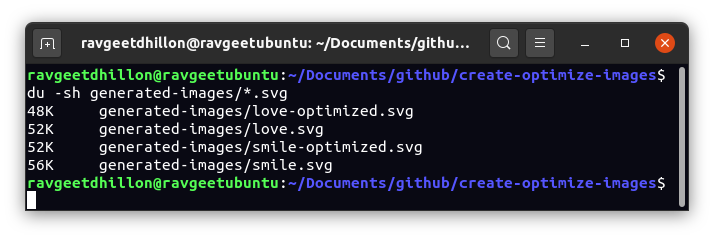
Results: commit 75045c3.
PNG: optimize-png.sh applies OptiPNG to every PNG in the input directory, appending -optimized to the output file name. Its -o flag sets the optimization level: the default is 2, and valid values run from 0 to 7.
#!/bin/bash

# directory containing images
input_dir="$1"

if [[ -z "$input_dir" ]]; then
  echo "Please specify an input directory."
  exit 1
fi

# for each png in the input directory
for img in $( find $input_dir -type f -iname "*.png" );
do
  optipng $img -out ${img%.*}-optimized.png
done
bash optimize-png.sh generated-images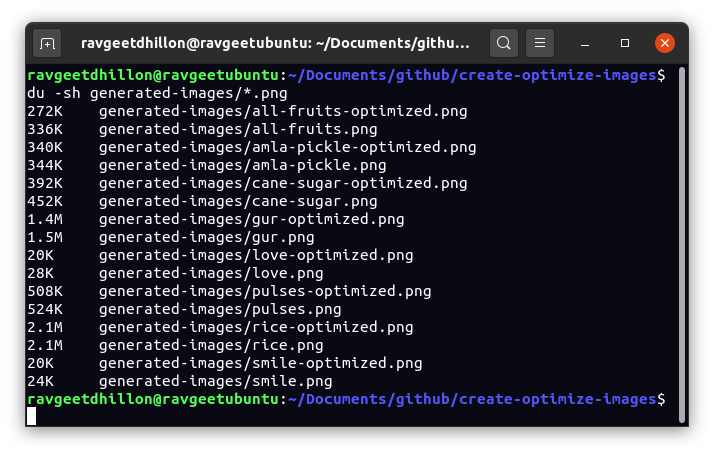
Adjusting -o trades quality against file size to suit the project. Outputs: commit 4a97f29.
JPG: optimize-jpg.sh uses JPEGoptim, which has no option to name an output file and only optimizes in place. The script works around this by copying each image under a new name and optimizing the copy. Its -m argument sets image quality and rewards experimentation for the best quality-to-size balance.
#!/bin/bash

# directory containing images
input_dir="$1"

# target image quality
quality="$2"

if [[ -z "$input_dir" ]]; then
  echo "Please specify an input directory."
  exit 1
elif [[ -z "$quality" ]]; then
  echo "Please specify image quality."
  exit 1
fi

# for each jpg or jpeg in the input directory
for img in $( find $input_dir -type f -iname "*.jpg" -o -iname "*.jpeg" );
do
  cp $img ${img%.*}-optimized.jpg
  jpegoptim -m $quality ${img%.*}-optimized.jpg
done
bash optimize-jpg.sh generated-images 95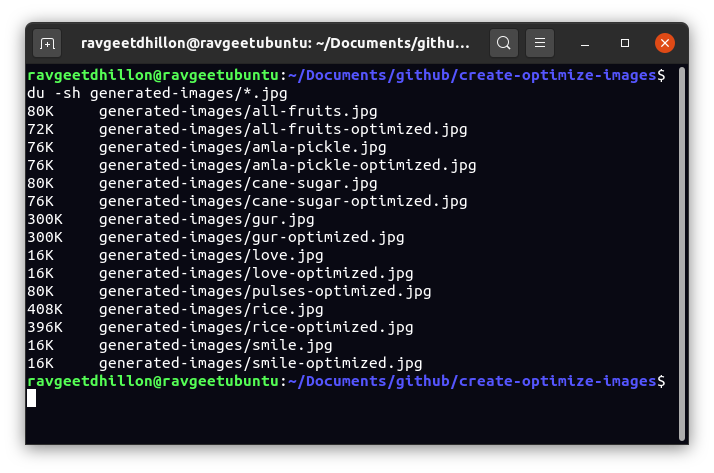
Outputs: commit 35630da.
The scripts install globally, so the same commands work across projects, and the workflow slots into CI/CD pipelines that generate per-format variants for delivery via HTML, APIs, or a dedicated conversion service.



