

Where Template Data Comes From
Before diving into context mechanics, it helps to understand what data Hugo actually makes available to a template. Every page in Hugo carries both its content and metadata — typically written in the front matter of a Markdown file — plus additional fields that Hugo derives from the site structure and configuration. This entire package becomes the initial context when Hugo renders a page.
You read values off that context by chaining field accesses after the dot, as in .Title for the page title, or .Site.Title for the site-wide title set in Hugo’s configuration file. An expression like {{ .Title }} tells Hugo to evaluate the Title field on the current context and write the resulting value into the output.
Part of what makes Hugo powerful — and occasionally confusing — is that this context is not fixed. The object that . refers to can be rebound as a template executes, for example when iterating over a collection with range or when pulling in a partial template. Understanding when and how that rebinding happens is the key to writing templates that behave predictably.
A Minimal List Template
Our example starts with a list template stored at layouts/_default/list.html. Hugo uses this template for any page that has subpages — a blog index, a section landing page, or a section of FAQs — unless a more specialized template exists for that particular situation. The template contains mostly HTML structure for styling and navigation, with the dynamic pieces wrapped in curly braces.
<html>
  <head>
    <title>{{ .Title }} | {{ .Site.Title }}</title>
    <link rel="stylesheet" href="https://www.smashingmagazine.com/css/style.css">
  </head>
  <body>
    <nav>
      <a class="logo" href="{{ "/" | relURL }}">
        <img src="https://www.smashingmagazine.com/img/tower-logo.svg">
        <img src="https://www.smashingmagazine.com/img/tower-claim.svg">
      </a>
      <ul>
        <li><a href="/">Home</a></li>
      </ul>
    </nav>
    <section class="content">
      <div class="container">
        <h1>{{ .Title }}</h1>
        {{ .Content }}
      </div>
    </section>
  </body>
</html>
This minimal example is enough to show the core mechanism: {{ .Title }} prints the current page’s title, and {{ .Site.Title }} prints the title for the entire site, which lives in Hugo’s configuration. Nothing else here manipulates the context, so . stays pointed at the page object for the whole render. But as soon as we introduce iteration or split templates into smaller pieces, that stable dot starts moving.
Rebinding the Context
Hugo is built on the Go template package, and it inherits that package’s fundamental behavior: certain template actions change what . refers to inside their block. The most common offender is range, which sets the dot to each element of the collection it iterates over. Inside a range block, .Title no longer refers to the page’s title — it refers to a field on the current list item, if that item has such a field at all.
This is not a bug; it is the design. The dot always points at the most relevant object in scope, and Hugo’s template language expects you to work with that. The trouble starts when you need to reach back out to data from the surrounding context — the page, the site, or a variable you set before entering the loop. Hugo gives you a few escape hatches for exactly this situation, including the global context and scoped variables.
The Global Context
Hugo maintains a separate, always-available context object that is unaffected by range, with, or any other rebinding construct. You access it through $. So, inside a loop over a page’s subpages, {{ .Title }} gives you the current subpage’s title, but {{ $.Title }} gives you the title of the page that owns the loop. The global context is a reliable reference point whenever the dot has drifted.
One caveat: the global context is only as good as what Hugo set it to. At the top level of a template render, $ and . point at the same object — the page being rendered. But this is not always the page you think it is. When Hugo renders a partial, it passes in a context explicitly, and that context may be a page, a slice, or a single value depending on what the caller decided to provide.
Scoped Variables
For situations where the global context is not enough, Hugo lets you capture values into named variables with the := assignment operator. A variable declared at the top level of a template remains in scope for the rest of that template, including inside subsequent range blocks, as long as you refer to it by name rather than through the dot.
The pattern looks like this: capture the page into a variable before looping, then use that variable inside the loop when you need page-level data.
This approach has a practical advantage over the global context: it makes the intent explicit at the point of use, and it does not depend on where the template happens to sit in Hugo’s render pipeline. A variable is a local, readable alias; the global context is an implicit assumption about the render state.
Data Flow Through Partials
Partials are Hugo’s mechanism for reusing template fragments. They live under layouts/partials/ and are invoked with {{ partial "name" context }} — the second argument is whatever context you choose to pass. This is both a feature and a trap.
Hugo does not automatically forward the current context to a partial. If you write {{ partial "header.html" . }}, the partial receives the current dot. If you write {{ partial "header.html" (dict "page" . "site" .Site) }}, the partial receives a dictionary you built on the spot. The partial’s template then treats that passed value as its initial dot.
This explicit passing means a partial never accidentally inherits the caller’s loop state. But it also means every partial needs to know what shape of context it can expect. A partial designed to display a navigation menu probably wants the site object or a page pointer; a partial that renders a card for a list item probably wants that list item. Passing the whole page when the partial only needs a title is not harmful, but it does couple the partial to a full page object and makes it harder to reuse that partial in a different context later.
For data that needs to be available everywhere, Hugo offers the site context itself. Config values and anything you attach to the site’s data files can be read from .Site — or $.Site inside a loop — from any template, including partials, without any explicit passing.
Base Templates
Base templates add another layer of context indirection. A base template defines the overall HTML skeleton — the <html>, <head> and <body> structure — and declares blocks that child templates fill in. When Hugo renders a page, it executes the base template with the page as the context. The block actions in the base template receive that same context, so . inside a block refers to the page unless the block itself rebinds it.
This is where variables declared outside a block become especially useful. If you capture the page into a variable in the base template, that variable is accessible inside the block definitions. Without it, you would have to rely on the global context, which does stay available in base templates but can be ambiguous if a child template rebinds the dot before calling a block.
Keeping Context Manageable
The mental model to hold onto: . is a moving target, $ is a stable but implicit reference, and named variables are your best tool for making data flow explicit. A template that keeps its dot at page level for as long as possible, captures what it needs with := before entering a loop, and passes narrowly scoped (or deliberately full) contexts to partials will be far easier to reason about than one that lets rebinding happen implicitly.
Hugo’s context system rewards planning. Deciding at the top of a template whether you are writing a page-rendering template, a list-item card, or a site-level navigational element clarifies which context you need and how far it has to travel. When a partial expects only the site title and the loop data it needs, passing a dictionary with exactly those fields is not ceremony — it is the difference between a reusable component and a fragile chain of assumptions about which dot is current.
Page Data and Front Matter
Hugo pulls template variables from several places. Some are built in; others come from project configuration, data files, or environment variables. For most pages, though, the richest source of data is the content file itself. A content file typically holds both the page body and metadata about that page, such as its title or publication date. Hugo supports multiple formats for each; the common pairing is Markdown for the body and YAML front matter for the metadata.
In that setup, the file opens with a metadata block delimited by lines of three dashes. Inside, fields use a key: value syntax, and YAML allows nested structures beyond simple pairs. The front matter is followed by the Markdown content. A minimal example lives at content/_index.md in the accompanying repository; the _index.md name marks it as the content file for a section page that has subpages.
---
title: Home
---

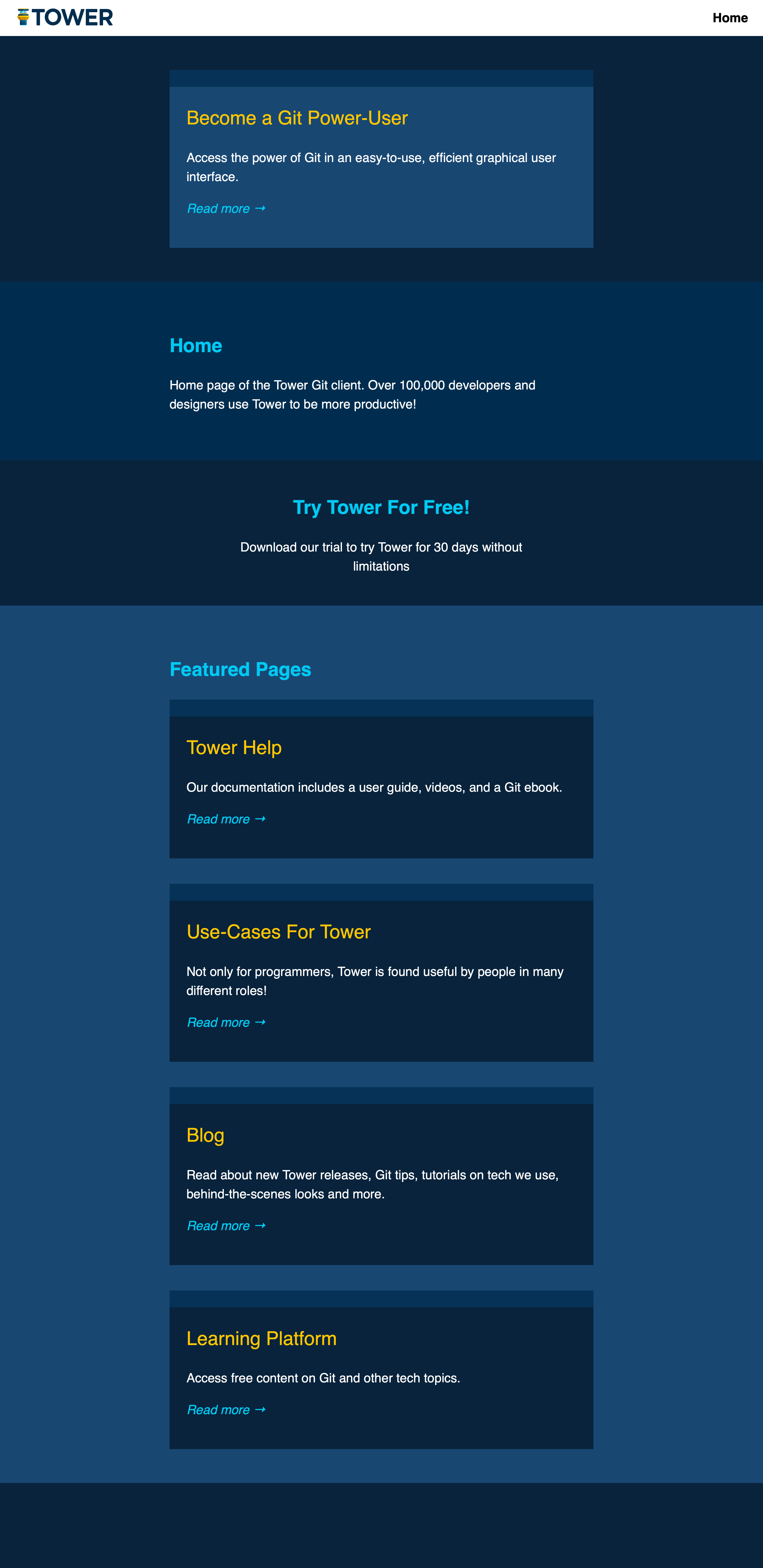
Home page of the Tower Git client. Over 100,000 developers and designers use Tower to be more productive!
Some front matter field names are predefined by Hugo, but you are free to add your own. The access path differs: predefined fields like title resolve directly as .Title, while custom fields such as author are reached through .Params.author. A reference of predefined fields, functions, and page variables is available in the Hugo cheat sheet.
The .Content variable is special because it is the only way to render Hugo's shortcode feature. Shortcodes embedded in Markdown only execute when accessed via .Content; running other data through a Markdown filter will not process them. Note also that accessing a predefined field that was never set, like .Date, returns an empty value without error, as does an undefined custom field under .Params. However, referencing a non-existent top-level field such as .thisDoesNotExist will break the site build.
Chained access like .Params.author or .Site.title works on nested structures, which you can define in YAML front matter. For instance, a map of banner properties can be declared in the content file and consumed in the template:
---
title: Home
banner:
  headline: Try Tower For Free!
  subline: Download our trial to try Tower for 30 days
---

Home page of the Tower Git client. Over 100,000 developers and designers use Tower to be more productive!
Rendered using the template from earlier, plus supporting styles from the repository, the page now includes that banner:
<html>
  ...
  <body>
    ...
    <aside>
      <h2>{{ .Params.banner.headline }}</h2>
      <p>{{ .Params.banner.subline}}</p>
    </aside>
  </body>
</html>

When the Context Shifts
Flow control in Hugo templates includes the usual conditional and looping constructs. For context, two statements matter most: with and range. The with statement tests whether an expression is "non-empty" — meaning not false, not 0, and not a zero-length array, slice, map, or string — and if so, rebinds the context (.) to that expression's value for the duration of the block. An end tag restores the previous context. Similarly, range loops over a collection, binding the context to each element in turn.
Consider a list template that should surface some of its subpages. To feature a specific page, we can add its path to the front matter of the home page's content file, with the content directory as root:
---
title: Home
banner:
  headline: Try Tower For Free!
  subline: Download our trial to try Tower for 30 days without limitations
featured: /features.md
...
---
...
The template can then display that page using Hugo's .GetPage function alongside with. Since .GetPage returns a page object, wrapping it in with rebinds the context to that object. Inside the block, .Title, .Summary, and .Permalink refer to the featured page, not the one being rendered:
<nav>
  ...
</nav>
<section class="featured">
  <div class="container">
    {{ with .GetPage .Params.featured }}
      <article>
        <h2>{{ .Title }}</h2>
        {{ .Summary }}
        <p><a href="{{ .Permalink }}">Read more →</a></p>
      </article>
    {{ end }}
  </div>
</section>
To list several pages, we extend the same front matter with an array of paths, plus a headline for the section:
---
...
listing_headline: Featured Pages
listing:
  - /help.md
  - /use-cases.md
  - /blog/_index.md
  - /learn.md
---
Displaying that list with range introduces a subtlety. Each iteration binds the context to one path string, not a page object. To get the page, we call .GetPage with that string. But wait — by this point the context is a string, and strings lack the GetPage method. The template below works around this by calling $.GetPage instead of .GetPage:
<aside>
  ...
</aside>
<section class="listing">
  <div class="container">
    <h1>{{ .Params.listing_headline }}</h1>
    <div>
      {{ range .Params.listing }}
        {{ with $.GetPage . }}
          <article>
            <h2>{{ .Title }}</h2>
            {{ .Summary }}
            <p><a href="{{ .Permalink }}">Read more →</a></p>
          </article>
        {{ end }}
      {{ end }}
    </div>
  </div>
</section>
The Global Context
Whenever with or range changes the context, the original context is still accessible through the $ variable. Known as the global context, $ holds the context value from when template execution began. This is useful not just for calling methods like GetPage, but for reaching properties of the page being rendered from inside a shifted context.
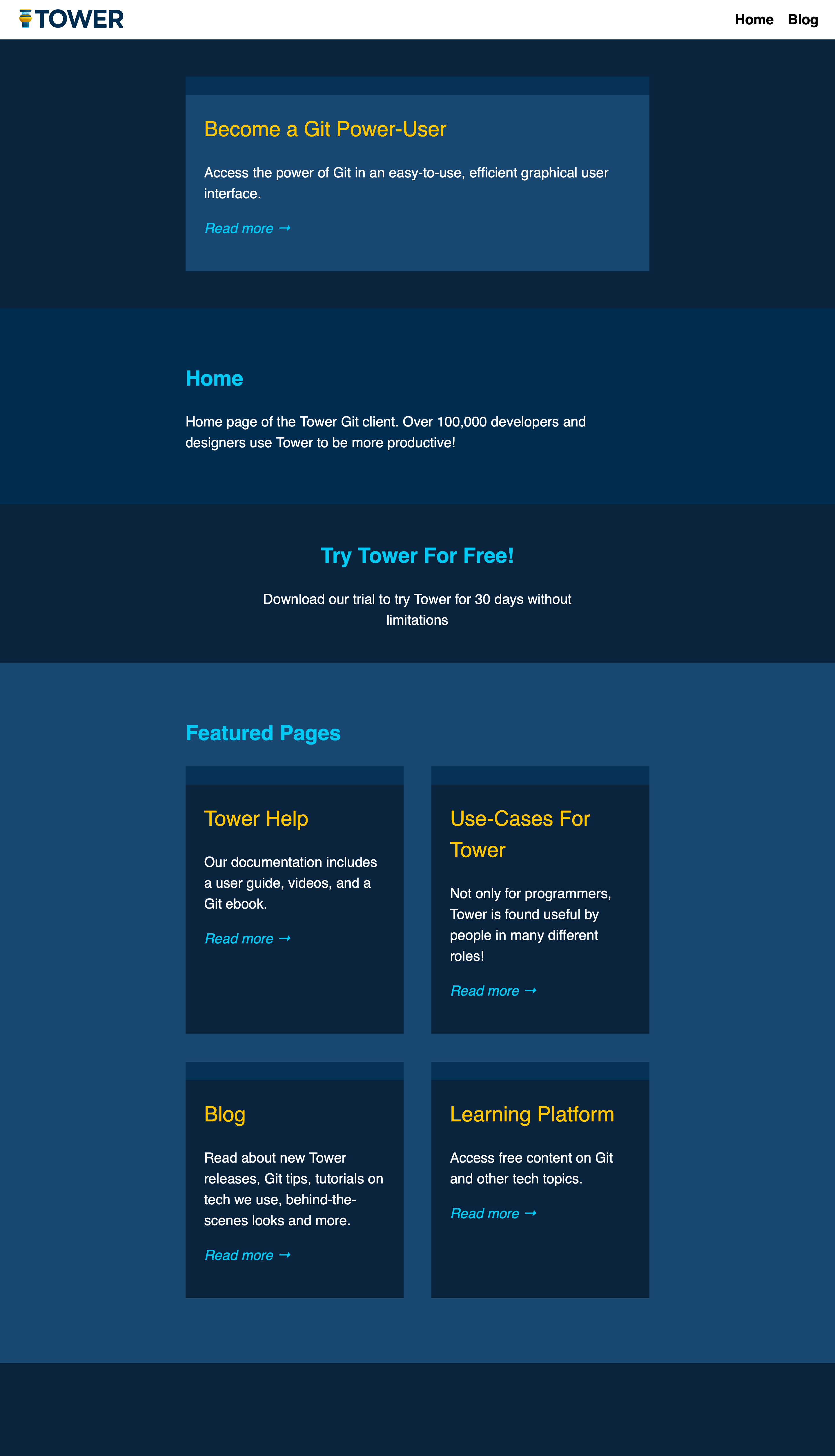
An example: the reusable list template also renders content/blog/_index.md, the blog's index page. Suppose the home page should display its listed items in a two-column grid while the blog index stays single-column. Hugo provides the page method .IsHome to detect the home page. The problem is that when we generate the listing HTML, the context already refers to each listed page object, not the page being rendered. Calling .IsHome inside the loop would call it on the wrong object. The global context makes the intended call possible:
<section class="listing">
  <div class="container">
    <h1>{{ .Params.listing_headline }}</h1>
    <div>
      {{ range .Params.listing }}
        {{ with $.GetPage . }}
          <article{{ if $.IsHome }} class="home"{{ end }}>
            <h2>{{ .Title }}</h2>
            {{ .Summary }}
            <p><a href="{{ .Permalink }}">Read more →</a></p>
          </article>
        {{ end }}
      {{ end }}
    </div>
  </div>
</section>
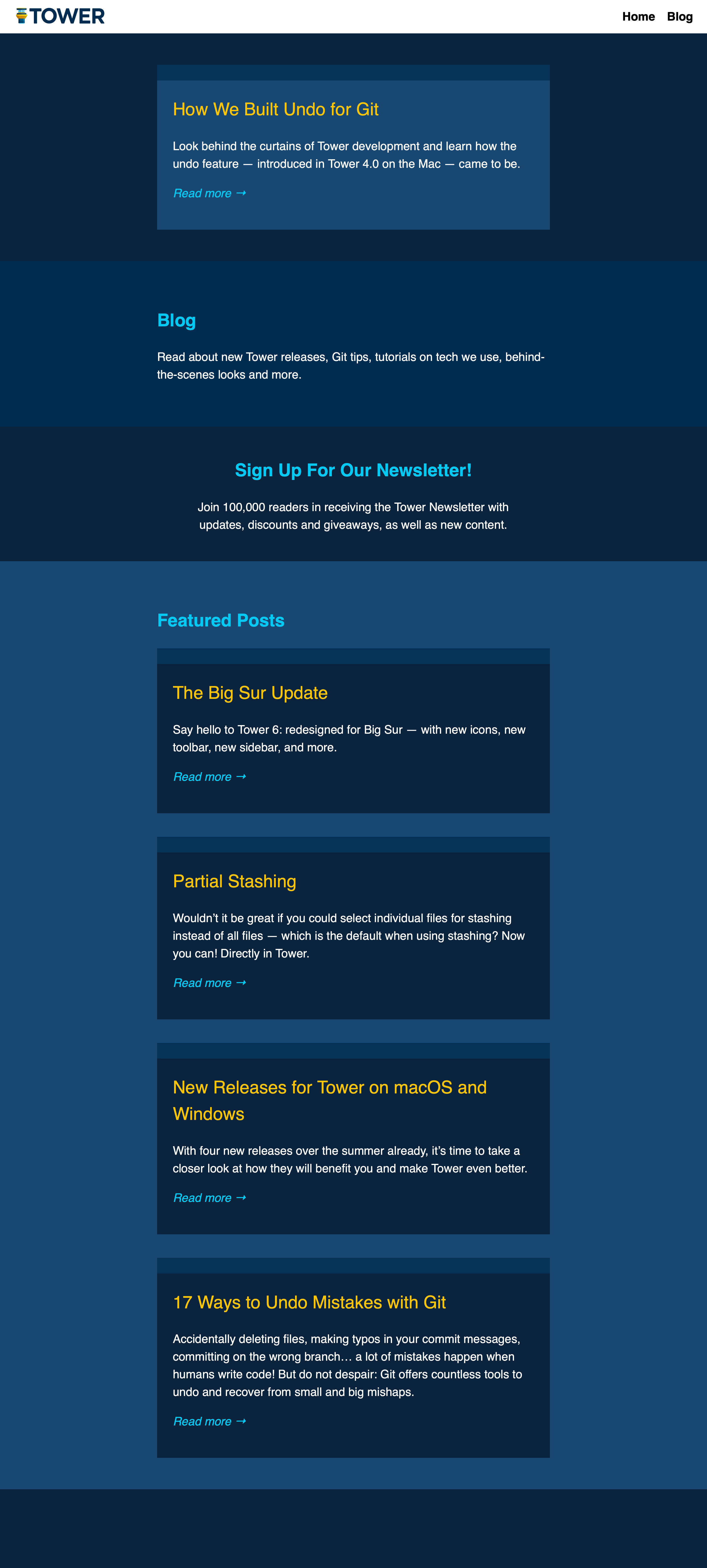
The blog index renders like the original home page with its own content, while the home page now applies the two-column layout:
Splitting Templates Into Partials
Hugo’s partial templates let you reuse markup or break a large template into manageable pieces. The critical detail is that when you include a partial, you explicitly pass it the context you want it to see. The idiomatic call is {{ partial "my/partial.html" . }}, where . is whatever context is current at that point in the parent template — the page being rendered if you haven’t rebound it, or something else if you have.
Inside the partial, the rules are the same as in any template: you can rebind the dot, and the global context $ refers to the context that was passed into the partial, not necessarily the main page. If you pass only a simple value — say, a string — into a partial and then need to call page methods, you’ll hit the same problem as with rebinding in a normal template, and $ won’t rescue you because it now refers to that string.
The fix is to pass a compound argument. Hugo permits exactly one argument to the partial call, but that argument can be a map created with the dict template function. dict takes an even number of arguments interpreted as alternating key-value pairs. For example, you can include a Page key set to the current page object alongside any custom data; inside the partial you then access the page as .Page and other values by their own keys.
Consider a list template that renders featured and listed content. The featured partial only needs the featured page object. The listed partial, however, must know whether the main page being rendered is the home page — it can’t simply call .IsHome on the listed page, since that returns a different result. You could pass a pre-computed boolean, but passing the main page object itself is more flexible for future needs.
<body>
  <nav>
    <a class="logo" href="{{ "/" | relURL }}">
      <img src="https://www.smashingmagazine.com/img/tower-logo.svg">
      <img src="https://www.smashingmagazine.com/img/tower-claim.svg">
    </a>
    <ul>
      <li><a href="/">Home</a></li>
      <li><a href="https://www.smashingmagazine.com/blog/">Blog</a></li>
    </ul>
  </nav>
  <section class="featured">
    <div class="container">
      {{ with .GetPage .Params.featured }}
        {{ partial "partials/featured.html" . }}
      {{ end }}
    </div>
  </section>
  <section class="content">
    <div class="container">
      <h1>{{ .Title }}</h1>
      {{ .Content }}
    </div>
  </section>
  <aside>
    <h2>{{ .Params.banner.headline }}</h2>
    <p>{{ .Params.banner.subline}}</p>
  </aside>
  <section class="listing">
    <div class="container">
      <h1>{{ .Params.listing_headline }}</h1>
      <div>
        {{ range .Params.listing }}
          {{ with $.GetPage . }}
            {{ partial "partials/listed.html" (dict "Page" $ "Listed" .) }}
          {{ end }}
        {{ end }}
      </div>
    </div>
  </section>
</body>
The featured partial stays as it was when inline:
<article>
  <h2>{{ .Title }}</h2>
  {{ .Summary }}
  <p><a href="{{ .Permalink }}">Read more →</a></p>
</article>
The listed partial now finds the original page in .Page and the listed content in .Listed:
<article{{ if .Page.IsHome }} class="home"{{ end }}>
  <h2>{{ .Listed.Title }}</h2>
  {{ .Listed.Summary }}
  <p><a href="{{ .Listed.Permalink }}">Read more →</a></p>
</article>
Hugo also supports base templates, where you extend a common layout rather than include subtemplates. The context mechanics are similar: when you extend a base template, you provide the data that forms the initial context there.
Custom Variables
Hugo lets you declare your own variables with names prefixed by $. The := operator declares and initializes in one step; later assignments use plain =. A variable must be declared before assignment and cannot be declared without a value. Variables declared inside a block such as an if are scoped to that block, so define them outside if you’ll need them afterwards.
Custom variables stay local to the template where they are declared — they don’t automatically flow into partials or base templates. One common use is storing intermediate results to shorten long function calls. For instance, assign the featured page to $featured and supply it to a with statement, or build the map for the listed partial once and reuse it.
<section class="featured">
  <div class="container">
    {{ $featured := .GetPage .Params.featured }}
    {{ with $featured }}
      {{ partial "partials/featured.html" . }}
    {{ end }}
  </div>
</section>
<section class="content">
  ...
</section>
<aside>
  ...
</aside>
<section class="listing">
  <div class="container">
    <h1>{{ .Params.listing_headline }}</h1>
    <div>
      {{ range .Params.listing }}
        {{ with $.GetPage . }}
          {{ $context := (dict "Page" $ "Listed" .) }}
          {{ partial "partials/listed.html" $context }}
        {{ end }}
      {{ end }}
    </div>
  </div>
</section>
In practice, it pays to use descriptive variable names liberally once logic grows beyond the trivial. Concise code often becomes unclear code, especially for others reading it later. Don’t hesitate to split a one-liner into several named steps.
The .Scratch Store
Older Hugo versions only allowed one assignment per custom variable, which made .Scratch necessary for any mutable state. Modern Hugo permits reassignment, so .Scratch is less critical, but it remains handy because scratch variables travel with the page context. If you pass the page to a partial, its scratch values come along automatically.
The two core methods are Set (key, value) and Get (key). Additional methods exist for compound data types, but these two cover most needs. To use .Scratch instead of dict for our listed partial, you would call $.Scratch.Set to store the listed page object, then pass the main page to the partial:
<section class="listing">
  <div class="container">
    <h1>{{ .Params.listing_headline }}</h1>
    <div>
      {{ range .Params.listing }}
        {{ with $.GetPage . }}
          {{ $.Scratch.Set "listed" . }}
          {{ partial "partials/listed.html" $ }}
        {{ end }}
      {{ end }}
    </div>
  </div>
</section>
The corresponding partial must be updated accordingly. The original page context is now the dot, and the listed content is retrieved from .Scratch. A custom variable can simplify repeated access:
<article{{ if .IsHome }} class="home"{{ end }}>
  {{ $listed := .Scratch.Get "listed" }}
  <h2>{{ $listed.Title }}</h2>
  {{ $listed.Summary }}
  <p><a href="{{ $listed.Permalink }}">Read more →</a></p>
</article>
The choice between dict and .Scratch is situational, but .Scratch offers a consistency advantage: you can adopt the habit of always passing the page object and keeping extra data in scratch, so every partial you write knows . is a page. You could equally standardize on a map with .Page as a fixed key — the key is to have a convention at all.
Static Site Trade-offs
Static generation changes what data is reachable. Operations that are too expensive per request are fine at build time, while request-time inputs such as query strings require JavaScript or platform-specific features, like Netlify’s redirect options. The shift from dynamic to static thinking takes practice, even if the underlying concepts are simple.
With that, the picture of how content data flows from files into templates and subtemplates — and how it can be reshaped with rebinding, custom variables, dict, and .Scratch — should be considerably clearer. Many areas remain unexplored, but these fundamentals cover a great deal of real-world template work.
For further study, the official Hugo documentation is always a solid starting point, as are in-depth blog posts on Hugo by community authors. A good cheat sheet can also help when you need to recall argument order for replaceRE, section navigation, or front matter field names.



