From shared wires to a global network
Before packet switching, placing a call meant a physical circuit: in the 1950s each telephone ran a wire to a central station, and an operator joined two wires by hand. Long distance required several operators to chain wires between stations. The Internet removes that model. Information is retransmitted step by step through a chain of linked devices, so no operator and no central coordination is required, and many concurrent connections can share the same wire.
The networking stack that makes this work is built from successive layers, each relying on the one beneath it.
The link layer: talking across one medium
Two directly connected computers communicate through a transmission medium — copper carrying current, fiber carrying light, or air carrying radio waves — and each machine needs a network interface to send and receive signals in it. The rules those interfaces agree on form the link layer.
An exclusive connection between two machines is point-to-point, and its minimal rule set is the Point-to-Point Protocol (PPP), which only ensures the two sides can identify each other and exchange data accurately. Shared media are harder: a hub physically joins every wire reaching it, and home WiFi puts all devices on one radio frequency, so a signal from one computer reaches all of them.

Medium Access Control
Medium Access Control (MAC) governs how computers share a medium, and it addresses two problems.
Collisions. Simultaneous transmissions interfere and garble each other. The countermeasures are to transmit only when the medium is idle, and to monitor the communication — after a collision, wait a brief random interval and retry. When attempts are too frequent, collisions become relentless and the link is saturated, which is why phones at a crowded venue can fail to send messages or place calls.

Physical addressing. On a shared medium everyone receives everyone's signal, so a transmission begins with two addresses: recipient and sender. Each network interface carries a physical address (also called a hardware address) burned in at production.


MAC addresses
Standard physical addresses are MAC addresses, written as six colon-separated hexadecimal pairs. The IEEE assigns each manufacturer a distinct range, so the first half identifies the vendor and the manufacturer picks a unique second half per interface. A device's MAC address is usually printed on a label on the packaging or the device, beside the serial number.
60:8B:0E:C0:62:DEIn the example above, 608B0E is the manufacturer number the IEEE assigned to Apple. Because MAC addresses are unique, an external lookup of the first six digits reveals who built a device.
The address FF:FF:FF:FF:FF:FF is the broadcast address, reserved for transmissions to every computer on the medium. A smartphone with WiFi enabled persistently broadcasts to it while searching for an access point, and discoverable access points answer with their own MAC address. Since every broadcast carries the sender's MAC address, a phone advertises its identifier constantly; in 2013 Edward Snowden revealed that the NSA tracked people's movements by sniffing WiFi traffic in large cities and recording where each MAC address appeared.
An interface in promiscuous mode picks up all transmissions regardless of intended recipient, which allows discovering hidden WiFi networks and listing nearby MAC addresses — and sometimes reading other people's traffic. That is why encryption matters at WiFi's link layer. A related weakness: an interface can be configured to place any value in the sender field, so a malicious agent can impersonate your MAC address. This is MAC spoofing; the protocols predate serious security concerns and are still being hardened.
Frames and the FCS
Long messages are not sent in one piece. Devices differ in speed, and a collision mid-transmission would otherwise force the whole message to be discarded, since sender and receiver could not tell which portions arrived. Instead, messages are split into small independent transmissions whose spacing can adapt to slower devices; on failure, only the failed piece is resent.

Each such transmission is a frame. WiFi frames are capped at 2,346 bytes, of which 34 go to MAC addresses and error-detecting codes, leaving up to 2,312 bytes of payload. Wired networks usually cap frames at 1,526 bytes, for a 1,500-byte payload.
FCS. The final field is the Frame Check Sequence, a value calculated from every preceding field rather than new information. The receiver recomputes the expected FCS from what it got and compares; a mismatch means the frame is discarded, a match means the payload is trusted as error-free.
Type. The payload type field tells the receiver which rules to apply when interpreting the payload. The most common such rule set is the next layer up.

The internet layer: reaching computers you aren't linked to
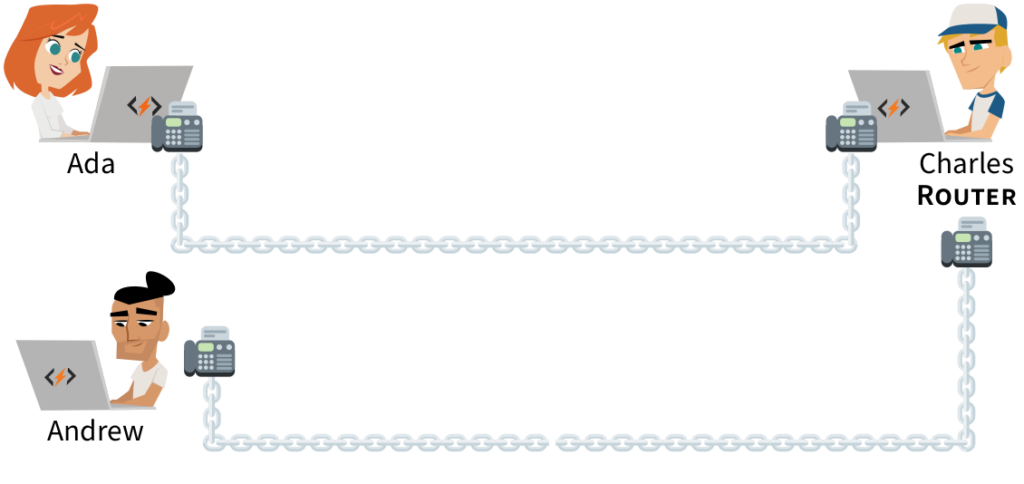
The internet layer, or network layer, carries messages between machines with no direct connection. The mechanism is the router: a computer with several network interfaces, forwarding a message received on one interface out through another.
A router can relay between your wired desktop and a wirelessly connected smartphone in the same home. Networks in close proximity that can reach each other through routers form a Local Area Network (LAN); a home or small office needs one router, while a university or hospital may need many. Linking distant LANs produces a Wide Area Network (WAN), and WANs can themselves interconnect. The largest such collection — thousands of interconnected networks — is the Internet: over a billion computers in 2019.

Paying for interconnection
The simplest route onto the Internet is paid transit: an organization links one of its routers to yours and carries your messages through its network. Where two networks exchange a lot of traffic — two neighboring universities, say — they can link routers directly instead, avoiding the paid path. This free exchange is peering.
Paths across the planet
Routers forward messages over intercontinental distances through submarine cables (diagrammed below). There is no direct Miami–Buenos Aires cable, but Miami links to Puerto Rico, which links to Fortaleza, then Rio de Janeiro, then Buenos Aires; routers along the chain forward packets hop by hop. Ground cables and satellites with routers extend the same reach to remote locations. Any computer on the Internet is reachable if a path to it can be found.


Hierarchical location addressing
A MAC address identifies a machine but says nothing about where it is; a device keeps its address even if it moves to the other side of the world. Postal systems solve the analogous problem with a hierarchical address: country first, then progressively finer detail. Routers need the same shape of information.

This only works globally if every participant follows one rule set for creating and handling forwarding requests — a computer in China must understand one in Nigeria despite different languages, operating systems and hardware.
The Internet Protocol
Just as the link layer's rules are MAC, the internet layer's rules are the Internet Protocol (IP). A forwarding request that follows them is an IP packet: essentially a big number whose digits, at fixed positions, encode sender and recipient location addresses followed by arbitrary data. IP packets travel from machine to machine until they reach their destination. The packet rides inside a frame whose type is 86DD; a router receiving such a frame retransmits the IP packet in a new frame toward the destination.

IP addresses and who gets them
IP addresses are the Internet Protocol's location addresses, and no computer can send or receive packets without one. A block of addresses is first granted to an organization, which assigns individual addresses to its own machines. An IP address is 128 bits long, written in hexadecimal as eight groups of four digits separated by colons; leading zeros within a four-digit group can be dropped.
They are hierarchical. The broadest part is the routing prefix — 2a03:2880 covers Facebook's network, 2c0f:fb50:4002 Google's in Kenya, and 2404:6800 Google's Singapore data center. Prefixes vary in length: organizations with more machines receive shorter prefixes, and some hold several.

Below the prefix, the digits up to the midpoint of the address select the subnet. Facebook has a network whose addresses all begin 2a03:2880:f003:c07. Prefix plus subnet form the network ID, always 16 digits including omitted zeros — so a longer routing prefix leaves room for fewer subnets. The following 16 digits are the interface ID, uniquely identifying one interface within its subnet; many administrators simply fill this part with the device's MAC address.
IANA and the regional registries
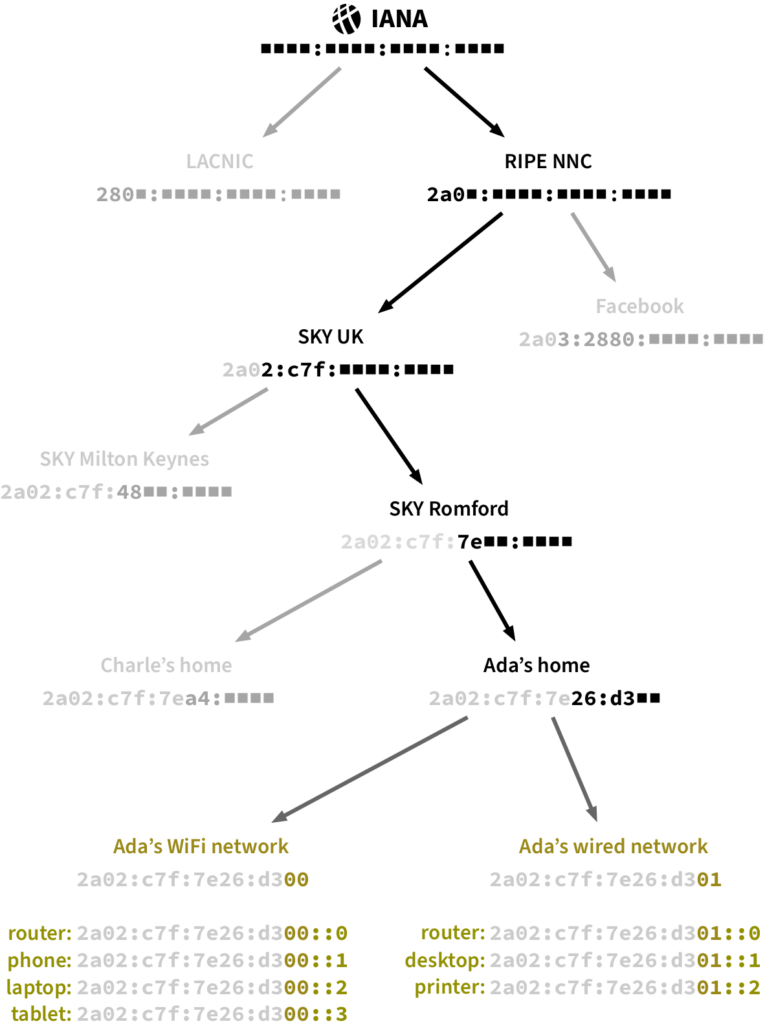
Uniqueness of prefixes is handled by coordination, as with MAC addresses. A US non-profit, the Internet Assigned Numbers Authority (IANA), controls who gets which prefix but delegates most of that authority to five Regional Internet Registries (RIRs), allocating each a short set of initial hex digits. You request a prefix from the RIR of the region containing your routers. Facebook, headquartered in Ireland, obtained its prefix from RIPE NCC; the Latin American branch of Credit Suisse obtained one from LACNIC.
2a03:2880:f003:0c07:face:b00c:0000:0002The bank's administrators pick a unique hex combination for each subnet within the space their prefix leaves: with each hex digit taking 16 values, that is 16^4 = 65,536 subnets. Facebook, being larger, received a prefix with room for over 4 billion subnets.
2a03:2880:f003:c07:face:b00c::22a03:2880:f003:c07:face:b00c::2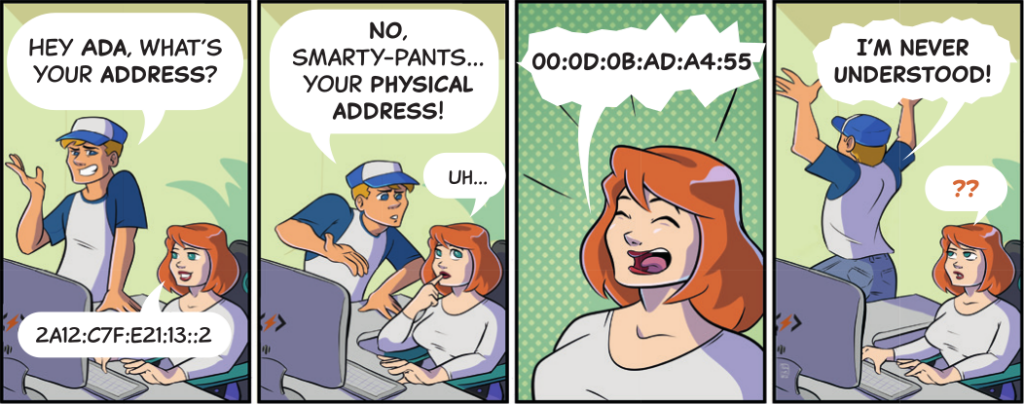
ISPs: prefixes for everyone else
Individuals and small organizations rarely deal with an RIR or maintain peering links. They buy connectivity from an Internet Service Provider (ISP), which places routers near its customers, links one to the customer's router, and allocates a routing prefix to each customer.
Sky in the United Kingdom holds 2a02:0c7f and splits it among regional bases, for example 2a02:c7f:48 for Milton Keynes and 2a02:c7f:7e for Romford. If Ada in Romford contracts Sky, it links a Romford router to her home router and gives her a 14-digit prefix derived from the Romford one; each of her home networks, wired and wireless, receives a subnet under that prefix. Her router's decision is easy: packets addressed to one of her subnets are delivered locally, and everything else goes out over the link to the ISP.

Routers without an ISP face a harder problem, since they gain connectivity from links to several routers in several networks and must decide which link carries each packet, and whether that link leads nearer the destination.
Forwarding and the default route
When Ada sends a message to Facebook, she crafts an IP packet holding her address, Facebook's address, and her message, and transmits it in a WiFi frame to her home router. Each router along the path consults its address table — rows of recognized IP addresses, each mapped to a next hop — and picks the outbound link. Tables differ per router, reflecting how it is wired.

A destination matching no row goes to the default route. ISP routers carry heavier tables: peering and transit links plus traffic from many customers; the hierarchy pays off here because addresses can be grouped by routing prefix, and all addresses beginning 2a0a:207, for instance, lie in Oxford University's network.

Exchange points and the backbone
To raise capacity and speed, administrators peer with as many organizations as they can, and the cheapest way to do so is at an Internet exchange Point (IXP), a building where members wire in their routers and establish individual peering links with each other. Large ISPs typically maintain scores of peering links per IXP, and corporations such as Netflix and Google peer directly with ISPs in major cities to shorten the path to their customers.
Networks that cannot be peered with must be reached through purchased transit — except for a handful of companies that pay no one. These peer with each other and interconnect regional ISPs globally; their huge networks are the Tier-1 networks that form the Internet backbone, operated by companies including AT&T, Verizon and Lumen, whose fiber holdings alone dwarf any single-country footprint.
2801:80:1380: ■ ■ ■ ■ :____:____:____:____Dynamic routing
Because any link may fail, large operators cannot depend on a single path per prefix. Dynamic routers periodically exchange information with their peers about which prefixes are reachable through which links, determine how many hops away each prefix lies, and choose routes by metrics such as distance and speed. As news of a new or failed link propagates, every router updates its table. No central entity coordinates this exchange: routers share it freely and voluntarily, and routing problems consequently arise.
Loops and the hop limit
A misconfigured table can send a packet back a few hops, trapping it in an endless cycle; uncorrected, packets circle indefinitely and can saturate links. This is the routing loop problem. IP counters it with the hop limit, a value between 0 and 255 carried by every packet, typically initialized to 64 and decremented by one at each forwarding. A packet circling forever eventually reaches zero; the receiving router discards it and returns an error message to the sender stating that the hop limit was reached.
ICMP: reporting what went wrong
Routers unable to handle a packet discard it and send the sender an informational message, formatted according to the Internet Control Message Protocol (ICMP), a subset of IP. ICMP assigns error codes to common problems and carries them as the message body of an IP packet. Reported conditions include:
- Time exceeded — the packet's hop limit hit zero, whether from a loop or an insufficient initial limit; the reply includes the first bytes of the discarded packet so the sender can identify it.
- Destination unreachable — the router has nowhere to forward the packet, for example no matching table row and no default next hop, or an offline next hop. First bytes of the discarded packet are included.
- Packet too big — the packet exceeds what the next hop supports. Link layers cap payloads at their Maximum Transmission Unit (MTU): 1,500 for Ethernet, 2,305 for WiFi. The ICMP reply carries the next hop's MTU, letting the sender trim or split the message.
- Parameter problem — a field violates the protocol's formatting rules. The reply indicates where in the packet the conflict was found, plus a few bytes of the discarded packet.
Each IP packet also carries a two-digit hex protocol field identifying how its payload should be read; the latest ICMP was assigned protocol number 0x3A.
ICMP is not only for errors. The echo request / echo reply pair lets a computer test whether another is online; the ping program sends an echo request and measures how long the reply takes, and echo requests sent with different initial hop limits can trace the route packets follow to their destination.
IP packet payloads also carry application data, but a computer running several applications needs extra information in the packet to keep their data streams apart. That information belongs to the transport layer, home of the TCP and UDP protocols.