
Meetings are a team sport
Most meeting failures trace back to one of four missing pillars: purpose, preparation, participation, or follow-up. Kaitie Chambers, FigJam Advocate, argues that facilitation is a design problem—anyone can book a calendar slot, but the best sessions are deliberately shaped around how a team actually works.
The responsibility doesn't stop with the facilitator. Participants shape a meeting just as much as the person running it. Here is how both sides pull their weight.
Set the stage before anyone dials in
Good meetings are built in advance. Identify the outcome you need—a status check, a decision, a cross-team briefing—and match the format to that goal. Coda co-founder and CEO Shishir Mehrotra sorts team meetings into three buckets:
- cadence: staff meetings, standups, project syncs
- catalyst: decision-making forums, product reviews, design crits
- context: all-hands, off-sites, orientations, one-on-ones
Defining the type of meeting makes it easier to frame the right questions and pick the right approach.
Circulate an agenda ahead of time, with any pre-read material—briefs, documentation, sketches—included. Share it at least a day in advance; once the workday is in motion, nobody has room for prep. Templates solve the “blank canvas problem” for teams that do not know where to start, and a FigJam template can double as a space where participants drop stickies and add context before the session begins. Teams can also save a working template to their shared files for reuse.
Keep the guest list tight
Invite the smallest group that can accomplish the goal. Be mindful of time zones and realistically how much time the work requires—the list is usually shorter than it seems. Jeff Bezos applies a similar heuristic: meetings should be small enough to feed with two pizzas.
An invitation is not a command. If the meeting falls outside your scope or your input is better delivered async, decline. Lisa Plachy, copywriter at Slack, argues that turning down meetings is a way to challenge the status quo and push back on agenda-less gatherings. In the long run, knowing when to say no protects your time and makes you better at your job.
Running the session: keeping everyone engaged
Once the meeting is underway, the real work begins: sustaining an inclusive, collaborative atmosphere that respects varied communication styles. A few deliberate tactics can build rapport, give every participant room to contribute, and keep the session productive.
Start with a warm-up
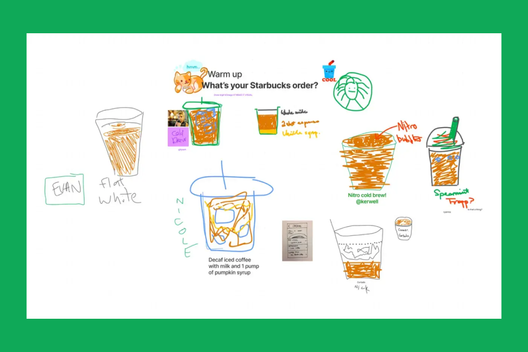
If attendees are joining from back-to-back meetings, a quick icebreaker can shift everyone into a more creative mindset. Stripe's remote design sprints, for instance, open with drawing exercises in FigJam. Participants sketch everything from their preferred coffee order to their favorite avocado toast, which both builds familiarity and introduces the canvas tools. Players can also try the photo booth widget for a lighter entry point. Stuck for prompt ideas? There's a Figma Community file stocked with icebreaker suggestions.
Set shared ground rules
Kaitie's advice is to open by establishing shared principles for the session. These ground rules might cover staying present, keeping an open mind, or avoiding insider jargon. Posting a visible list at the start of an agenda lets everyone buy in from the outset. Participants can stamp emotes on agreed rules to signal their commitment.
For those in the room, etiquette matters as much as the rules. As Kaitie puts it, staying present is the overlooked essential of remote meetings. Resisting the pull of Slack, email, and other tabs means everyone gets more from the time together.
Structure for full participation
Meetings designed for genuine input—especially design critiques—benefit from a round-the-room format that gives each person the floor. Noah Levin, VP of Product Design at Figma, favors this structure for crits because it accommodates different personalities and preferences. Crucially, participants should be allowed to pass if they need more time to reflect, with the option to contribute feedback later.
Make the session interactive
Interest can flag quickly in a passive meeting. The antidote, Kaitie notes, is building intentional spaces that keep people involved. Patagonia demonstrated this by opening its product development process through FigJam ideation workshops. Each session centers on a problem; participants brainstorm individually using stickies, screenshots, and sketches before presenting to the group. After voting, the team arranges the strongest concepts on an impact-versus-effort matrix. Senior Experience Designer Manu Garzaron sees this as democratizing design, noting that people now self-organize work as genuine teamwork rather than individual tasks.
Linear's product planning template takes a similar approach, but the prompts drive discovery: "What are we bad at (that we care about)?" and "What are we doing today that would be game-changing?" After clustering answers into themes—a job FigJam's AI features can handle—teams vote on discussion topics using the stamp tool.
Other levers for engagement include timed sessions set to music, and widgets like interactive polls, alignment scales, and the photobooth for quick pulse checks.
Break the document mold
If you want out-of-the-box ideas, you may need an out-of-the-doc process. A FigJam canvas offers the collaborative, free-form space that a static document lacks. Coda Co-founder and CEO Shishir Mehrotra illustrates a different approach in his rules for great team meetings: the "Bullpen," a 90-minute leadership cadence with no set agenda at all. The format naturally produces the multi-threaded discussions that would otherwise spawn separate ad-hoc meetings.
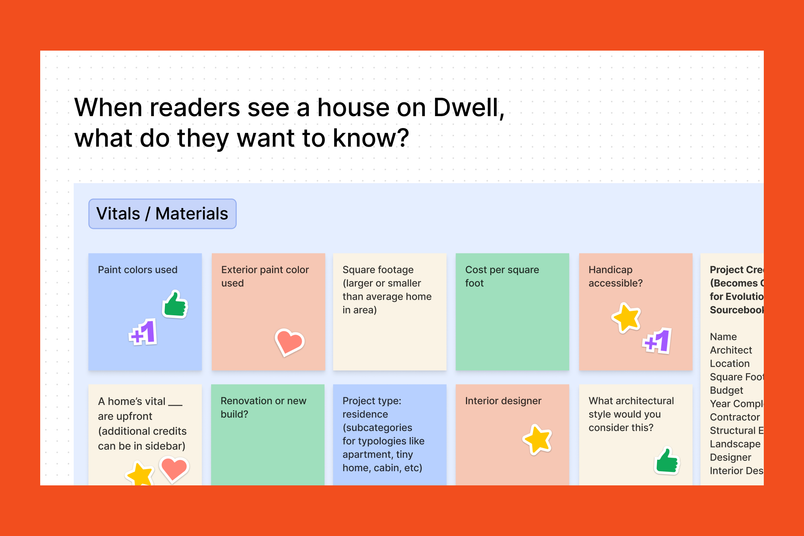
Following a similar logic, anyone at Dwell Magazine can call an impromptu company-wide brainstorm. The "swarm" lasts ten to fifteen minutes and starts when someone posts a question with a FigJam file into Slack. With the timer running, collaborators across departments trade ideas and offer feedback. The short format rewards creative bursts without causing burnout.
After the session: converting momentum into results
Ending on time doesn't end the work. "Too often, we leave a meeting and everyone assumes the job is done," says Kaitie. The best facilitators follow up to make sure discussion becomes action.
Distill notes and actions
Stickies that are clear during the meeting can read like riddles hours later, so tidy them while the context is fresh. FigJam's AI can cluster sticky notes and summarize the session, leaving you to identify the next steps. Share a summary, along with documentation or recordings for absentees, and delegate the discussed action items to keep progress moving.
The best facilitators follow up to ensure the conversation carries forward to results.“The best facilitators follow up to ensure the conversation carries forward to results.”
Keep the conversation alive
A single spark from a meeting sometimes needs fanning in the days after. Encourage continued discussion in the collaboration file, on Slack, or by email. Participants can use stamps to underline points or @-mention a colleague to open a new thread. Not everyone contributes best in real time. "Some people might prefer to come up with ideas on their own, or reflect for longer than the 45 minutes of in-person meeting time," says Kaitie. "Or maybe the lightning bolt idea hits them after the fact."
Meetings have picked up a bad reputation, but perhaps unfairly. With the right preparation, participation tactics, and follow-through, those calendar blocks can become genuinely productive sessions—ones you might even look forward to.


