Newsletter platforms are plentiful, but they're mostly paid and hosted elsewhere. A self-managed alternative can be built from three free-tier services: an HTML form hosted on Netlify, a serverless function that processes submissions, and a Notion database storing the addresses through the Notion API.
The stack is a Netlify account, a Notion account, and a Mailgun account — at least for the confirmation step, though any email provider with an API will do. The complete code lives in this GitHub repository.
Building the data store in Notion
Notion can serve as a lightweight datastore: its tables hold rows of structured data, and each row is a page with its own body, editable much like a WordPress blog post. Notion recently opened a public API, which we'll use to write into a table from our function.

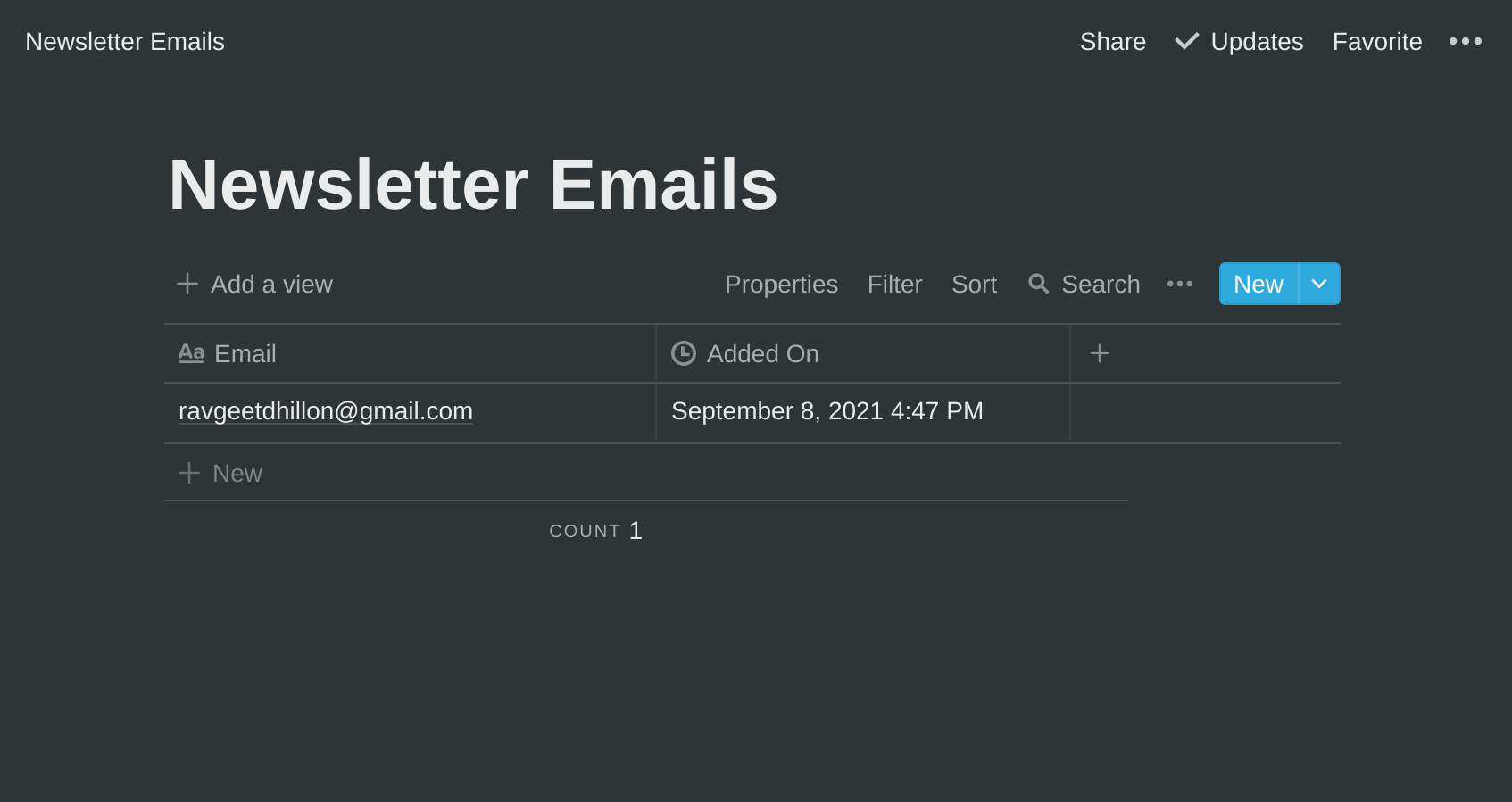
To start, create a new page, then insert a full-page table block by typing /table, and name the database Newsletter Emails. Since the form only captures an address, one Email column is enough. Notion also offers advanced properties, among them a "Created time" property that records a timestamp each time an entry is added.
Wiring the Notion integration
API access requires an integration. Create one in the Notion integrations dashboard while logged in — not from inside your workspace — and name it something like "Newsletter Signups". Once created, the integration exposes an Internal Integration Token; keep it for the environment variables later.
By default an integration cannot touch any page or database. Sharing is explicit: open the database, click Share in the top-right corner, select the integration by name, and click Invite.
Preparing the Netlify project
Netlify Functions are serverless endpoints written in JavaScript or Go. They're preferable here to Netlify's own form handling, which caps free-plan submissions at 100 per month; functions can be invoked 125,000 times a month, enough to collect a quarter-million emails at no cost.
The workflow begins with the Netlify CLI:
npm install netlify-cli -gAuthentication options vary; Netlify's documentation covers them. Then create the project:
$ mkdir newsletter-subscription-notion-netlify-function
$ cd newsletter-subscription-notion-netlify-function
$ npm init
Writing the submission function
Install the official Notion JavaScript SDK:
$ npm install @notionhq/client --saveCreate a .env file at the project root holding the API token and database ID:
NOTION_API_TOKEN=<your Notion API token>
NOTION_DATABASE_ID=<your Notion database>
The database ID sits in the page URL, which looks like https://www.notion.so/{workspace_name}/{database_id}?v={view_id}. Functions live in a functions directory, so a netlify.toml file at the root tells Netlify where to build them from:
[build]
functions = "functions"
Inside that directory, an index.js exposes the handler at /.netlify/functions/index:
const { Client, LogLevel } = require('@notionhq/client');

const { NOTION_API_TOKEN, NOTION_DATABASE_ID } = process.env;

async function addEmail(email) {
  // Initialize Notion client
  const notion = new Client({
    auth: NOTION_API_TOKEN,
    logLevel: LogLevel.DEBUG,
  });

  await notion.pages.create({
    parent: {
      database_id: NOTION_DATABASE_ID,
    },
    properties: {
      Email: {
        title: [
          {
            text: {
              content: email,
            },
          },
        ],
      },
    },
  });
}

function validateEmail(email) {
  const re =
    /^(([^<>()[\\]\\\\.,;:\\s@"]+(\\.[^<>()[\\]\\\\.,;:\\s@"]+)*)|(".+"))@((\\[[0-9]{1,3}\\.[0-9]{1,3}\\.[0-9]{1,3}\\.[0-9]{1,3}\\])|(([a-zA-Z\\-0-9]+\\.)+[a-zA-Z]{2,}))$/;
  return re.test(String(email).toLowerCase());
}

module.exports.handler = async function (event, context) {
  // Check the request method
  if (event.httpMethod != 'POST') {
    return { statusCode: 405, body: 'Method not allowed' };
  }

  // Get the body
  try {
    var body = JSON.parse(event.body);
  } catch (err) {
    return {
      statusCode: 400,
      body: err.toString(),
    };
    return;
  }

  // Validate the email
  const { email } = body;
  if (!validateEmail(email)) {
    return { statusCode: 400, body: 'Email is not valid' };
  }

  // Store email in Notion
  await addEmail(email);
  return { statusCode: 200, body: 'ok' };
};
The handler logic runs in two parts. An addEmail helper authenticates a Notion client with NOTION_API_TOKEN — its log level parameter gives development-time output and can be dropped for production — and calls notion.pages.create, since every database entry is a page. The exported module.exports.handler runs the request checks in order:
- Any method other than
POSTreturns405 - Method not allowed. - If
event.bodyfails to parse, the response is400 - Bad request. - An email that fails
validateEmailreturns400 - Bad requestwith the messageEmail is not valid. - On success,
addEmailstores the address and the function returns200 - Success.
The form front end
An index.html at the project root provides the markup, styled with Bootstrap 5:
<!DOCTYPE html>
<html lang="en">
<head>
  <meta charset="UTF-8">
  <meta http-equiv="X-UA-Compatible" content="IE=edge">
  <meta name="viewport" content="width=device-width, initial-scale=1.0">
  <title>Notion + Netlify Functions Newsletter</title>
  <link href="<https://cdn.jsdelivr.net/npm/[email protected]/dist/css/bootstrap.min.css>" rel="stylesheet" integrity="sha384-KyZXEAg3QhqLMpG8r+8fhAXLRk2vvoC2f3B09zVXn8CA5QIVfZOJ3BCsw2P0p/We" crossorigin="anonymous">
</head>

<body>
  <div class="container py-5">
    <p>
      Get daily tips related to Jamstack in your inbox.
    </p>

    <div id="form" class="row">
      <div class="col-sm-8">
        <input name="email" type="email" class="form-control" placeholder="Your email" autocomplete="off">
        <div id="feedback-box" class="invalid-feedback">
            Please enter a valid email
        </div>
      </div>
      <div class="col-sm-4">
        <button class="btn btn-primary w-100" type="button" onclick="registerUser()">Submit form</button>
      </div>
    </div>

    <div id="success-box" class="alert alert-success d-none">
      Thanks for subscribing to our newsletter.
    </div>
    <div id="error-box" class="alert alert-danger d-none">
      There was some problem adding your email.
    </div>
  </div>
</body>
<script>
</script>
</html>
The page has an email input whose button calls registerUser, plus two alerts — one for success, one for failure. Start it on the local dev server with the CLI:
$ netlify dev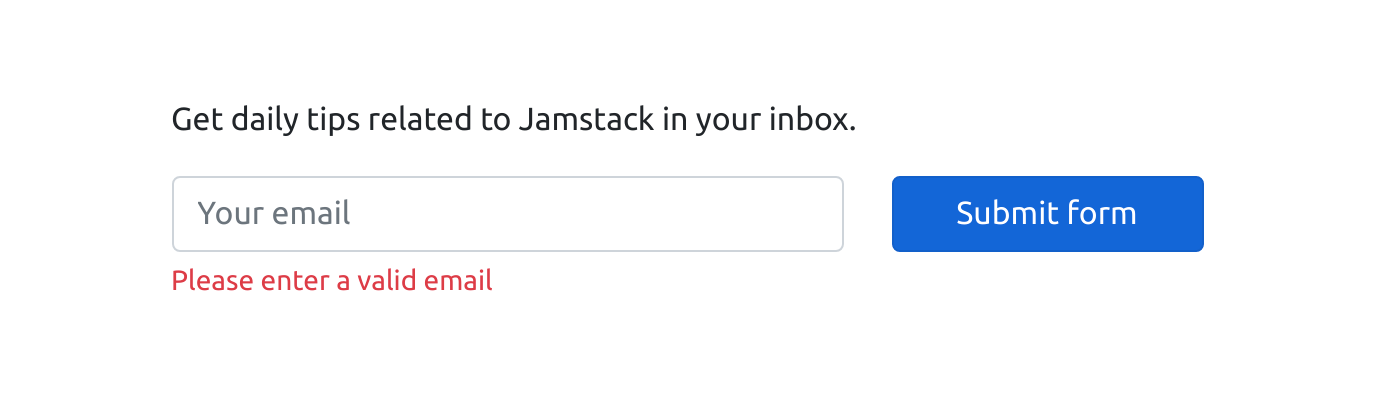
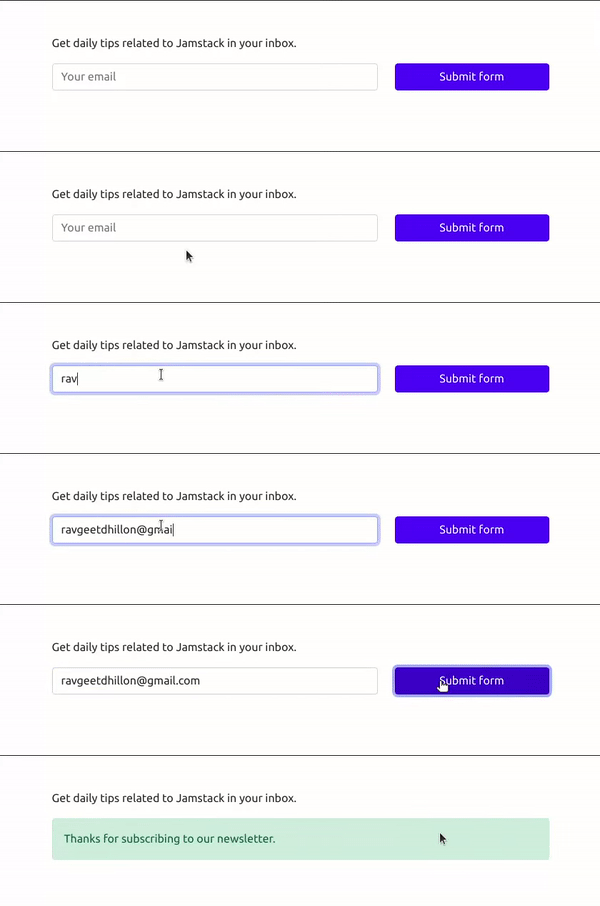
localhost:8888 and see our webpage with the form.The inline script validates the input with validateEmail and prompts the user to retry if it doesn't pass. A valid address is sent by fetch as a POST to /.netlify/functions/index with a payload containing the email. The response determines which alert the user sees.
function validateEmail(email) {
  const re =
    /^(([^<>()[\\]\\\\.,;:\\s@"]+(\\.[^<>()[\\]\\\\.,;:\\s@"]+)*)|(".+"))@((\\[[0-9]{1,3}\\.[0-9]{1,3}\\.[0-9]{1,3}\\.[0-9]{1,3}\\])|(([a-zA-Z\\-0-9]+\\.)+[a-zA-Z]{2,}))$/;
  return re.test(String(email).toLowerCase());
}

async function registerUser() {
  const form = document.getElementById('form');
  const successBox = document.getElementById('success-box');
  const errorBox = document.getElementById('error-box');
  const feedbackBox = document.getElementById('feedback-box');
  const email = document.getElementsByName('email')[0].value;

  if (!validateEmail(email)) {
    feedbackBox.classList.add('d-block');
    return;
  }

  const headers = new Headers();
headers.append('Content-Type', 'application/json');

  const options = {
    method: 'POST',
    headers,
    body: JSON.stringify({email}),
  };

  const response = await fetch('/.netlify/functions/index', options);

  if (response.ok) {
    form.classList.add('d-none');
    successBox.classList.remove('d-none');
  }
  else {
    form.classList.add('d-none');
    errorBox.classList.remove('d-none');
  }
}
Delivering the welcome email
Storing addresses is only half the job; subscribers should receive a confirmation. Rather than firing immediately on signup, the plan collects signups from the last 30 minutes and mails them — the delay makes the welcome feel less automated. Mailgun's dashboard is the place for credentials, under Settings → API Keys.
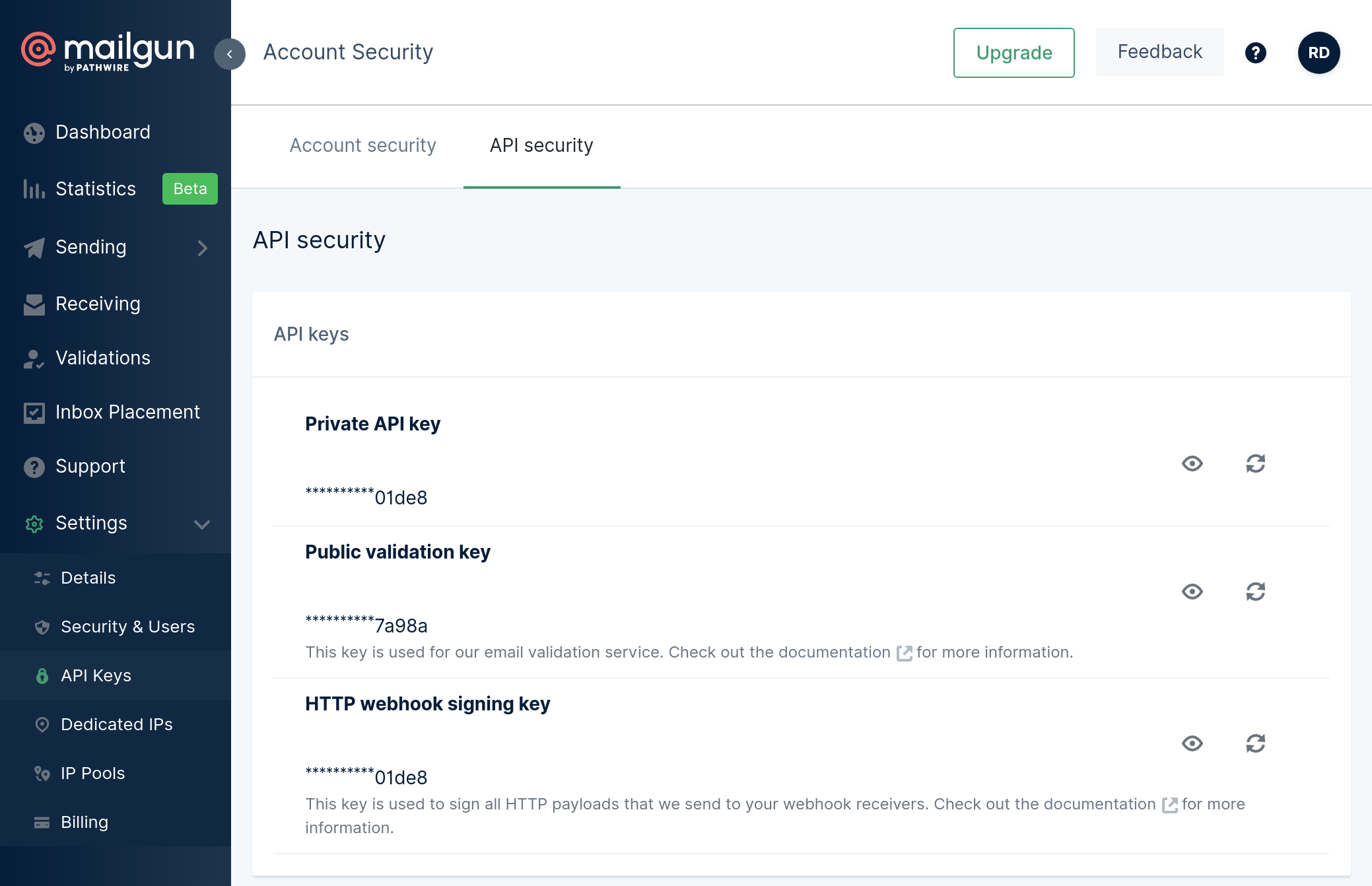
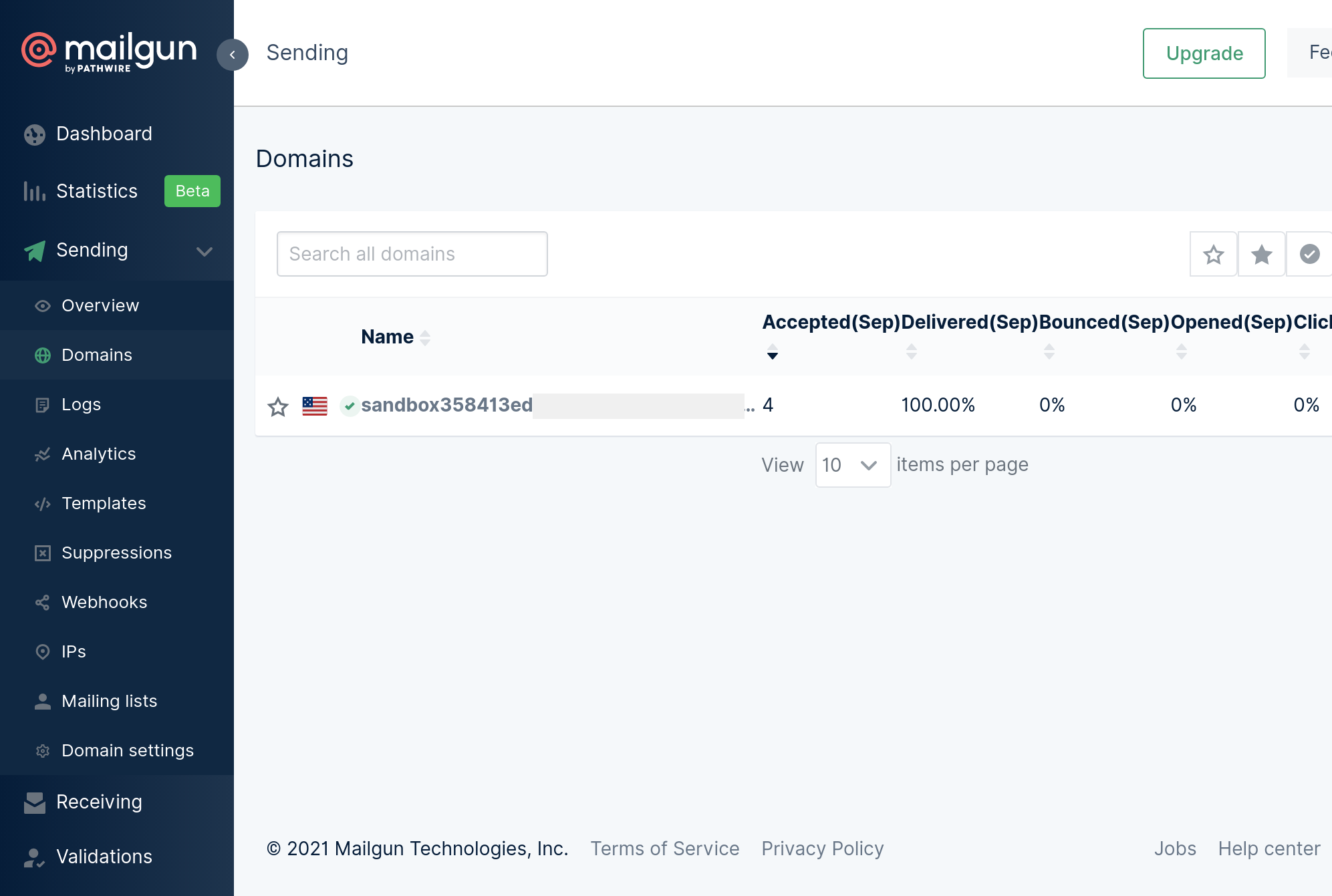
The private key goes into the .env alongside the sandbox domain found under Sending → Domains:
MAILGUN_API_KEY=<your Mailgun api key>MAILGUN_DOMAIN=<your Mailgun domain>Install Mailgun's official SDK first:
$ npm install mailgun-js --saveA separate function, welcome.js, reuses the /.netlify/functions/index endpoint for this job:
const { Client, LogLevel } = require('@notionhq/client');
const mailgun = require('mailgun-js');

const {
  NOTION_API_TOKEN,
  NOTION_DATABASE_ID,
  MAILGUN_API_KEY,
  MAILGUN_DOMAIN,
} = process.env;

async function fetchNewSignups() {
  // Initialize notion client
  const notion = new Client({
    auth: NOTION_API_TOKEN,
    logLevel: LogLevel.DEBUG,
  });

  // Create a datetime that is 30 mins earlier than the current time
  let fetchAfterDate = new Date();
  fetchAfterDate.setMinutes(fetchAfterDate.getMinutes() - 30);

  // Query the database
  // and fetch only entries created in the last 30 mins
  const response = await notion.databases.query({
    database_id: NOTION_DATABASE_ID,
    filter: {
      or: [
        {
          property: 'Added On',
          date: {
            after: fetchAfterDate,
          },
        },
      ],
    },
  });

  const emails = response.results.map((entry) => entry.properties.Email.title[0].plain_text);

  return emails;
}

async function sendWelcomeEmail(to) {
  const mg = mailgun({ apiKey: MAILGUN_API_KEY, domain: MAILGUN_DOMAIN });

  const data = {
    from: `Ravgeet Dhillon <postmaster@${MAILGUN_DOMAIN}>`,
    to: to,
    subject: 'Thank you for subscribing',
    text: "Thank you for subscribing to my newsletter. I'll be sending daily tips related to JavScript.",
  };

  await mg.messages().send(data);
}

module.exports.handler = async function (event, context) {
  // Check the request method
  if (event.httpMethod != 'POST') {
    return { statusCode: 405, body: 'Method not allowed' };
  }

  const emails = await fetchNewSignups();

  emails.forEach(async (email) => {
    await sendWelcomeEmail(email);
  });

  return { statusCode: 200, body: 'ok' };
};
It relies on two helpers. fetchNewSignups queries the Notion database with a filter restricted to entries from the previous 30 minutes and maps the results into an emails array. sendWelcomeEmail hands each address to Mailgun. The handler iterates the collected emails and sends one welcome message apiece. Locally the endpoint is found at localhost:8888/.netlify/functions/welcome.
Verifying end to end
With netlify dev running, visit localhost:8888, submit a valid address, and confirm the success alert before checking the Notion database for the new row. Then issue a POST to localhost:8888/.netlify/functions/welcome — Postman works — and check the inbox for the confirmation. A missing message is usually a spam-filter issue.

Hardening and scheduling
The setup leaves two loose ends. The welcome endpoint is currently open to anyone, so it should be protected with a simple password or a JWT token to keep spammers from firing it. And the 30-minute cadence has to be triggered externally, since Netlify has no CRON facility — GitHub Actions can invoke the endpoint on a schedule. That wires a complete email pipeline from form to validator to database to outbound message using services and APIs alone.



