
Cloudinary's fetch URLs let you route existing images through its optimization, resizing, format conversion and CDN without learning much of the API — you only need an account and a prefixed URL. The catch is that fetch requires the image to be reachable on the public internet, while development servers usually serve images from local, non-public paths. The target setup keeps relative paths such as /images/image.png in development and swaps in a fully qualified fetch URL in production, e.g. https://res.cloudinary.com/css-tricks/image/fetch/w_1200,q_auto,f_auto/https://production-website.com/images/image.png.
A Nunjucks-style template expressing that split would follow this pseudo-code:
<img src="
  {{CLOUDINARY_PREFIX}}{{FULLY_QUALIFIED_PRODUCTION_URL}}{{RELATIVE_IMAGE_URL}}
  "
  alt="Don't screw this up, fam."
/>| Development | Production | |
{{CLOUDINARY_PREFIX}} | “” | “https://res.cloudinary.com/css-tricks/image/fetch/w_1200,q_auto,f_auto/” |
{{FULLY_QUALIFIED_PRODUCTION_URL}} | “” | “https://production-website.com” |
{{RELATIVE_IMAGE_URL}} | “/images/image.jpg” | “/images/image.jpg” |
Only the first two values need to be global; the relative image path is written by hand wherever it is needed.
Data files and environment detection
Eleventy turns any *.js file placed in a _data folder into template variables. A file /src/_data/sandwiches.js like this:
module.exports = {
  ham: true
}
makes it possible to use {{sandwiches.ham}} in a template and receive {{true}}.
Since these files run in Node, they can branch on other variables — most usefully process.env. Many hosts (Netlify, Vercel and others) expose environment variables configured in their dashboards to build processes, though that ties the logic to a particular host. Setting a variable directly on the command line works anywhere:
SANDWICH="ham" eleventyWith that command, process.env.SANDWICH reads ham anywhere in your Node JavaScript. In this scenario the production build sets a flag indicating production:
PROD="true" eleventyLocal development runs without that variable. The variable is consumed in /src/_data/images.js:
module.exports = {

  imageLocation:
    process.env.PROD === 'true'
      ? 'https://coding-fonts.css-tricks.com'
      : '',

  urlPrefix:
    process.env.PROD === 'true'
      ? 'https://res.cloudinary.com/css-tricks/image/fetch/w_1600,q_auto,f_auto/'
      : ''

};
For Netlify deploy previews, checking process.env.CONTEXT === 'deploy-preview' lets you alter the behavior for those builds if desired.
Consuming the prefixes in templates
Templates then assemble sources from {{images.imageLocation}} and {{images.urlPrefix}}:
<img
  src="
    {{images.urlPrefixLarge}}{{images.imageLocation}}/image.png
  "
  alt="Useful alternative text."
/>
Development produces a local, relative source; production produces the fully qualified Cloudinary URL that fetch can resolve.
Responsive variants from one source
Because the fetch prefix contains transformation parameters, adjusting it lets a single source image feed a responsive images setup. A variant of the data file exposes multiple prefixes, which can be plugged into the full responsive syntax. Locally the output stays relative:

srcset is kind of a production concern.and in production it becomes Cloudinary fetch URLs:
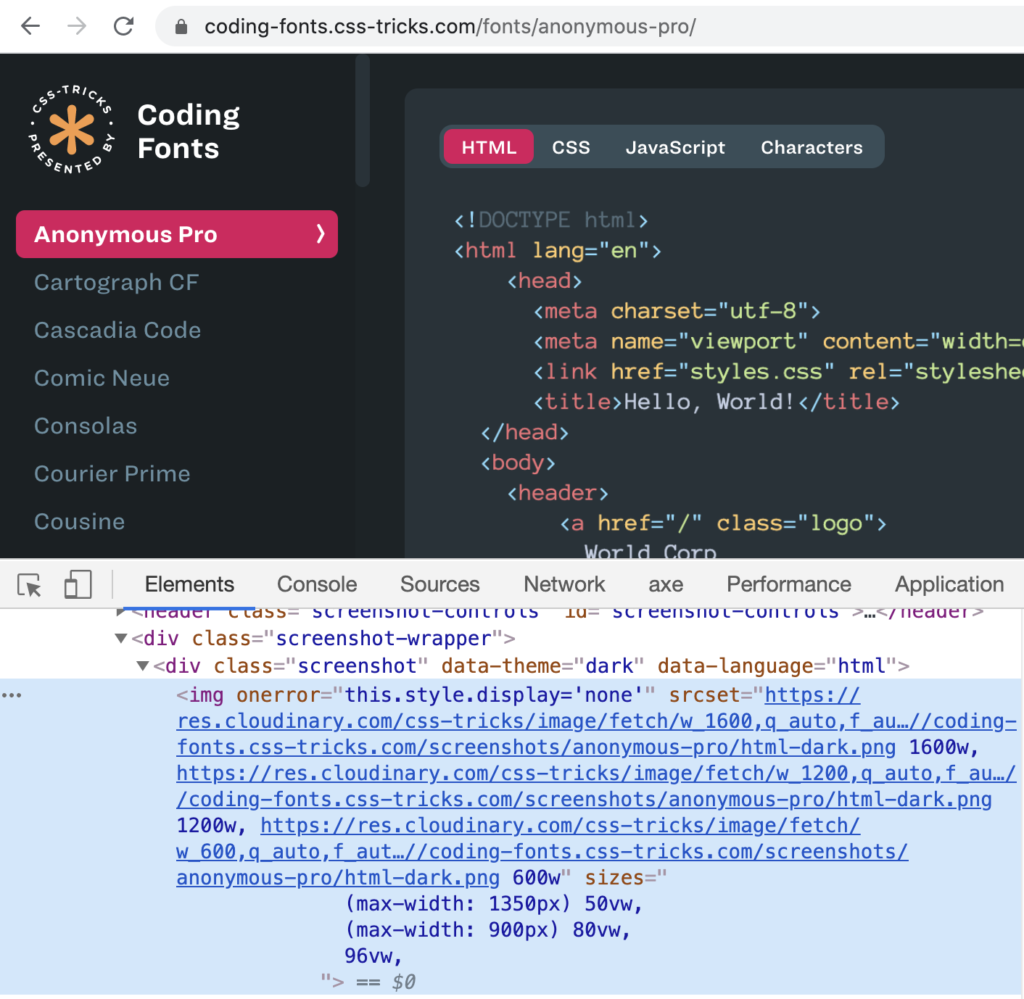
Alternative approaches
- Netlify redirects can rewrite image requests toward Cloudinary; for local development, the technique relies on catching the resulting 404s and redirecting them again locally.
- Hand-writing responsive image syntax gets tedious quickly. In Eleventy, Nicolas Hoizey's
eleventy-plugin-images-responsiverabstracts it, and Eric Portis'seleventy-respimgdoes the same with Cloudinary specifically. - Tim Kadlec's post "Proxying Cloudinary Requests with Netlify" expands on the redirect approach and adds performance context and gotchas.
https://twitter.com/philhawksworth/status/1328340868726726656