
Rendering Photos Without Dropping Frames
Carousel’s UI had to meet three requirements from the start: instant data availability, smooth scrolling at 60 frames per second, and high-fidelity images. The hardest part of that third goal is the decode step—JPEGs are compact on disk, but turning them into pixels is expensive. A 256px by 256px thumbnail takes about 10ms to decode on a Nexus 4 and 9ms on an iPhone 5. At 60fps, each frame gets only 16ms of main-thread time. Since photos are laid out three per row, displaying a new row sync means three decodes in a single frame—roughly 30ms of work. That doesn't fit.
Why a Simple Background Queue Isn’t Enough
The textbook fix is to move decoding to a background thread. That preserves framerate but introduces latency between the moment a photo scrolls into view and the moment its pixels are ready. Fast scrolling exposes the gap: the screen fills with placeholder squares while the render queue catches up.
Carousel needed another layer of indirection. The team’s solution was to give each image not one, but two cached sizes:
- A 256px by 256px high-resolution thumbnail (~28KB on disk, 0.2MB decoded, roughly 0.1s to download in a batch over Wi-Fi)
- A 75px by 75px low-resolution thumbnail which runs at roughly one-fifth the decode cost of the larger version
Experiments on iPhone 5 and Nexus 5 hardware showed that 75px was the smallest size that still read as a recognizable photo; a 256px thumbnail was the point where images looked crisp, and boosting beyond that didn't help. Servers already pre-generated both sizes for every photo, so no extra upload work was needed.
A Hybrid Rendering Pipeline
The renderer distinguishes between two scrolling states. During a fast fling, most on-screen thumbnails won't be visible long enough to make high-resolution decoding worthwhile. In that case, the app draws the 75px thumbnails synchronously on the main thread—they decode in roughly 2.7ms on an iPhone 5, slow enough to preserve 60fps. While the scroll is fast, nothing is added to the background decode queue. Once scrolling slows down, the renderer queues the 256px jobs for the images currently on screen. Since the queue is small when the user is moving slowly, the swap from low to high resolution is nearly immediate.
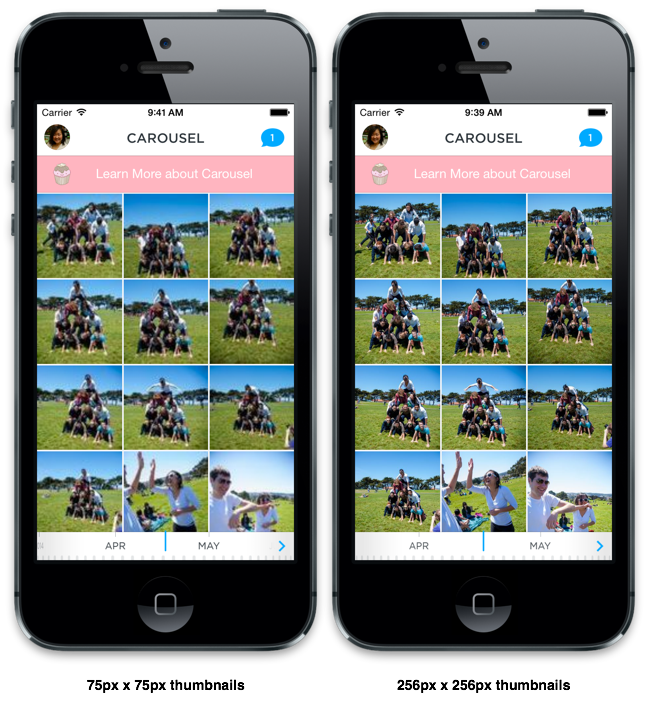
The renderer keeps a queue of 256px decode jobs and ties job scheduling directly to scroll velocity using draw-callback timing (CADisplayLink on iOS) to measure the scroll offset delta. Jobs are only added if the user is scrolling slowly enough that the thumbnail will stay on screen long enough to matter. The queue prunes stale entries as thumbnails move off-screen, so it never holds more than a screen’s worth of work. Decoded results are cached so scrolling back and forth doesn't repeat the same work.

Avoiding Redundant Work
Two extras reduced wasted CPU further. First, the renderer prefetches and decodes thumbnails just outside the visible viewport, so a one-screen buffer of rendered images is always ready. Second, events with many photos render a blurred composite with a “+n” count instead of laying out every high-resolution thumbnail. Blurring doesn't require an expensive source decode — the low-res thumbnail is sufficient.
Offloading JPEG decoding to a background thread is standard practice. What makes Carousel different is the adaptive policy: low-res synchronous decodes while the user is flinging, high-res background decodes when scrolling slows enough to see them. That combination satisfies both the performance requirement and the fidelity requirement simultaneously.


