
From Disk to Screen
Carousel’s first priority is making sure that regardless of how many photos a user has in Dropbox—even over 100,000—the app can display them quickly and scroll smoothly. The bottleneck isn’t network calls; it’s disk I/O. Reading photo metadata directly from SQLite on demand is too slow for a real-time scrolling UI. On a Nexus 5, with roughly 300 bytes of metadata per photo, reading just 5,000 photos from storage takes a full second. Loading that on the main thread would cause an obvious stall, and doing it repeatedly as the user scrolls is out of the question.
Our solution is to keep an in-memory model of the user’s photo metadata that mirrors what is cached on disk. However, this model has to stay correct under concurrent access from multiple threads: the network thread receiving remote file changes, the main thread handling user interactions, and background tasks like uploads or camera roll detection. Reading the entire metadata store on startup is not feasible—it would freeze the app before the first photo ever appears.
Why We Ditched the Traditional Cursor Pattern
On Android, the typical approach to displaying data from a local database is to use a Loader with a Cursor. For our older Dropbox mobile app, we used a SQLiteCursor, which wraps a query to the database. The problem is that SQLiteCursor doesn’t fit SQLite’s threading model. SQLite is single-threaded and requires a lock on the connection from the start of a query through the last fetch. The Cursor interface, on the other hand, implies lazy access to results.
To reconcile these, SQLiteCursor runs the query lazily and caches a limited result set—about 2MB by default. Once you pass that threshold, the cursor re-runs the query with an OFFSET clause to get the next page. This has two significant drawbacks. First, if the underlying data changed between query runs, rows can be missed or duplicated silently. Second, unless you force the query to run on a background thread beforehand, that initial execution is easy to trigger inadvertently during the first moveToFirst() or getCount() call, which often lands on the main thread. Even if you keep the first execution off the UI thread, advancing past that 2MB cache triggers another blocking re-run—also likely on the main thread. A 2MB disk read on the UI thread can stall the app for seconds.
For the original iOS and Android applications, we dodged this by paginating the photos tab. A page size of roughly 5,000 photos kept the blocking disk read latency arguably tolerable. That compromise only works if users have about a page worth of content, though. Carousel’s continuous, full-history timeline needs a better foundation.
The Accumulator as the Living Model
Carousel takes a different approach. Instead of querying disk repeatedly for the UI, we maintain a shareable, in-memory stack dubbed the “accumulator.” The accumulator accepts incremental data changes and produces an optimized view model—an indexed collection that is fast enough to bound to UI callbacks at render time. This lets our cellForRowAtIndexPath: on iOS and Adapter.getView() on Android resolve a position to photo data in microseconds.
One major benefit of that interface symmetry is portability. Because the data structure logic is identical across platforms, we wrote it once in C++. This keeps the data model out of Java, which also reduces the frequency of Android garbage collection pauses that could otherwise degrade scroll performance.
The transactional interface for changing the accumulator is straightforward:
class EventsAccumulator {
public:
  virtual ~EventsAccumulator() {}

  virtual void add_photo(const string & photo_id,
                         const PhotoMetadata & photo_metadata) = 0;
  virtual void remove_photo(const string & photo_id) = 0;
  virtual void add_event(const string & event_id,
                         const EventMetadata & event_metadata,
                         const vector & photo_ids) = 0;
  virtual void remove_event(const string & event_id) = 0;
  virtual void commit() = 0;
};
In one transaction, a caller adds a batch of photos plus their associated events, then ends with commit. Even if we haven’t yet loaded the user’s entire collection—because metadata is still streaming in from the server or SQLite cache—the data model is guaranteed consistent at the end of each commit.
We feed the accumulator through three independent pathways:
- loading cached metadata from SQLite at first app launch
- receiving new metadata updates from the server
- detecting new local photos to back up via the camera roll scanner
These run on separate threads. Opening two concurrent accumulator transactions would corrupt its state, so each thread takes the accumulator’s lock during its transaction. The lock is only held during the quick in-memory update—network calls and JSON parsing happen beforehand. As an example, our sync thread processes new entries from the /delta API as follows:
while (/*delta has more*/) {
  Json response = call_server_delta();
  vector events;
  vector photos;
  std::tie(events, photos) = parse_delta(response);
  write_delta_to_disk(events, photos);
  /*with accumulator lock*/ {
    for (const ParsedEvent & event : events) {
      accumulator->add_event(event.id, event.metadata, event.photo_ids);
    }
    for (const ParsedPhoto & photo : photos) {
      accumulator->add_photo(photo.id, photo.metadata);
    }
    accumulator->commit();
  }
}
That thread does the expensive network roundtrip and parsing before contending for the accumulator lock, so the disk read thread remains unblocked. We still coordinate database access: the thread reading from SQLite takes a database lock while pulling a batch of metadata, which prevents the sync thread from executing write_delta_to_disk at the same instant.
Immutable Snapshots for the UI
Because these three worker threads can repopulate the accumulator at any time, the UI-facing data could change mid-calculation. To give the view layer reliable control, every commit produces an immutable snapshot. Rather than continually patching the view with incremental updates, a snapshot simply becomes the new backing store.
Mobile UI frameworks generally support one of two data refresh patterns:
- Swapping the entire view model for a new model.
- Applying incremental changes to the single source of truth.
Android commonly uses the swap pattern; iOS historically prefers incremental edits for animating row insertions and deletions. Those incremental changes are useful, but they can also be computed by diffing two snapshots when needed. Our core shared codepath implements the swap pattern. The snapshot supports lookups by absolute photo position as well as by the (event_index, index_within_event) pair—iOS developers will recognize that shape as an NSIndexPath. When a new snapshot is available, iOS swaps it in via a [UITableView reloadData:]; Android wraps the snapshot in a thin adapter layer that computes each event’s row index for the ListAdapter.
Copy-on-Write for Snapshot Speed
Immutable data structures have clean semantics but often come with poor performance for write-heavy access patterns. A naive snapshot implementation treated the photo timeline as one long sorted array. Copying the entire array on every mutation and re-sorting was the hidden cost: a user with 50,000 photos who hides just one would force a near-one-second rebuild. That is unacceptable for a touch interaction.
The expensive fix is avoidable with a smarter structure, leveraging the fact that photos are grouped into events. Typically, a given change only affects a few photos in one or two events, not the entire timeline. So we represent each snapshot as an array of events, each holding a pointer to its own photo array. To produce a modified snapshot, we only deep-copy the events that actually changed; all other events are shared by pointer.
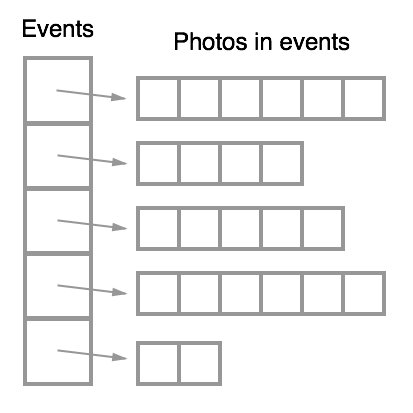
The benefit is best seen by example. If we need a new snapshot with a single event’s contents altered, we deep-copy just that one event while the surrounding event pointers retain their existing arrays.
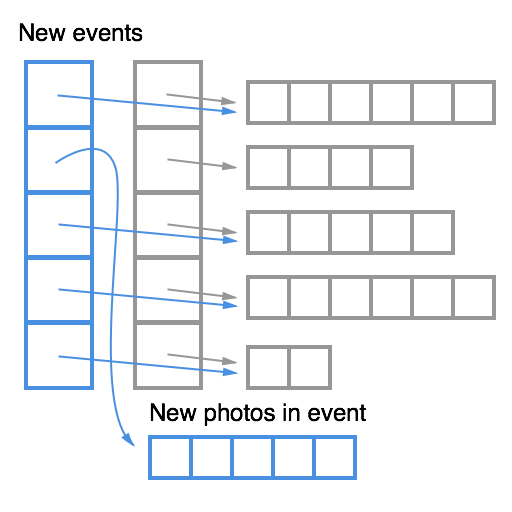
To keep lookups fast, the structure stores cached offsets for binary search. These offsets map each event’s start into the timeline’s absolute list of photos. With that in place, finding which event holds photo 20,000 is an array binary search.

After inserting a photo and rebuilding a snapshot, only the affected event plus the offset array update—there is no need to copy the underlying unchanged photo lists.

Keeping the view model light
The accumulator and snapshot pattern pays off because it lets Carousel hold a complete view model — metadata for every photo a user has — in memory. What it cannot do is hold the actual image data for all of those photos at once. That requires a separate strategy: keeping only a window of thumbnails resident in memory and fetching the rest based on where the user is currently looking.
This split between the metadata snapshot and the image cache is just one layer of optimization. The UI layer between the snapshot model and the rendered result also gets special treatment. The layout that presents metadata and photos inside conversations, for instance, is built quite differently from the events view. Those layouts and the windowing mechanics for thumbnails are worth their own discussion, and later posts will go into that in more detail.


