
Bubbles Beyond the Basics
Supporting Android 11 Conversation Bubbles for DMs and Group DMs required more than just flipping a switch. The feature sits on top of three pre-existing Android APIs, and each one introduced its own set of integration challenges. Here's how we worked through them.
The official requirements for a bubble-enabled notification are straightforward:
- The notification must use
MessagingStyle. - The notification must be tied to a Sharing Shortcut.
- A
BubbleMetadataobject pointing to a resizable embedded Activity must be attached.
The first two items weren't new territory for our Notification team. MessagingStyle had already been adopted in a recent notification rewrite, and Sharing Shortcuts were already in flight because they're also a prerequisite for showing up in the notification shade's Conversations section. The third requirement—getting the shortcut plumbing right—turned out to be where most of the interesting work lived.
Shortcut Icons for Every Conversation
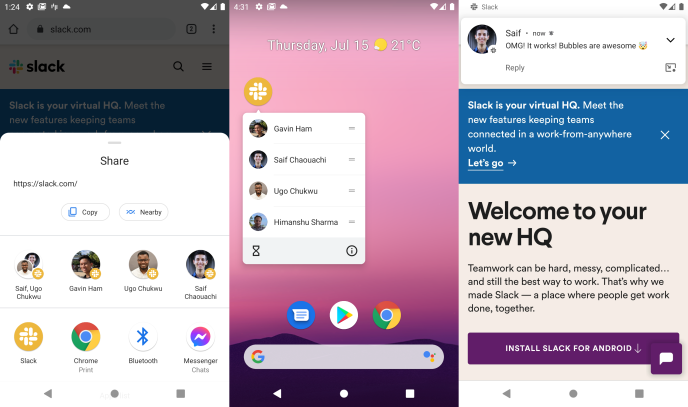
Shortcut icons surface in three places: on top of the notification, in the launcher when you long-press the app icon, and in the system share sheet. The icon should make the conversation instantly recognizable.
For Direct Messages this was easy—we just used the user's avatar. Group DMs were less trivial. We followed what has become a loose platform convention: two circular avatars overlapping on a white background.
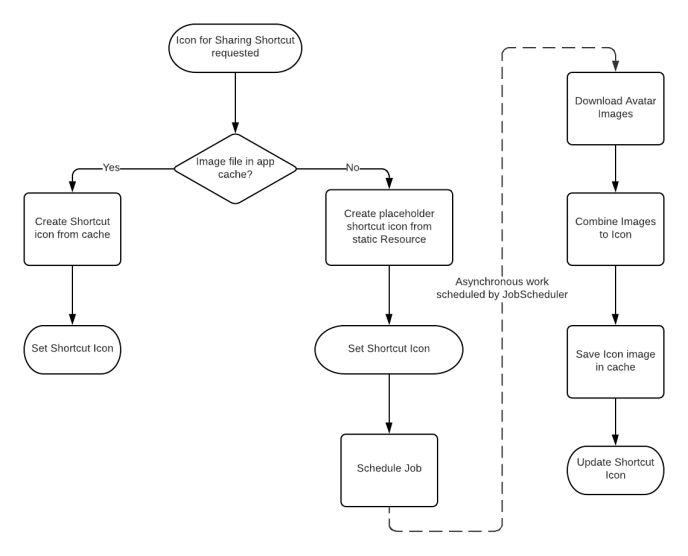
The implementation fetches avatars for two participants and composites them onto a png bitmap canvas. That image is cached in the app's cache directory so it can be reused each time a shortcut for that conversation needs to be created.

Icons Without the Latency
Shortcuts are being created from the notification codepath, where execution time is critical. Message delivery latency matters, and Android's Background Execution Limits cap how long we can process an incoming push. Downloading avatars synchronously in that path wasn't acceptable.
Instead, if a conversation's icon isn't already cached, we create the Sharing Shortcut with a placeholder and dispatch a JobScheduler job. That job asynchronously fetches the avatars, renders the composite icon, and updates the shortcut in place. Notifications themselves never block on an avatar download.
Routing One Shortcut to Three Destinations
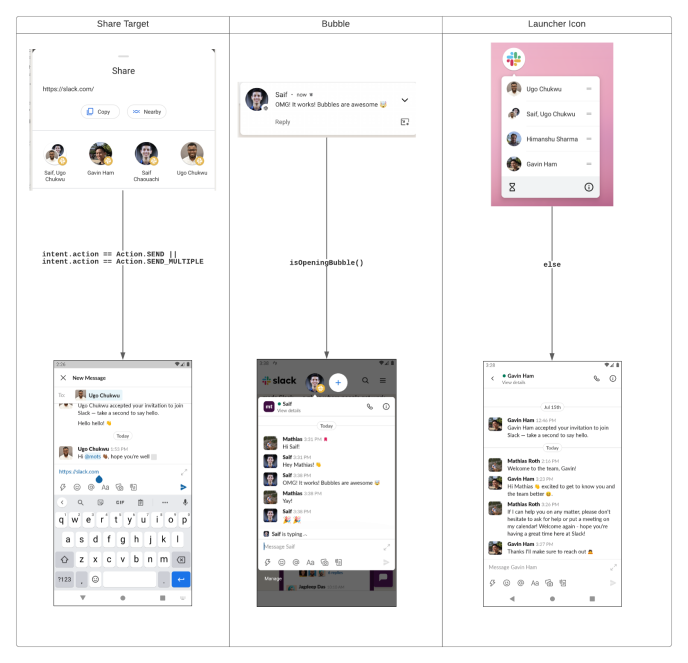
The Shortcut API targets a single Activity, but we have three distinct UI surfaces that could be the destination:
- Compose, when a user shares text or a file into Slack from the Android share sheet
- Messages, when the shortcut is opened from the launcher's app icon long-press menu
- Bubbles, when the user taps the "Bubble" button on a conversation notification
Since we can't attach multiple intents to one shortcut, we point it at a Trampoline Activity—a lightweight launcher whose only job is to inspect the incoming intent, pick the correct UI, and hand off before finishing itself.
Determining whether this is a share action is the easy case: we check if intent.action is SEND or SEND_MULTIPLE.
Detecting a Bubble launch is harder. Android 11 exposes no official API to reveal that a shortcut intent originated from a Bubble. So we dug through the Android source itself. Bubbles render on a virtual display using a hardcoded name prefix: TaskVirtualDisplay. That gave us the hook needed to write a small utility that inspects the current display name and identifies a Bubble context reliably in practice.
private const val BUBBLE_DISPLAY_NAME_PREFIX = "TaskVirtualDisplay"

private fun isOpeningBubble(): Boolean {
  return Build.VERSION.SDK_INT >= Build.VERSION_CODES.R &&
    display?.displayId != Display.DEFAULT_DISPLAY &&
    display?.name?.startsWith(BUBBLE_DISPLAY_NAME_PREFIX) == true
}
This workaround was necessary on Android 11, but Android 12 finally introduced a proper signal via the new isLaunchedFromBubble() API on Activity—no more display-name inspection.
Keeping a Bubble tied to its conversation
With BubbleMetadata set on the notification, Android renders the conversation in a Bubble. But Slack’s main app is fully navigable, and letting a user wander from a Bubble’s anchored conversation would leave them staring at a chat that doesn’t match the avatar they tapped. Two safeguards keep a Bubble honest:
- Disable navigation inside the Bubble wherever possible. Bubbles are lightweight, so most click listeners that lead to other parts of the app are simply turned off.
- For flows that still need support, like sharing a message, open them outside the Bubble. Intents launched from a Bubble normally open inside it, but an
IntentwithFLAG_ACTIVITY_NEW_TASKset will launch in the main app.
Read receipts vs. Bubble lifetime
Slack clears notifications once their messages are read on any device, keeping the drawer clean. With Bubbles, that mechanism caused an unexpected coupling: cancelling a notification also dismisses its Bubble.
The bug surfaced quickly. Opening a Bubble rendered the conversation, which marked the channel read. The clearing mechanism then cancelled the notification and yanked the Bubble out from under the user. The fix was a simple check: don’t cancel a notification if it has an active Bubble.
Websocket teams and the switching problem
Slack’s Android client communicates over a websocket bound to one workspace (a “team”). Supporting team switching, an ActiveTeamDetector implemented as ActivityLifeCycleCallbacks tracks which team the foreground activity belongs to, and the socket connection manager reads that state.
Bubbles broke that model. A Bubble for Team A could float over a main app showing Team B. Collapsing the Bubble returned to Team B’s UI, but no new onResume fired on the main activity, so the detector kept reporting Team A. The app would render Team B while the socket spoke to Team A.
Supporting simultaneous sockets would have meant a major infrastructure overhaul. The workaround: while a Bubble is open, the main app is covered anyway, so a second connection isn’t needed — only the state corruption on collapse matters. The Bubble does emit onPause when it collapses, so the fix records the active team before the Bubble opens and re-emits it on that onPause, restoring the correct socket binding.
The Android 11 Work Profile snag
Everything worked in emulators, but real work phones — running Slack inside an Android Work Profile per IT policy — silently failed. The Bubble icon appeared, but tapping it did nothing. Tracking down the cause revealed an Android 11 bug: Bubbles simply don’t work in Work Profiles.
Rather than block the launch, Android 11’s new UserManager.isManagedProfile() finally gave a clean way to detect the environment. With that, Slack could gate Bubble support on Android 11 for managed profiles and measure the impact. Telemetry showed only about 5% of Android 11 users run Slack in a Work Profile.
The Android 12 Developer Preview has since verified the fix, so Work Profile users on Android 12 get Bubbles back.


