
Actions on the go
GitHub Actions remains one of the most-requested features for the GitHub Mobile apps, and the team has now shipped a first iteration focused on pull request workflows. The goal is to give developers a mobile-first way to check the status of CI/CD runs, dig into failures, and act on them — without opening a laptop.
This release brings a better view of checks on a pull request, support for opening workflows and their logs, push notifications when runs complete, and controls to cancel or re-trigger runs. Everything is accessible directly from the iOS and Android apps.
Reworked checks overview
Previously, tapping View All in the Checks section of a pull request was limited. The mobile team has replaced that with an all-new screen showing every check tied to the pull request, with the option to switch to parent workflow summaries where those exist. Tapping a check takes you straight to its detail view.

From there, you can inspect the overall workflow summary or drill into the steps of an individual job. Once a step finishes processing, its full logs are available and are a single tap away:
Notifications and remote run control
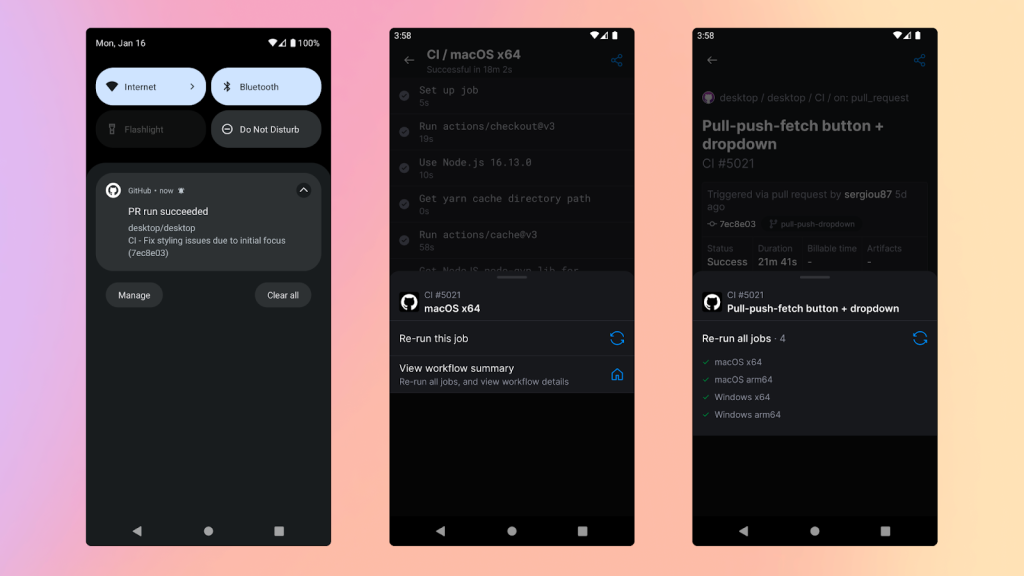
On mobile, the expectation isn't that you watch a run complete in real time. To remove that burden, push notifications now alert you the moment a workflow run finishes. You can optionally limit these alerts to failed runs only, matching how you'd configure alerts elsewhere in GitHub. Look for Settings → Configure Notifications in the apps.
Beyond visibility, the new screens include options to cancel or re-trigger jobs and workflow runs. The controls appear in context on the relevant screens so you can recover from a failed run or clean up a lingering one without switching to a desktop browser.
Availability and feedback
The updated GitHub Mobile apps are available for iOS and Android. Users can share feedback through the public feedback community at github.com/orgs/community/discussions/categories/mobile or via Settings → Share Feedback inside the apps.


