
Animated GIFs and the Hidden Cost of Obscured Elements
Keeping a page at a smooth 60fps requires minimizing paint work, and sometimes the biggest offenders are the things you can’t even see. Animated GIFs that are still running behind other content are a classic case: they can trigger a cascade of unnecessary repaints that grind mobile frame rates to a halt. The good news is that the problem is straightforward to diagnose and even simpler to fix.
Why Layers Matter
Modern browsers often composite groups of DOM elements into separate "layers." A page might have one layer for everything, or in extreme cases, thousands. When an element changes visually, the browser has to repaint not just that element, but every other element in the same layer that overlaps it. Since painting one element over another permanently overwrites the pixels beneath, the browser must repaint those covered elements from scratch to restore them.
Isolating frequently changing elements into their own layers prevents this cascading repaint. A fixed header combined with scrolling content is a typical example: placing the header on its own layer lets the browser simply shift layers around during scroll, avoiding repaints of both the header and the content. But layers aren't free—each one adds memory and compositing overhead—so you want as few as possible while still hitting your performance targets.
The Animated GIF Trap
Suppose you have a loader animation implemented as a GIF, sitting in a layer behind other interface elements that have since loaded and covered it. In that situation the GIF is invisible to the user, yet the browser still needs to decide what to do when the GIF’s next frame is ready.
In an ideal world the browser would check whether the GIF is actually visible and skip the paint entirely. In practice, verifying that an element is fully obscured can cost more than just painting it. So browsers do the cheaper—but still wasteful—thing: they repaint.
If the GIF happens to be isolated on its own layer, the damage is limited to painting that layer and uploading it to the GPU. But if the GIF is grouped into the page’s main layer, the browser has to repaint every other element in that layer as well, then upload everything to the GPU. All that work gets repeated for every frame of the animation, even though the user sees nothing.
Desktop browsers can often absorb this overhead with their faster CPUs and higher GPU bandwidth. Mobile is a different story—painting there is expensive enough that even small amounts of excess work will cause visible jank.
Which Browsers Are Affected?
Browser behavior is mixed. Chrome, Safari, and Opera will happily repaint obscured animated GIFs. Firefox, by contrast, analyzes the visibility and skips repainting if the GIF is not seen. Internet Explorer remains something of a mystery: even IE11's F12 tools give no hint whether repaints are happening.
Finding the Problem with DevTools
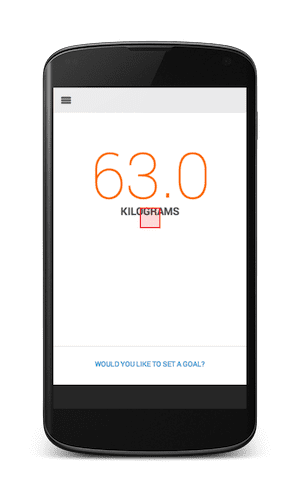
The quickest way to detect this issue is Chrome DevTools' "Show paint rectangles" feature. Open DevTools, click the gear icon in the lower right corner, and enable Show paint rectangles under the Rendering section.


As you interact with the page or an animation plays, watch for red rectangles that momentarily flash on screen. A red box indicates a repaint. To test for the GIF problem, hide the foreground elements and check whether an animated GIF is still spinning behind them.
The Simple Fix
If you find an obscured GIF, stop it explicitly. Apply display: none or visibility: hidden to the GIF element or its parent via CSS or JavaScript. If the animated graphic is a background image, remove it altogether when no longer needed. For a real-world example of the problem in the wild, Allegro’s product listings use a loader GIF behind each product image that gets obscured rather than cleanly hidden.
Eliminating unnecessary paints is one of the most direct ways to reach a consistent 60fps. Hidden animated GIFs are an easy thing to overlook, but a quick check with DevTools will tell you exactly what’s triggering those costly repaints. So, did you already hide that loader kitten, or is it still spinning away unseen?


