
Bridging the GitHub Auth Gap
Most GitHub automation needs fall neatly into one of two authentication paths: personal access tokens (PATs) or the platform’s built-in token. PATs are powerful but long-lived and tied to an individual developer account. GitHub’s GITHUB_TOKEN is safer but can’t reach outside the repository or kick off downstream workflow events—by design. We hit use cases that fell between these two options, and instead of patching around the gap, we built a system to automatically rotate GitHub access tokens.
Our workflows needed to clone code from other private repositories, push issues and pull requests into organization-level projects, and trigger workflows that require non-repository_dispatch/workflow_dispatch events. PATs seemed like the obvious answer—they can be scoped at the organization level, support cross-repo operations, and can be set to never expire. But that convenience came with real problems:
- Developer churn breaks things. When someone leaves, their tokens lose access, and workflows fail in ways that are hard to diagnose.
- Actions are misattributed. Automations run under a human account, which muddies auditing and troubleshooting.
- No enforced rotation. You can’t require PATs to expire at the org level, and manually recreating them every 30 or 90 days is painful.
A Serverless Rotation Service
We needed something that rotated credentials automatically behind the scenes, kept tokens short-lived, offered manual override for emergencies, produced full audit logs, and survived employee departures. We also wanted an approval-based onboarding flow. GitHub Actions gave us all of that without running our own service.

Choosing GitHub-hosted infrastructure rather than a custom service meant we got scheduling, managed compute, code owner review through branch protection, secrets management, run history for auditing, and a manual “break-glass” trigger—all out of the box. The maintenance burden shrank to maintaining a list of YAML files, some TypeScript action code, and operational monitoring.
To avoid tying credentials to human identities, we generate secrets from a GitHub App instead of a developer account. GitHub Apps are first-class actors with their own credentials and permissions. That solves both the churn problem and the attribution problem.
On the developer side, the generated secrets land in the same repository secrets that PATs used to live in, so existing workflows can reference them identically. Migration was seamless, and no one had to update their code.
What We Hit Along the Way
Costs Rounded Up Unexpectedly
Shopify runs workloads on GitHub’s Larger Action Runners, which means we pay for billable minutes. Our initial cost estimates were wrong in two ways.
First, billable time is rounded per job, not per organization. Each workflow job’s execution duration is rounded up to the nearest minute, and those rounded minutes are summed—even when jobs run in parallel. Ten jobs that each finish in one second still cost you ten billable minutes. That realization forced an architectural shift: we now execute downstream workflows sequentially inside a single job rather than fanning out in parallel.
Second, the subtlety of how GitHub buckets and rounds time is easy to underestimate when scoping a project. GitHub’s Actions pricing calculator is the best tool we found for getting real numbers before committing to an approach.
The Schedule Trigger Is Best-Effort
GitHub App installation tokens expire after one hour, so we planned to rotate tokens every 45 minutes using the schedule trigger with */45 * * * *. In practice, that trigger was unreliable—runs sometimes didn’t happen for tens of minutes, since schedule is best-effort and depends on GitHub’s service load.
We switched to explicitly listing minutes on the hour in our cron expressions and reduced the interval to 15 minutes. That gave us four runs per hour and far more predictable timing.
Onboarding Had to Get Friendlier
The first onboarding flow asked developers to copy a YAML template, read the comments, and fill in REPLACE_ME_X placeholders. We added a CI lint step to catch unfilled fields, but that only helped people who already understood GitHub Actions deeply. Everyone else found the process confusing and opaque.
The next iteration moved to a wizard that prompted users for raw inputs and rendered a template from their answers. That reduced missing-field errors but didn’t lower the knowledge bar. The most common stumbling block was knowing which token permissions a given use case actually needed, especially since the field had to be formatted as a JSON blob.
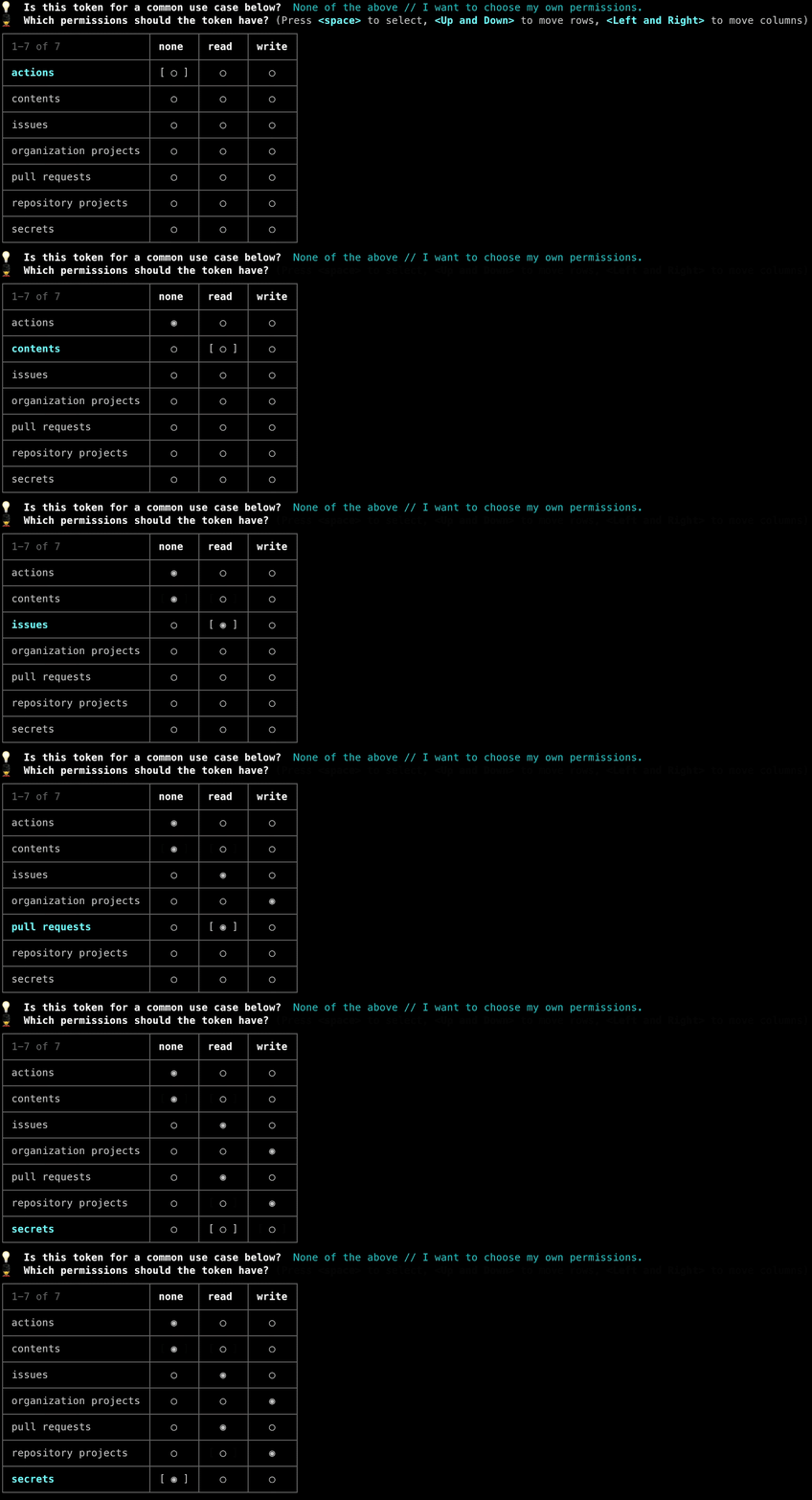
The production version solves that by presenting a list of common use case descriptions. Each maps to the correct permissions internally, and power users can still specify custom scopes. The permissions editor is now a graphical matrix instead of raw JSON input.
Building Your Own Rotation System
The high-level blueprint Shopify followed breaks down into these steps:
- Create a centralized GitHub App for your organization. Choose a meaningful name—it appears as the actor in Issue Timelines and other public-facing events.
- Grant the App a superset of all expected permissions. Installation tokens can only carry a subset of the App's own permissions, so define the broadest possible scope to cover downstream consumers. Organization admins can adjust this anytime; Shopify had to tweak permissions four or five times.
- Install the App on the organization with access to all repositories.
- Set up a central repository to host rotation workflows and the custom action code.
- Store the App's secrets (private key, client secret, etc.) as repository secrets.
- Write a custom action that performs a single token rotation. Shopify's version is written in TypeScript and compiled to JavaScript for the Actions runtime.
The action accepts these parameters:
- Private key
- Application ID
- Client ID
- Client Secret
- App Installation ID
- Repository Organization (defaults to “Shopify”)
- Repository Name (where the token lives)
- Accessible Repositories
- Permissions (a JSON blob mapping each permission to its access level)
- Target Secret Name (the key used when storing the rotated token)
Internally, the action performs these operations:
- Authenticates as the App by generating a signed JWT.
- Generates two installation tokens—one stored as the rotated secret and one carrying the
secrets:writepermission to authenticate the secret update call. - Fetches the target repository's public key for secret encryption.
- Encrypts and places the rotated secret into the target repository.
- Revokes the installation token used for the secrets update.
Orchestration and Onboarding
Steps seven through ten are optional but were important for Shopify's scale:
Self-Service Onboarding
Shopify built a registry system that lets customer teams onboard themselves. The flow uses plop.js to walk users through selecting permissions, naming secrets, and choosing the destination repository. The inputs render a GitHub Actions workflow definition file and generate a pull request for review and merge.
Canary Testing
A test workflow validates that the action code works as expected. Shopify runs a canary workflow and monitors its uptime as a signal of overall system health.
Centralized Scheduling
Individual customer workflows are not scheduled. Each is triggered only by workflow_dispatch, and a single consolidated workflow runs them all in sequence. Because GitHub Actions workflow files follow an exact schema, Shopify wrote a custom action that parses all workflow files and executes them in the context of one workflow run—a measure that keeps costs down.
Operational Visibility
Shopify publishes metrics covering GitHub primary rate-limit exhaustion, canary uptime percentage, and secret rotation error rates.
Why Bother
The platform sits between personal access tokens and GitHub's built-in authentication. Shopify needed to trigger downstream actions and reach repository-external resources—both beyond the scope of built-in auth. The rotation system also makes the platform resilient to developer turnover and reduces the blast radius when a secret does leak. Automating the rotation cycle removes a recurring manual chore from the maintenance backlog.


