When an alt Attribute Can Stay Empty
Writing alt text is reflex for most of us: the attribute nearly completes itself in editors, and Emmet fills it in automatically. The default advice is to supply an empty string when no description is needed, since screen readers skip it — a practice called "nulling" the alternative text. Some screen readers fall back to announcing the image's file name, so the value must be truly empty: even a single space can be picked up by some assistive tech and cause the image to be skipped entirely.
<img src="image.jpg" alt=""><!-- Not empty -->
<img src="image.jpg" alt=" ">Still, the reflex raises a fair question: are there images that simply don't need alt text? Eric's argument that the vast majority of images carry content and deserve description holds up, but probably is doing real work there. Content and context differ from image to image.
What Screen Readers Actually Want
The goal of alt text matches the goal of any image: an easy path to accomplishing basic tasks. A product image illustrates this — the visual gives context about what the item looks like and sets expectations, and its absence forces users to stop and ask support about something as basic as size or color. That image needs describing.
But "describe" is the wrong word. A common trap is composing alt text around what we find helpful, as if the job were to let screen-reader users imagine the picture. A screen-reader user navigating a product page works differently: jumping between headers for structure, exploring a section labeled Product Description, then hitting an image and asking what information it communicates that was missed elsewhere. Most of the time, screen-reader users aren't curious what an image looks like — they want to know its purpose. Exceptions include sites that present images purely for visual enjoyment, such as artwork, or users who could see previously and have lost their sight.
Three questions help decide whether a given image needs description:
- Is the image repetitive? Is the task-related information also available elsewhere on the page?
- Is the image referential? Does the page copy directly reference the image?
- Is the image efficient? Could
alttext help users complete a task more efficiently?
Repetitive Images
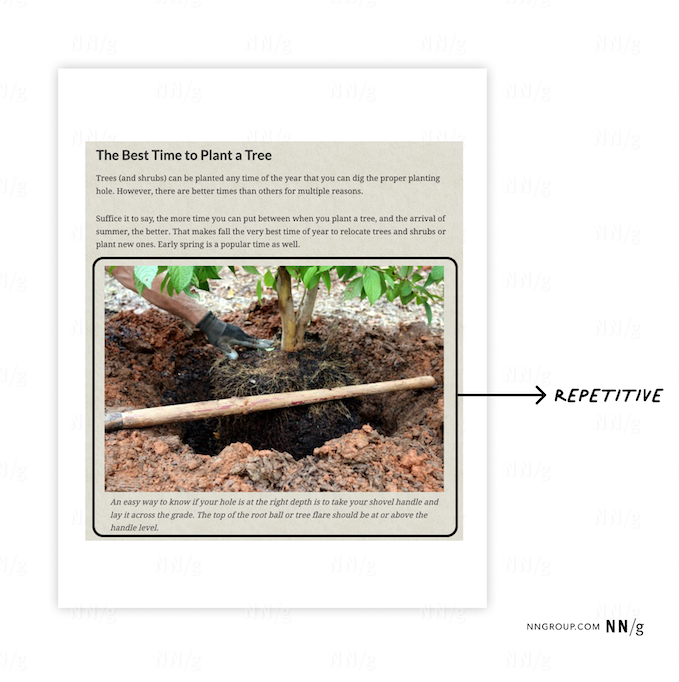
If surrounding content already does a good job of conveying what the image communicates, nulling alt may be appropriate. A figure with a caption that describes exactly what the image communicates doesn't need alt text as well — if the actual alt text matched the caption, users would encounter the same information twice in a row, which is confusing and unnecessary.
The happy path:
<img src="image.jpg" alt="">A table-setting diagram, by contrast, carries information the surrounding text doesn't. The verbosity trap is real: describing the whole legend and every point in the diagram is the wrong instinct, and a screen reader shouldn't receive a transcript of what a sighted reader scans. The concise approach is a short list of key items: bread plate and butter knife in the top left corner, dessert fork placed horizontally at the top center, dessert spoon below it. That is far less verbose than a full narration. How long or short alt text should be is a separate question.

Referential Images
A referential image is one the copy directly references. Nulling it in that situation is a mistake — not because the description is missing, but because the screen reader skips the image entirely. If the content mentions the image, the screen reader should still know it's there.
The happy path:
<img src="image.jpg" alt="">Since a screen reader may announce the image's file name, that name is an opportunity to both flag the image and briefly describe it. Skipping an image that the surrounding copy mentions creates more confusion than clarity.
Efficient Images
In this context, efficient has nothing to do with performance. The question is whether the image helps visitors complete a task faster. An image that contributes to a task — purchasing a product, for instance — needs alt text. An image whose surrounding content already does that job can be left null (alt=""), or skipped (alt=" ") when nothing on the page mentions it.