
Why Language Models Make Things Up
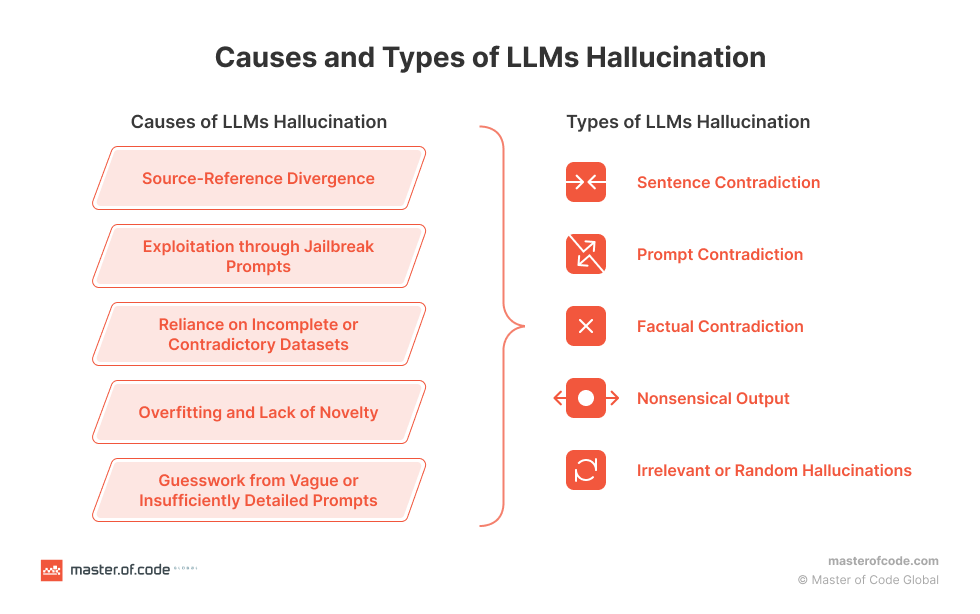
Language models are impressive, but they have a well-documented weakness: they hallucinate. Ask a chatbot a question about anything published after its training cutoff, and you’ll get either a vague disclaimer or a confident, entirely fabricated answer. The root cause is simple — the model only knows what was in its training data. Since that data becomes stale over time, asking about recent events or niche topics often produces plausible-sounding nonsense.
“LangChain is a blockchain-based decentralized translation platform. It’s designed to connect translators and those seeking translation services directly without the need for intermediaries. This system uses artificial intelligence and blockchain technologies to provide high-quality, efficient translation services. LangChain also has a token-based economy, where users can earn and spend tokens within the LangChain ecosystem.”
That response is from OpenAI’s GPT-4 when asked about LangChain. It sounds convincing but is entirely wrong — LangChain is an open-source framework for building applications with language models, not a blockchain platform. The models latch onto the “chain” in the name and run with it because they are designed to predict plausible token sequences, not to reason about facts.
The same failure pattern shows up across models. When asked about preferred frameworks for LLM development, Vicuna suggests tools that lack production scalability, while GPT-4 switches to a completely irrelevant topic — LLVM, a compiler infrastructure project with nothing to do with large language models. Refining the prompt doesn’t always help either: GPT-4 Turbo points to the Hugging Face transformer library, which is more of a hub for experimentation than a framework, while GPT-3.5 Turbo contradicts itself by calling OpenAI Codex both a framework and a language model.
Semantic Search: The Foundation
Before looking at a solution, it helps to understand semantic search, since it is the mechanism that makes RAG work. Unlike keyword search, which matches exact terms, semantic search attempts to interpret the intent behind a query. A search for “best budget laptops” understands that “budget” and “affordable” are related concepts without requiring the user to use any particular word.
This is possible thanks to text embeddings — mathematical representations that capture the meaning of words and phrases as numeric vectors. An embedding model converts text into a high-dimensional space where semantically similar items are positioned close to one another. This representation enables functions like removing irrelevant words from a query, indexing information for fast retrieval, and ranking search results by relevance.

Working with language models requires specialized databases optimized for speed and scale, since searches may run across billions of documents. A semantic search setup with text embedding allows for efficient storage and querying of high-dimensional data, producing fast comparisons between query vectors and document vectors in massive datasets.
How RAG Works
Retrieval Augmented Generation (RAG) is a framework that addresses the limitations of language models by letting them fetch relevant, up-to-date information from an external source. It was introduced through research by the Meta team and combines two core components: a retriever and a generator.
The retriever is responsible for finding the most relevant information from a dataset in response to a given query. It is itself a model, though not one that performs machine learning in the traditional sense. Instead, it acts as an enhancement layer that uses semantic search vector stores to identify and fetch pertinent information efficiently. Several retriever options are available, including offerings from OpenAI and Cohere, plus a variety of smaller models in the Hugging Face community.
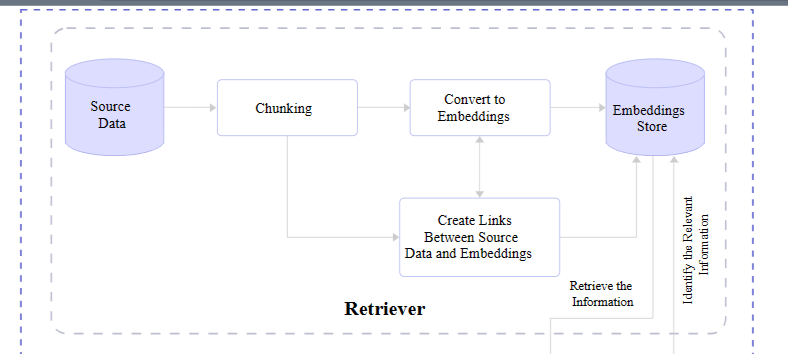
The generator receives the retrieved information and transforms it into human-readable content. It begins by accepting the embeddings passed from the retriever, combining them with the original query, and feeding everything through a trained language model for a natural language processing pass to produce the final output.
The Complete Flow
When all the pieces are assembled, a full RAG flow follows this sequence:
- A user makes a query.
- The query is passed to the RAG model, which encodes it into text embeddings for comparison against a dataset.
- The retriever uses semantic search to select the most relevant information and converts it into vector embeddings.
- The retrieved embeddings are sent to the generator, which merges them with the original query.
- The generator passes everything to the language model, which produces natural-sounding content presented to the user.
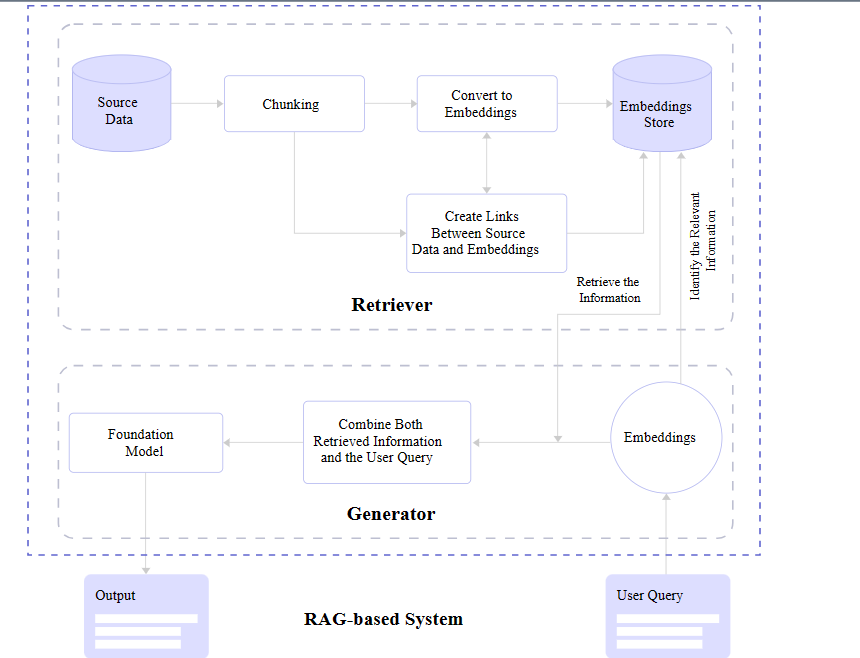
This architecture lets the language model work with fresh, context-specific data rather than relying solely on its fixed training set. The retriever finds what matters, the generator shapes it into a coherent response, and the user gets an answer that is grounded in current information instead of stale or invented facts.
Putting RAG to Work
RAG is not a single approach; it can be implemented in different ways depending on the use case and the existing infrastructure. The fundamental goal remains the same — supplement the model’s training with accurate, timely data — but the implementation details vary based on performance needs and the nature of the application.
Wiring RAG Into a Language Model
Once the RAG components are installed and the data is prepared, the next step is connecting them to the generator model. The demonstration below uses Llama-2 as the LLM, LlamaIndex for data loading and indexing, and Chroma as the vector store.
Setting Up the Environment
Before writing any application code, you need a few accounts and libraries in place:
- Hugging Face — used to source an embedding model and to obtain an access token for downloading Llama-2.
- Llama-2 — Meta’s LLM acts as the generator; access must be requested through Meta’s website.
- LlamaIndex — the framework that loads data and feeds it into the model.
- Chroma — an embedding database for vector similarity search and retrieval.
With the prerequisites satisfied, install the required libraries in a fresh project directory:
# Install essential libraries for our project
!pip install llama-index transformers accelerate bitsandbytes --quiet
!pip install chromadb sentence-transformers pydantic==1.10.11 --quiet
Next, import the modules needed for vector indexing, embeddings, storage, and other operations. These imports can live in a root-level app.py file:
## app.py

## Import necessary libraries
from llama_index import VectorStoreIndex, download_loader, ServiceContext
from llama_index.vector_stores import ChromaVectorStore
from llama_index.storage.storage_context import StorageContext
from llama_index.embeddings import HuggingFaceEmbedding
from llama_index.response.notebook_utils import display_response
import torch
from transformers import BitsAndBytesConfig
from llama_index.prompts import PromptTemplate
from llama_index.llms import HuggingFaceLLM
from IPython.display import Markdown, display
import chromadb
from pathlib import Path
import logging
import sys
Loading Source Material and the Model
The source document used in this walkthrough is a research paper on the ARM-RAG approach to retrieval augmented generation (PDF). The previously imported download_loader() function from LlamaIndex downloads the PDF:
PDFReader = download_loader("PDFReader")
loader = PDFReader()
documents = loader.load_data(file=Path('/content/ARM-RAG.pdf'))
PDFs are only one possible source; the LlamaIndex Hub offers other loaders, such as one for arXiv papers. This example sticks with a single PDF, but alternative ingestion methods are worth exploring.
Now download Llama-2. You will need a Meta account and an access token with read permissions to pull the model from Hugging Face.
# huggingface api token for downloading llama2
hf_token = "YOUR Access Token"
For memory-constrained environments like Google Colab, configure 4-bit quantization so the model loads at reduced precision:
quantization_config = BitsAndBytesConfig(
  load_in_4bit=True,
  bnb_4bit_compute_dtype=torch.float16,
  bnb_4bit_quant_type="nf4",
  bnb_4bit_use_double_quant=True,
)
Initialize HuggingFaceLLM to prepare the model for text generation:
llm = HuggingFaceLLM(
    model_name="meta-llama/Llama-2-7b-chat-hf",
    tokenizer_name="meta-llama/Llama-2-7b-chat-hf",
    query_wrapper_prompt=PromptTemplate("<s> [INST] {query_str} [/INST] "),
    context_window=3900,
    model_kwargs={"token": hf_token, "quantization_config": quantization_config},
    tokenizer_kwargs={"token": hf_token},
    device_map="auto",
)
The code defines Llama-2, specifically the Llama-2-Chat subset intended for conversational use. Other text generation models from the Hugging Face hub can be swapped in if desired.
Comparing Responses With and Without RAG
With the model configured, query it without any added context to establish a baseline. The following code displays the output without the PDF providing data:
from IPython.display import HTML, display

# Assuming resp contains the response
resp = llm.complete("What is ARM-RAG?")

# Using HTML with inline CSS for styling (gray color, smaller font size)
html_text = f'<p style="color: #1f77b4; font-size: 14px;"><b>{resp}</b></p>'
The response, shown below, is a hallucinated description of an unrelated algorithm:
display(HTML(html_text))

ARM-RAG (ARM Register-Allocating Generator) is a register allocation algorithm used in compiler design. nobody knows who invented it, but it was first described in a 1995 paper by Mark H. T. Kim and Andrew Y. Chen. The ARM-RAG algorithm is a register-allocating generator, meaning it is a heuristic algorithm that takes a program as input and generates a register allocation plan for it. The goal of the algorithm is to assign registers to variables in a way that minimizes the number of spills (i.e., loads or stores to/from memory) while satisfying all the memory access constraints of the program. The ARM-RAG algorithm works by first partitioning the program into a set of basic blocks, and then iteratively allocating registers to variables within each basic block. The algorithm uses a cost function to evaluate the quality of each allocation, and it selects the allocation with the lowest cost. The cost function takes into account factors such as the distance between the variable and the current register, the distance between the variable and the next allocation, and the number of spills that would be required to allocate the variable. ARM-RAG
To correct this, the document must be encoded into embeddings and indexed. When a query arrives, relevant passages are retrieved and fed to Llama-2, grounding the response in the PDF content. Start by creating a client for ChromaDB and a new collection for the vector index:
# create client and a new collection
chroma_client = chromadb.EphemeralClient()
chroma_collection = chroma_client.create_collection("firstcollection")
Then instantiate the HuggingFaceEmbedding class, passing a pre-trained model name such as BAAI/bge-base-en-v1.5:
# Load the embedding model
embed_model = HuggingFaceEmbedding(model_name="BAAI/bge-base-en-v1.5")
Set up the vector store and index the embedded document vectors:
# set up ChromaVectorStore and load in data
vector_store = ChromaVectorStore(chroma_collection=chroma_collection)
storage_context = StorageContext.from_defaults(vector_store=vector_store)
service_context = ServiceContext.from_defaults(llm=llm, embed_model=embed_model)
index = VectorStoreIndex.from_documents(
  documents, storage_context=storage_context, service_context=service_context
)
This connects a ChromaVectorStore to the collection, defines the storage and service contexts, and builds a VectorStoreIndex from the loaded documents. The index enables fast retrieval of relevant passages for a given query. A SummaryIndex can also be created to support efficient summarization:
summary_index = SummaryIndex.from_documents(documents, service_context=service_context)
Now repeat the earlier question, this time querying the indexed data:
#Define your query
query="what is ARM-RAG?"

from llama_index.embeddings.base import similarity
query_engine =index.as_query_engine(response_mode="compact")
response = query_engine.query(query)
from IPython.display import HTML, display

# Using HTML with inline CSS for styling (blue color)
html_text = f'<p style="color: #1f77b4; font-size: 14px;"><b>{response}</b></p>'
display(HTML(html_text))
The output, shown below, is grounded and hallucination-free:
Final Response: Based on the context information provided, ARM-RAG is a system that utilizes Neural Information Retrieval to archive reasoning chains derived from solving grade-school math problems. It is an Auxiliary Rationale Memory for Retrieval Augmented Generation, which aims to enhance the problem-solving capabilities of Large Language Models (LLMs). The system surpasses the performance of a baseline system that relies solely on LLMs, demonstrating the potential of ARM-RAG to improve problem-solving capabilities.
Because the chat variant of Llama-2 is in use, follow-up questions can be asked conversationally about the PDF content. Natural-language interaction is supported by the indexed data:
chat_engine = index.as_chat_engine(chat_mode="condense_question", verbose=True)
response = chat_engine.chat("give me real world examples of apps/system i can build leveraging ARM-RAG?")
print(response)
The resulting output demonstrates a coherent, context-aware reply:
Querying with: What are some real-world examples of apps or systems that can be built leveraging the ARM-RAG framework, which was discussed in our previous conversation?
Based on the context information provided, the ARM-RAG framework can be applied to various real-world examples, including but not limited to:

1. Education: ARM-RAG can be used to develop educational apps that can help students learn and understand complex concepts by generating explanations and examples that can aid in their understanding.

2. Tutoring: ARM-RAG can be applied to tutoring systems that can provide personalized explanations and examples to students, helping them grasp difficult concepts more quickly and effectively.

3. Customer Service: ARM-RAG can be utilized in chatbots or virtual assistants to provide customers with detailed explanations and examples of products or services, enabling them to make informed decisions.

4. Research: ARM-RAG can be used in research environments to generate explanations and examples of complex scientific concepts, enabling researchers to communicate their findings more effectively to a broader audience.

5. Content Creation: ARM-RAG can be applied to content creation systems that can generate explanations and examples of complex topics, such as news articles, blog posts, or social media content, making them more engaging and easier
Further questions can be posed now that the model has supplementary context augmenting its original training data.
Other RAG Tooling to Consider
Chroma and LlamaIndex formed the core of this implementation, but they are not the only options. The table below lists popular alternatives for integrating RAG with language models:
| RAG | Type of System | Capabilities | Integrations | Documentation / Repo |
|---|---|---|---|---|
| Weaviate | Vector Database | Vector & Generative search | LlamaIndex, LangChain, Hugging Face, Cohere, OpenAI, etc. | |
| Pinecone | Vector Database | Vector search, NER-Powered search, Long-term memory | OpenAI, LangChain, Cohere, Databricks | |
| txtai | Embeddings Database | Semantic graph & search, Conversational search | Hugging face models | |
| Qdrant | Vector Database | Similarity image search, Semantic search, Recommendations | LangChain, LlamaIndex, DocArray, Haystack, txtai, FiftyOne, Cohere, Jina Embeddings, OpenAI | |
| Haystack | Framework | QA, Table QA, Document search, Evaluation | Elasticsearch, Pinecone, Qdrant, Weaviate, vLLM, Cohere | |
| Ragchain | Framework | Reranking, OCR loaders | Hugging Face, OpenAI, Chroma, Pinecone | |
| metal | Vector Database | Clustering, Semantic search, QA | LangChain, LlamaIndex |
Why RAG Addresses Hallucination
The examples in this article illustrate how language models fabricate answers when their training data is outdated or incomplete. A model’s output quality is bounded by the data it receives; when that data runs stale, the model responds with confident guesses that may be mistaken for facts.
By embedding text vectors pulled from additional sources of data, a language model’s existing dataset is augmented with not only new information but the ability to query it more effectively with a semantic search that helps the model more broadly interpret the meaning of a query.
This was demonstrated by registering a PDF file with the model. When queried on the subject of that document, the model used the retrieved passages to produce accurate, on-topic responses instead of hallucinating. The example was deliberately kept to a single source and subject so the before-and-after behavior was easy to compare.
For further experimentation, some recommended directions are:
- Use high-quality data and embedding models — they directly affect RAG output quality.
- Evaluate the generator model — consult Vectara’s hallucination leaderboard to avoid models prone to fabrication.
- Tune the retriever and generator — refinement can improve end-to-end results.
Related documentation includes the LlamaIndex documentation, ChromaDB documentation, Meta’s Llama-2 access page, and the ARM-RAG research paper.


