
Keyword search inside Figma files
Figma has rolled out deep search, a feature that lets users locate files by the text contained within them—not just by file or folder names. If you remember a snippet of copy, a keyword from a design, or the gist of a project, deep search can surface the file that contains it. The feature builds on Universal Search, which was introduced earlier to improve discoverability and add context across the editor.
Deep search is powered by the same infrastructure used for Design System Analytics (DSA). Both systems depend on a pipeline that opens a recently edited file, pulls it down from storage, and walks through the file structure to extract relevant information. For DSA, that meant tracking shared library usage; for deep search, the goal is indexing the text content inside design files.
Indexing content, not just metadata
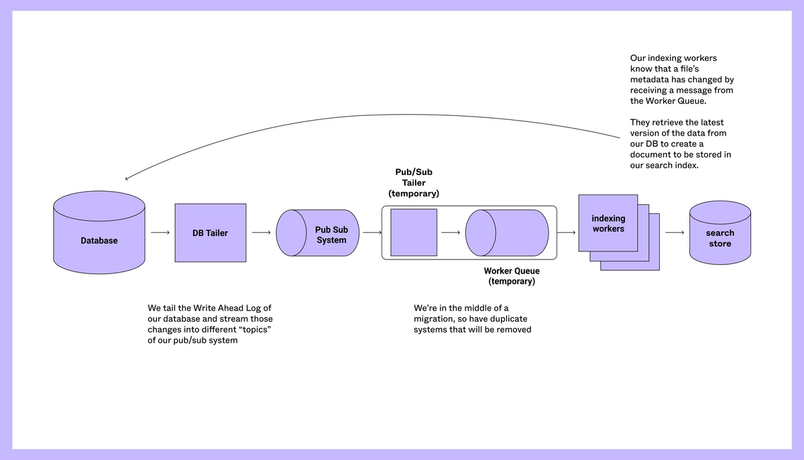
Previous search updates only needed metadata stored in the database—file titles, creators, and similar fields. The pipeline for that kind of search is straightforward: tail relevant database tables, stream IDs of changed items into a messaging system, and have indexers pull the latest metadata and push it into an Elasticsearch cluster.
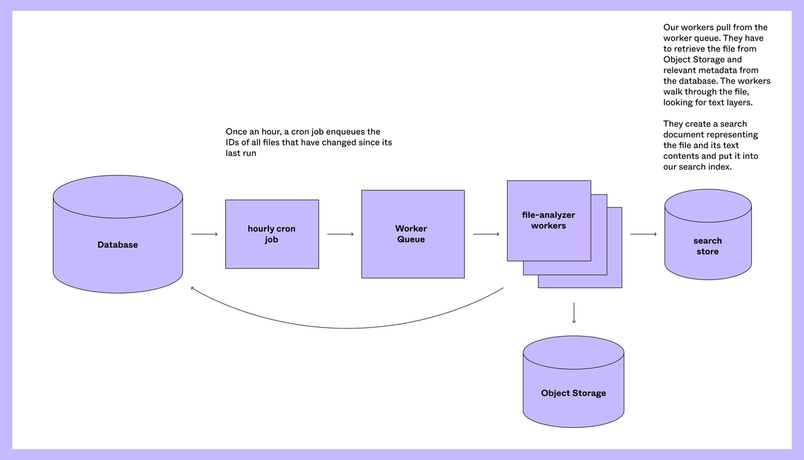
Deep search requires a fundamentally different approach. Figma files are stored as .fig documents in Amazon S3. The structure is a tree: each node represents a Figma object such as a frame, vector, ellipsis, or text object, along with its properties. To index the text within a file, the system must retrieve the full file and traverse every node—a computationally expensive operation for files with thousands of nodes.
Tradeoff: freshness over cost
Updating the deep search index at the same cadence as the regular search index would be impractical. Figma saves a new version of your file every 30 seconds as you edit, and processing every save through a file walker would be prohibitively expensive. Instead, the system deduplicates all file changes on an hourly basis and sends those files to dedicated file-analyzer workers. This platform, originally built for DSA, handles computationally intensive periodic tasks. The product decision here is explicit: deep search results may be stale for up to an hour, but the approach saves servers a significant amount of duplicated work.
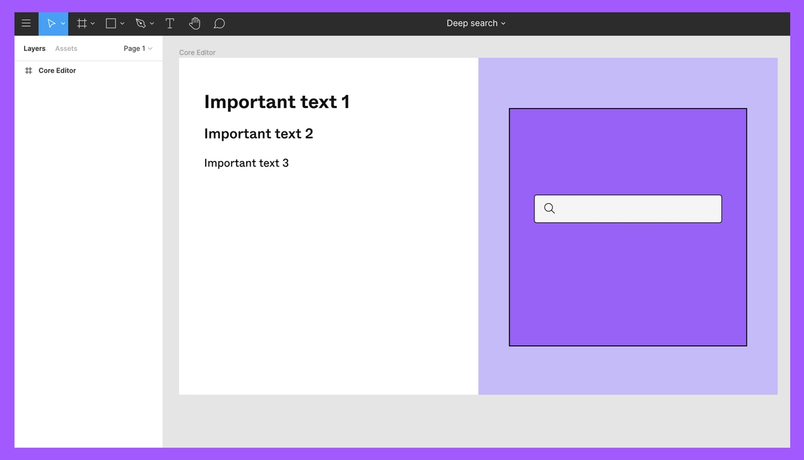
The file-analyzer workers walk each node, extract text content, and pass it to the deep search indexer. The indexer stores the results in a multi-value Elasticsearch field called text_instances. For example, if a file contains a frame, a rectangle, and three text nodes, only the text nodes are captured.
The team debated at length what should be included in the index: whether component instances should count, whether page names and layer names matter, and what would actually improve search relevance versus adding noise. The conclusion was that page names are largely generic and categorical—"Idea," "Rough draft," "Final"—so they offer less signal than the content within a page.
Component instances, however, were included. Although excluding instances would allow significant deduplication and reduce the index size, the team decided that instance frequency matters too. A phrase repeated in 100 instances of a component should rank a file higher than a file with that same phrase appearing only once.
Bringing deep search to life
The deep search effort was a coordinated project across teams, but the core working group stayed intentionally small. An infrastructure engineer handled the initial investigation, while an engineer from the collaboration team productized the work, coordinated dark and live launches, and pulled in infrastructure and data science partners to validate the approach. The team treated search as an evolving product, learning from user behavior and iterating on what gets indexed and how results are ranked.
Deep search reflects the advantages of building in the browser: Figma has access to rich information about the files users can see, how components are used, and how often files are viewed. That visibility is what makes content-level search a natural extension of the platform. As with DSA, deep search is built on the belief that understanding the structure of your work—not just its name—is the foundation for better discoverability.


