

GitHub’s own automation playbook: four internal Actions workflows
GitHub has long practiced “using GitHub to build GitHub,” and its internal adoption of GitHub Actions predates the platform’s official 2018 release. The automations below show how different teams at the company rely on Actions for security, regression testing, mobile releases, and everyday office chores—proving that the same tooling can scale from critical infrastructure to lighthearted team culture.
Security Lab: guided vulnerability reporting
The GitHub Security Lab handles vulnerability disclosures to open source maintainers, runs the CodeQL bug bounty program, and maintains the GitHub Advisory Database. To standardize how employees report bugs they find in third-party projects, the team built an issue form template that kicks off an Actions workflow. When a reporter submits the form:
The workflow generates a report template automatically, pre-filling fields like the reporter’s name. The reporter provides a URL to a private repository where the template is created as an issue, keeping the discussion confidential.
Each report receives a unique ID in the
GHSL-2021-1001format. The action generates these IDs by creating empty issues in a dedicated repository and using the issue numbers as the identifiers—replacing an older, error-prone shared spreadsheet approach.

For employees who rarely report vulnerabilities, the form and auto-generated template walk them through exactly what information the Security Lab needs to relay to maintainers, cutting down on manual entry and follow-up questions.
CodeQL: parallel regression testing at scale
The CodeQL team runs nightly experiments and custom tests on most pull requests to evaluate how implementation changes affect query performance and output. Rather than standing up dedicated infrastructure, they built the entire regression system on GitHub Actions.
Their setup uses two workflow types:
- Dynamically generated, one-off workflows that run
github/codeql-actionon individual open source projects. These resemble standard user workflows but include extra code to collect experiment data. - Periodic workflows that generate and trigger the above workflows, then combine the collected data into human-readable reports.
The system leans on Actions’ elasticity: experiments across hundreds of projects parallelize onto hundreds of on-demand runners, and large outputs are stored as workflow artifacts. Engineers track each experiment’s status through an automatically updated GitHub issue, which notifies the relevant people on completion and allows cross-referencing between experiments and pull requests. Detailed results are written as markdown files in a repository, viewable directly in a browser.
The approach answers questions like whether an optimization speeds up queries or whether a query change surfaces new security alerts—without the need for a bespoke testing farm.
GitHub Mobile: CI/CD for weekly releases
The GitHub Mobile team ships new builds to more than 8,000 beta testers every week. Since the team is relatively small, they automated as much of the release pipeline as possible—from running shell commands and opening pull requests to creating releases and assigning developers.
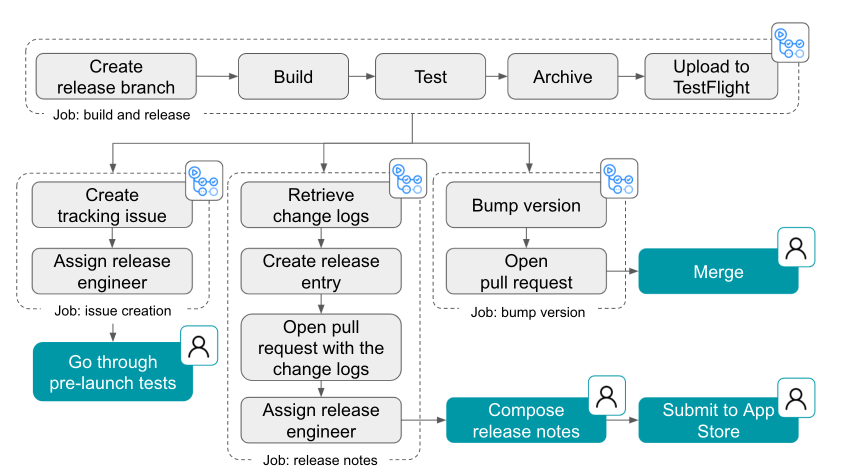
A key design goal was making any engineer capable of acting as release captain. By shifting release logistics onto a workflow, the team removes the need for specialized training and reduces hours of repetitive manual work each week, letting engineers spend more time on product code and features.
Everyday automations across the company
Beyond core engineering, internal teams use Actions to streamline routine tasks and add a little fun:
- Company-wide announcements: The Intranet team watches a specified directory in a repository; any file added there triggers a workflow that publishes the update to the intranet and posts it to Slack automatically.
- Program status reporting: Technical program managers compile weekly status reports across development projects. Actions aggregates individual reports into a single all-up program status dashboard, covering progress, timelines, and blockers.
- Team GIFs: The Ecosystem Applications team runs a custom workflow that stitches weekly team meeting photos into a GIF and uploads it to their team README—an “obvious thing to do” once Actions was available, according to Senior Engineer Jake Wilkins.
Automation as a shared building block
These examples span security workflows, large-scale performance testing, consumer mobile CI/CD, and administrative chores—yet they all run on the same platform and the same primitives. With more than 12,000 community actions in the GitHub Marketplace, most organizations can find a starting point for their own automations, whether that’s a full CI/CD pipeline or a Slack notification.


