

Automating security and compliance with GitHub Actions
GitHub Actions is usually discussed in the context of build, test, and deployment pipelines. But the same automation engine can handle recurring security and compliance work that has nothing to do with shipping code. These workflows can run in any repository, even when the primary CI/CD pipeline lives in another system.
Auditing who has access to what
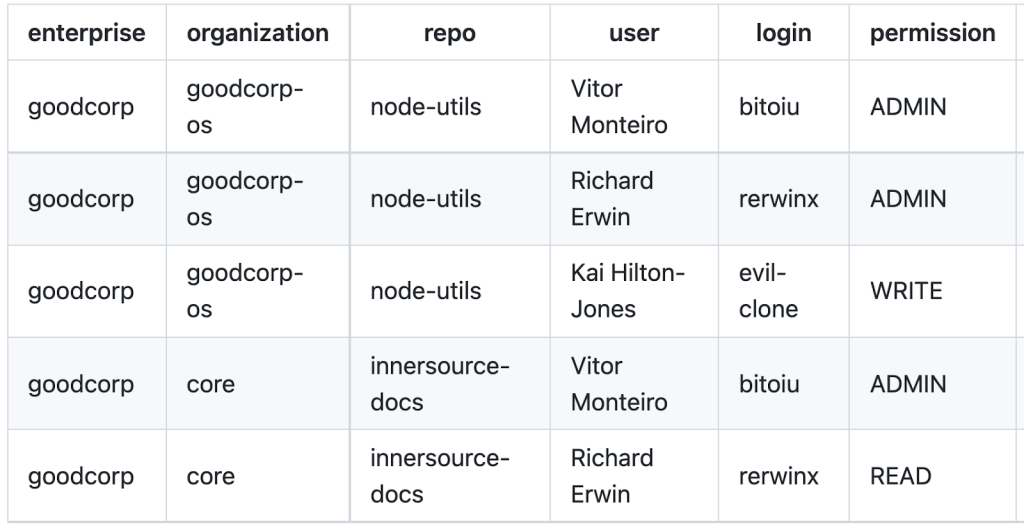
Proving to auditors that access controls are correct becomes harder as repositories multiply. The org-audit-action automates evidence gathering by producing a .csv and .json report covering every repository in every organization in an enterprise. The output details which users have access, the permission level granted, and the user's login, full name, and optional SAML identity.
Coding a security policy
GitHub already surfaces a great deal of security data: Dependabot alerts flag vulnerable dependencies and can auto-open pull requests, the dependency graph exposes OSS license information, and code scanning reports insecure code as it is written. What has been missing is a way to enforce a consistent policy against all of that data.
The ghascompliance action fills that gap by letting organizations codify policy for Dependabot, secret scanning, and code scanning alerts, as well as for OSS license usage. Teams define their risk threshold for each alert type and set remediation timelines per severity. Detailed setup guidance is available in the action's marketplace listing.
Linking code to requirements
Regulated environments frequently demand end-to-end traceability: from a requirement to the implementing code, through review and approval, to production deployment. GitHub Actions can support that pattern without leaving the normal GitHub flow.
One common approach generates a short-lived feature branch for each requirement, with the branch name referencing the requirement's unique identifier. The create-issue-branch action automates branch creation directly from a GitHub issue. It can be triggered on issue assignment or via a slash command in a comment. Branch naming and response content are customizable, and the action can open a draft pull request linked back to the issue.

Enforcing the issue link
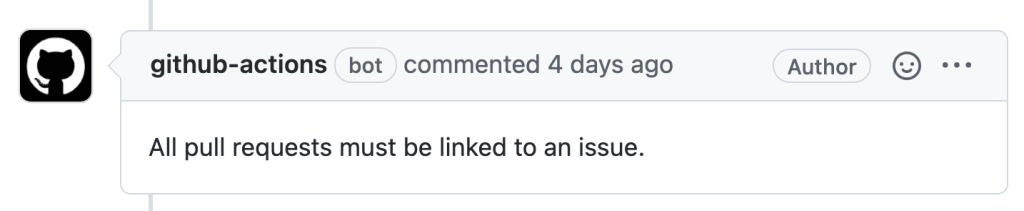
Having the branch and pull request created automatically is convenient, but it does not guarantee that every change is properly linked. The verify-linked-issue action provides that enforcement. Configured on the pull_request event, it fails its check unless the pull request is linked to an issue. When set as a required status check in a branch protection rule, it blocks merging of any pull request lacking an issue link.
Going further
These workflows show how GitHub Marketplace actions can build secure, audit-ready processes into everyday development. They are a small sample of the available automations beyond conventional CI/CD. For teams getting started, the GitHub Actions Quickstart and security hardening guides cover the fundamentals, and the GitHub Community forum hosts discussion of practical implementations.



