

Solutions Have a Shelf Life
In the unpredictable environments where most of us work, even carefully crafted solutions can become obsolete quickly. Accepting that our work is impermanent shifts the goal from delivering complete answers to building tools that empower users to adapt and design their own solutions.
Working in educational technology for the past two decades, I’ve come to see teachers and administrators as designers in their own right. They use a broad set of tools and techniques to craft learning experiences for students. Framing all users as designers helps us mine our own experiences for deeper empathy with their struggles, and develop strategies that set these user-designers up to handle change and uncertainty.
Most designers are familiar with "design thinking," typically represented as a series of steps:
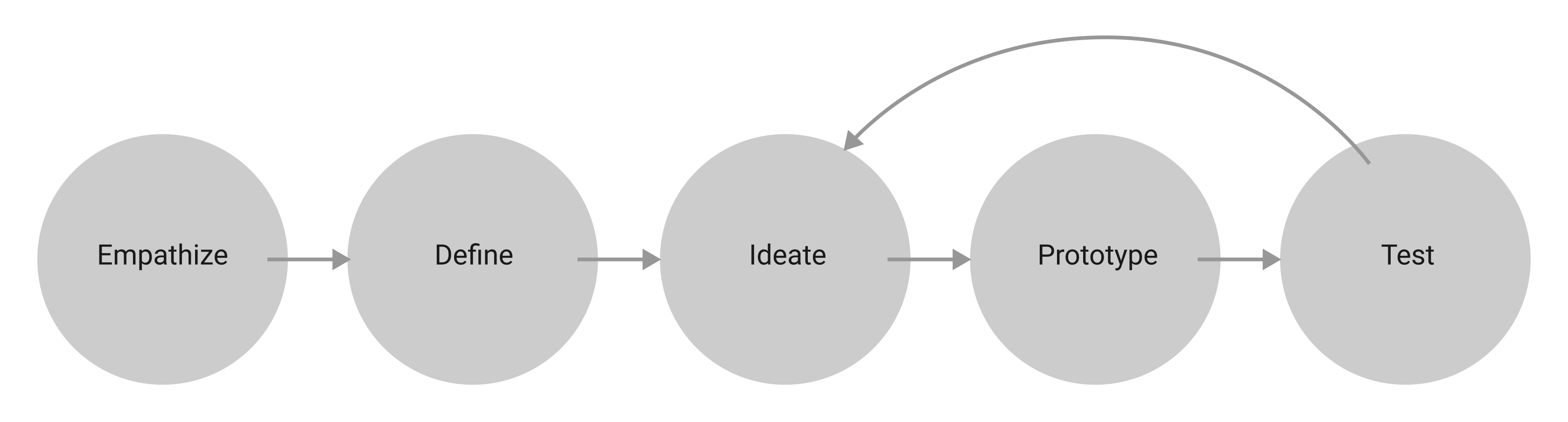
Many variations of this diagram exist, reflecting the many ways the process plays out. It usually spans months and begins with empathy: immersing ourselves in a specific context to understand users' tasks, pain points, and motivations. From there, we look for patterns and themes, define the problem, and iteratively ideate, prototype, and test solutions until we find one that works—or run out of time. The underlying purpose is simple: solve a problem. That purpose isn't new, and it isn't exclusive to people with "Designer" in their job titles. While not identical to the scientific method, design thinking resembles it closely:
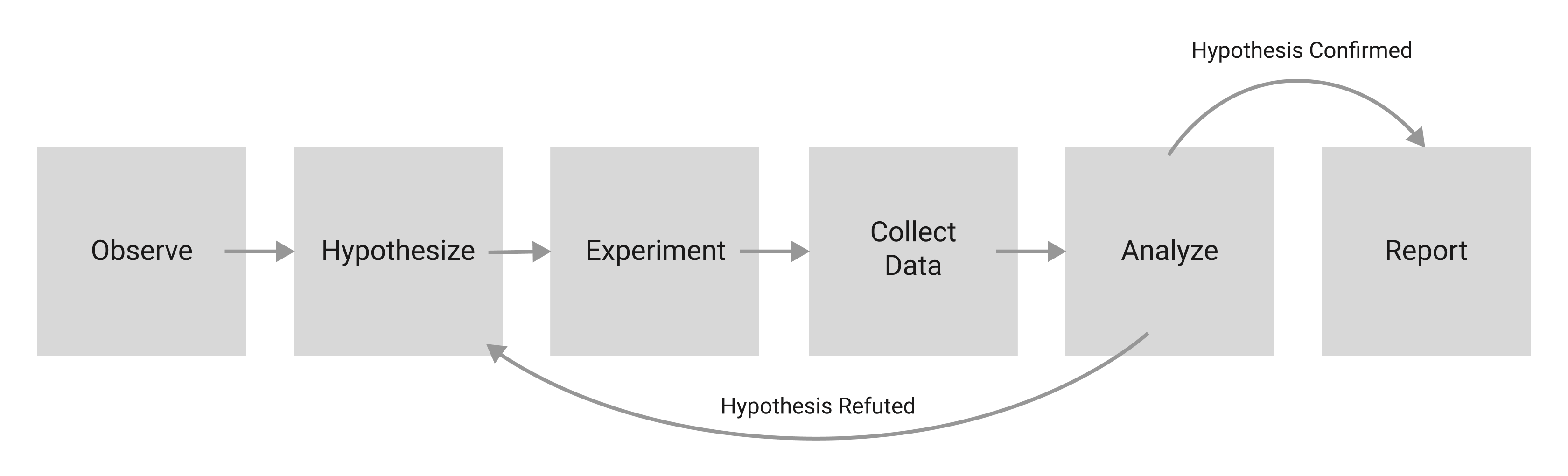
By placing design thinking in this lineage, we align the designer with the scientist—the one responsible for discovering and delivering the solution.
At its best, design thinking is highly collaborative, bringing together diverse voices, including those often unheard, and centering the needs and emotions of the people we serve. It can pull us out of our own biases and open us to new ways of thinking. At its worst, applied dogmatically or cynically, it becomes gatekeeping—a rigid structure that excludes approaches not fitting a narrow cultural standard.
Despite its critiques, design thinking has become orthodoxy in software development. A UX portfolio feels incomplete without a photo of a team in the "Define" step, staring at a wall of colorful sticky notes. My colleagues and I use it regularly in EdTech.
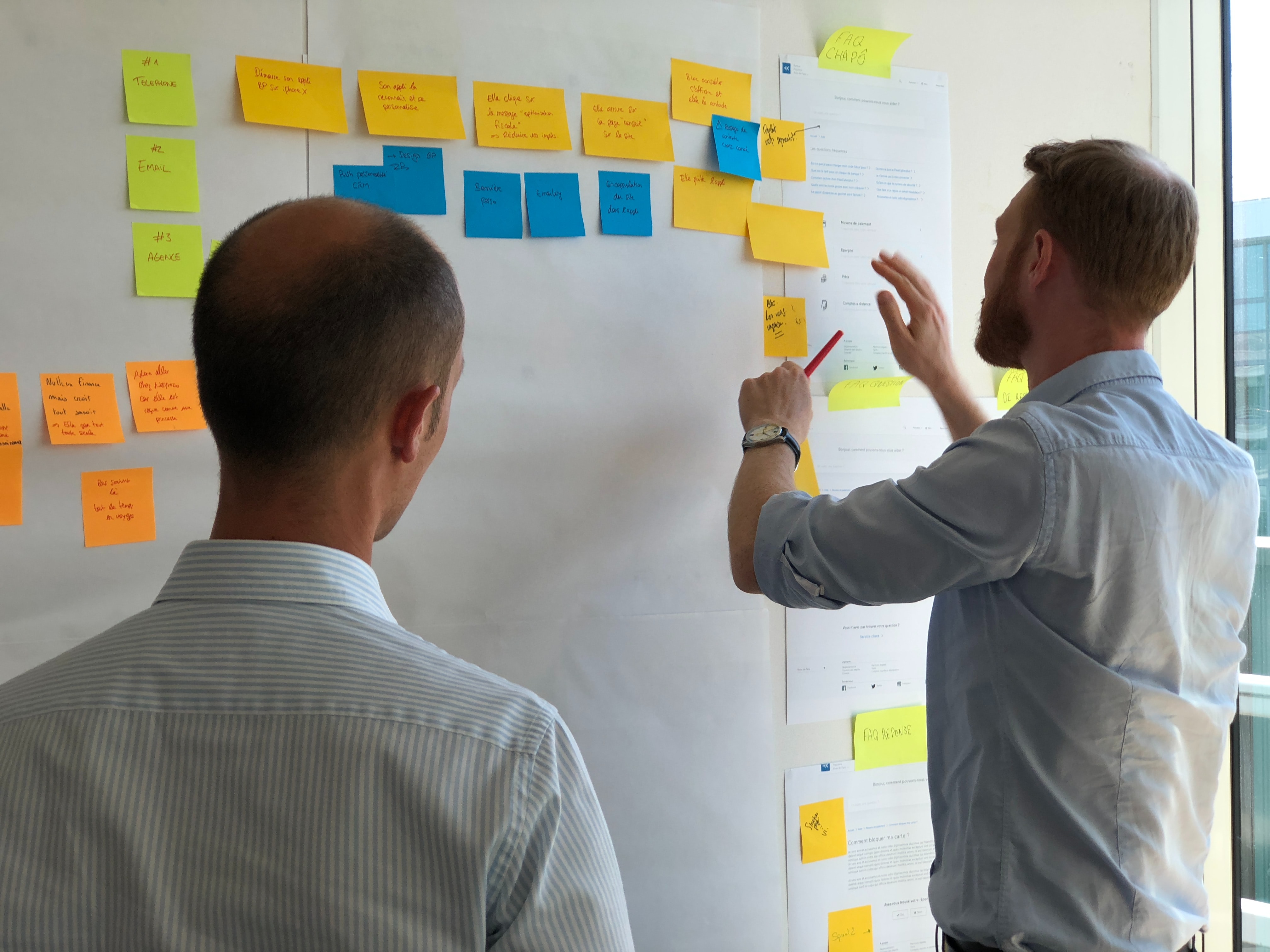
The methodology has spread far beyond software into elementary schools, nonprofits, and government innovation labs.
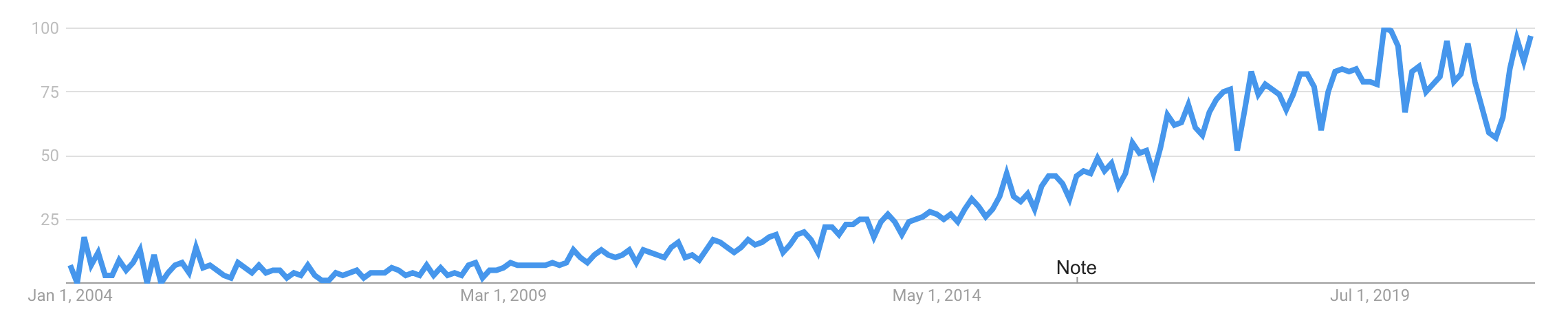
Amid all the enthusiasm, it’s easy to overlook a core assumption: the existence of a solution. The process assumes that after completing the steps, a problem changes from unsolved to solved. This framework is effective but incomplete. Zooming out reveals the limits of our power as designers and what those limits mean for our work.
The Butterfly Effect in Design
An unchecked belief in our ability to methodically solve big problems leads to grandiose ideas. In Chaos: Making a New Science, James Gleick describes how scientists in the 1950s and '60s, fueled by advances in computing and satellites, aimed not just to predict but to control the weather:
"There was an idea that human society would free itself from weather's turmoil and become its master instead of its victim. Geodesic domes would cover cornfields. Airplanes would seed the clouds. Scientists would learn how to make rain and how to stop it."
— "Chaos: Making a New Science," James Gleick
That hubris seems absurd now, but it followed naturally from growing faith that science could solve any problem. What those scientists missed was the butterfly effect, a central pillar of chaos theory. It describes the inherent volatility in complex, interconnected systems: a butterfly flapping its wings on one side of the globe today can cause a hurricane on the other tomorrow. Studies show the butterfly effect touches politics, the economy, and even fashion trends.
If we accept that social systems are as complex and unpredictable as the climate, a tension emerges. Design thinking exists within chaotic contexts, yet predicting is central to it. Prototyping and testing gather evidence about whether our design will solve the defined problem. The process ends when we're confident in our prediction. This approach isn't wrong—we should trust the process to confirm immediate usefulness. But whenever we deliver a solution, we are like the butterfly, contributing to constant change. The short-term result may be predictable, but the long-term outlook is unknowable.
Building for Impermanence
How do we cope with the fact that our solutions address conditions that will change in unpredictable ways?
The first step is awareness: recognizing that our work meets the needs of a specific moment. It's more like a tree fort in the woods than a stone castle fortress. The castle may take years to build and last for centuries, but the tree fort is directly connected to its environment. It shelters us from rain without any expectation of permanence—only the hope that it serves us well while it stands, and that we learn from building it.

Impermanence doesn't diminish the importance of our work or excuse sloppiness. It means the ability to adapt quickly without sacrificing functional or aesthetic quality is core to the job—which is why design systems, with their consistent, high-quality reusable patterns, are essential.
Users as Designers
A more fundamental shift is rethinking our self-image. If we identify only as problem solvers, our work becomes obsolete quickly, and our users wait helplessly for the next solution. In reality, users adapt and design their own solutions with whatever tools they have. They are their own designers. Our task shifts from delivering fixed solutions to providing user-designers with useful, usable tools specific to their needs. Understanding our place as equals on a continuum—each relying on others—builds empathy and sets everyone up for success.
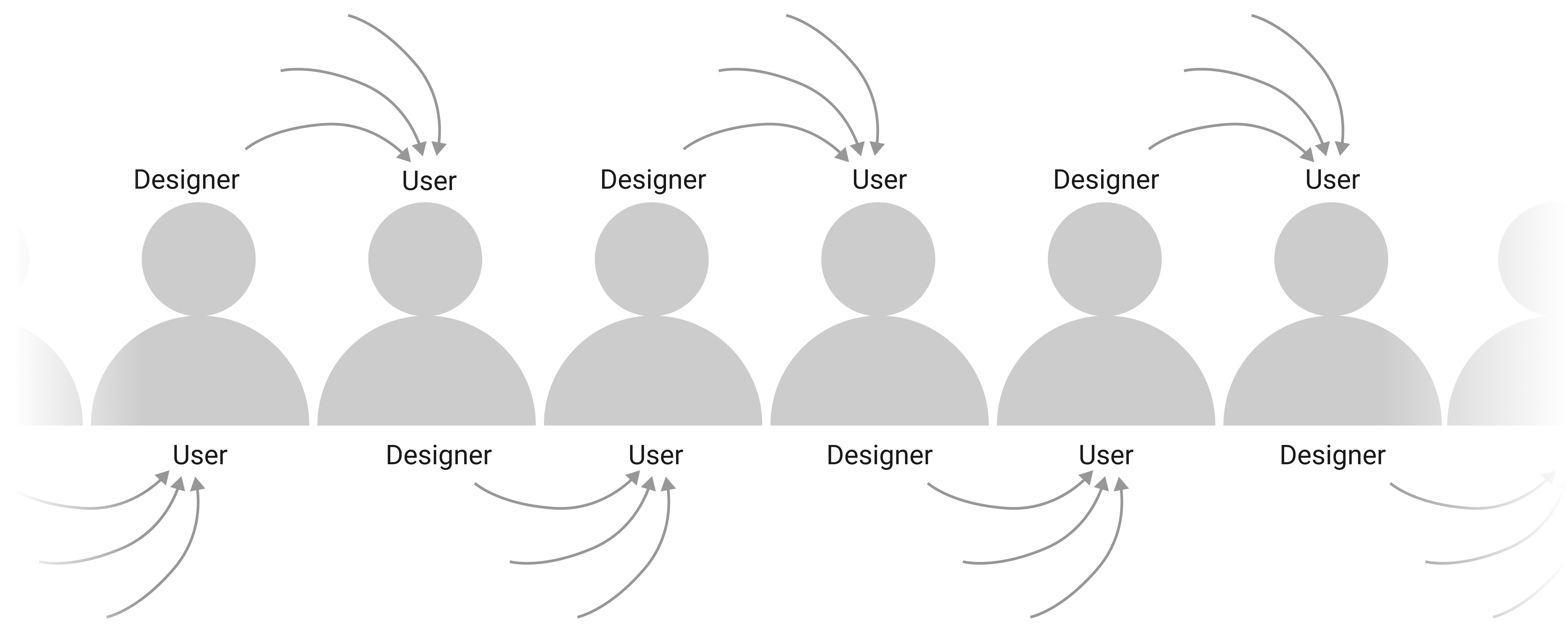
Designing For The User-Designer
When your users are themselves designers, the relationship shifts. They are not passively consuming a finished product; they are actively composing their own solutions from a toolkit of software, using your product as one component among many. Designing for someone in this position, whether an educator building a lesson plan or a UX professional assembling a prototype pipeline, requires centering a different set of principles than conventional problem-solving design.
The following guidance draws on experience from both ends of this relationship: from building EdTech tools for educators who design their own student-facing learning experiences, and from using design software to carry out those same kinds of tasks in daily UX work.
Share The Value, Don’t Hoard It
The first instinct is often to contain a product’s core value so that users must stay inside the application to benefit from it. For the designer-for-designers, that instinct is counterproductive. If a product is a single tool in a larger set, users rely on those tools to interoperate as they assemble coherent, holistic workflows. Rather than locking value within the product, the goal should be to facilitate the free flow of information and task continuity across the whole toolbox. Sharing value elevates its source while giving users full command of their stack.
In the EdTech context, the core value of assessment applications is the data — the fundamental reason schools administer tests is to learn about student achievement. Once captured, that data supports recommendations for goal-setting, instructional grouping, and assigning practice. Resisting the urge to lock up that data is critical. Teachers often have legitimate reasons for their preferred workflow, whether driven by state requirements, school policy, or personal style. If the product makes it difficult to export assessment data for use elsewhere, such as a spreadsheet application for goal-setting, it has added inconvenience rather than value. Ironically, hoarding the information reduces its worth; easy, flexible export unlocks its power.
The same principle applies to design tools. Switching between applications based on the core value each provides in a given phase is standard practice. For instance, the primary value of Sketch lies in rapid ideation, allowing quick brainstorming of multiple concepts. The ability to bring those preliminary designs into a heavier prototyping tool like Axure without friction reinforces attachment to both products. If competitive pressures caused those applications to stop cooperating, the user would likely drop one or both entirely.
Consistency Beats Novelty
Jakob’s Law states that users spend more time on other sites than on yours. When people are accustomed to interacting with information in a certain way, presenting them with unfamiliar patterns based on design exploration is generally not interpreted as an opportunity to learn — it is resented. Novel approaches are not inherently wrong; it is possible to improve or replace established conventions, but that is a tall order when useful predictability provides harmony across a world of disparate tools.
In EdTech, conventions for visualizing student progress are firmly established: test scores over time, plotted with scale on the vertical axis and the timeline on the horizontal, a scatter plot or line chart often augmented by color or dot size. Consistent exposure allows even reluctant data consumers to interpret a graph immediately and construct a narrative around it. Brainstorming novel visual formats could surface valuable insights, but practicality favors sticking with the reading pattern people already understand across domains. Exploring alternatives is a worthwhile exercise; replacing the accepted standard is rarely the optimal deployment of it.
The same logic applies when adopting new software as a design practitioner. The faster a user can recognize the visual language from other products, the quicker they move from the learning phase to the productive phase. Consistent patterns breed relief and comprehension; divergence without clear cause breeds frustration. A product team redesigning the standard alignment palette in the name of innovation would, in practice, merely make its tool harder to adopt while delivering no corresponding benefit.
Flexibility Over Prescription
Domain expertise and research-informed best practices can and should inform a product’s workflows. Where user trust exists, baked-in guidance and guardrails are powerful. Such guardrails, however, are exactly what their name implies: guidance, and nothing more. The user-designer knows when the recommended practice applies and when to disregard it. Restraint in burdening users with choice is wise, but whenever feasible, the product should give way to the user’s design intent.
For educators, setting student learning goals is generally aided by smart defaults based on historical data and peer performance. A research-backed baseline for expectations is both appreciated and useful when presented simply. Yet designers remain removed from specific classrooms, individual circumstances, and shifting policy demands that drive goal-setting decisions. Recommendations built into the happy path streamline the common case, but the ability to edit or reject them outright is essential.
Reusable design libraries offer a complementary example. Pre-made, properly branded UI components eliminate significant redundant work, and in the Ideate phase, using them in generic form may be enough to articulate core layout hierarchy. As the design matures and high-fidelity testing approaches, capabilities to override text and styling, or detach the object entirely for deep customization, become essential. This progressive flexibility enables the speed of adaptation required when moving between phases quickly.
Building Empathy For End Users
A central distinction among user-designers is whether they design for themselves or for another audience. Self-designing users naturally empathize with their own problems — the friction of discovery is built in. Designing for a separate group, however, demands tools that help the designer extend that empathy. This is a lever the product can pull directly.
For educators in the EdTech context, their end users are students. Implementing standards derived from Universal Design for Learning (UDL) prompts instructors to consider how their materials support multiple means of engagement — varied motivation strategies; multiple means of representation — accommodating different learning styles and backgrounds; and multiple means of action and expression — creating separate channels for students to interact with material and demonstrate learning. Presenting these guidelines within the workflow encourages the design of instructional experiences that account for all learners.
Embracing accessibility provides a similar lens for design tools. Features that nudge designers to consider those facing the greatest barriers in using a product are valuable. Support for alt-text creation, defining tab orders for keyboard navigation, and responsive layouts for assorted device sizes have made some headway, but there is clear room for more.
Designing For The Storm, Not The Forecast
The most honest way to describe a user’s environment is unpredictable. By the time a product ships, the conditions it was built for have already shifted. Rather than fight this reality, design should anticipate it. That means treating users not as passive recipients of a finished solution, but as active participants who will adapt, modify, and improvise with what you give them.
Three principles support this mindset. First, unlock value by making the core of your product something users can repurpose. Second, lean on established patterns so that the unfamiliar feels navigable. Third, accept that each individual has a personal tolerance for constraint — some want rigidity, others want room to maneuver. Together, these principles create space for empathy, not as a buzzword but as a practical design tool.
Users As Designers, Not Dependents
When you treat your users as designers in their own right, you acknowledge the complexity of their lives. They are not blank slates waiting for instructions. They are already solving problems, often in ways you did not predict. Your job is to make their problem-solving easier, not to hand down a single correct path.
This reframing also changes how you see your own role. Having “Designer” in your job title does not make you an oracle. You are navigating the same turbulent conditions as your users, just with a different toolkit. You cannot control the weather, but you can build better rain gear — sturdy galoshes, a reliable coat, a compact umbrella. The goal is not to stop the storm but to make it survivable.
Design Thinking Is Not A Panacea
Design thinking’s rise in business has been accompanied by a predictable backlash. As organizations rushed to adopt the methodology, many skipped the hard parts and took shortcuts. The result was a diluted version of the practice, one that looked good in a workshop but fell apart in production.
A key risk is overreach. When everyone is called a designer, the specific expertise of the professional designer gets minimized. Yes, a teacher designs a lesson plan, and a nurse designs a care routine. But their daily tools, methods, and objectives are entirely different from those of someone whose full-time role is product design. Recognizing everyone as a designer is useful for building empathy, but it must not erase the value of dedicated design training.
From Products To Platforms
The designer’s role is also shifting in scope. As the economy moves from manufacturing physical goods to managing vast streams of data, the focus changes from delivering finished products to sustaining complex, dynamic platforms. This is where the idea of “meta-design” enters: designing the systems in which others operate, rather than designing every outcome inside those systems.
In that context, a finished artifact is less important than the infrastructure that supports ongoing adaptation. The designer becomes a steward of possibility, setting up conditions for users to make their own sense of the data and tools they have.
Where To Continue
- James Gleick’s Chaos: Making a New Science offers a readable introduction to the chaos theory concepts that underpin much of this thinking about unpredictability.
- Jon Kolko’s 2015 piece in the Harvard Business Review explains how design thinking entered the business mainstream. His follow-up from 2017 addresses the backlash directly, asking what happens when organizations apply the theory superficially and what lasting damage that may cause.
- Hugh Dubberly and Paul Pangaro’s “Making Sense in the Data Economy” describes the move from manufacturing to data platforms and the emergence of meta-design as a core competence.
- For more practical ideas on interoperability, consistency, flexibility, and accessibility, searches on Smashing Magazine and other UX resources are a good starting point.



