From design file to live site
Figma Sites is an all-in-one tool for designing and publishing custom, responsive websites without leaving Figma. The long-standing community request for a way to turn a design into a working site is addressed with both the "single click" convenience and deeper functionality: responsive layouts, prototyping tools, and built-in effects such as custom cursors, marquee, and parallax.
The traditional path involves context switching and manual work—designing in Figma, prototyping flows, hand-building breakpoints, exporting, coordinating with developers to translate designs into code, then testing and publishing. Sites replaces that linear pipeline with a more iterative, fluid workflow. It suits personal portfolios, event sites, and product landing pages alike, with no extra tooling required.
Starting points and design systems
To keep the tool approachable for teams with limited design and development resources, Figma Sites ships with templates, pre-built responsive web elements, and ready-made interactions. A chat-to-code feature powered by Figma Make is also on the way: describe the interaction or animation you want and it will be built for you.
Published libraries can be linked directly into a site through the inserts panel, so components and styles from your design system are available as you build. Teams without a design system can use provided blocks—navigation, hero sections, and even full pages—rather than starting from scratch.
Responsive behavior and live preview
Responsiveness is built into the tool so effort goes into the experience rather than aspect ratios. Layouts, text, and designs adapt automatically across breakpoints. multi-edit applies changes across screen sizes at once, and text styles can carry different sizing and spacing per breakpoint without variables. Manual adjustment remains possible wherever fine-tuning is needed.
Previewing a site opens a web-based preview rendered in HTML and CSS, letting you review a fully responsive site before publishing—comparable to a Figma prototype but with website-specific interactions. Resizing the window shows layout reflow and breakpoint switching in real time, which makes it practical to share the live site with collaborators for feedback.
Interactions and motion
A catalog of pre-built interactions adds motion without custom code:
- Mouse parallax: displaces objects based on cursor movement
- Lightbox: spotlights an image and dims the background
- Spin: rotates an object infinitely
- Draggable: moves elements freely around the page
- Typewriter: prints one character at a time
- Scramble text: randomizes and reveals text
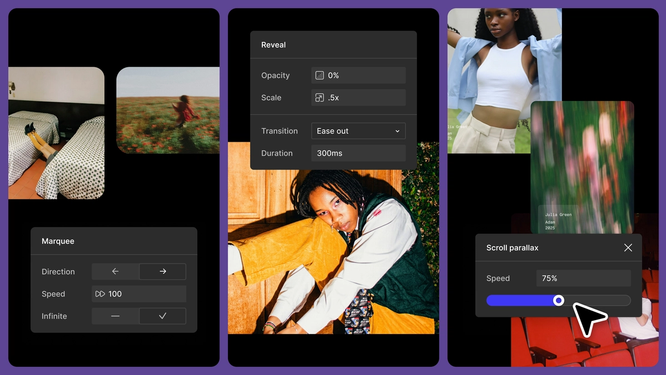
Several interactions are exclusive to Figma Sites and do not yet exist in Figma Design, including scroll parallax, scroll transform, and hover and pressed states created without interactive components.
Code layers are coming to convert designs into interactive experiences without plugins or tool switching. AI chat will extend this: design a single frame, then describe how it should become interactive—draggable lists and geographically accurate clocks are the given examples. Code layers will also become reusable, shareable components and instances, mirroring design system libraries in Figma Design.

The Config.new recap site began in Figma's Brand Studio with inspiration gathering and early sketches, with content, tone and layout explored in parallel. Components were then pulled straight into Figma Sites for rapid iteration. The team reused type and button styles from the Config 2025 web experience but deliberately skipped the Figma web system so the page would feel more expressive than the constraints on figma.com allow. Each feature received a bespoke section with custom buttons and interactions, supplemented by pre-built interactions that show how much can be done without code.
- Pre-built interactions: Reveal, Scroll parallax and Scroll transform carry the page from top to bottom, while Marquee animates a horizontal section presenting a range of Figma Make prompts.
- Motion: An embed block carries a custom Rive asset from the Config motion library that plays on hover; the call-to-action text also animates on hover and echoes the Config web expression.
- Custom cursor: Hovering a pull quote turns the cursor into a set of Config glyphs. Restricting the effect to one region keeps attention focused there.
The result is a responsive published site whose motion, microinteractions and full-viewport use support the feature value propositions rather than competing with them.
Type specimen: a static specimen turned interactive
Figma partnered with creative agency Other Means on Practice, a book on craft and design distributed to Config attendees. For the publication, Other Means worked with Kia Tasbihgou on drop caps for each article, then built an expressive specimen site where visitors can explore the full character set and download the Open Type Font (OTF). Letters A–Z were first pulled into a Figma Design file, and the team worked out how each drop cap could tell a story, landing on an experience that presents the handcrafted letters in unexpected ways through Figma Sites' interactive capabilities.
Scroll-driven backgrounds and navigation
The goal was to make as much of the site as possible respond to scrolling. Each section has its own background pattern that appears when specified layers come into view, and the navigation fades in as the visitor moves down the page.
Interaction building blocks
- Built-in hover states, mouse parallax and variants produce a customized keyboard that reveals glyphs on hover.
- Draggable elements let visitors grab pebbles resting on top of one of the copy blocks.
- Interactive components power a carousel of celebrity names that highlights each drop cap, plus a literal scroll that unfurls as the page scrolls.
Combined, these effects lift a static type specimen into a dynamic experience that is specific to Figma Sites.
Figma built its tool in the browser on the premise that collaboration, transparency and access come most readily from web-based tools. The same end-to-end flow—design, build, publish—serves a personal portfolio, a quick prototype for feedback, or a project pushing the limits of expression. A Discord server has been set up to gather community feedback as Figma Sites was built.



