
Persuasion As A UX Skill: Making Research Impossible To Ignore
UX work doesn’t end when the data is collected or the final design file is exported. The real test is whether stakeholders understand, accept, and act on what you’ve learned. Presenting research findings and design concepts to non-UX audiences is where much of the value of our work is won or lost. Yet few UX practitioners are trained in the communication strategies that make those presentations effective.
Persuasion is a core part of that skill set. It’s not about manipulation or spin; it’s about framing your findings in a way that helps busy stakeholders grasp what the evidence is telling them and why action is warranted. When done well, persuasion turns stakeholders into partners who champion user-centered decisions rather than obstacles to them.
A Framework For Persuasive UX Presentations
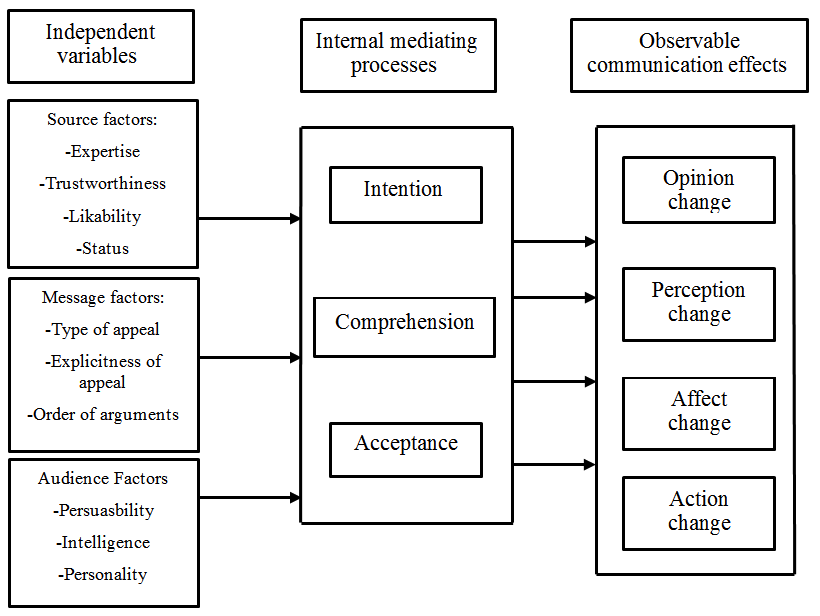
The Hovland-Yale model of persuasion, developed by Carl Hovland and his team at Yale in the 1950s, provides a useful structure. Originally informed by studies of World War II propaganda, the model breaks persuasion down into three sets of independent variables: Source, Message, and Audience. These feed into the audience’s internal mediating processes, which in turn determine whether communication leads to observable attitude or behavior change.

For presenters, the practical value lies in the independent variables — the parts of the communication process that you can actively shape. Careful attention to those elements increases the chance that your audience will arrive at the desired conclusions.
Academic research on the model has produced several findings that directly apply to UX presentations:
- Source credibility strongly predicts whether a persuasive message is accepted.
- Clear, logically structured, and reasonably concise messages are more persuasive than sprawling or confusing ones.
- Face-to-face communication changes attitudes more effectively than mass media channels.
- Audience characteristics matter: individuals with high intelligence tend to resist persuasion, and those with moderate self-esteem are easier to persuade than those at either extreme.
- Persuasive effects decay over time, particularly for messages from low-credibility sources, so important points need reinforcement.
The model is a simplification — emotional states, group dynamics, and other factors also shape decision-making. But it provides a practical lens for strengthening how UX insights are communicated.
Source: Building Credibility Before You Present
Where a message comes from matters as much as what it says. Audiences weigh whether a presenter is dependable, informed, and trustworthy. By the time you walk into a meeting, stakeholders may have already formed an impression of your team. That reputation is something you can actively build before the presentation begins.
Case studies. A strong case study about past UX work demonstrates the value of user-centered design. Tailor the story to what your stakeholders care about — ROI, customer retention, satisfaction scores — rather than telling a generic narrative. Share it as a pre-read before the project starts.

Thought leadership. Articles, white papers, talks, and other content your team has produced can establish you as experts in your domain. If you’re kicking off a project, sharing relevant work your team has already published with stakeholders beforehand signals that they’re dealing with practiced specialists.
Strengthening Credibility During The Presentation
Business goals alignment. Tie research findings and design recommendations directly to business outcomes. Work with stakeholders to identify which metrics matter most to them, then show how your UX direction supports those numbers.
Industry benchmarks. Compare your findings to industry data or competitor performance where available. Reference points beyond your own research help stakeholders see that your insights are grounded in broader context.
Methodological transparency. Explain how the research was planned, who was involved, how data was analyzed, and what challenges came up. Openness about method builds confidence in results and signals rigor.
Making Design Concepts Credible
Once you’re presenting design work, credibility comes from showing that decisions are grounded and that you have thought through the path that led to them.
- Ground decisions in research. Highlight the user data that supports each major design choice.
- Go beyond static mockups. Interactive prototypes help stakeholders understand flows and interactions that static images obscure, which matters especially when the design represents a departure from what they already know.
- Draw on user voices. Include participant quotes or brief stories from your research to personalize the process and explain why you made specific choices.
- Show before-and-after impact. Use journey maps or side-by-side comparisons to illustrate how your redesign removes existing pain points.
- Show your process. For developed concepts, walk through early sketches, wireframes, and iterations. This is particularly effective for executives who did not watch the project evolve.
- Invite feedback. Make clear where stakeholder input can refine the design and how you plan to incorporate it.
Not every presentation calls for all of these tactics. Experiment and find what works for your audience. What matters most is that you deliberately build trust and credibility before and during your presentation — not that you deploy every tool in the box.
Turning Findings Into a Message That Lands
Communication models, including the Hovland-Yale framework, emphasize that what you say matters as much as how you say it. In UX, your message is your data and recommendations. It also includes every artifact you use to convey them: slides, wireframes, prototypes, and user stories.
Treating your message as a deliverable in its own right means making it easy to understand, relevant, and impactful. Raw figures rarely persuade on their own. Instead of reporting that “30% of users found the signup process difficult,” explain the consequence and the opportunity: those users struggled because the flow was overly complicated, which risks reducing renewals. Simplifying the process, you can note, would improve retention and the user experience at once.
Storytelling strengthens this further. Narratives help stakeholders connect with data on a human level and make key takeaways stick. Direct quotes or anecdotes from users can make a presentation more memorable than charts alone.
Delivering the Message
Several practical habits make your presentation more persuasive:
- Rehearse thoroughly. Practice smooths rough edges, helps you anticipate questions, and builds confidence.
- Prepare for objections. Think through stakeholder concerns in advance and be ready to counter them with data.
- Invite discussion. Open dialogue and a willingness to adapt your recommendations show that you value stakeholder input, which builds trust.
- Follow up. Send a concise summary of decisions and action items after the meeting so everyone can refer back to what was agreed.
When unveiling design work, tell stakeholders what you are proposing rather than just showing it. Static screens depict the final state, but they do not explain the user journey. Walk through user stories to show how someone reaches that screen, why they take certain actions, and what improves as a result. For a redesigned search experience, describe a user landing on the page, typing a query, and hovering over an unfamiliar tooltip to understand a new feature. That narrative makes the functional payoff of the design tangible.
Polished design language and attention to accessibility best practices in mockups also strengthen the message. Consistent, professional visuals suggest rigor, while accessible choices signal a genuine commitment to user-centered design.
Choosing the Right Channel
Research indicates that face-to-face communication changes attitudes more effectively than mass media. Remote and distributed teams face a disadvantage here, but deliberate channel choices can compensate:
- Make it interactive. Polls, quizzes, or clickable prototypes keep remote viewers engaged.
- Summarize on video. Short recordings add a personal touch and communicate nuance that slides often miss.
- Hold live Q&A sessions. Dedicated time for questions and discussion restores the back-and-forth of in-person meetings.
- Proactively follow up. After stakeholders review the material, reach out to clarify, gather feedback, and reinforce the main points.
Framing the Message
Framing is a well-established persuasion technique, widely used in public safety and health campaigns, that applies equally well to design. The goal is to present your findings and recommendations in language that aligns with your stakeholders’ values, so your proposed direction feels like the natural next step.
Word choice alone can shift perception. Calling usability issues “opportunities” reframes them as chances for improvement. If research on a hospital website reveals a confusing appointment flow, describe it as an opportunity to raise patient satisfaction and reduce call center volume through a simpler online booking system. That framing turns your recommendation into a win that benefits both users and the organization.
Know Your Audience Before You Start
Understanding your audience’s goals is a prerequisite for any research or design project. This foundation allows you to tailor content, support decision-making, and establish evaluation metrics. Critically, you need buy-in from product and delivery teams before the work begins. Without their investment in the outcomes and input on the process, you risk presenting findings to stakeholders who see little value in a project created in a vacuum. Early engagement aligns expectations and ensures your efforts are informed by organizational objectives.
Once you have identified key stakeholders and secured buy-in, map the decision-making process. You need to understand the pain points, considerations, and influencing factors your audience faces:
- How are decisions made, and who makes them?
- Is it group consensus?
- Are there key voices that overrule all others?
- Is there even a decision to be made regarding the work you will do?
Understanding this process enables you to provide necessary information at each stage. Finally, set clear objectives with key stakeholders before engaging in any work. Collaborate with product and delivery teams to establish objectives that align with both organizational goals and audience needs.
Audience Characteristics
Your audience’s existing opinions, intelligence, and self-esteem significantly affect how persuasive you can be. Research indicates that people with higher intelligence tend to resist persuasion more, while those with moderate self-esteem are easier to persuade than those with very low or very high self-esteem. To present effectively, identify the different stakeholder groups—designers, developers, product managers, executives—and learn about their attitudes toward the area your UX team is exploring, if possible through interviews or short surveys.
Your team then needs to decide:
- How can you best keep all stakeholders engaged and informed as the project unfolds?
- How will your presentation or concepts appeal to different interests and roles?
- How can you best encourage discussion and decision-making with the different stakeholders present?
- Should you hold separate presentations because of the wide range of stakeholders you need to share your findings with?
- How will you prioritize information?
Designers might focus on usability issues, while executives care more about business impact. For a mixed audience, include a mix of information and highlight what’s relevant to each group. Adapt your communication style: provide technical details for developers and emphasize user experience benefits for executives.
Example: Mobile Banking App Research
Suppose you conducted UX research for a mobile banking app. Tailor your presentation to each role:
Designers:
- Focus on: User preferences in the interface, navigation problems, and visual design suggestions.
- How to communicate: Use visuals like heatmaps and user journey maps to show design challenges and how fixing them improves the overall user experience.
Developers:
- Focus on: Performance problems, bugs, or challenges with building the app.
- How to communicate: Share code snippets or technical details about the problems found. Discuss feasible solutions and be realistic about the work required, including the scope of a “minimum viable product” (MVP).
Product Managers:
- Focus on: Findings that affect user engagement, retention, and overall business goals.
- How to communicate: Use numbers and data to show how UX improvements help the business and fit into the product roadmap and long-term strategy.
By tailoring your presentation to each group, you ensure your message resonates and increases the likelihood of stakeholder support and collaborative decision-making.
The Impact and Call to Action
The end goal is to get key stakeholders to act on what you learned from users. Make the impact crystal clear by relating findings to business goals, customer happiness, and market success. Suggest actionable next steps as design concepts and encourage feedback and collaboration. Answer questions and solicit further input to show you value stakeholder participation, which increases the value of your research.
End with a strong call to action (CTA), but you must be clear on what you want them to do and understand their limitations. For a CEO, tailor the CTA to their priorities, focusing on the ROI of user-centered design. Use clear visuals and explain how user needs translate into business benefits. A strong statement would be:
“Let’s set up a meeting to discuss how we can implement these user-centered design recommendations to reach your strategic goals.”
For product managers and business unit leaders, focus on goals like increasing revenue or reducing customer churn. Explain findings in terms of ROI. For example:
“Let’s try out the redesigned checkout process and aim for a 10% increase in conversion rates next quarter.”
Remember that the effects of persuasive messages can fade over time, especially if the source isn’t seen as credible. You must keep reinforcing your message to maintain its impact.
Addressing Limitations
Persuasion is about guiding understanding, not tricking people. Be upfront about limitations like budget or development resource constraints. Anticipate concerns and address them in your CTA. For instance:
“I know implementing the entire redesign might need more resources, so let’s prioritize the high-impact changes we found in our research to improve the checkout process within our current budget.”
Considering both your desired outcome and the audience’s perspective lets you create a clear, compelling CTA that resonates and drives user-centered decisions.
Presenting findings isn’t the end of the road. Continuously look for ways to reinforce key messages as you implement solutions. Keep presentations in a shared folder, remind people of the reasoning behind decisions, and remain flexible if multiple approaches can achieve the desired outcome. Demonstrating how you’ve addressed stakeholder goals maintains credibility and trust for future projects.
Track Your Persuasion Alignment
Your UX team likely already incorporates persuasion elements. Tracking how you do this helps reflect on what works, what doesn’t, and where gaps exist. The spreadsheet below provides a structure to modify as you see fit, with sample data as an example. You can set it up before your next project or fill it in retrospectively to identify what to incorporate more in the future.
| Project Phase | Persuasion Element | Topic | Description | Example | Notes/ Reflection |
|---|---|---|---|---|---|
| Pre-Presentation | Audience | Stakeholder Group | Identify the specific audience segment (e.g., executives, product managers, marketing team) | Executives | |
| Message | Message Objectives | What specific goals do you aim to achieve with each group? (e.g., garner funding, secure buy-in for specific features) | Secure funding for continued app redesign | ||
| Source | Source Credibility | How will you establish your expertise and trustworthiness to each group? (e.g., past projects, relevant data) | Highlighted successful previous UX research projects & strong user data analysis skills | ||
| Message | Message Clarity & Relevance | Tailor your presentation language and content to resonate with each audience’s interests and knowledge level | Presented a concise summary of key findings with a focus on potential ROI and revenue growth for executives | ||
| Presentation & Feedback | Source | Attention Techniques | How did you grab each group’s interest? (e.g., visuals, personal anecdotes, surprising data) | Opened presentation with a dramatic statistic about mobile banking app usage | |
| Message | Comprehension Strategies | Did you ensure understanding of key information? (e.g., analogies, visuals, Q&A) | Used relatable real-world examples and interactive charts to explain user research findings | ||
| Message | Emotional Appeals | Did you evoke relevant emotions to motivate action? (e.g., fear of missing out, excitement for potential) | Highlighted potential revenue growth and improved customer satisfaction with app redesign | ||
| Message | Retention & Application | What steps did you take to solidify key takeaways and encourage action? (e.g., clear call to action, follow-up materials) | Ended with a concise call to action for funding approval and provided detailed research reports for further reference | ||
| Audience | Stakeholder Feedback | Record their reactions, questions, and feedback during and after the presentation | Executives impressed with user insights, product managers requested specific data breakdowns | ||
| Analysis & Reflection | Effect | Effective Strategies & Outcomes | Identify techniques that worked well and their impact on each group | Executives responded well to the emphasis on business impact, leading to conditional funding approval | |
| Feedback | Improvements for Future Presentations | Note areas for improvement in tailoring messages and engaging each stakeholder group | Consider incorporating more interactive elements for product managers and diversifying data visualizations for wider appeal | ||
| Analysis | Quantitative Metrics | Track changes in stakeholder attitudes | Conducted a follow-up survey to measure stakeholder agreement with design recommendations before and after the presentation | Assess effectiveness of the presentation |
Figure 3: Example of spreadsheet categories to track the application of the Hovland-Yale model to your presentation of UX Research findings.
Use the spreadsheet as a suggestion and make adjustments as needed. The model isn't dogmatic; experiment and find what works best for your team.
References
Foundational Works
- Hovland, C. I., Janis, I. L., & Kelley, H. H. (1953). Communication and persuasion. New Haven, CT: Yale University Press. (The cornerstone text on the Hovland-Yale model).
- Weiner, B. J., & Hovland, C. I. (1956). Participating vs. nonparticipating persuasive presentations: A further study of the effects of audience participation. Journal of Abnormal and Social Psychology, 52(2), 105-110.
- Kelley, H. H., & Hovland, C. I. (1958). The communication of persuasive content. Psychological Review, 65(4), 314-320.
Contemporary Applications
- Pfau, M., & Dalton, M. J. (2008). The persuasive effects of fear appeals and positive emotion appeals on risky sexual behavior intentions. Journal of Communication, 58(2), 244-265.
- Chen, G., & Sun, J. (2010). The effects of source credibility and message framing on consumer online health information seeking. Journal of Interactive Advertising, 10(2), 75-88.
- Hornik, R., & McHale, J. L. (2009). The persuasive effects of emotional appeals: A meta-analysis of research on advertising emotions and consumer behavior. Journal of Consumer Psychology, 19(3), 394-403.