
Design educators face the same pressure as their students to keep up with fast-moving technology, and curriculums have to be revised continually to stay aligned with industry needs. The Fashion Institute of Technology has a long record of doing this: it had a user experience design course running just two years after the first iPhone launched. Professors Christie Shin and C.J. Yeh drove that effort, and both continue to shape FIT's programming. Shin's courses in the Advertising and Digital Design program emphasize systems thinking, tight feedback loops, and an environment where students exchange ideas openly.
Collaboration sits at the center of that approach, and Figma has become a growing part of Shin's classroom workflows. In her UI course, she builds a virtual classroom in Figma, organizing it into Figma teams that map to each lecture section. Course materials are further grouped into Figma projects, and students gather directly in the files during lectures. The semester opens with icebreakers such as interactive student profiles, and the structure grows more rigorous as students develop their design skills. From this work, Shin has distilled four principles for collaborative design teaching.
1. Celebrate early work
Sharing ideas before they are finished is intimidating, but Shin's students work in open team environments and are asked to sit with that discomfort daily. To build the habit of requesting and giving early feedback, she has students drop into each other's work frequently to respond out loud and inside the file during every class.
“Working together in Figma helps students understand that design is a way of thinking rather than the creation of a precious object.”““Working together in Figma helps students understand that design is a way of thinking rather than the creation of a precious object.””
2. Structure the process, leave room to grow
Class exercises and final presentations all live in Figma. At the start of the semester, students get a set of files, each containing pages of named templates for the various course activities. Every page is built around a purposeful, structured template, while the infinite canvas around it stays open for sketches, ideas, and quick iterations. That lets a single Figma file function as a design journal: one page might hold a research activity and a summary, the next wireframes. Shin calls each student's file a "creative journey."
3. Work individually, together
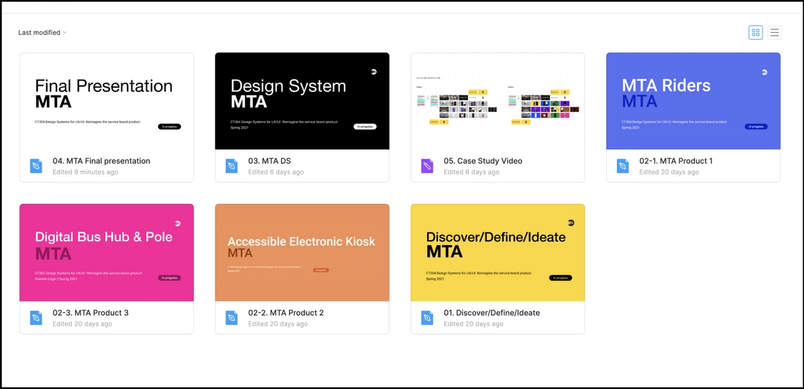
Students work within study groups even on solo projects. In one exercise last year, each student had to build a design system for the MTA app, complete with a video case study. Study groups met to present progress, and feedback was exchanged incrementally instead of waiting for the final presentation. The structure mirrors real design workplaces, where professionals work on cross-functional teams and hold formal design critiques. For students to do their best work, Shin says, they need to feel less precious about their designs and make a habit of continuously folding in peer feedback.
4. Embrace your influences
Designers are inherently shaped by other designers and by each other. Before Figma, students tended to hide their work until the end, worried someone might steal an idea. Shin emphasizes that it is acceptable—and expected—for work to be shaped by others, reframing it as a central part of the design process rather than as theft. She puts equal weight on crediting influences: every project requires students to collect images of designs that informed their work, whether from professional designers or from each other, so the discussion of influence becomes part of the project and part of its critique.
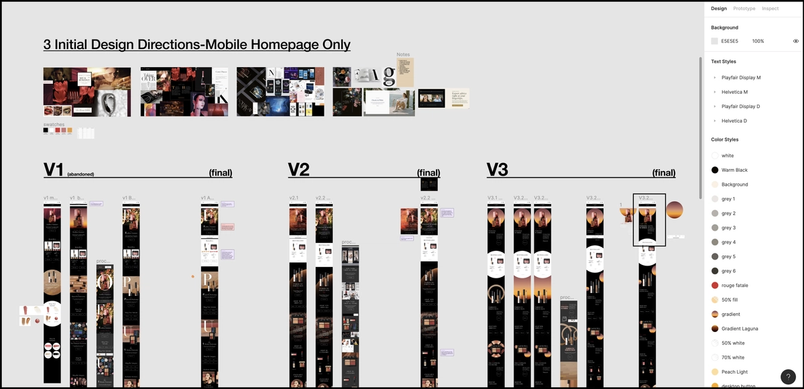
Professors Christie Shin and C.J. Yeh walk through their files and student work in a recorded livestream. More on using Figma in the classroom is available at figma.com/education.