
Bringing design collaboration earlier into the process
Figma’s product design team has shifted much of its early-stage work—brainstorms, critiques, and cross-functional alignment—from Figma itself into FigJam, the company’s online whiteboard. The reason: Figma’s flexibility and depth, while valuable for detailed design work, can be intimidating for collaborators outside the design team, and it tempts designers to polish ideas that should remain rough and exploratory.
FigJam gives the team a lower-fidelity space where the focus stays on the idea rather than the pixels, and where product managers, engineers, and other partners feel comfortable jumping in. The team shared how they’ve incorporated FigJam into their workflows, including using it to design features for FigJam itself.
Constrained workshops to drive generative thinking
When Product Designer Jenny Wen needed to source ideas for FigJam features, she ran a workshop built around a deliberately narrow prompt: imagine how users might react publicly to announcements of features like cursor chat, emoji reactions, and stamps. She prepared design components resembling tweets and Slack messages ahead of the session. Teammates duplicated a component and filled it in with the responses they’d ideally want to see after launch.
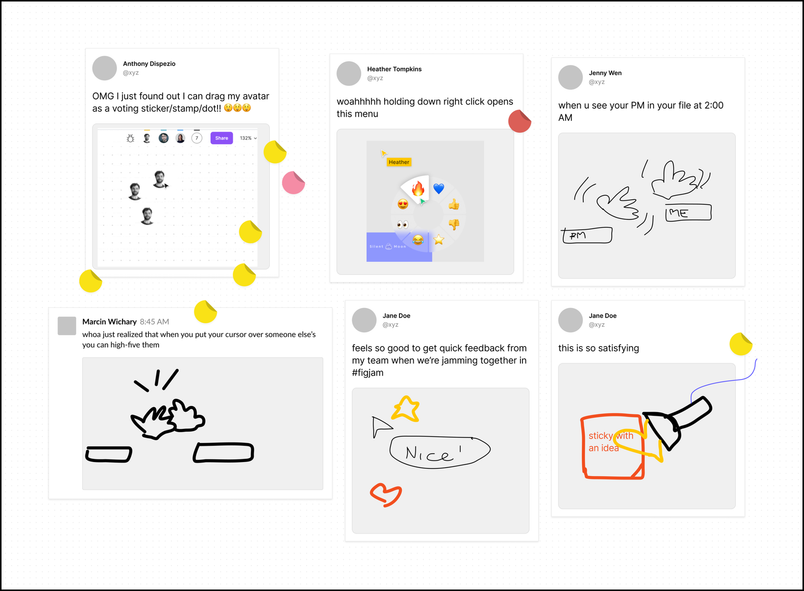
Wen wasn’t looking for concrete phrases or exact imagery at that point—only for reactions that would produce a positive emotional response. The tight scope kept the team from sinking into detail, and the format made it easy to collect many ideas quickly. The team could then pull popular entries into a Figma file for further design work, a process that led to features that eventually shipped in FigJam.
Using FigJam to untangle interaction design problems
When Wen was designing sticky-note attribution in FigJam, she had open questions on how names should appear, whether they could be edited, and what happens when a note is copied and pasted. Instead of writing documentation, she grouped feedback from alpha testers and teammates visually in FigJam, built a decision tree next to those notes, and shared the file over Slack.
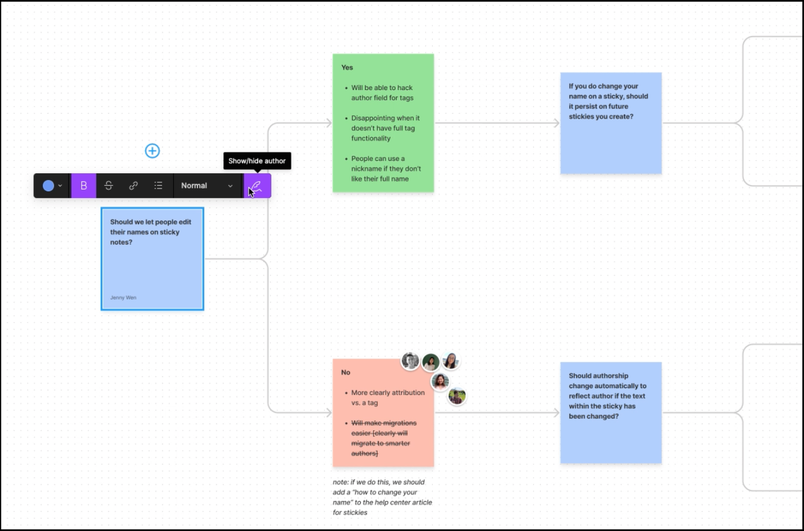
Her cross-functional partners—product managers, engineers, and other designers—could follow her reasoning asynchronously, add comments, and use stamps to vote. No calls or written summaries were required.
Co-designing a feature from scratch
For Product Designer Keeyen Yeo, FigJam was the key to working through the “high five” interaction feature. With no existing reference to pull from, he started by using FigJam’s basic shapes and connectors to map out how people actually high-five in person. Previously, he sketched on paper, which made sharing iterations with teammates difficult.
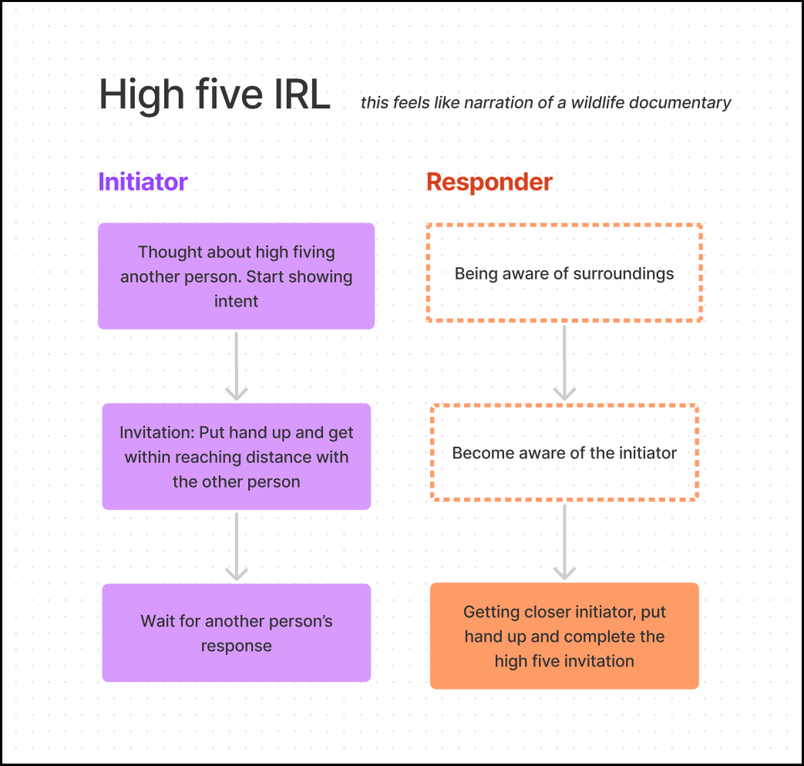
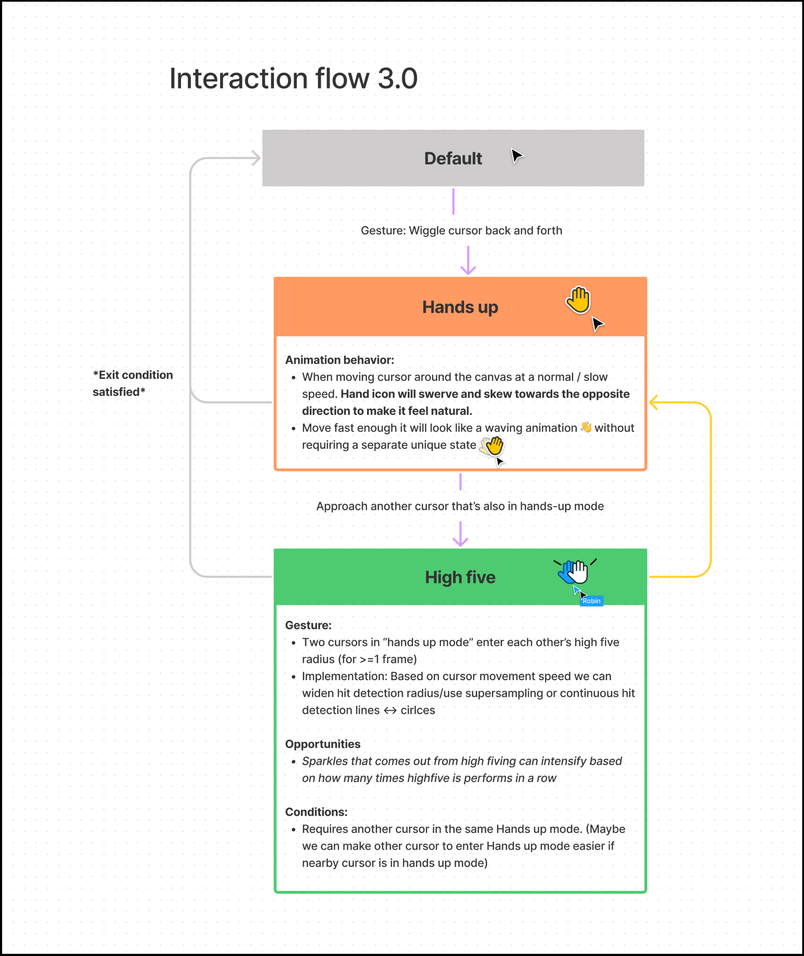
In FigJam, Yeo could continuously add new explorations to a shared file so that his product partners could effectively co-design the feature with him. Engineer Willy Wu used the same canvas to lay out the technical logic, such as how and when a cursor should enter high-five mode, and the group iterated on the interaction flow until technical constraints and user experience goals balanced out.
Daily workflows beyond brainstorming
Though FigJam is often used for early-stage design activities, the team has found other practical applications. Design Director Noah Levin relies on it for hiring support, design critiques, and offsite planning.
Standardized hiring kits
After repeatedly answering the same candidate questions about org structure, culture, and strategy, Levin’s team assembled a hiring kit in FigJam with components covering common FAQs. Each candidate receives a personalized file, giving them a space to ask open questions, review the timeline, or understand next steps.
Stage-appropriate critiques
The design team holds critiques at various points in the design process, adjusting the depth of feedback to the current stage. Levin encourages early exploration critiques in FigJam—where it’s easy to react to an idea, point a direction, and vote—and reserves Figma for detailed design and polish reviews.
Planning offsites on a canvas
Offsite planning moved from a linear document to a FigJam canvas, providing a richer space to brainstorm exercises, prompts, and discussion topics. The team can gauge alignment on session goals, set focus areas for participants, and manage several conversation threads at once.
The team says FigJam has opened up the design process to more contributors, from generating ideas to refining features to coordinating day-to-day work. Figma has also made the components used in these sessions available for duplication, along with a recording of the team's livestream discussion for those who want to see the workflows in action.


