
When Captions Need To Do More Than Transcribe
Closed captioning is often framed as a solution for noisy environments—busy restaurants, airport lounges, or open-plan offices. That framing is accurate, but incomplete. For people who are hard of hearing, captions aren't a convenience feature; they're the primary means of accessing spoken content, regardless of the surrounding noise level.
The use case has expanded well beyond video streaming. Captions appear in online courses, social media clips, and real-time platforms like Zoom and Google Meet. And an increasing number of viewers enable captions by default even in quiet settings: non-native speakers following along, viewers unfamiliar with a speaker's accent, or those who simply prefer reading to listening. Captions are better for everyone, and they expand audience reach.
A decade ago, captions were rare on the web; today they're expected. Yet captions shouldn't be treated as a simple text overlay with timestamps. Done well, they can communicate nuance lost in a plain transcription: sarcasm, music, synthetic voices, background noise, or interruptions.
Captions Versus Subtitles: Not The Same Thing
Though often used interchangeably, captions and subtitles serve different purposes. Captions are an accessibility feature for deaf and hard-of-hearing viewers: they convey aural information in the same language as the audio, complete with speaker identifications and descriptions of sounds. Subtitles, on the other hand, are an internationalization feature: a translation from the original spoken language into another written language, intended for hearing viewers who don't understand the original.
Because subtitles typically omit speaker IDs and sound descriptions, they are not necessarily accessible to deaf viewers. The guidelines that follow apply to both formats, with that distinction in mind.
Formatting Rules Worth Following
A visual language for captions and subtitles already exists, developed by professional captioners and codified in resources like Gareth Ford Williams's guide to the visual language of closed captions. Commonly used rules include:
- Split sentences into two roughly equal parts, shaped like a pyramid—around 40 characters per line for the top line, slightly fewer for the bottom.
- Maintain an average of 20–30 characters per second.
- Keep each caption sequence between 1 and 8 seconds.
- Keep a person's name or title together; don't break a line after a conjunction.
- Align multi-line captions to the left.
Formatting conventions vary somewhat by language, but these rules serve as a solid checklist for ensuring fine details aren't overlooked.
Treating Subtitles As Part Of The Design
Captions are usually an overlay on top of existing content. A different approach treats text as a native part of the video experience. The Ethics for Design player, for instance, gives subtitles a prominent role while supplementary speaker information stays on the page as the video progresses. The text isn't burned into the video; it's available separately, fully accessible for copy-paste, with additional materials highlighted as the speaker talks.
Another technique is the on-screen text method used in shows like Sherlock: text messages are embedded as visual narrative rather than showing a character's phone screen. Experimental projects have pushed further—for a thesis at the Hogeschool van Amsterdam, Agung Tarumampen explored what sound visualization might look like as a first-class experience for deaf people. His Living Comic concept uses bolder typography, animation, and comic-book styling to turn subtitles into an integral visual component. In fight scenes, the video player's frame changes color and glows. The result is dynamic but labor-intensive to produce.
Making Transcripts Searchable
Some video platforms publish edited transcripts alongside their content. TED talks do this well: every sentence in the transcript links to the corresponding timestamp, letting viewers jump directly to a specific moment using their browser's search. For most video with subtitles alone, however, that capability is missing—even though subtitles are just a text file containing both content and timestamps.
Adding search to subtitles or captioning settings is a straightforward enhancement. It works similarly to the search feature Zoom provides within auto-generated transcripts, helping users navigate video faster and more precisely.
Don't Assume Language Preferences
Viewers don't always want subtitles in the same language as the audio. The audio track may not be available in the user's language; captions may include detailed audio descriptions in some languages but not others; and many viewers simply prefer one language for listening and another for reading. Whenever possible, decouple the audio track settings from subtitle or caption settings so users can choose their preferred combination freely.
The same goes for multiple viewers. Most video players allow selecting a single subtitle language, but if several people watch together, offering multiple simultaneous languages—displayed differently and taken one line at a time—could be useful. Group and alphabetize language options, and never use flags as language identifiers: flags represent countries, not languages.
Customization Beyond Styling
Where subtitles appear on screen and how they look is often dictated by brand typography. But accessibility needs vary: some viewers require larger text, and some fonts are better suited to people with dyslexia. YouTube lets users choose among monospaced or proportional serif and sans-serif fonts, plus casual, cursive, and small-caps variants. In addition to stylistic options, consider providing fonts designed for specific needs, such as dyslexic fonts or hyper-legible typefaces.
Presets can reduce the effort required to configure captions. Amazon, for example, shows presets for various high-contrast combinations, letting users select a readable option without manually adjusting colors and transparency. Advanced customization options should still be available for those who need them—but presets make the most common cases much faster to set up.
Putting Subtitles Where Viewers Want Them
Fine-grained control over subtitle and caption position is often missing from customization menus. Streaming platforms frequently set positions manually, shifting text to avoid overlapping on-screen elements. Netflix, for example, sometimes shows Japanese subtitles on the side of the frame so they don’t cover text or crucial visuals.

But users rarely get to make that call themselves. Research from the BBC suggests there is value in letting them try. Their user testing found a significant improvement in comprehension when subtitles moved from inside the video bottom to below the clip.
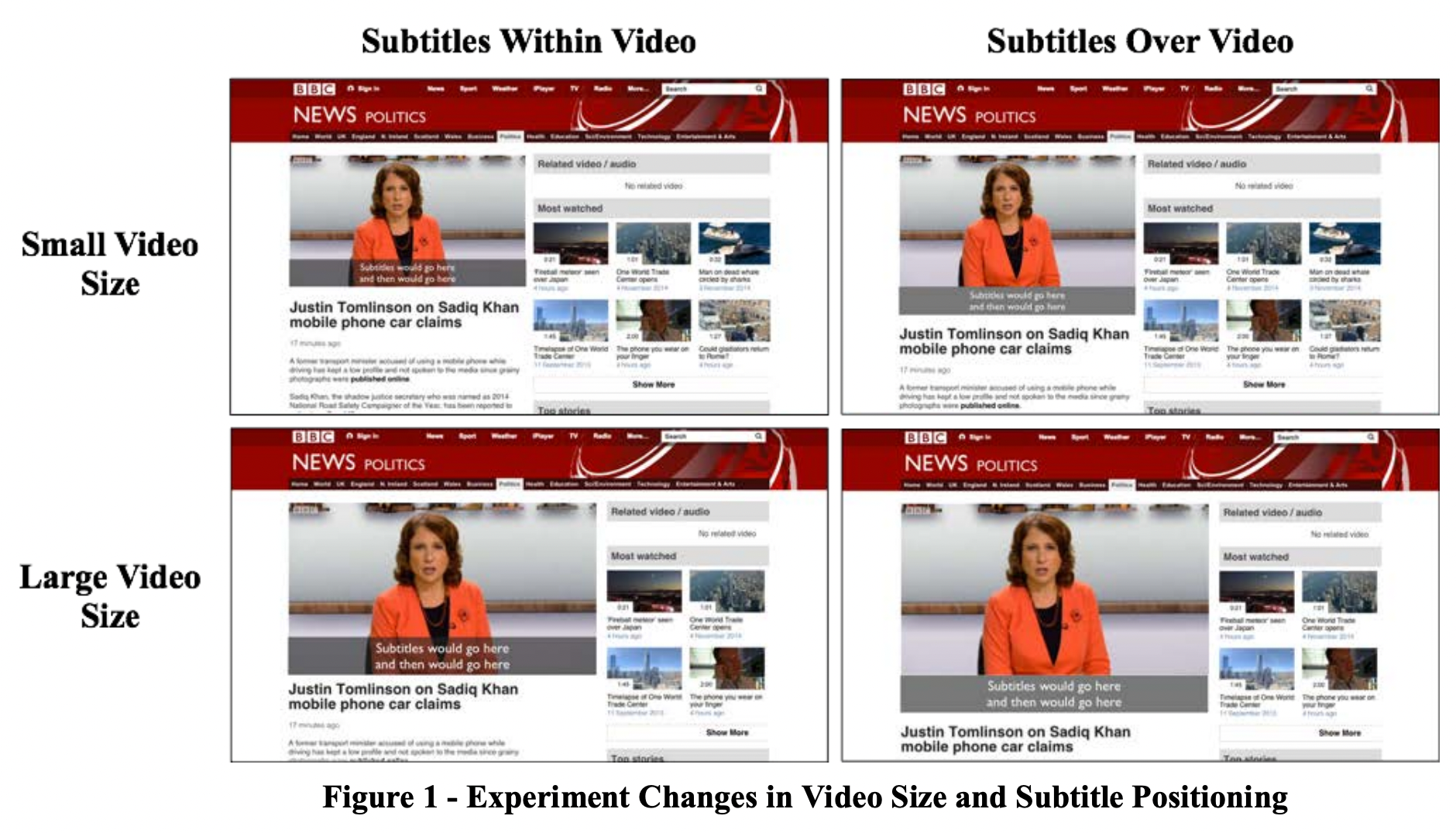

Desktop players like VLC and KM Player already include options to resize subtitles, move them around, and even synchronize them automatically. The web largely lacks that capability. A robust set of display settings would probably combine user-adjustable fonts, predefined display presets, and a simple way to relocate captions on the screen.
Relocation matters in real-time communication too. On tools like Zoom or Google Meet, live captions commonly overlap the shared slide deck or the face of whoever is speaking.

Should Captions Start On?
There’s a case for shipping video with captions enabled by default, given how many viewers use them. But this assumes a single preferred language and captioning style. It also forces those who want an uncluttered screen to disable captions on each visit.
More elegant is treating captions as a persistent user preference. Ideally, the player would recall whether a viewer chose captions on or off across sessions. Going further, users could store preset formatting options — covering font, size, and placement. Rather than forcing captions on for everyone, an opt-in setting could be applied once and kept as the default until the user changes it.
Designing Captions as Part of the Experience
Captions may seem like a straightforward accessibility add-on, but doing them right touches formatting choices, editorial conventions, display method, positioning, and settings persistence. These guidelines help whether you are evaluating a video platform or preparing captioned social clips.
A majority of your audience will likely turn captions on at some point. The extra attention you give their placement, typography, and defaults directly shapes how good their viewing experience is.


