Figma has spent the decade since launch widening what "design" covers inside its product. Dylan Field, co-founder and CEO, framed this year's Config releases around the same idea: as AI lowers the cost of building software, craft, quality and point of view become what separate products, so Figma should carry a design from idea through to production.
What launched at Config 2025
- Figma Make, a prompt-to-code capability for turning designs into interactive prototypes
- Figma Sites, for publishing responsive websites straight from Figma
- Grid, a new Auto layout option in the design panel
- Figma Draw, a rewritten vector editing and illustration toolset
- Figma Buzz, for producing brand assets in any format
From design to a working prototype
Field describes the boundary between design and production as an artificial one, created by tooling rather than by the creative process, and points out that closing it has until now demanded specialized knowledge and convoluted workflows. Figma Make is aimed squarely at that gap. Given an existing design, it uses natural language prompts to produce a fully coded prototype while retaining the design's intent and fidelity.
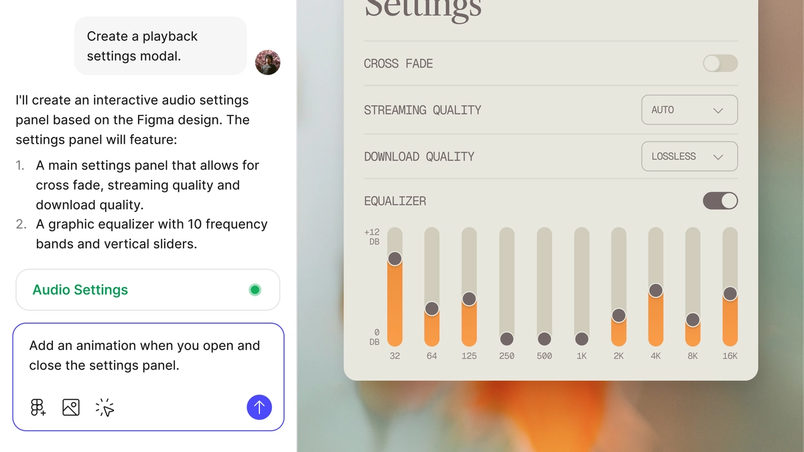
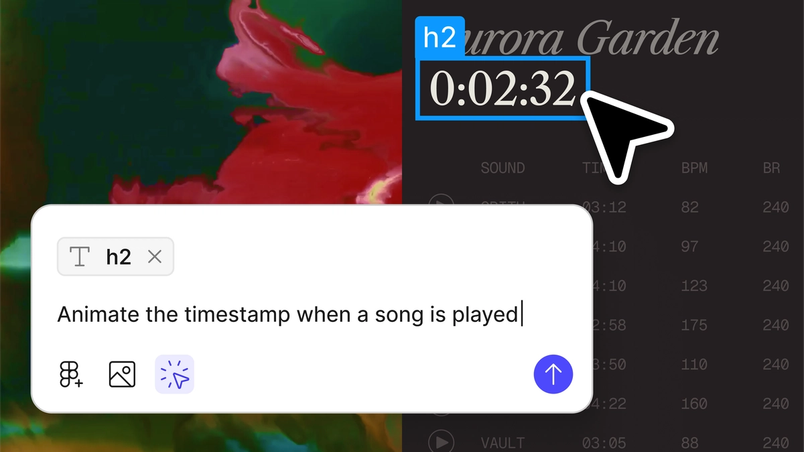
Entry points are deliberately plural. You can start from a phrase or from a Figma file. For finer work, you highlight one region of a prototype and instruct changes there in natural language—Field's example is pointing at part of a page and asking for a "publish" button to be added.
Because Make lives inside the Figma platform and is collaborative by default, the same workspace supports defining, iterating and polishing an idea end to end. Field notes that a static design can only communicate so much, which makes alignment and feasibility checks harder. More capabilities are promised over the coming weeks and months, with the stated goal of giving designers more control and specificity.
Publishing sites from inside Figma
For years, users have asked why they couldn't simply click "publish" and turn designs or prototypes into working sites and apps. Figma Sites answers that, taking a design to the web in a single click without leaving the platform.
- Responsive design: Auto layout, grid and new breakpoint features adapt layouts to any screen size
- Component creation: responsive components and variants for building interfaces
- Interactive prototyping: familiar Figma tools extended with website-specific interactions
- Advanced interactions: custom code interactions or Figma Make prompts for animations
- Content management system: a no-code CMS for updating site content, listed as coming soon
Selecting a frame and choosing "create code from design" hands off to Figma Make to generate animations and interactions for the page.
Grid, and mixing structured with freeform
Grids predate the web—they organized type and graphics from the earliest printing presses, and the lineage runs from Bauhaus grid theory through CSS Grid and Flexbox. In Figma, however, grids have been awkward to implement responsively, which pushed designers toward workarounds and deeply nested Auto layout frames. Grid replaces that with an Auto layout option in the design panel.
- Layout flexibility: span elements across multiple cells and watch responsive behavior by resizing grid frames in real time
- Precision controls: adjust individual column and row track dimensions, and position elements using the "Ignore Auto layout" option
- Dynamic design: rearranged, resized and styled elements act independently
- Layer management: arrange objects above or below overlapping elements, since grid elements function independently of layer order
Grid panel
Dev Mode in Grid
Drag & drop in Grid
Grid translates directly to CSS in Dev Mode, which Field lists among the reasons it should accelerate the design-to-production path.
A rewritten vector core for illustration
Figma's original vector networks were itself a challenge to existing drawing conventions. As brand expression has grown more important to product and web experiences, the company has now completely rewritten its vector editing functionality, fixing long-standing problems with boolean operations, flattening and stroke outlining. Figma Draw is the layer built on top: a set of tools optimized for visual design and free-form creation.
- Shape creation and editing: multi-select vectors, a shape builder for combining and subtracting, and a lasso for anchor point selection
- Pattern and text tools: repeaters for radial and linear arrangements, text on a path, custom pattern fills
- Effects: dynamic strokes, variable width, texture and noise, progressive blur
- Design system integration: color variables, a precise rotation origin, a reworked selection interface
The interface changes are immediately visible: larger layer thumbnails, new specialized tools, and slider controls moved out of fly-out panels into the properties panel. Multiple vectors can be selected and edited together, with common actions in a new selection menu above the toolbelt. Boolean operations got the rewrite; Multi-Select Across Vectors and Shape Builder handle more complex shapes. Color variables from a design system can be applied to illustrations so they respond to light or dark modes.
Extending the canvas beyond product design
Figma positions itself as the source of truth for design and product development, yet much of the work its users produce sits outside websites and applications. Figma's own Brand Studio designs social media assets, event materials and merchandise in the tool, and the same holds for many teams whose output was never the target of Figma's core editing model.
Figma Buzz addresses those artifacts and the teams producing them.
A shared workspace for brand and marketing teams
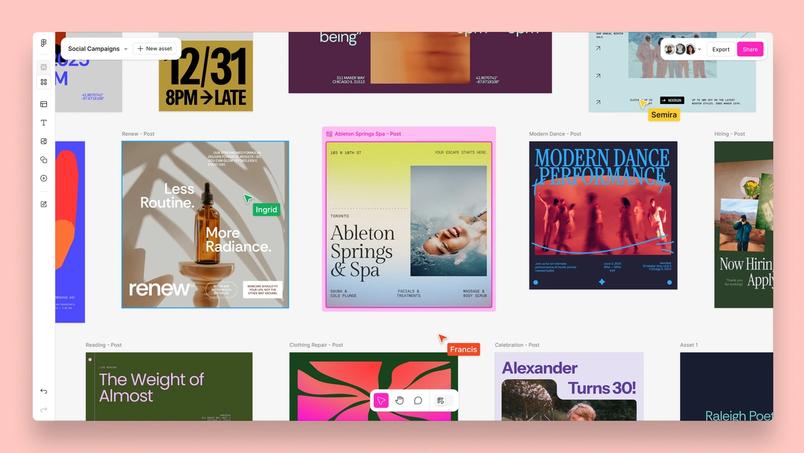
Figma Buzz is designed as a common space where brand designers and marketers co-create on-brand assets at scale, with the designer's expertise serving as the engine behind the output. The central piece is customizable templates paired with a focused editing experience that preserves brand integrity and blocks unwanted changes, so the people generating assets cannot break the system. Bulk asset creation, driven by data connections, covers high-volume production; an intuitive grid view and a centralized Template and Tools section handle organization and discovery. Distribution runs on versatile export options, and a dedicated Content Seat brings non-designers into the same workflow irrespective of their design skill.
From idea to production in one place
The new products connect to a single ambition: a space where teams can prototype, fine-tune, iterate and ideate through to the finish line. Figma Make and Figma Sites bring code directly onto the canvas and publish to the web; Grid and Figma Draw reimagine fundamental design tools; Figma Buzz widens the range of artifacts a design system can serve. Read more about Figma Buzz here.