
A maintainer’s shortcut to a ready-made dev environment
One of the recurring friction points in open source is the gap between wanting to contribute and actually being able to run the project. A new contributor might need to install a specific runtime, pull in the right dependencies, configure environment variables, and hope that everything matches what the maintainers use. That process can eat up hours or even days, and documentation quality varies widely. If the setup is painful enough, some contributors simply walk away.
GitHub Codespaces changes that dynamic by moving the development environment into the cloud. Instead of asking every contributor to replicate your setup on their own machine, you can offer a preconfigured environment that opens in a browser or VS Code client — no local setup required.
Why Codespaces works well for maintainers and contributors
Codespaces is not just a hosted IDE; it is an approach to reducing onboarding time and making the contributor experience more predictable. The main benefits for maintainers fall into three categories.
Fast setup reduces time-to-first-contribution
For repositories with complex build steps or a long list of dependencies, getting a local environment running can be a blocker — especially for someone evaluating whether to contribute at all. Codespaces prebuilds can speed up the creation of new environments, which is valuable when working with larger codebases that otherwise take a long time to configure.
By defining a development container in the repository, you can give contributors a space that already includes the right extensions, dependencies, and environment variables. A new contributor can skip the local setup and open a working environment directly, which lowers the barrier to entry. That matters for retention: when the path from "interested" to "contributing" is short, more people are likely to complete it.
Consistent, project-defined environments
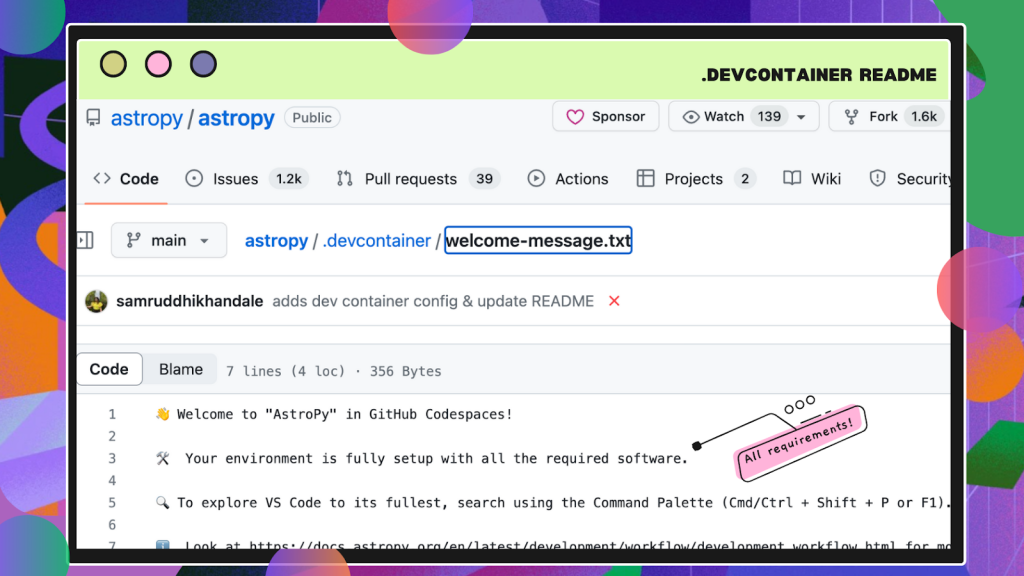
A dev container file in the repository is the key to making the environment reproducible. It lets you specify the Linux-based operating system, install runtimes and frameworks, set environment variables, forward common ports, and even define preferred editor settings and extensions. Once that file is committed, every contributor who opens a Codespace gets the same baseline.
This removes the "works on my machine" problem and gives maintainers a way to standardize how work gets done. Instead of debugging environment-specific issues, you can focus on the code itself. The configuration also improves security: by controlling what tools and settings exist in the environment, you minimize the risk of contributors working in insecure or inconsistent setups — without requiring them to configure security policies themselves.

Cloud isolation improves security
Because Codespaces runs in the cloud, each environment gets its own virtual machine and network, isolated from the contributor's local machine. That reduces exposure to local security vulnerabilities and gives maintainers a way to enforce encryption, firewall rules, and access controls through the dev container configuration.
Maintainers no longer have to hope that every contributor has secure local setups. Instead, the security baseline is defined centrally in the repository and applied consistently whenever a Codespace is created.
Real-world usage in open source
Several established projects have adopted Codespaces to simplify their onboarding and development workflows:
- fastai/course22 — uses Codespaces to host the environment for running Jupyter notebooks in deep learning courses.
- apache/airflow — contributors can spin up a fully configured environment with all required tools for the workflow platform.
- mastodon/mastodon — the social media platform uses Codespaces to simplify its contributor experience.
- Astropy — the astronomy library provides a ready-to-use environment for contributors and makes dependency installation straightforward.
An example: etcd’s dev container
The etcd project illustrates how this looks in practice. Its dev container configuration uses the Microsoft Go image with version 1.19 on Debian's Bullseye distribution. It enables additional features such as docker-in-docker and the GitHub CLI, and forwards ports 2379 and 2380 from the container to the local machine. After the container is created, the build process runs via make build. Tool-specific optional properties can be added in a customizations section.

Getting started with Codespaces
For individual accounts, Codespaces includes 60 hours of free usage per month, plus free storage for prebuilt environments. That makes it feasible for open source projects to adopt without a large upfront cost.
If you want to try it on your own project, start by adding a devcontainer.json file to the repository root. For guidance on the basics, GitHub provides a beginner’s guide to learning to code with GitHub Codespaces. For more advanced setup patterns, their walkthrough on automating your dev environment covers the full range of options available in dev containers.
For feedback and questions, the Codespaces discussion forum is the place to connect with the team and other users.

Codespaces for maintainers: less setup, more contribution
Getting a new contributor from "I'd like to help" to a passing pull request is one of the harder parts of running an open source project. The local environment setup alone can eat up days, and every hour spent debugging dependency conflicts is an hour not spent improving the codebase. GitHub Codespaces attacks that problem at the root by moving the entire development environment into the cloud, where it can be defined once in the repository and reused by everyone.
Several well-known open source projects already rely on it. fastai/course22 runs Jupyter notebooks for its deep learning courses in a hosted environment. apache/airflow gives contributors a fully configured setup for its workflow orchestration platform. Mastodon and the astronomy library Astropy also use Codespaces to simplify onboarding and dependency installation. The pattern is the same in each case: a devcontainer.json file in the repo defines the environment, and contributors skip the manual setup entirely.
Three reasons maintainers should adopt Codespaces
1. Onboarding drops from days to minutes
For a maintainer, helping newcomers stand up a local environment is often a week-long exercise in documentation triage. With Codespaces, that process is automated. A pre-configured environment with all required extensions, dependencies, and environment variables can be launched immediately, which lets contributors open a codespace and start working without ever touching their local machine.
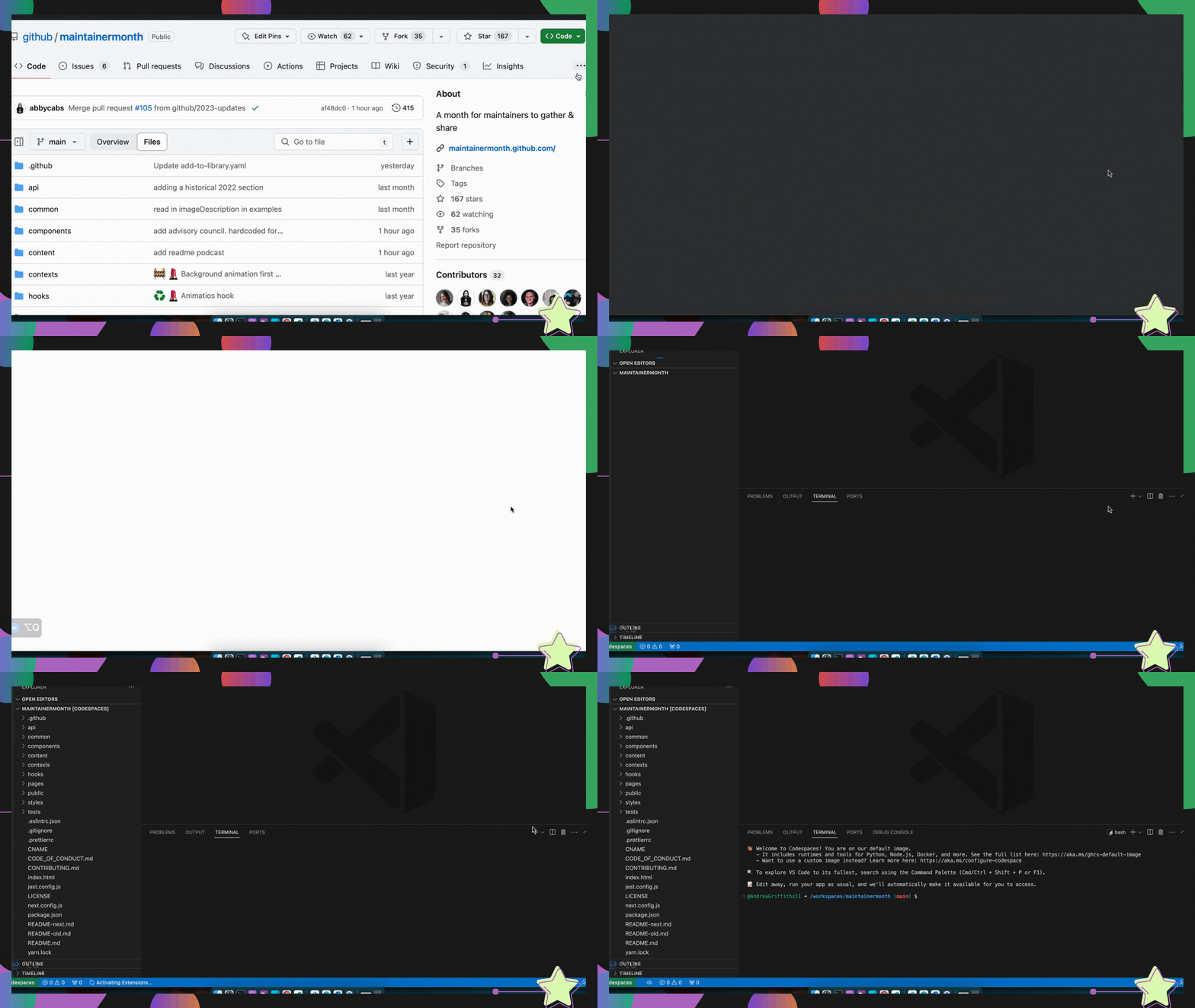
The effect on contribution quality is significant. Many new contributors abandon their efforts when test setup or PR formatting becomes frustrating. A smooth, repeatable environment reduces that friction and improves the odds that a first-time contributor sticks around and becomes a regular one.
2. One environment definition, consistent for everyone
Contributors work on different operating systems, with different tool versions and hardware. Codespaces removes that variability by defining the development environment in the repository itself. When a devcontainer.json file is included in a project, every contributor gets the same base operating system, runtime, and tooling regardless of what machine they use.
The configuration options go well beyond the basics. You can select a Linux-based image, set environment variables, install runtimes and frameworks, forward commonly used ports, and specify editor settings and extensions. For example, the etcd-io/etcd project uses a dev container built on the Microsoft Go image with version 1.19 on Debian Bullseye. It enables docker-in-docker and the GitHub CLI, forwards ports 2379 and 2380, and runs make build after creation. Tool-specific properties can be added under a customizations section.
3. Security by isolation
Cloud-hosted development has a security advantage: there is no local machine to compromise. Codespaces are isolated from each other, with each one assigned its own virtual machine and network. That isolation prevents cross-tenant interference and reduces the attack surface that comes with local development setups.
The devcontainer.json file also carries security weight. By declaring the exact tools and settings an environment needs, you avoid the ad-hoc installations and undocumented configuration changes that often weaken a local setup. Security-related settings such as encryption requirements, firewall rules, and access controls can be specified in the configuration, giving maintainers a measure of control over the environment contributors use.
The free tier gets you started
Individual accounts include 60 hours of free usage per month, which is enough to evaluate Codespaces on a real project without upfront cost. If you manage multiple repositories with different configuration requirements, the ability to pre-build codespaces makes spinning up large codebases notably faster than a cold start each time.
For open source projects, the combination of reusable configuration and low onboarding friction makes Codespaces a practical tool for growing a contributor base. It turns the setup problem from a documentation issue into a solved configuration problem, and it does so without requiring contributors to change the way they work on their own machines.


Why maintainers are adopting Codespaces
Open source maintainers spend a disproportionate amount of time on setup and onboarding tasks that have nothing to do with writing code. GitHub Codespaces shifts the development environment into the cloud, where it can be preconfigured, standardized, and secured before a contributor ever opens it. That removes a whole category of friction from the contribution lifecycle.
Setup time collapses from days to seconds
Getting a new contributor’s local environment working can take anywhere from a day to a week, depending on the quality of your documentation. For large or complex repositories, even maintainers with working setups lose time to environment drift. Codespaces solves this with prebuilds, which dramatically shorten the time it takes to spin up a new codespace, especially for sizable codebases that typically require lengthy setup.
Because the entire environment—extensions, dependencies, and environment variables—is preconfigured, contributors can skip local setup altogether and open a ready-to-work codespace. This matters most for maintainers juggling multiple projects with different configurations, and for new contributors who might otherwise abandon a pull request because they can’t get the test suite running. A seamless first contribution is often the difference between a one-time drive-by and a long-term contributor.
One configuration file standardizes every environment
Codespaces gives every contributor the same powerful, consistent environment no matter what physical machine they are on. That consistency is enforced through a devcontainer.json file checked into the repository, which unlocks the same customization options available in VS Code Dev Containers.
The file can control the Linux-based operating system, environment variables, runtimes, frameworks, installed tools, forwarded ports, editor settings, and extensions. The dev container for etcd-io/etcd is a good example: it uses the Microsoft Go image (version 1.19 on Debian Bullseye), enables docker-in-docker and the GitHub CLI, forwards ports 2379 and 2380, runs make build after container creation, and carries tool-specific settings under the customizations section.
This level of control means the environment is not just reproducible—it can be tailored to the exact needs of the project. Contributors spend their time on the code, not on reconciling differences between their laptop and your CI setup.
Cloud isolation reduces security overhead
Hosting development environments in the cloud removes a class of local-machine security concerns. Codespaces is secure by default, with each environment isolated from others by its own dedicated virtual machine and network.
The devcontainer.json file plays a security role as well. By pinning the required tools and configuration, you can bake in security-related settings such as encryption requirements, firewall rules, and access controls. That reduces the attack surface and protects sensitive project data without requiring each contributor to manually harden their own machine.
What 60 free hours unlocks for your project
Individual accounts get 60 hours of free Codespaces usage per month, plus free prebuilt storage. For open source projects, that combination lowers the barrier for contributors who want to test changes in a full environment without provisioning their own infrastructure.
The result is a more efficient collaboration loop: faster onboarding, consistent environments, and reduced maintenance overhead. If you are still negotiating with setup documentation and environment inconsistencies, Codespaces is worth evaluating as the default path into your repository.

The month of May is Maintainer Month, with free workshops and events for the open source community. If you have questions about Codespaces, the GitHub community discussion is the place to ask.




