

Choosing the Right AI Interface: A Task Audit Approach
The default assumption that every AI feature belongs in a chat window is a convenience for developers, not users. Because LLMs are trained on conversational data, chat feels like the natural interface — but it is only one option. The real design question is which modality — the way a person uses sight, hearing, touch, speech, or typing to interact with a system — fits the user's context, intent, and cognitive load at the moment of use.
Consider the traveler rushing through a noisy terminal after a gate change. One hand holds a roller bag, the other a coffee. Opening the airline app to ask the AI assistant for the new gate forces them to stop, balance their drink, and type a long booking reference into a small chat field. Worse, the response is a dense paragraph about weather patterns, with the actual gate number buried at the bottom. The tool is smart, but the interface fails the user at precisely the moment they need clarity with minimal effort.
Why Chat Underperforms as a Universal Interface
Chat has an obvious appeal: it is a blank slate that suggests infinite capability. But a text-heavy interface creates a dual burden. Input requires linguistic effort; output demands cognitive processing.
On the input side, a blank text box hides the tool's capabilities. Menus and buttons in a traditional GUI signal available options; a chat box forces users to guess what the AI can do and recall exact phrasing. A data analyst who might click a filter in a spreadsheet must now describe complex logic in a sentence. A manager reorganizing a schedule must type out drag-and-drop actions. Composing a prompt is a creative act, translating a vague thought into a precise command — a barrier for users who know what they want but cannot articulate it in text.
On the output side, long text responses shift interpretive work onto the user. Text is serial: words must be read in sequence to extract meaning. Visual formats, by contrast, support parallel processing — a chart pattern is understood in under a second. When an AI answers a project status query with three paragraphs instead of a color-coded dashboard, a quick check becomes a reading assignment. This tax compounds under professional pressure: a doctor needs vital signs as numbers, not narrative; a trader needs a price-line graph, not prose about movement. Text forces slow, error-prone extraction when speed and accuracy matter most.
A Taxonomy of Input and Output Modalities
Before choosing a modality, teams need a shared vocabulary for available options. The taxonomy below maps common input and output methods to the contexts where each is strongest — not as a ranking, but as a reference for matching modality to workflow.
Accessibility is inherent to this analysis. Visual dashboards serve many users well, but screen-reader-optimized audio alternatives must exist for users with visual disabilities. Modality choices should multiply access paths, not restrict them.
Input Modalities
| Modality | Best For | Example Contexts | Cognitive & Physical Rationale |
|---|---|---|---|
| Button / Tap | Single-step, binary actions | Launching a feature; confirming an alert | Eliminates recall overhead by utilizing recognition; maximizes execution speed during time-sensitive tasks. |
| Voice | Hands-busy or eyes-busy contexts | Field technician query; driving navigation | Offloads physical interaction to speech, though bounded by ambient noise and social privacy norms. |
| Natural Language Chat | Ambiguous or exploratory queries | Researching options; asking follow-up questions | Offers users freedom in what they can say; however, the user must figure out how to phrase their request clearly. |
| Form / Wizard | Structured, multi-field data entry | Filling out a contract; configuring a report | Keeps users from missing information by breaking down a complicated task into clear, step-by-step visual sections. |
| GUI (Filters, Sliders, Drag-and-drop) | Complex parameter setting or spatial tasks | Scheduling; data filtering; image editing | Prevents mistakes and ensures users don't miss information by dividing complicated tasks into clear, step-by-step visual parts. |
| Multi-modal (Image + Text) | Visual input paired with description | Uploading a design mockup with annotation | Reduces the effort of explaining things because users can reference an object instead of having to describe it only with words. |
| Gesture | Hands-free spatial interaction | Waving a hand to acknowledge an alert in a sterile operating room | Allows physical interaction without touching a surface. This keeps users safe and clean in contaminated environments and allows for quick input or acknowledgement. |
Output Modalities
| Modality | Best For | Example Contexts | Cognitive & Physical Rationale |
|---|---|---|---|
| Push Notification / Alert | Time-sensitive, ambient awareness | Price spike alert; task completion notice | Provides a quick update that the user can process at a glance. It delivers information without demanding a full break in concentration from their primary task. |
| Audio Summary | Hands-busy or eyes-busy contexts | Status updates while walking; conversational voice agents providing real-time navigation | Delivers information directly to the user’s ear. Removes the need to look at a screen, keeping the user safe and aware of their physical surroundings while moving or working. |
| Short Text Summary | Focused queries needing brief answers | Definition lookup; single-metric status | Gives a fast answer to a direct question. Users can read a short sentence quickly without experiencing the fatigue of scanning paragraphs of text. |
| Visual Dashboard | High-density, comparative analysis | Project status; resource allocation | Enables visual trend and outlier detection. Avoids the mental effort of reading data line-by-line and cross-referencing in real time. |
| Interactive Canvas | Generative or iterative creative tasks | Design iteration; layout adjustment | Allows users to manipulate the output instead of asking an AI to move it via text instructions. Reflects a natural way to interact with the output. |
| Inline Confirmation | Guided task flows needing feedback | Step-by-step configuration wizard with in-line validation | Provides visual proof that the system recorded a choice correctly. Reduces users’ anxiety about wondering if an error occurred. |
Table 1: Input and Output Modality Taxonomy. Use this as a reference during the Task Audit to identify candidate modalities before narrowing to a recommendation.
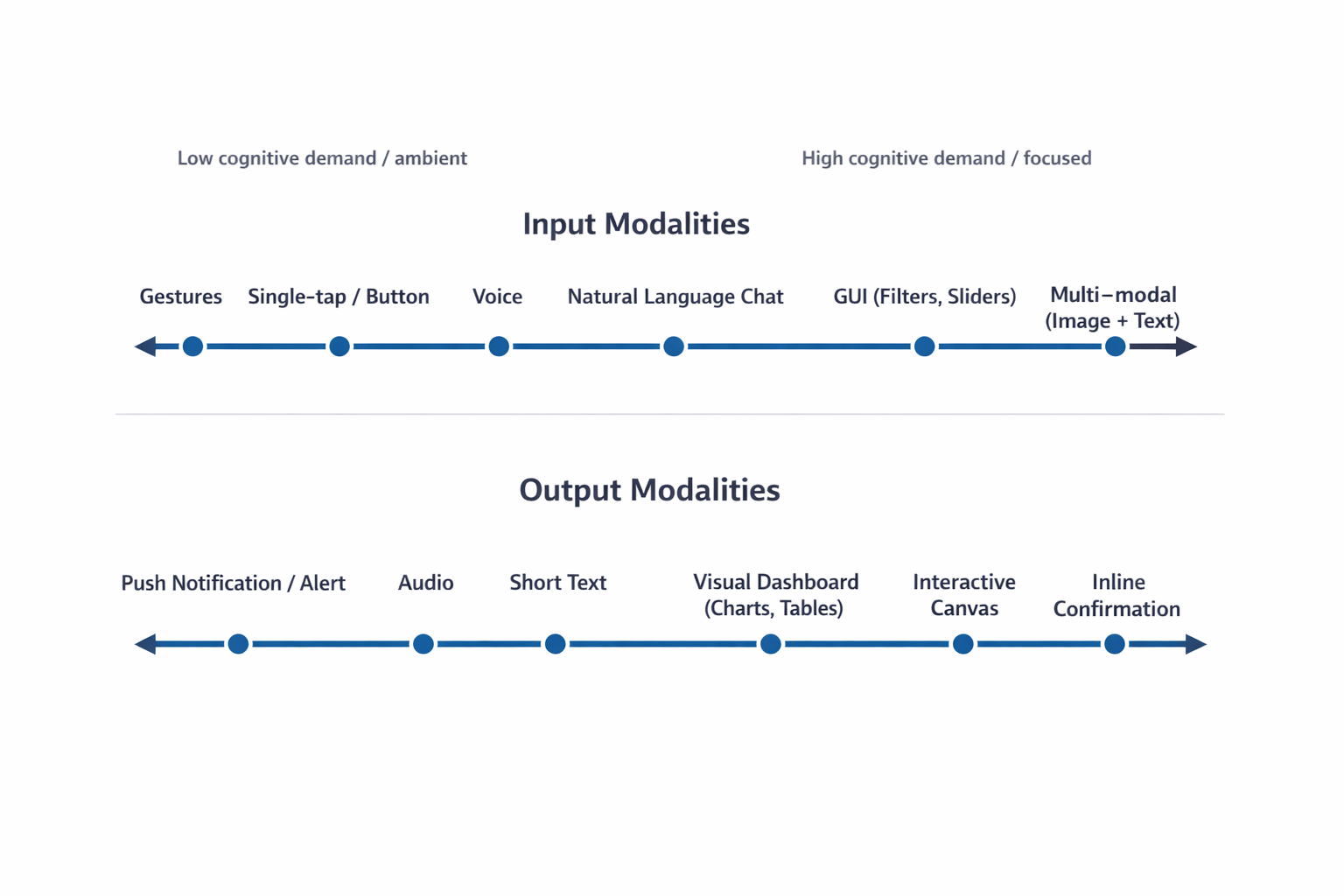
The cognitive spectrum in the figure below illustrates how mental effort scales across interaction methods — from low-effort, glanceable interfaces to high-density formats that support analytical thinking. Knowing where a task falls on this spectrum tells a team whether the user needs minimal processing or room to dig deep.
Applying a Task Audit to Select the Right Combination
With a shared vocabulary in place, the next step is rigorous selection grounded in users' real environments. Evaluate the physical and cognitive load the user brings to the task, then match the input and output modalities to their immediate intent — ensuring the interface serves the user's situation rather than requiring the user to serve the interface.
Grounding Modality Choices in Field Evidence
Choosing how users interact with an AI system often defaults to interface convention — a chat window here, a button there. A more defensible approach starts with a Task Audit: a structured method for collecting evidence about the physical, social, and cognitive realities of the work before any design decisions are made.
The audit centers on four constraints that shape both input and output modality:
- Input Constraints — whether the user can physically type or tap. A mechanic working under a vehicle, hands occupied and covered in grease, needs voice input because keyboard and touch are impractical.
- Output Constraints — whether the user can safely look at a screen. A delivery driver navigating an intersection cannot read a detailed map, so audio directions become the appropriate output channel.
- Social Constraints — whether the environment tolerates audible interaction. A quiet open-plan office calls for silent text notifications, while a loud manufacturing floor rules out audio output entirely.
- Cognitive Load — the mental effort the primary task already demands. A surgeon needs a quick visual red indicator during a procedure; a lawyer researching case strategy benefits from a detailed text summary to absorb at their own pace.
For every feature, the audit answers two questions: What modality can the user physically use to provide input here? And what modality can the user realistically process as output here?
Collecting the Evidence
Contextual inquiry and observation is the most direct method for capturing how people work in their natural setting. Users often perform hidden work — small steps and workarounds they forget to mention in interviews, or environmental details they have adapted to and no longer notice. Observing a technician who cannot put down their tools rules out typing and points directly to voice input. Watching a supervisor look up and down repeatedly from a screen signals a need for glanceable, low-density output rather than a scrolling text summary.
Focused interviews surface mental models and decision points that observation cannot capture, particularly around cognitive load. Structured one-on-one sessions should ask for stories about past successes and failures rather than general opinions. A lawyer may explain that the volume of detail is not the challenge — synthesis for ethical and strategic judgment is. That confirms a need for detailed text the user can read and absorb, not a summary dashboard. Interviews also uncover process ambiguity: situations that are unclear or error-prone, which identify where AI provides the most leverage and what output format reduces rather than adds confusion.
Collaborative workshops bring designers, engineers, product managers, and business analysts together to build a shared Task Inventory. Product managers ensure factual accuracy of the process map; the research team applies audit criteria to each step. Workshops confirm social constraints — a workflow on a loud manufacturing floor versus a shared quiet library demands very different outputs. For every task in the inventory, two tests apply. First: Does this step require human ethical judgment? If yes, the AI output must support that judgment, not replace it. Second: Does this step require instantaneous execution? If yes, the interface must support fast input with minimal cognitive overhead.
Mapping Intent to Modality Combinations
With audit findings in hand, an Input/Output Alignment Matrix formalizes the connection between user intent and modality. The matrix is organized by what the user is trying to accomplish in a given moment, not by what the AI is capable of doing. That distinction matters: if intent shifts across a single workday for the same user, the interface should respond to those shifts.
| User Intent | Optimal Input Modality | Optimal Output Modality | Environmental Fit |
|---|---|---|---|
| Quick Status Check | Voice or Single-tap Button | Audio or Push Notification | Hands-busy, Eyes-busy (e.g., Technician on ladder) |
| Specific Detail Query | Natural Language Chat | Short Text Summary | Focused, low-density data need |
| Complex Analysis | GUI (Filters, Sliders) | Visual Dashboard (Charts, Tables) | Desk-based, high-resolution screen |
| Creative Generation | Multi-modal (Image + Text) | Interactive Canvas | Design or drafting environment |
| Monitoring / Alert | Passive (background system) | Push Notification or Audio Alert | Any environment; task is ambient awareness |
| Guided Task Completion | Structured Form or Step-by-step Wizard | Inline Confirmation + Progress Indicator | Focused workflow; user needs verification feedback |
Wrong-modality choices create distinct failure patterns. Users feel mentally drained when information arrives in a format that is hard to process — a massive status update delivered only as text. They worry whether a precise command was completed correctly when it gets buried inside a long chat exchange. They develop clumsy workarounds, adapting to the machine's method instead of working in their natural, most effective way.
Coordinating these factors moves teams past the automatic default of adding a chatbot. Visual layouts enable rapid scanning. Structured inputs remove the burden of constructing perfect sentences. Audio outputs serve users whose hands and eyes are otherwise occupied. The right modality combination respects the user's physical and cognitive state at the moment of interaction.
Matching Interface to Working Conditions
A field study of technicians servicing high-voltage electrical grids exposed the gap between interface conventions and real working conditions. The technicians’ job demands heavy protective gloves, bucket-truck work at significant heights, and constant attention to live wires. Interacting with touchscreen tablets while managing those constraints created a serious cognitive load and elevated safety risks, leading the research team to design an adaptive multi-modal interface rather than relying on a standard chat window.
Research Approach: Documenting Physical Constraints
The design team used a Task Audit with three specific methods to capture the realities of the field.Contextual Inquiry and Observation showed that technicians routinely operated in “hands-busy, eyes-busy” states. Thick mandatory gloves made precise screen taps nearly impossible and often triggered unintended commands. Direct sunlight washed out displays even at full brightness, and technicians had to secure a heavy ruggedized tablet while balanced in awkward positions — a distraction that could lead to dangerous slips or equipment contact. Because they constantly monitor live wires and their surroundings, technicians could not safely dedicate eyes or hands to a standard tablet interface.
Focused Interviews with veteran technicians confirmed the findings across multiple sites, including high-altitude transmission lines and sprawling power substations. The interviews also surfaced a critical cognitive constraint: the need for glance verification of vital signs such as voltage readings and temperature trends rather than reading long narrative descriptions of system health. Technicians required immediate, unambiguous answers (“is this safe?” or “where is the fault?”), not a lengthy diagnostic report. A text-heavy response was dangerous to their workflow, so the environment demanded a departure from traditional chat or form-based interfaces.
The Solution: A Multi-Modal Handoff
The implemented solution used an adaptive modality handoff to address the physical and cognitive barriers identified during research. On a job site, technicians use voice input to query the system, bypassing touchscreen limitations entirely. The AI delivers a short audio summary of immediate diagnostic data, which avoids screen glare and allows technicians to maintain situational awareness of the high-voltage grid without looking away from dangerous equipment. Voice answers for fault locations meet the need for quick verification through a hands-free and eyes-free channel.
Once technicians return to a vehicle and secure safety gear, workflows hand off to a 15-inch visual dashboard mounted inside the truck. A rugged 10-inch field tablet lacks adequate screen real estate for complex schematics, but the larger vehicle display supports parallel processing of historical trend data and wide electrical grid maps. This case study reflects an actual field audit conducted for national utility provider; implementing the adaptive approach reduced diagnostic time by twenty percent and increased daily tool adoption among field crews.
Interface Design Must Start in the Environment
An AI capability is only as usable as the interface that delivers it. Designers should resist the pull toward the path of least resistance. Building a chatbot is fast and familiar, but building an interface that feels like a natural extension of how someone already works is harder, and it is the work that matters.
Start by leaving the screen. The Task Audit requires presence in the places where work actually happens: the field site, the warehouse floor, the operating room. The physical and social realities of those spaces are not edge cases — they are the design brief.
The future of AI interface design is a diverse ecosystem: visual, vocal, haptic, and ambient, calibrated to user intent and environmental context. The chat window is one tool in that ecosystem. It is the right tool for specific jobs, and often the wrong tool for the jobs we reflexively assign to it.
In order for us to create the greatest likelihood of acceptance and use of the AI capability we offer users, we must fit the modality to the person and the place.
To get started, run a lightweight version of the Task Audit before your next design sprint. Spend two hours observing the workflow in its actual environment, conduct three to five interviews with the people who perform the task, and bring a PM or analyst into a 90-minute workshop to build a task inventory and apply the four audit questions. The data will not be complete, but it will be enough to make a defensible modality recommendation backed by evidence rather than convention.
A downloadable Modality Task Audit Field Template is available for design and product teams to document specific physical barriers before writing code. The template contains three parts:
- Part 1: Physical Reality Check — an observation checklist to log hand availability, eye focus requirements, and ambient noise levels in a workspace.
- Part 2: Cognitive Baseline — a scoring grid to rate required reading density and verification anxiety for a given workflow.
- Part 3: Handoff Map — a flow diagram to chart where users start a task (for example, using voice on a mobile phone in a warehouse) and where they finish it (for example, reviewing a visual dashboard on an office monitor).
The field worksheet covers checklists for hand state (free, holding a clipboard or smartphone, holding tools or wearing thick gloves), visual focus requirements (focused entirely on a screen, alternating glances, watching live machinery), and ambient noise level (quiet, moderate, or loud). Its cognitive baseline section rates mental effort required for a specific workflow, and the handoff map documents the location, input method, and output method at each stage of a user journey across environments — including the context transition trigger that sends users from one environment to the next.
We focus heavily on training smarter AI models. We owe equal attention to human interfaces. A brilliant underlying model packaged in a lazy text interface fails. When you observe actual work environments and align interaction modalities to them, you remove adaptation friction.


