
Why Roll Your Own Assistant?
Anyone who has ever copy-pasted the same 448-word mega-prompt for the tenth time knows the pain. AI assistants — whether you call them CustomGPTs in ChatGPT, Agents in Copilot, or Gems in Gemini — are essentially pre-trained interns. They carry your context, constraints, and examples with them, so you don't have to re-explain everything on every interaction.
Public assistants are a useful starting point, but they're built for the masses. They won't match your team's voice, your quirks, or your specific processes. Building your own means you get results that are consistent, repeatable, and grounded in your knowledge — not a generic bot that needs constant tweaking.
What You Gain
- Focused on a real, repeating problem. A good assistant handles one recurring task that takes significant manual time and produces inconsistent quality depending on who does it — like analyzing customer feedback.
- Customized for your context. LLMs are designed to be everything to everyone. An assistant lets you make one work the way you actually work.
- Consistency at scale. Instead of copy-pasting a finely tuned prompt and re-sharing examples, bake it all in. Everyone gets the same quality output every time.
- Codified expertise. Turning a great prompt into an assistant bottles your knowledge into a living guide that outlasts projects and personnel changes.
- Faster ramp-up. New teammates start with pre-tuned tools, not a blank slate and a long onboarding lecture.
Why Not Use a Public One?
Publicly available assistants are like stock templates — useful for inspiration but rarely a perfect fit. Beyond fit, there are real concerns about trust. You don't know what instructions or hidden guardrails someone else baked in. With your own, you control exactly what it will and won't do, and you can evolve it over time with updated files, tweaked prompts, and a changelog.
A word of caution: these assistants are still built on generic models. Don't share anything you wouldn't want screenshotted at the next all-hands. A shared assistant can potentially reveal its inner workings or training data, so keep it safe and user-respecting.
Note: This guide demonstrates building a CustomGPT in ChatGPT. As of publication, a paid account is required to create one, though anyone with a free account can use a shared one. Similar limits apply on other platforms, and outputs vary depending on the underlying model.
When to Hold Off
An assistant pays off when the same audience has the same problem often. Skip it if any of these apply:
- One-off tasks. If it won't be reused at least monthly, keep it as a saved prompt.
- Sensitive data. PII, health, finance, legal, or trade secrets should stay out of a consumer-graded assistant. Use redaction or an approved enterprise tool instead.
- Heavy orchestration. Multi-step workflows, API calls, or database writes are agentic territory, beyond what an assistant should handle today.
- Real-time information. Assistants may not reach live prices or breaking news. You can upload near-real-time data, but don't rely on the open web.
- High-stakes outputs. Compliance, legal, or medical outputs need humans in the loop with proper guardrails for accountability.
- No measurable win. If you can't name a success metric — time saved, first-draft quality, fewer re-dos — it's not worth building.
Revisit the decision when a prompt starts getting used weekly, multiple teammates ask for it, or manual copy-pasting takes more than ~15 minutes per run.
Start With the User, Not the Build
Before you build anything for anyone besides yourself, answer these questions:
- Who will use this assistant?
- What specific pain or task do they struggle with today?
- What language, tone, and examples feel natural to them?
Skip this and you'll end up with a clever assistant nobody touches. The same product-design rules apply — understand the audience before building features.
From Prompt to Assistant: The MATCH Framework
If you've already structured your prompt using a framework like WIRE+FRAME, you've done the heavy lifting. Converting it into a reusable assistant is a matter of working through a checklist:
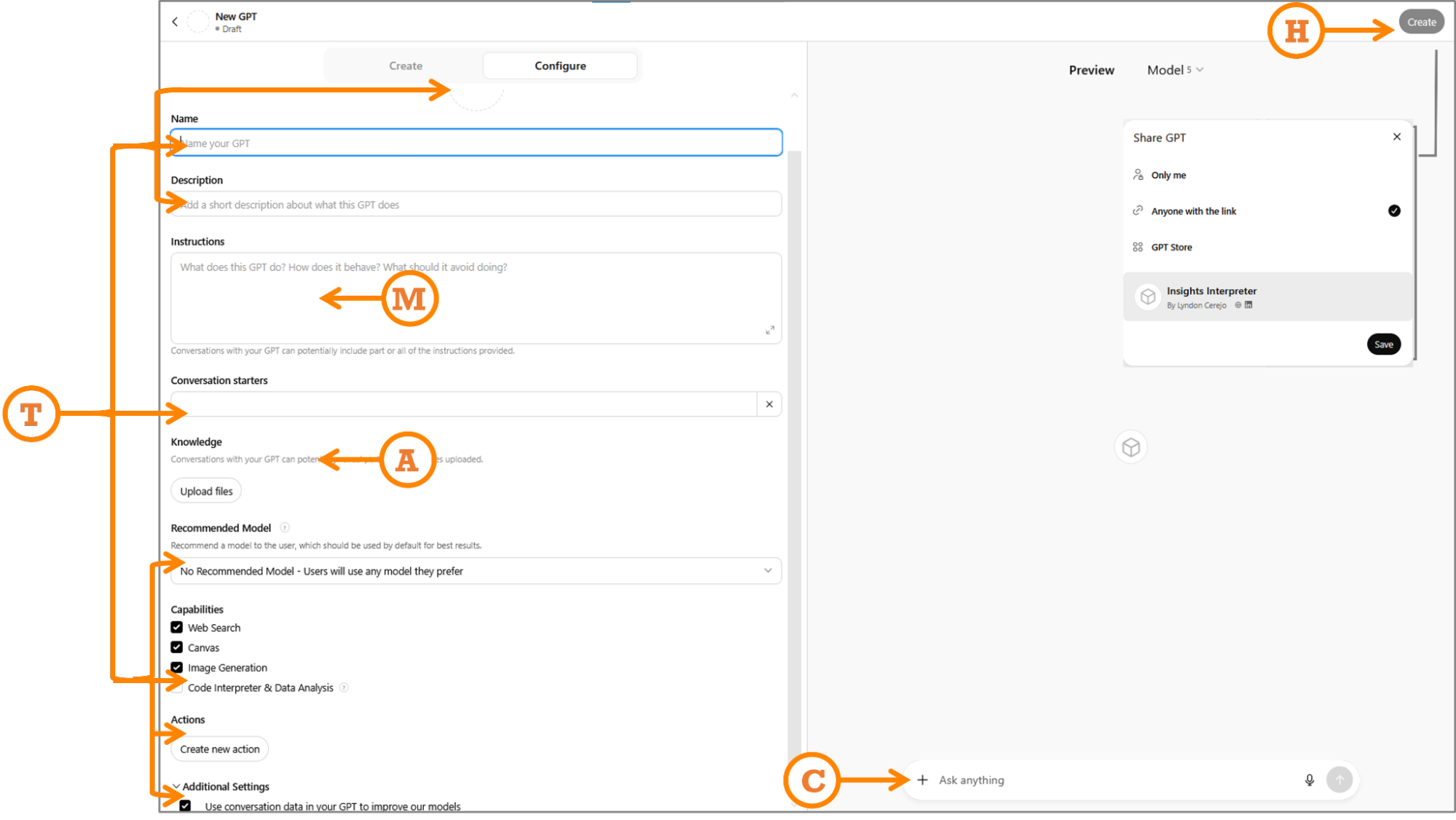
- M: Map your prompt. Port your successful structured prompt into the assistant's instructions.
- A: Add knowledge. Ground it in your world by uploading knowledge files, examples, or guides.
- T: Tailor for audience. Adjust capabilities, tone, examples, and conversation starters so they land with the people who will actually use it.
- C: Check, test, refine. Try the preview with different inputs and iterate until the outputs are right.
- H: Hand off and maintain. Set sharing options, distribute the link, and keep it updated.
The most requested assistant from readers was one that turns piles of customer feedback — survey responses, app reviews, open-ended comments — into actionable themes. That's the one worth building, and it's the perfect demonstration of turning a great prompt into a dependable teammate. Let's call it Insight Interpreter.
Building the Insight Interpreter: A CustomGPT Walkthrough
Customer feedback often arrives in overwhelming volume, split between solicited sources like surveys and unsolicited ones like social media posts and public reviews. Making sense of that mix is a perfect job for an AI assistant. The example here takes the WIRE+FRAME prompt from the earlier article and turns it into a working CustomGPT called the Insight Interpreter.
Starting at https://chat.openai.com/gpts/editor presents two routes:
- Conversational interface: Quick to start, but inputs get baked in messily, leading to vague or inconsistent instructions over time.
- Configure interface: A structured form with fields for instructions, file uploads, and capability toggles. Less instant, but far more control — the right pick for assistants you plan to depend on or share.
The MATCH framework works for both. In conversational mode it serves as a mental checklist; in configure mode it becomes a formal structured checklist as shown here.
M: Map Your Prompt
Start by pasting the complete WIRE+FRAME prompt into the Instructions field exactly as written. That prompt already contains the key components, mapped here for reference:
- Who & What: The persona and deliverable — a senior UX researcher specializing in synthesizing qualitative data.
- Input Context: Scope and background, such as analyzing uploaded customer feedback from named sources.
- Rules & Constraints: Boundaries like not fabricating pain points, quotes, journey stages, or patterns.
- Expected Output: The structured theme list format with required fields for each theme.
- Flow: Explicit ordered sub-tasks, defined as step-by-step instructions.
- Reference Voice: Tone guidance, e.g., concise, pattern-driven, and objective.
- Ask for Clarification: Behavior when data is missing or ambiguous.
- Memory: Persistent instructions to keep using the defined process unless told otherwise.
- Evaluate & Iterate: Built-in self-critique and improvement suggestions on outputs.
For Copilot Agents or Gemini Gems, the same full prompt goes into their respective Instructions sections.
A: Add Knowledge And Training
Upload up to 20 files in the knowledge section to give the CustomGPT working context. Keep them small and clearly versioned — reviews_Q2_2025.csv beats latestfile_final2.csv. For a customer feedback analyzer producing journey-stage themes with severity and effort ratings, useful files include:
- Taxonomy of themes
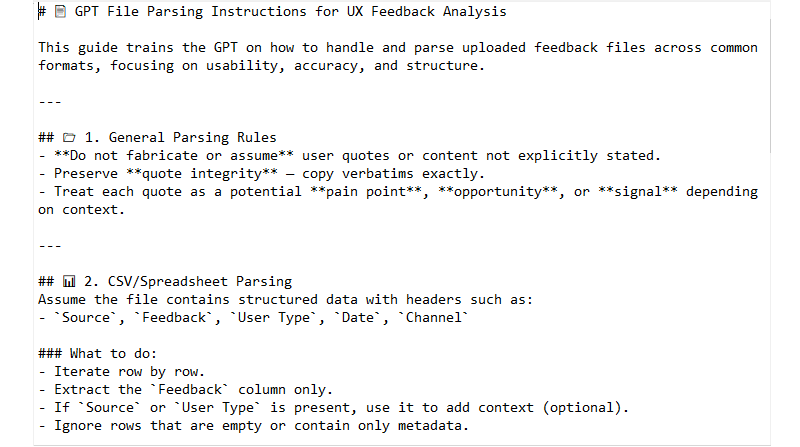
- Parsing instructions for uploaded data
- Example UX research reports following the target structure
- Scoring guidelines distinguishing severity levels, such as 3 vs. 5
- Customer journey map stages
- Templates for feedback files, not actual data
T: Tailor For Audience
Two types of tailoring matter here: audience and functional configuration.
Audience tailoring: If others will use the CustomGPT, the prompt’s Reference Voice section should already set the tone and expertise level. If not, fix that now. Then use Conversation starters to add example prompts phrased for end users. For the Insight Interpreter, "Analyze feedback from the attached file" makes its purpose obvious to anyone, whereas "Analyze data" only serves the builder. Similar logic applies elsewhere: a curiosity-focused GPT might use starters like "What are the types of curiosity?" so users unfamiliar with its scope can jump in.
Functional tailoring: Fill in the customization fields:
- Name: Choose something descriptive, like "Insights Interpreter — Customer Feedback Analyzer." A version number can help. The name appears in the sidebar, so front-load the recognizable part.
- Icon: Upload or generate a simple image that stays identifiable at small sidebar sizes.
- Description: Write a brief, clear value statement. This matters for discoverability if listed in the GPT store.
- Recommended Model: Select one if the task needs specific capabilities — GPT-5-level reasoning for detailed analysis, for instance. Otherwise leave it to user choice.
- Capabilities: Disable anything unneeded. Turn off Web Search to constrain analysis to uploaded data only. Enable Code Interpreter & Data Analysis to process uploaded files. Canvas is for shared editing of written work; Image generation applies only if visuals are required.
- Actions: Third-party API integration, an advanced feature not needed here.
- Additional Settings: Toggle off training on OpenAI models, which is opted in by default.
C: Check, Test & Refine
Before testing, do a final review: Is the concept sharp and focused rather than a do-everything bot? Are roles, goals, and tone explicit? Are the supporting assets such as documentation and guides loaded? Can a newcomer get started without friction?
Use the Preview panel to verify the CustomGPT matches or exceeds the original WIRE+FRAME prompt’s performance on representative inputs. Compare results against expectations. If something that worked previously now fails, inspect whether new instructions or knowledge files are overriding it.
Common issues have quick fixes:
- Generic answers: Tighten Input Context or refresh knowledge files.
- Hallucinations: Revisit Rules. Disable web browsing when external data isn’t needed.
- Wrong tone: Strengthen Reference Voice or replace examples with clearer ones.
- Inconsistency: Test across models in preview, then set the most reliable one as recommended.
H: Hand Off And Maintain
Publishing via "Create" offers several access levels:
- Only me: Private use for experimentation or personal workflows.
- Anyone with the link: Shareable but not searchable — useful for team pilots. Links can be reshared, so treat them as semi-public.
- GPT Store: Fully public and findable. This is the option used here.
- Business workspace: Restricted to your organization on GPT Business, keeping everything in-house.
Publication is just the start. Ongoing maintenance keeps the assistant relevant:
- Collect feedback: Ask teammates what broke, what they had to fix manually, and what’s missing.
- Iterate: Apply updates or duplicate the GPT to run multiple versions. Manage all CustomGPTs at https://chatgpt.com/gpts/mine.
- Track changes: Keep a dated changelog with version numbers for traceability.
- Refresh knowledge: Update knowledge files and examples on a regular cadence to prevent stale outputs.
The Insight Interpreter went live using exactly this process. Comparing its outputs against the plain WIRE+FRAME prompt shows why the extra setup matters:
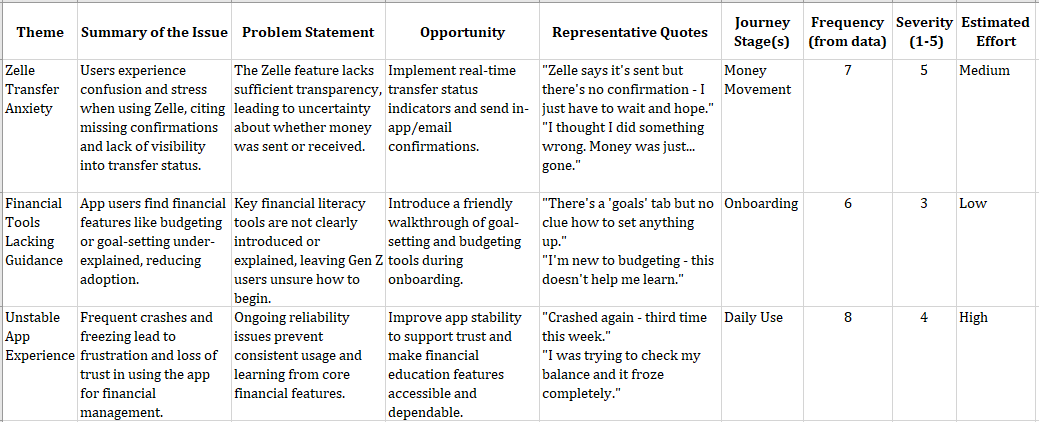
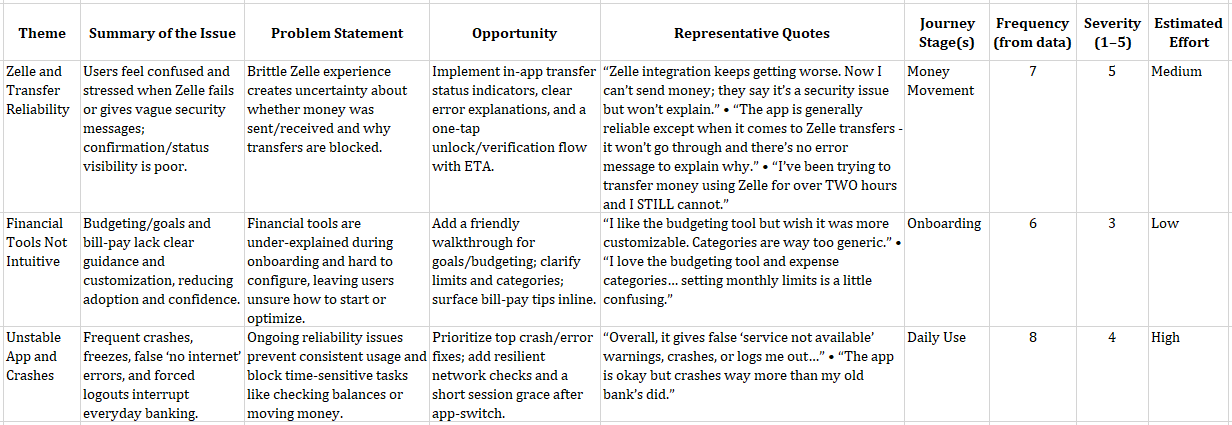
Results are broadly similar but not identical. The core themes, issues, journey stages, frequency, severity, and effort estimates match, with some wording drift in theme labels, summaries, and problem statements. Opportunities and quotes differ more visibly — a direct result of the knowledge files, examples, and guardrails now acting as always-on guidance instead of single-use prompt context.
Expect variance. Generative AI output is inherently variable; identical inputs won’t produce identical wording on repeated runs, and underlying model capabilities shift frequently. To keep things stable, recommend a specific model, version your data, and compare outputs on structure, priorities, and evidence rather than chasing exact phrasing.
Rather than adopting the Insight Interpreter as-is, spend 15 minutes building your own using this process. That’s the only way to embed the tone, context, and output formats that match your team’s actual work.
More Assistant Ideas
Beyond the Insight Interpreter and the earlier Critique Coach and Prototype Prodigy concepts, these assistant types demonstrate the range of useful automation:
- Workshop Wizard: Drafts agendas, icebreaker questions, and follow-up survey drafts.
- Research Roundup Buddy: Condenses transcripts into themes and produces quote-plus-visual highlight reels for team share-outs.
- Persona Refresher: Updates stale personas from recent feedback and rewrites them for different audiences, from boardroom formal to design-team casual.
- Content Checker: Reviews copy for tone, accessibility, and reading level before publication.
- Trend Tamer: Monitors competitor reviews for emerging patterns worth addressing before they hit your roadmap.
- Microcopy Provocateur: Experiments with alternate phrasing under different tones — sassy, calm, ironic, nurturing — and simulates user reactions, particularly for error states and calls to action.
- Ethical UX Debater: Voices an ethics board or concerned user to pressure-test design decisions and deceptive patterns.
The strongest custom assistants come from examining your workflow for regular, repetitive tasks where AI augmentation adds real leverage — then applying this same build, test, and maintain cycle to create a team of specialized tools.
Assistants, Under The Hood: Answers For The Pragmatic
Building a custom assistant is straightforward, but making one that's actually useful requires understanding what these tools can and can't do. Here's what you need to know before you start uploading files and writing instructions.
- The intern analogy holds. Think of a CustomGPT as a very smart intern with broad but shallow knowledge. The underlying LLM can carry biases, hallucinate, or offer incomplete answers. Your uploaded files serve as onboarding documentation, your guardrails become the job description, and regular updates are how you retrain the hire.
- You can't copy someone else's CustomGPT, but you can reverse-engineer it. There's no direct clone function, but you can study how a public assistant is framed and rebuild it using the WIRE+FRAME & MATCH approach to keep full control over instructions and files. Google's Gemini Gems, however, work more like shared documents: anyone with access can view the instructions and files, and anyone with edit rights can update or delete the Gem.
- Assume your uploads aren't private. Files stored to answer prompts could be referenced if the CustomGPT isn't set to private or if conversations are allowed to improve the model. Never upload sensitive, confidential, or personal data unless you're comfortable with it circulating. Enterprise accounts offer some safeguards, so verify your company's policy.
- Start small with files. Platform limits differ, but focused, granular files outperform huge documents. Think "chapter" rather than "entire book." Current limits at the time of writing: CustomGPTs allow up to 20 files, Copilot Agents up to 200 (if you need that many, your agent probably lacks focus), and Gemini Gems up to 10.
- CustomGPTs versus Projects: know the difference. A CustomGPT is a specialist: an assistant tuned for a single role, like an "Insight Interpreter." A Project is a container: a workspace for grouping multiple prompts, files, and conversations around a broader effort. For something reusable and shareable, go with a CustomGPT. For organizing broad work with mixed outputs and shared knowledge, choose Projects.
Design As A Discipline
Throughout this series, we've moved from unstructured prompting to the structured WIRE+FRAME framework, and now to building your own reusable assistant. The progression is deliberate: every step treats prompt design as a craft.
CustomGPTs don't replace designers. They extend your craft, codify your expertise, and create leverage for your team that generic AI models can't match. The value isn't in the tool itself—it's in how thoughtfully you design and manage it.
Build one this week. Train it, share it, stress-test it, and keep refining it until it truly augments your workflow.



