

Terminal animation is a systems problem
ASCII art looks simple because the output is just text. But building an animated banner for a CLI means working within a rendering environment that has no canvas, no compositor, no frame buffer, and no standard color model. Every frame is a sequence of stdout writes and ANSI control sequences, manually repainted over whatever was there before.
The GitHub Copilot CLI team discovered this when they set out to add an entrance animation to the command-line experience: a 3D Copilot mascot flying in to reveal the CLI logo. What looks like a playful three-second flourish took over 6,000 lines of TypeScript—most of it dedicated not to the visuals themselves, but to terminal quirks, accessibility, and keeping the rendering logic testable and maintainable.
The constraints come from the medium itself. Terminals treat output as a stream of characters. They don't offer frames, sprites, z-index, pixels, or animation tick rates. ANSI escape codes like \x1b[35m or \x1b[H behave differently across emulators—and some environments, such as older Windows Command Prompt or PowerShell, barely support them at all. There is no consistent rendering model, and screen readers can treat rapidly changing characters as noise. The result is a fragmented landscape where every engineering decision has to account for terminals the developer will never see.
Color as a semantic system, not a literal one
Cursor movement is the tractable part. Color is where the real complexity hides. ANSI terminals support 16-color mode, 256-color mode, and sometimes truecolor—but truecolor support is inconsistent. Even at 256 colors, terminals remap values based on user themes, accessibility settings, high-contrast modes, light or dark backgrounds, and OS-level overrides. You can't promise a specific hue, and users often disagree about what "good" colors look like.
For the Copilot CLI animation, the team treated color as a set of semantic roles rather than literal RGB values. Eyes, goggles, shadow, and border were each mapped to high-level roles that map to 4-bit ANSI colors—the minimal customizable palette most terminals allow users to override. This approach degrades gracefully when users have customized themes or need higher contrast, even if it means the brand palette isn't reproduced exactly.
There are realistic alternatives, but each has a downside:
- Using no color at all guarantees compatibility but makes it harder to guide attention in dense output.
- Using richer color modes (8-bit, truecolor) introduces support and maintenance headaches across terminals and accessibility profiles.
- Using a minimal palette like the one they chose limits brand accuracy but maximizes compatibility and user control.
Building the design toolchain from scratch
There are tools for creating static ASCII art, but almost none exist for frame-by-frame ANSI animation: no way to preview multi-color output across terminals, no way to export color roles, no way to generate components for Chris Dickinson's Ink—a React renderer for building CLIs in JSX. Ink re-renders on every state change, but it offers no frame delta management, no synchronization with terminal paint cycles, and no protection against flicker or cursor ghosting. Animation logic would have to be handcrafted.
Brand designer Cameron Foxly (@cameronfoxly), who was initially asked to create a static banner, quickly hit the limits of a manual workflow. After attempting to create even one frame by hand, he concluded it was a nightmare and decided to build his own tool. Working in VS Code with GitHub Copilot as his pairing partner, he prototyped an animation editor within an hour. It could read text files as frames, render them sequentially, control timing, clear the screen without flicker, and present a basic UI.
The first version was monochrome. Here is a simplified variation of the early frame loop logic:
import fs from "fs";
import readline from "readline";

/**
 * Load ASCII frames from a directory.
 */
const frames = fs
  .readdirSync("./frames")
  .filter(f => f.endsWith(".txt"))
  .map(f => fs.readFileSync(`./frames/${f}`, "utf8"));

let current = 0;

function render() {
  // Move cursor to top-left of terminal
  readline.cursorTo(process.stdout, 0, 0);

  // Clear the screen below the cursor
  readline.clearScreenDown(process.stdout);

  // Write the current frame
  process.stdout.write(frames[current]);

  // Advance to next frame
  current = (current + 1) % frames.length;
}

// 75ms = ~13fps. Higher can cause flicker in some terminals.
setInterval(render, 75);
Color turned out to be the dominant obstacle. Once it was added, the inconsistencies across terminals and the accessibility constraints began to shape every downstream decision.
From frames to fill: adding an ANSI color brush
To make the visual design tractable, Cameron needed a way to paint characters with ANSI color roles while previewing the result in different contexts. Skepticism aside, he took a screenshot of the Wikipedia ANSI color table and asked Copilot to scaffold a palette UI for his tool. The simplified version looks like this:
function applyColor(char, color) {
  // Minimal example: real implementation needed support for roles,
  // contrast testing, and multiple ANSI modes.
  const codes = {
    magenta: "\x1b[35m",
    cyan: "\x1b[36m",
    white: "\x1b[37m"
  };

  return `${codes[color]}${char}\x1b[0m`; // Reset after each char
}
This gave him a Photoshop-like workflow: paint ASCII characters one at a time, but with semantic color roles instead of literal colors.
Getting the animation into Ink
With the frames ready, the next step was exporting them into the actual Copilot CLI. The team's existing UI is built with Ink and JSX components that render to stdout. The animation had to fit the same model: accept frames, render them line by line, and animate them with state updates.
Here is a simplified Ink frame renderer:
import React from "react";
import { Box, Text } from "ink";

/**
 * Render a single ASCII frame.
 */
export const CopilotBanner = ({ frame }) => (
  <Box flexDirection="column">
    {frame.split("\n").map((line, i) => (
      <Text key={i}>{line}</Text>
    ))}
  </Box>
);
And a minimal animation wrapper:
export const AnimatedBanner = () => {
  const [i, setI] = React.useState(0);

  React.useEffect(() => {
    const id = setInterval(() => setI(x => (x + 1) % frames.length), 75);
    return () => clearInterval(id);
  }, []);

  return <CopilotBanner frame={frames[i]} />;
};
Foxly relied on Copilot to fill in syntax—his first engineering pull request in nine years at GitHub. But as he describes it, the architectural decisions were his own.
Accessibility shapes the architecture from the start
Terminal users have a wide range of visual abilities: some are blind and use screen readers, others have low vision or color blindness, and many work in customized high-contrast themes. Rapid re-renders create auditory clutter for screen readers. Color-based meaning must degrade safely because bold, dim, or subtle hues may be imperceptible. And animations must never be automatic—they have to be opt-in.
These constraints shaped the Copilot CLI animation's architecture from the start. The animation appears behind an opt-in flag. Clearing sequences are designed to avoid confusing assistive technologies. And the banner has to remain legible and functional even when the user's terminal overrides every color in the animation, or when the animation isn't visible at all. What looks like a lighthearted mascot fly-in is, underneath, a study in making rich visual effects work within the most constrained rendering environment in modern software.
Terminal animation is still uncharted territory
Bringing the banner into the Copilot CLI codebase fell to Andy Feller (@andyfeller), a long-time GitHub engineer on the GitHub CLI team, working alongside Cameron. The core problem: terminal environments lack the shared infrastructure that makes UI work predictable on the web. There is no DOM, no standardized accessibility layer, and behavior is inherited from decades-old hardware like the VT100. "There's no framework for terminal animations," Andy said. "We had to figure out how to do this without flickering, without breaking accessibility, and across wildly different terminals."
Rendering without flicker or delay
Terminals typically repaint the entire viewport when new content arrives, and CLI users expect to start working immediately. The team had to introduce a brief banner without slowing startup or destabilizing the render loop. Different terminals complicate this further by throttling fast writes, revealing cleared frames, buffering output differently, and repainting cursor regions inconsistently.
The solution treated the animation as a non-blocking enhancement. Key decisions included keeping it under three seconds, separating static from dynamic components to reduce redraws, initializing MCP servers and user setup without blocking render, and working within Ink's asynchronous re-rendering model.
ANSI color is a moving target
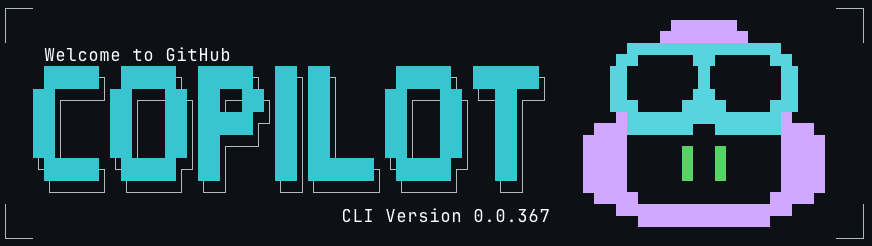
"ANSI color consistency simply doesn't exist," Andy noted. While most terminals support 8-bit color with 256 options, actual rendering varies with themes, OS settings, and user overrides. The Copilot wordmark added another wrinkle: even though it's built from text characters, it functions as a graphical object, which carries different contrast requirements than readable body text under accessibility guidelines.
The team chose a minimal 4-bit ANSI palette—one of the few color modes users can customize across most terminals—to keep the animation legible under high-contrast themes and low-vision settings. Instead of encoding brand colors directly, the animation maps semantic roles like borders, eyes, and highlights to ANSI color slots that terminals can safely reinterpret. This keeps the banner recognizable without seizing control of the user's color environment.
Making the animation maintainable
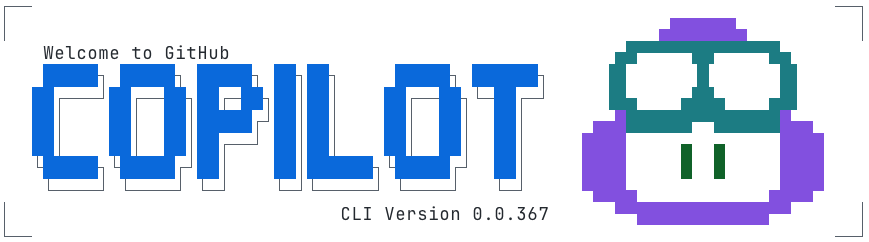
Cameron's prototype was a solid starting point, but turning it into a maintainable system required significant refactoring. The banner spans roughly 20 frames across an 11×78 area, with about 10 stylized elements per frame. Frames originally mapped hard-coded colors to coordinates, making them brittle and hard to theme.
The refactor broke the animation into distinct elements that could support separate light and dark themes:
type AnimationElements =
    | "block_text"
    | "block_shadow"
    | "border"
    | "eyes"
    | "head"
    | "goggles"
    | "shine"
    | "stars"
    | "text";

type AnimationTheme = Record<AnimationElements, ANSIColors>;

const ANIMATION_ANSI_DARK: AnimationTheme = {
    block_text: "cyan",
    block_shadow: "white",
    border: "white",
    eyes: "greenBright",
    head: "magentaBright",
    goggles: "cyanBright",
    shine: "whiteBright",
    stars: "yellowBright",
    text: "whiteBright",
};

const ANIMATION_ANSI_LIGHT: AnimationTheme = {
    block_text: "blue",
    block_shadow: "blackBright",
    border: "blackBright",
    eyes: "green",
    head: "magenta",
    goggles: "cyan",
    shine: "whiteBright",
    stars: "yellow",
    text: "black",
};
The overall animation then captured content, color, and timing for the full sequence:
interface AnimationFrame {
    title: string;
    duration: number;
    content: string;
    colors?: Record<string, AnimationElements>; // Map of "row,col" positions to animation elements
}

interface Animation {
    metadata: {
        id: string;
        name: string;
        description: string;
    };
    frames: AnimationFrame[];
}
Each frame was stored to separate content from styling and animation details, producing over 6,000 lines of TypeScript to animate three seconds of the logo reliably:
    const frames: AnimationFrame[] = [
        {
            title: "Frame 1",
            duration: 80,
            content: `
┌┐
││

││
└┘`,
            colors: {
                "1,0": "border",
                "1,1": "border",
                "2,0": "border",
                "2,1": "border",
                "10,0": "border",
                "10,1": "border",
                "11,0": "border",
                "11,1": "border",
            },
        },
        {
            title: "Frame 2",
            duration: 80,
            content: `
┌──     ──┐
│         │
 █▄▄▄
 ███▀█
 ███ ▐▌
 ███ ▐▌
   ▀▀█▌
   ▐ ▌
    ▐
│█▄▄▌     │
└▀▀▀    ──┘`,
            colors: {
                "1,0": "border",
                "1,1": "border",
                "1,2": "border",
                "1,8": "border",
                "1,9": "border",
                "1,10": "border",
                "2,0": "border",
                "2,10": "border",
                "3,1": "head",
                "3,2": "head",
                "3,3": "head",
                "3,4": "head",
                "4,1": "head",
                "4,2": "head",
                "4,3": "goggles",
                "4,4": "goggles",
                "4,5": "goggles",
                "5,1": "head",
                "5,2": "goggles",
                "5,3": "goggles",
                "5,5": "goggles",
                "5,6": "goggles",
                "6,1": "head",
                "6,2": "goggles",
                "6,3": "goggles",
                "6,5": "goggles",
                "6,6": "goggles",
                "7,3": "goggles",
                "7,4": "goggles",
                "7,5": "goggles",
                "7,6": "goggles",
                "8,3": "eyes",
                "8,5": "head",
                "9,4": "head",
                "10,0": "border",
                "10,1": "head",
                "10,2": "head",
                "10,3": "head",
                "10,4": "head",
                "10,10": "border",
                "11,0": "border",
                "11,1": "head",
                "11,2": "head",
                "11,3": "head",
                "11,8": "border",
                "11,9": "border",
                "11,10": "border",
            },
        },
At render time, each frame builds text segments based on consecutive color usage with the necessary ANSI escape codes:
           {frameContent.map((line, rowIndex) => {
                const truncatedLine = line.length > 80 ? line.substring(0, 80) : line;
                const coloredChars = Array.from(truncatedLine).map((char, colIndex) => {
                    const color = getCharacterColor(rowIndex, colIndex, currentFrame, theme, hasDarkTerminalBackground);
                    return { char, color };
                });

                // Group consecutive characters with the same color
                const segments: Array<{ text: string; color: string }> = [];
                let currentSegment = { text: "", color: coloredChars[0]?.color || theme.COPILOT };

                coloredChars.forEach(({ char, color }) => {
                    if (color === currentSegment.color) {
                        currentSegment.text += char;
                    } else {
                        if (currentSegment.text) segments.push(currentSegment);
                        currentSegment = { text: char, color };
                    }
                });
                if (currentSegment.text) segments.push(currentSegment);

                return (
                    <Text key={rowIndex} wrap="truncate">
                        {segments.map((segment, segIndex) => (
                            <Text key={segIndex} color={segment.color}>
                                {segment.text}
                            </Text>
                        ))}
                    </Text>
                );
            })}
Putting accessibility first
The team applied the same philosophy as the broader GitHub CLI accessibility work: respect global color overrides in terminal and system preferences, avoid animations after first use unless explicitly enabled, and minimize ANSI instructions that could confuse assistive technology. The animation is opt-in behind its own flag, and it is automatically skipped in --screen-reader mode so no decorative motion reaches assistive tools.
"CLI accessibility is under researched," Andy said. "We've learned a lot from users who are blind as well as users with low vision, and those lessons shaped this project."
An architecture ready for reuse
The final structure stores frames as plain text, layers semantic roles on top, and applies themes at runtime under Ink's control. This pattern—plain-text frames with runtime colorization—is not specific to Copilot. It is a reusable approach for terminal UIs and animations generally.
What an ASCII banner taught us about CLI engineering
A seemingly simple banner produced a frame-based animation tool that hadn't existed before, a custom ANSI palette strategy, a new Ink component, and a rendering architecture built for maintenance and accessibility. It also gave Cameron a first open source contribution path: she built out her MVP into ascii-motion.app, and community members are already contributing. "The most rewarding part was stepping into open source for the first time," she said.
The broader lesson is that terminal accessibility lags far behind web standards, and building for it requires inventing tooling where none exists. The Copilot CLI team can now ship new animations without rebuilding the system—proof that disciplined, accessibility-first engineering can push CLIs into a more useful future for everyone.


