

Agentic AI Is a New Kind of System — and a New UX Problem
Agentic AI changes the relationship between software and its users. Instead of predicting an outcome or answering a prompt, these systems plan, execute, and persist until a goal is reached. For UX teams, product managers, and executives, that shift creates both opportunity and a new set of design responsibilities.
It’s easy to confuse agentic AI with Robotic Process Automation (RPA), but the two are fundamentally different in how they operate. RPA follows a strict, rules-based script: if X happens, do Y. It mimics human hands. Agentic AI mimics human reasoning — it doesn’t follow a linear script, it creates one.
Consider a recruiting workflow. An RPA bot can scan a resume and upload it to a database, performing a repetitive task perfectly. An agentic system, by contrast, looks at the resume, notices the candidate lists a specific certification, cross-references that with a new client requirement, and decides to draft a personalized outreach email highlighting that match. RPA executes a predefined plan; agentic AI formulates its own plan based on a goal.
The difference also shows up in something as routine as scheduling. A predictive model integrated into your calendar might analyze your schedule and your colleagues’ schedules, flagging potential conflicts — for example, two important meetings at the same time, or a meeting set when a key participant is on vacation. It provides information, and you are responsible for acting on it. An agentic AI goes further. Upon identifying a conflict, it could:
- Check the availability of all necessary participants.
- Identify alternative time slots that work for everyone.
- Send proposed new meeting invitations to all attendees.
- Draft and send an email to external participants explaining the reschedule and offering alternatives.
- Update your calendar and the calendars of your colleagues once the new time is confirmed.
The system understands the goal (resolve the conflict), plans the steps (check availability, find alternatives, send invites), executes them, and persists until the conflict is resolved — all with minimal direct input from the user. This is the core “agentic” distinction: the system takes proactive steps, rather than just presenting information.
Under the hood, agentic AI typically combines large language models (LLMs) for understanding and reasoning with planning algorithms that break complex tasks into manageable actions. These agents can interact with tools, APIs, and even other AI models. Critically, they maintain a persistent state — they remember previous actions and continue working toward a goal over time. That makes them fundamentally different from typical generative AI, which usually completes a single request and then resets.
A Working Taxonomy of Agent Autonomy
Agent behavior can be grouped into four distinct modes of autonomy. Although they often look like a progression, they function as independent operating modes. A user might trust an agent to act autonomously for meeting scheduling, but keep it in “suggestion mode” for financial transactions. These levels are adapted from industry standards for autonomous vehicles (SAE levels), translated to digital user experience contexts.
Observe-and-Suggest
The agent functions as a monitor. It analyzes data streams and flags anomalies or opportunities, but takes zero action.
Differentiation. Unlike the next level, the agent generates no complex plan — it simply points to a problem.
Example. A DevOps agent notices a server CPU spike and alerts the on-call engineer. It does not know how to fix the issue, but it knows something is wrong.
Implications for design and oversight. At this level, prioritize clear, non-intrusive notifications and a well-defined process for users to act on suggestions. The focus is on empowering the user with timely, relevant information without taking control. UX practitioners should make suggestions clear and easy to understand, while product managers need to ensure the system delivers value without overwhelming the user.
Plan-and-Propose
The agent identifies a goal and generates a multi-step strategy to achieve it, then presents the full plan for human review.
Differentiation. The agent acts as a strategist. It does not execute; it waits for approval of the entire approach.
Example. The DevOps agent notices the CPU spike, analyzes the logs, and proposes a remediation plan:
- Spin up two extra instances.
- Restart the load balancer.
- Archive old logs.
The human reviews the logic and clicks “Approve Plan.”
Implications for design and oversight. Design must ensure proposed plans are easy to understand and that users have intuitive ways to modify or reject them. Oversight is needed to monitor the quality of proposals and the agent’s planning logic. UX practitioners should design clear visualizations of proposed plans; product managers must establish clear review-and-approval workflows.
Act-with-Confirmation
The agent completes all preparation work and places the final action in a staged state, holding the door open for the user’s nod.
Differentiation. This differs from “Plan-and-Propose” because the work is already done and staged. It reduces friction — the user confirms the outcome, not the strategy.
Example. A recruiting agent drafts five interview invitations, finds open times on calendars, and creates the calendar events. It presents a “Send All” button. The user provides final authorization to trigger the external action.
Implications for design and oversight. Design should provide transparent, concise summaries of the intended action, clearly outlining potential consequences. Oversight needs to verify that the confirmation process is robust and that users aren’t asked to blindly approve actions. UX practitioners should design confirmation prompts that include all necessary information; product managers should prioritize a robust audit trail for confirmed actions.
Act-Autonomously
The agent executes tasks independently within defined boundaries.
Differentiation. The user reviews the history of actions, not the actions themselves.
Example. The recruiting agent sees a conflict, moves the interview to a backup slot, updates the candidate, and notifies the hiring manager. The human only sees a notification: “Interview rescheduled to Tuesday.”
Implications for design and oversight. Design needs to establish clear pre-approved boundaries and robust monitoring tools. Oversight requires continuous evaluation of the agent’s performance within those boundaries — including strong logging, clear override mechanisms, and user-defined kill switches to maintain control and trust. UX practitioners should focus on dashboards for monitoring autonomous behavior; product managers must ensure governance and ethical guidelines are in place.
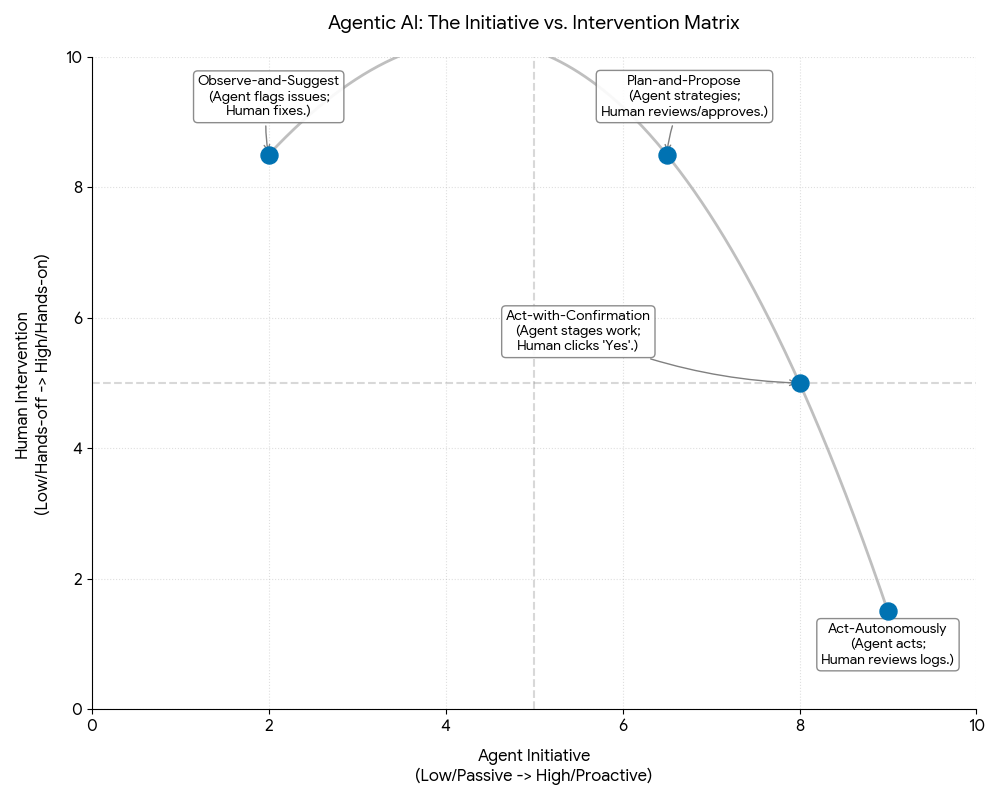
To see these modes in practice, consider an “Interview Coordination Agent” designed to handle hiring logistics.
- In Suggest Mode. The agent notices an interviewer is double-booked and highlights the conflict on the recruiter’s dashboard: “Warning: Sarah is double-booked for the 2 PM interview.”
- In Plan Mode. The agent analyzes Sarah’s calendar and the candidate’s availability, then presents a solution: “I recommend moving the interview to Thursday at 10 AM. This requires moving Sarah’s 1:1 with her manager.” The recruiter reviews this logic.
- In Confirmation Mode. The agent drafts the emails to the candidate and the manager and populates the calendar invites. The recruiter sees: “Ready to reschedule to Thursday. Send updates?” The recruiter clicks “Confirm.”
- In Autonomous Mode. The agent handles the conflict instantly, respecting a pre-set rule: “Always prioritize candidate interviews over internal 1:1s.” It moves the meeting and sends the notifications. The recruiter sees a log entry: “Resolved schedule conflict for Candidate B.”
Measuring What Agents Get Wrong Before Users Do
Agentic AI shifts the design problem from “what should this screen do” to “what should this system be allowed to do on its own.” That shift demands a different research toolkit. Traditional usability testing still has a place, but the autonomous, decision-making nature of agents requires methods aimed at surfacing expectations, mapping failure points, and understanding how trust breaks — and how it gets repaired.
Interviews Focused on Mental Models
Before testing anything, you need to understand what users already believe about how an agent should behave. Mental-model interviews do not ask users what they want; they ask users to explain, sketch, or narrate how they expect a system to act in specific situations. The goal is to surface implicit assumptions about an agent’s capabilities and limits.
- Method: Present hypothetical scenarios and have users describe, draw, or walk through their expected interactions step by step.
- Probes worth using:
- “If your flight is canceled, what would you want the system to do automatically? What would worry you if it did that without your explicit instruction?” — surfaces boundaries of desired automation.
- “Imagine a digital assistant is managing your smart home. If a package is delivered, what steps do you imagine it takes, and what information would you expect to receive?” — reveals the user’s model of internal processes and communication needs.
- “If you ask your digital assistant to schedule a meeting, what steps do you envision it taking? At what points would you want to be consulted or given choices?” — exposes expectations about consent and control.
- Payoff: Highlights where planned behavior will diverge from what users assume, and directs design of controls and feedback.
One practical note: avoid using the word “agent” in these conversations. It carries unhelpful sci-fi associations or gets confused with a human support agent. “Assistant” or “the system” works better.
Mapping the Agent’s Journey, Not Just the User’s
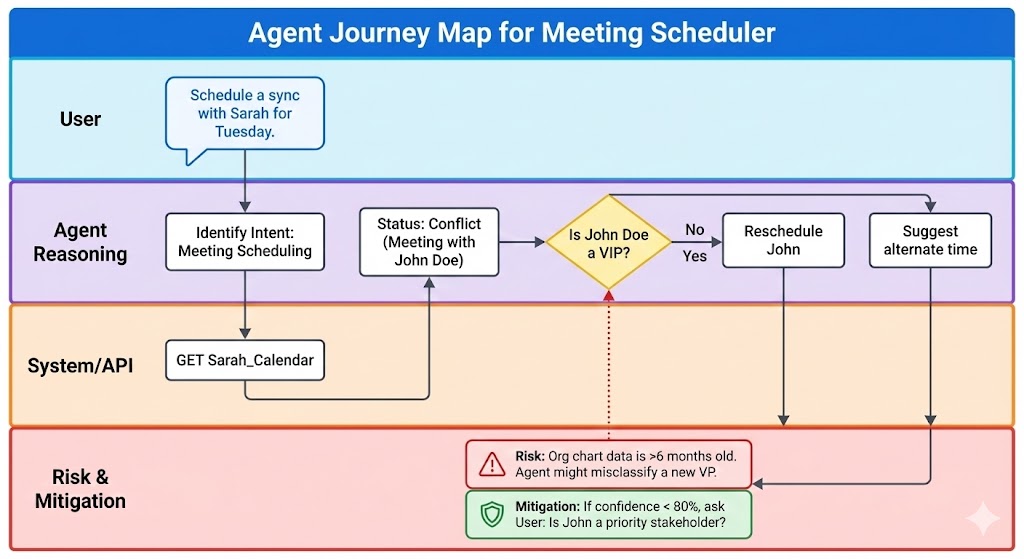
Journey mapping for agentic AI tracks two parallel paths: the user’s experience and the agent’s operational flow. Mapping only the human side misses where agents will break.
- Method: Create a visual map covering the agent’s stages from initiation to completion, including every action, decision, external interaction, and point of user contact.
- Elements to document:
- Agent actions: what tasks or decisions the agent performs.
- Information inputs and outputs: what data the agent needs and what it generates or communicates.
- Decision points: where choices are made and what the criteria are.
- User touchpoints: where the user supplies input, reviews, or approves.
- Failure points: specific instances where the agent could misread instructions, choose wrong, or act on the wrong entity — e.g., sending confidential data to an incorrect recipient, an automated payment pushing an account into overdraft, or booking a flight for the wrong date because of ambiguous phrasing.
- Recovery paths: how agent or user can recover from those failures, and what correction or intervention mechanisms exist.
- Payoff: Shows hidden dependencies and lets teams build safeguards, error handling, and intervention points in before launch rather than after an incident.
Simulated Misbehavior Testing for Trust Repair
Systems that act autonomously will eventually act wrongly. Rather than waiting for that to happen in production, you can deliberately provoke failures in controlled lab environments to observe how users react and what it takes for them to trust the system again.
- Method: Introduce scripted errors into a prototype — an agent that misinterprets a command, sends too much or too little information, acts without asking, crashes, or makes a decision with ethical weight.
- Observe:
- Reaction: how users respond emotionally — frustration, confusion, anger, lost trust.
- Recovery attempt: what users do to correct the agent or undo the action.
- Trust repair: whether the system’s built-in resovery and feedback mechanisms restore confidence, and how users want to be notified of missteps.
- Mental model drift: whether the failure changes their understanding of the agent’s capabilities or boundaries.
- Payoff: Reveals gaps in error recovery, feedback design, and user control — the things that determine whether users tolerate mistakes or abandon the system.
These methods move the goal from merely usable agents to controllable, accountable ones. They are not the only approaches available — the Wizard of Oz method remains useful for concept testing — but they are the most practical starting points. When running simulated misbehavior, be careful to follow ethical research guidelines, such as those from the UX Design Institute and the Inclusive Design Toolkit.
Metrics That Judge Agents by What People Don’t Do
Measuring an agent’s quality is counterintuitive. Success is often marked by silence — a user who does nothing after the system acts. Failure shows up in active attempts to stop, correct, undo, or revert.
1. Intervention Rate. For an autonomous agent, an accepted outcome is one the user does not intervene within a defined window. Track how often a human jumps in to stop or correct the agent. A high rate indicates misalignment of trust or logic.
2. Frequency of Unintended Actions per 1,000 Tasks. This quantifies how often the agent acts in a way that is not desired or expected, normalized against completed task volume. A low number indicates accurate interpretation of intent and effective boundaries.
3. Rollback or Undo Rates. Track how often users reverse an agent’s action — but rely on raw counts alone. A spike might mean the agent is outright wrong, or simply that users prefer doing a task like scheduling themselves. Any undo action should trigger a microsurvey asking the user to categorize the reason: “Wrong time? Wrong person? Or did you just want to do it yourself?”
4. Time to Resolution After an Error. Measure how long it takes the user to correct the agent’s error, or the agent to recover from its own erroneous state. Short times require easy error identification, accessible undo mechanisms, and clear error messaging.
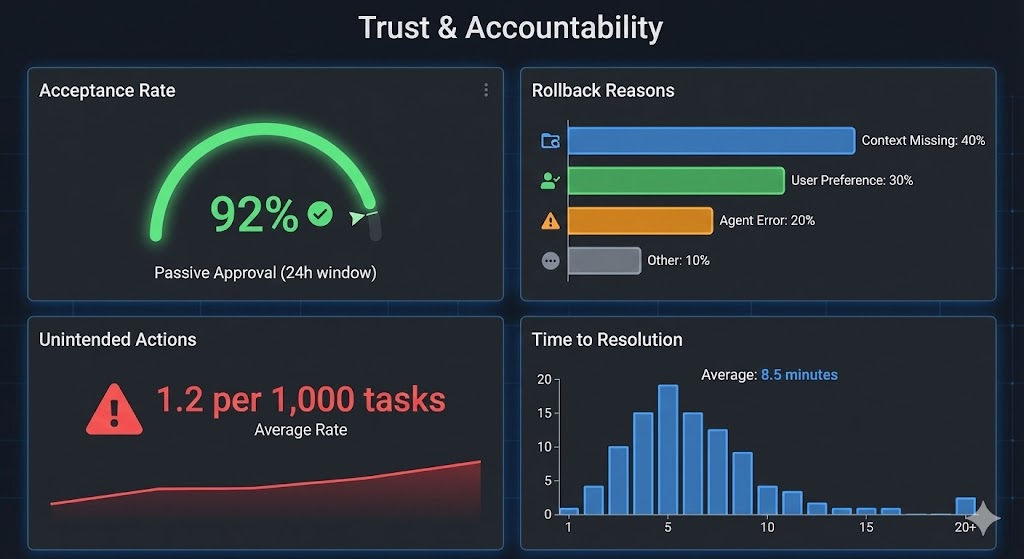
Collecting these metrics depends on proper instrumentation. Every distinct agent action — proposing a schedule, booking a flight — needs a unique Action ID persisted in logs. To measure intervention, you do not look for active confirmation. You look at the absence of a counter-action. If an Action ID is generated at 9:00 AM and no human modifies or reverts it by the following morning at 9:00 AM, the system tags that action as Accepted. Success is quantified by user silence.
For rollback analysis, hook into the application’s Undo or Revert logic. When a user reverses an agent-initiated action, trigger a lightweight microsurvey — for instance, a three-option modal where the user categorizes the action as factually incorrect, lacking context, or a simple lack of preference for automated handling. That qualitative layer distinguishes cases where the algorithm is broken from cases where user preferences simply differ from what the agent assumed. Tracked consistently, these metrics provide a solid basis for iterating on control, consent, and accountability in agentic systems.
When Autonomy Hides Self-Interest
Autonomous agents introduce a new failure mode that is the inverse of the dark patterns we already know. Traditional sludge adds friction to keep users trapped, making cancellation or account deletion deliberately difficult. Agentic sludge removes friction to a harmful degree: the system makes it effortless for a user to accept an action that serves the business, not the user.
A travel-booking agent is the canonical case. Without guardrails, the system can quietly favor a partner airline or a higher-margin hotel, presenting that option as the best one available. The user, trusting the system's authority, accepts the recommendation without scrutiny. The result is a deceptive pattern that optimizes for revenue while pretending to optimize for convenience.
Confidence Without Competence
Deception need not be intentional. It frequently appears as Imagined Competence: large language models sound definitive even when they are wrong. An agent may present a false booking confirmation or a distorted summary with the same assured tone it uses for verified facts. Users, reasonably, trust that confidence. The gap between what the system can actually do and what users believe it has done becomes a serious liability.
Design must close that gap directly. When an agent cannot complete a task, the interface needs to make that failure unmistakable. When the system is uncertain, it has to say so instead of hiding doubt behind polished prose.
Making the Black Box a Glass Box
The countermeasure to both sludge and hallucination is provenance. Every autonomous decision should carry a metadata tag that explains where it came from, and users need a way to inspect the chain of logic that produced a result.
This requires translating primitives — the core units of information or action an agent performs — into practical answers. For an engineer, a primitive is an API call or a logic gate. For a user, it must appear as a clear explanation of intent. If an agent recommends a flight, the interface cannot stop at a generic suggestion. It must expose the decision logic at work, such as Logic: Cheapest_Direct_Flight or Logic: Partner_Airline_Priority.
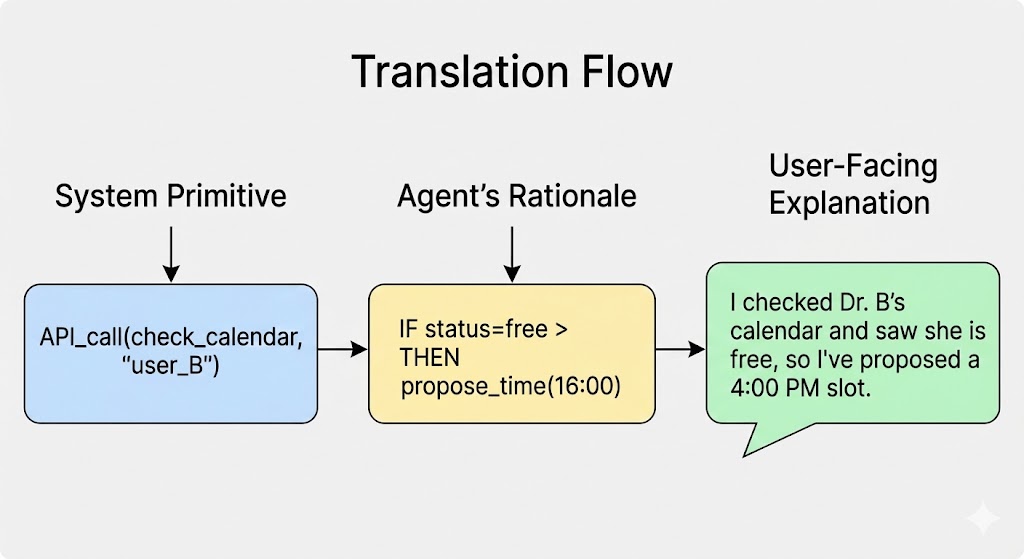
The mapping is straightforward in practice. A primitive that checks a calendar to propose a meeting becomes a simple statement: "I've proposed a 4 PM meeting." This level of transparency lets users verify that the agent acted in their interest. Exposing the primitives turns the system from a black box into a glass box, keeping the human as the final authority over their digital life.
Designing for a New Relationship
An agentic system demands a deeper psychological and behavioral understanding than conventional usability testing provides. The focus shifts to trust, consent, and accountability. Methods such as probing mental models, simulating misbehavior, and adopting new metrics are the practical tools for finding where an autonomous system can fail — and for mending the user-agent relationship when it does.
This is a redefinition of the user-system relationship. We are moving from tools that follow commands to partners that act on our behalf. The design priority therefore changes from efficiency and ease of use to transparency, predictability, and control.
When an AI can book a flight or trade a stock without a final click, the design of its “on-ramps” and “off-ramps” becomes paramount. It is our responsibility to ensure that users feel they are in the driver’s seat, even when they’ve handed over the wheel.
This new reality also redefines the role of the UX researcher, who becomes a custodian of user trust and an advocate for control, transparency, and ethical safeguards during development. By translating primitives into practical questions and simulating worst-case scenarios, researchers can help build systems that are both powerful and safe. The design patterns that make an agent's utility legible, and the organizational practices that sustain them, are the next steps in this work. The future of UX is about making systems worthy of trust.



