

Copilot tasks from anywhere on GitHub
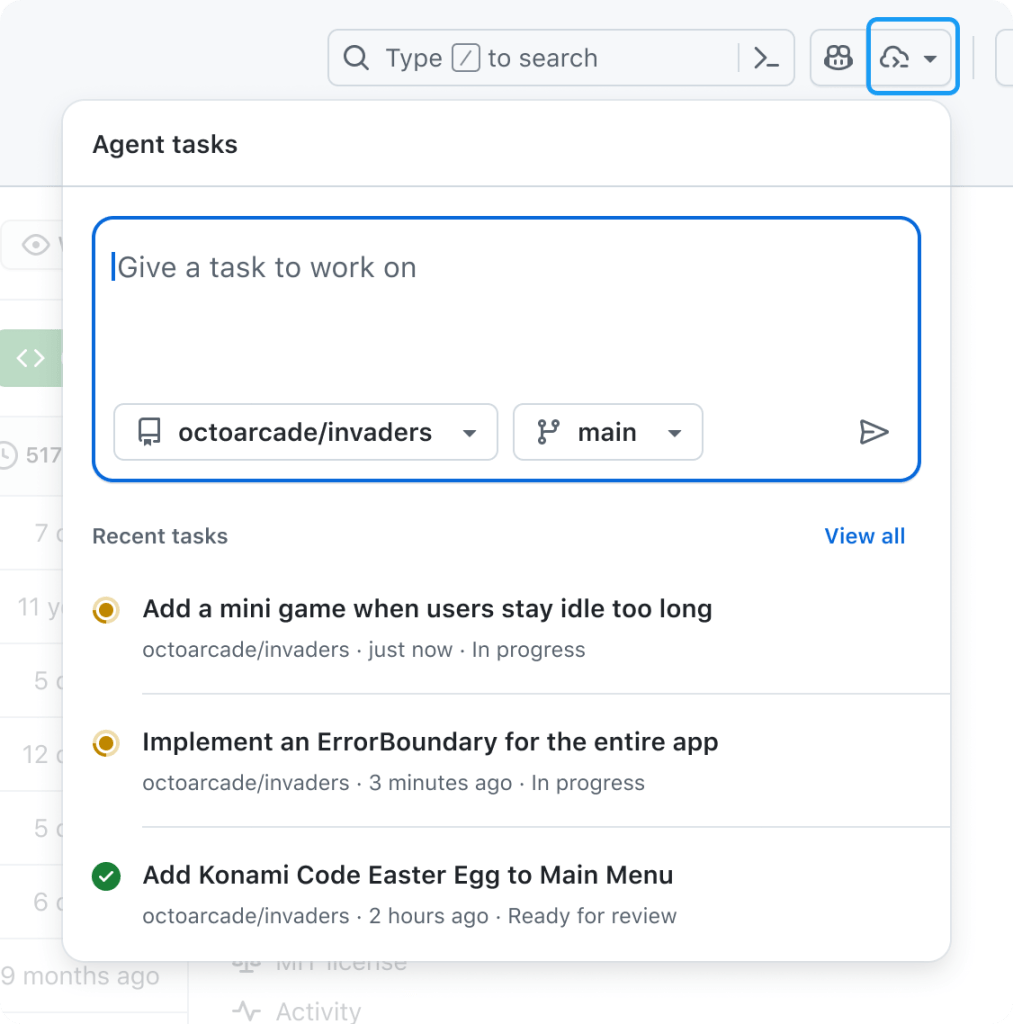
GitHub is expanding where you can kick off Copilot coding agent tasks. The new agents panel puts a lightweight overlay on every page of github.com, so you can assign work to Copilot and track progress without leaving whatever you’re currently looking at.
Click the Agents button in the navigation bar to open the panel, describe the task in natural language, and pick the target repository. From there, Copilot works in the background: it drafts a plan, makes changes, runs tests, and prepares a pull request for your review.
| Need a quick refresher on GitHub Copilot coding agent? Skip ahead > |
Beyond starting new work, the panel is a place to monitor active tasks and see real-time status. When a job is ready, you can jump straight into the resulting pull request from the same overlay. A View all tasks option expands the panel to full screen, and the github.com/copilot/agents page is available directly if you want to skip the overlay entirely.
Prompting patterns that work
You can be as specific or as open-ended as you like when starting a task. Some useful patterns:
- Simple tasks: “Add integration tests for LoginController,” “Refactor WidgetGenerator for better code reuse,” or “Add a dark mode/light mode switcher.”
- Use existing work as context: “Fix #877 using pull request #855 as an example” or “Fix #1050, and make sure you update the screenshots in the README.”
- Run independent jobs in parallel: issue separate prompts such as “Add unit test coverage for utils.go” and “Add unit test coverage for helpers.go.”
How Copilot coding agent operates
Copilot coding agent runs its tasks in the cloud inside a secure, GitHub Actions-powered environment. That means it can execute builds, tests, and linters without pinging you for approval on every step, and it keeps working even when your machine is off. You retain control through detailed logs and pull-request-based approvals, and you can steer the work by mentioning @copilot in a review.
The agent gets read access to repository data through the Model Context Protocol, powered by the GitHub MCP Server. It can also load web pages for testing and validation via the Playwright MCP Server, and it can connect to your own MCP servers.
Other entry points for agent tasks
The agents panel is the newest way to hand work to Copilot, but not the only one:
- GitHub Issues: assign an issue to Copilot from a repo on
github.comor in GitHub Mobile. - VS Code: delegate tasks and watch running agents through the GitHub Pull Requests extension.
- Other IDEs: ask Copilot to open a pull request from Copilot Chat in JetBrains IDEs and Visual Studio.
- MCP-enabled tools: trigger tasks from external apps that integrate through the Model Context Protocol.
Availability
The agents panel and Copilot coding agent are in public preview today for all paid Copilot subscribers. Enterprise administrators may need to enable the Copilot coding agent policy before the feature is available in their organization.


