

Workflow injection flaws are still common — and mostly avoidable
CI/CD pipelines have become a prime target for attackers, and GitHub Actions — one of the most widely adopted automation platforms — is squarely in the crosshairs. A joint research effort between the GitHub Security Lab, Purdue University, and North Carolina State University, presented at USENIX Security 2023, dug into GitHub Actions workflows across open source projects and uncovered a broad set of code injection vulnerabilities. The findings were confirmed by GitHub, which also helped coordinate disclosure with the many affected maintainers.
The vulnerabilities all trace back to a few recurring patterns. Understanding those patterns is the first step toward keeping your workflows safe.
Where the injection happens
A GitHub Actions workflow is a program that fires in response to repository events. Because those events are user-triggerable, the data attached to them — values such as github.event.issue.title or github.event.issue.body — has to be treated as untrusted input. The trouble starts when that input makes its way into GitHub's ${{ }} expression syntax inside a run block.
Here is a minimal workflow that is vulnerable:
- name: print title
  run: echo "${{ github.event.issue.title }}"
An attacker who creates an issue titled $(touch pwned.txt) can exploit this:
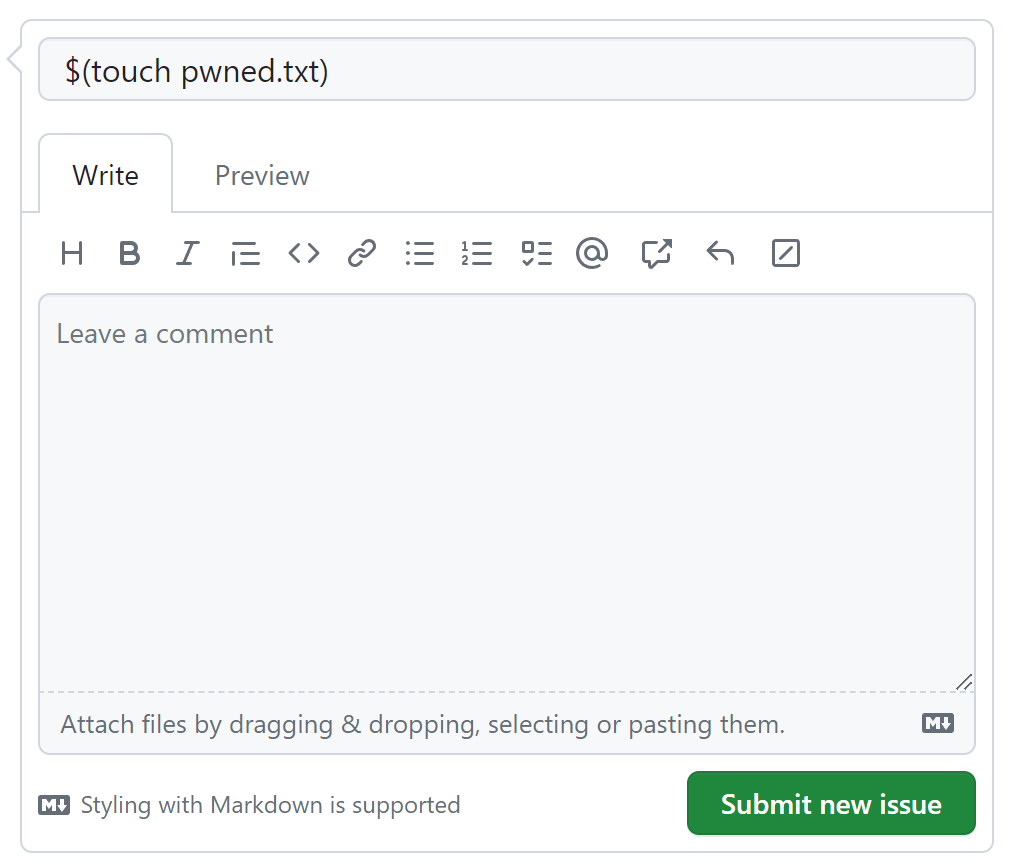
The expression gets macro-expanded directly into the command body before execution, so the shell ends up running an injected command:
echo "$(touch pwned.txt)"
The risk is not limited to Bash. Because expression expansion is language-independent, the same pattern in a JavaScript script block can be abused with syntactically valid JavaScript constructs. A successful injection can do far more than touch files: an attacker could exfiltrate secrets or push code introducing backdoors or supply chain compromises.
1. Stop interpolating untrusted input into run
The safest approach is to never place ${{ }} with untrusted values directly into a run or script section where it gets macro-expanded. Instead, route the value through an intermediate environment variable and read it using the language's own mechanism.
- name: print title
  env:
    TITLE: ${{ github.event.issue.title }}
  run: echo "$TITLE"
Or, in a JavaScript context:
- name: print title
  env:
    TITLE: ${{ github.event.issue.title }}
  uses: actions/github-script@v6
  with:
    script: console.log(process.env.TITLE)
The tradeoff matters: when ${{ }} appears inside run, it expands into the command text and makes shell injection trivial. Placing it in the env section is much safer, since the value is stored and the reference — "$TITLE" in a shell block or process.env.TITLE in JavaScript — is standard, predictable syntax that behaves the way the workflow author expects. One caveat: this fix prevents command injection but does not sanitize the value itself. The environment variable still carries untrusted input and needs caution if used in other dangerous operations.
2. Scan workflows as part of code review
Safer interpolation is not a complete fix. To catch regressions before they land, GitHub recommends enabling code scanning using CodeQL. The Security Lab shipped a set of CodeQL queries that flag unsafe interpolation of untrusted input into workflows.
As of this writing, the workflow scanning queries ship only with the JavaScript CodeQL suite. That means code scanning covers these vulnerabilities by default when the repository's primary language is JavaScript. If your project is predominantly Python, Java, or something else, you need to add JavaScript to the CodeQL setup — even if the repository contains no JavaScript source files. CodeQL configuration also allows path exclusions if you only want to scan workflow files and ignore other JavaScript content.
3. Shrink and audit token permissions
The blast radius of an injection depends heavily on what the workflow token can do. Each workflow gets a GITHUB_TOKEN. Historically these tokens had broad read/write access to the repository, and while GitHub has since moved to read-only defaults for new repositories, many older organizations retain the grandfathered write-all default. Check your repository or organization settings: Settings → Actions → “Workflow permissions.”
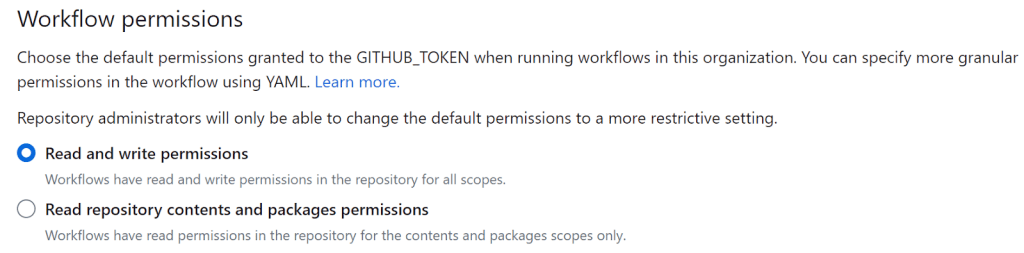
Also note the platform-level protections around fork pull requests: workflows triggered by a fork PR run without secrets and with a read-only token, which limits damage in many scenarios. But the research group found a corner case where worklows running between existing branches of the same repository could grant external users more privileged execution. GitHub has since fixed the issue
The key takeaway: keep workflows injection-free even when they run least privilege. The Security Lab also published a permission monitor action that assists orgs migrating to least privilege GITHUB_TOKEN settings.
4. Open a channel for researchers to report problems
Vulnerabilities are unavoidable in practice. A productive response depends on researchers being able to communicate with maintainers. GitHub introduced Private Vulnerability Reporting (PVR) to make that simpler: you can grant researchers a direct, private channel, host coordinated discussions, and pool together a private patch PR.
If this is not enabled for your repository, the list of potentially unknown remote injection holes no longer comes with a clear path for disclosure. Enable it in your repository security settings.
The research collaboration presents a reminder: open source security is collective effort, and fixing the common root causes — interpolation handling and token privileges — goes a long way.



