Home/AI & ML/A step-by-step guide to modernizing Java projects with GitHub Copilot
AI & ML
A step-by-step guide to modernizing Java projects with GitHub Copilot agent mode
Learn how to use GitHub Copilot agent mode to modernize legacy Java projects with guided upgrades, automated fixes, and cloud-ready migrations.
AG
Andrea GriffithsGitHub
·September 23, 2025·AI & ML
Bringing Legacy Java Projects Up to Date with Copilot Agent Mode
Modernizing a legacy Java application is rarely a simple lift. Conflicting dependencies, deprecated APIs, and outdated deployment targets can stall even the most straightforward upgrades. GitHub Copilot agent mode, paired with the GitHub Copilot app modernization VS Code extension, tackles this by providing an interactive, step-by-step workflow: it analyzes the code, proposes a plan, executes transformations, and iterates on build and test failures until the project is clean.
The focus here is Java, but the same agent-based workflow applies to .NET modernization within Visual Studio, covering upgrades, cloud migration paths, and Azure deployment.
Prerequisites
Before starting, you’ll need:
Visual Studio Code
A GitHub Copilot license (Pro, Pro+, Business, or Enterprise; the latter tiers also unlock the Copilot coding agent)
The GitHub Copilot app modernization – upgrade for Java extension
A Git-based, legacy Java project built with Maven or Gradle (JDK 8 or later)
How the Agent Approaches the Upgrade
When you launch an agent session with the Java upgrade extension, Copilot follows a defined sequence:
Executes code transformations using tools like OpenRewrite.
Fixes build errors iteratively.
Validates changes through test execution.
Scans for CVEs and proposes secure replacements.
Provides a full summary report.
Step 1: Open Your Project and Start an Agent Session
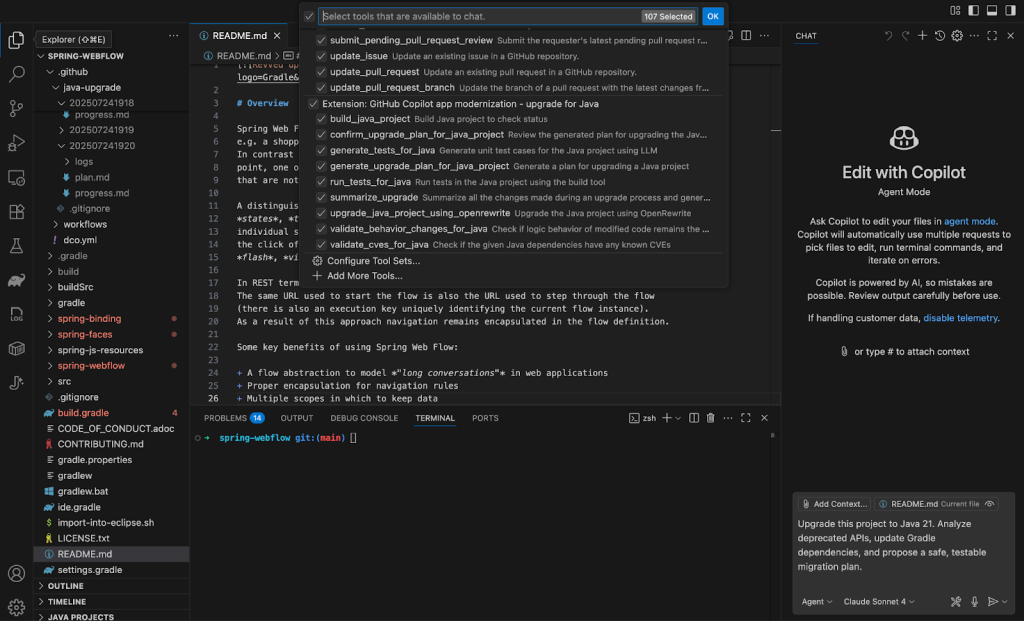
Open a legacy Java project in VS Code, ideally with Git initialized and a working test suite. A sample Spring WebFlow project works well for this. Then, launch the GitHub Copilot chat sidebar and start a new agent session, selecting GitHub Copilot app modernization – upgrade for Java from the available tools.
Copy and paste the following prompt into the agent session to begin:
Using Java upgrade tools,upgrade this project to Java 21. Analyze deprecated APIs, update Gradle dependencies, and propose a safe, testable migration plan.
Step 2: Analyze, Plan, and Apply Changes
Copilot starts by scanning the project’s:
JDK version usage
Build configurations (build.gradle or pom.xml)
Outdated or insecure dependencies
Deprecated APIs and language features
From that scan, it proposes a structured upgrade plan directly in the chat. You can edit it to exclude specific modules or adjust the scope before proceeding. Once you approve the plan, Copilot begins upgrading files, adjusting imports, and fixing syntax errors. If build errors appear, the agent enters a fix-and-test loop until the project compiles cleanly. The final report summarizes changed files, commit history, API and dependency updates, and any remaining to-dos.
// Before (deprecated constructor)
View view = this.resolver.resolveViewName("intro", new Locale("EN"));

// After Java 21 upgrade
View view = this.resolver.resolveViewName("intro", Locale.of("EN"));
Step 3: Prepare for a Cloud Migration
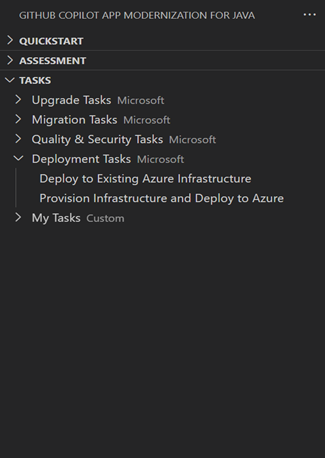
To make the application Azure-ready, run an app assessment to identify cloud readiness issues. From the extension UI, click Migrate to Azure. Depending on your deployment target — Azure App Service, Azure Kubernetes Service (AKS), Azure Container Apps, and others — Copilot will flag relevant migration issues. The deployment target is set in the assessment-config.yaml file under appmod-java/appcat.
The assessment generates a report detailing cloud readiness issues. As with the upgrade, Copilot first proposes a plan around dependency updates and configuration changes; once approved, it executes the migration. For instance, migrating from on-premise authentication to Microsoft Entra ID involves:
Adding the Microsoft Entra ID dependency to the build configuration
Adding the corresponding configuration in Application.properties
Adding a configuration adapter for Spring Security
Adding documentation on implementing Entra ID authentication with the app
Step 4: Validate with Tests and Check for CVEs
After the code is updated, run the test suite through your project’s build system. For Maven projects, run tests manually with:
./mvnw test
For Gradle projects:
./gradlew test
The agent will also perform a comprehensive CVE scan across all changed dependencies. When vulnerabilities are found, it proposes safe version replacements or alternative libraries to maintain security compliance.
Deploy to Azure
Once the code is validated, deployment to Azure is also automated, removing the need to hand-craft infrastructure as code and allowing you to go from code to cloud more directly.
The Complete Modernization Workflow
With GitHub Copilot app modernization, taking a legacy Java project to a cloud-ready state becomes a guided process: it remediates code for Java upgrades and migration scenarios, resolves build issues, validates changes, and can even strengthen test coverage — all within a single workflow with the human in the loop at every decision point.
Andrea is a Senior Developer Advocate at GitHub with over a decade of experience in developer tools. She combines technical depth with a mission to make advanced technologies more accessible. After transitioning from Army service and construction management to software development, she brings a unique perspective to bridging complex engineering concepts with practical implementation. She lives in
Identity alone doesn't guarantee a bot will behave responsibly. We are introducing a system to continuously evaluate whether Verified bots honor site preferences, like robots.txt and HTTP 429s, ensuring they remain accountable over time.
What can digital transformation teach us about AI adoption? Paul Boag revisits his book Digital Adaptation to show how lessons from the past can help organizations navigate the challenges of AI today. - AI - Workflow - Business