

Files Were the Original Open API
The file system predates the modern internet, yet its core design is worth revisiting. When you save a document, it isn't locked inside the application that created it. The file lives on your disk, readable by you, portable to a friend, and openable by any number of other tools. An .svg made in Excalidraw renders in your browser without Excalidraw's API or permission—the file format is the shared contract. Apps and formats form a many-to-many relationship: a single app can speak many formats, and one open specification can be understood by many apps that never have to coordinate.
Proprietary formats illustrate the same point. Even when a developer keeps a format undocumented, motivated programmers can reverse-engineer it. That is how third-party software made the .doc format broadly usable. The lesson holds: what you make with a tool does not belong to the tool. A manuscript does not remain trapped inside the typewriter. Because files live in app-agnostic storage, your data outlives whichever piece of software wrote it. That is why app developers can be replaced without leaving your work stranded—a new application can always be made to speak the format of the files you already have.
A Folder for Your Entire Social Presence
Social platforms broke with that model. A Tumblr post, an Instagram follow, or a Hacker News upvote is not something you can inspect or open with another tool. It is an entry in someone else's database, accessible only through their interface.
But those actions could behave like files. Imagine your online persona had an "everything folder"—a directory holding every POST you have ever made across all social apps. Posting to Tumblr would create a Tumblr post file there. Following someone on Instagram would write an Instagram follow file. Upvoting on Hacker News would add an HN upvote file. These would not be archives or exports; this folder would be where your data actually lives.
In such a world, the app-specific database becomes derived data—a cached, materialized view reflecting the contents of everybody's folders. Deleting an Instagram follow file would work as cleanly as unfollowing through the interface. Crossposting to three Tumblr communities would mean creating three separate Tumblr post files. Applications become reactive viewers over your folder rather than the sole keepers of your digital history.
A Social Filesystem
This is not just a thought experiment. It is the premise of the AT protocol, which is already in production at scale. Social apps built this way include Bluesky, Leaflet, Tangled, Semble, and Wisp.
Using these apps doesn’t feel different. But lifting data out of a closed application forces a desirable outcome: apps no longer hold your files hostage. Anyone can build a new app that reads old data, and since formats can evolve independently, choosing which apps to use is up to you.
All the users’ folders, interconnected, form a distributed social filesystem. The core concept is an extension of a personal filesystem: it works on files, collections of files, and links between files across different users’ spaces.
From Post to Record
Take a simple social media post. How would you represent it as a file? JSON is a natural fit. A first attempt at a representation might keep all displayed data in one blob:
{
  author: {
    avatar: 'https://example.com/dril.jpg',
    displayName: 'wint',
    handle: 'dril'
  },
  text: 'no',
  createdAt: '2008-09-15T17:25:00.000Z',
  replyCount: 819,
  repostCount: 56137,
  likeCount: 125381
}
But this structure needs refinement. Embedding the author’s profile details here is wrong—if a user changes their display name or avatar, their posts would all have to change, too. Even a field like author: 'dril' is redundant because the post lives in the creator’s folder, so authorship is already implied by location. It can be removed:
{
  text: 'no',
  createdAt: '2008-09-15T17:25:00.000Z',
  replyCount: 819,
  repostCount: 56137,
  likeCount: 125381
}
Similarly, fields like replyCount, repostCount, and likeCount are not data the author created. They are derived from other people’s actions—replies, reposts, likes—and belong to the apps aggregating them, not in this file. The essence of the post boils down to this:
{
  text: 'no',
  createdAt: '2008-09-15T17:25:00.000Z'
}
This is the post as a file. The trick is deciding what genuinely belongs in it: think about the data a user sends in a POST request when creating something. That’s what should be stored.
In this filesystem, every file is JSON. These files are called records.
Record Keys
Next, we need a name for the file. Posts don’t have natural names. Sequential numbers could work, but they risk collision across devices. Instead, generated timestamps with some randomness are used:
posts/
├── 1221499500000000-c5.json
├── 1221499500000000-k3.json   # clock id helps avoid global collisions
└── 1221499500000001-k3.json   # artificial +1 avoids local collisions
These are locally generated and almost never collide. Since these names are used in URLs, the encoding is designed carefully; the encoding sorts alphabetically like chronological order:
posts/
├── 34qye3wows2c5.json
├── 34qye3wows2k3.json
└── 34qye3wows3k3.json
Reverse sorting now gives a reverse chronological timeline. Since all files are JSON, we can drop file extensions.
Not all records accumulate. Some things, like a profile, are single-value records. For that case, a fixed name is used:
posts/
├── 34qye3wows2c5
├── 34qye3wows2k3
└── 34qye3wows3k3

profiles/
└── self
{
avatar: 'https://example.com/dril.jpg",
displayName: 'wint'
}This gives us a post at posts/34qye3wows2c5 and a profile at profiles/self.
Defining Lexicons
Post and profile records need stable formats:
{
  text: 'no',
  createdAt: '2008-09-15T17:25:00.000Z'
}
{
avatar: 'https://example.com/dril.jpg",
displayName: 'wint'
}TypeScript is insufficient for these needs—it can’t express constraints like the text string having at most 300 Unicode graphemes or a string being a properly formatted datetime. A richer schema explicitly for social file formats is necessary. Here’s a Post definition:
{
  // ...
  "defs": {
    "main": {
      "type": "record",
      "key": "tid",
      "record": {
        "type": "object",
        "required": ["text", "createdAt"],
        "properties": {
          "text": { "type": "string", "maxGraphemes": 300 },
          "createdAt": { "type": "string", "format": "datetime" }
        }
      }
    }
  }
}
This is called a lexicon because it defines the language an app speaks. This schema format is verbose in JSON, but it is trivial to parse, making it easy to build tooling. You can also generate type definitions and validation code for other languages.
Collections
This structure works for a single app, but different apps will disagree on what, say, a “post” is. The trick is to namespace record types by the app that designs them. Domain names offer a global namespace that prevents conflicts:
com.twitter.post/
├── 34qye3wows2c5
├── 34qye3wows2k3
└── 34qye3wows3k3

com.twitter.profile/
└── self

com.tumblr.post/
├── 34qye3wows4c5
└── 34qye3wows5k3

com.tumblr.profile/
└── self
This creates collections—folders containing records of a specific lexicon. The `com.twitter.post` collection is separate from `com.tumblr.post`. They can coexist inde的finently. Examples include fm.last.scrobble for listens or org.schema.recipe for shared standards. Breaking changes to a format just mean creating a new lexicon, not a migration.
A question remains: who enforces that records match their lexicons? Practically, nothing. But apps always treat records as untrusted input, like any payload in a POST request. Validation runs on read; any record that doesn’t conform is ignored. That’s fine because the system is built like file extensions—invalid data doesn’t break things for other apps.
Care is required when evolving lexicons. Once public, you shouldn’t change what records it accepts. Adding optional fields is fine, but redefining existing ones is not. Linters exist to check this. For breaking changes, define a new lexicon.
Lexicons can be published into a com.atproto.lexicon.schema collection on an account where the domain ownership is verified with DNS.
Likes, Reposts, and Replies as Files
What is a like? It’s created by a user, so records are the atomic unit for these actions, each referring to another record:
type Post = {
  text: string,
  createdAt: string
};

// ...

type Like = {
  subject: Post
};
The core problem is expressing the reference. The Post and Repost records are in separate users’ filesystems—each user has their own “everything folder,” completely isolated. There’s no global, shared hierarchy. This means we can’t reference a target using an absolute path.
Instead, we need a persistent identity for each user—a handler for their repository. These changes are designed so a user can migrate to a new host or change their display name without breaking existing links.
Several identity designs were considered:
- Host as identity: breaks when moving hosts.
- Centralized handle: unwieldy and creates a new namespace.
- Domain as identity: gets tied to a single domain you might lose.
- Distributed, auditable identity (DID): persistent hash-based account IDs.
In the chosen approach, each account has a DID. A signed operation log, kept by a registry, contains a series of updates for an account—including its current handle, hosting address, and a public key used to sign. The hash of the first operation acts as the persistent identifier.
Updates to this registry are signed, which lets you verify the integrity of the entire operation chain. The registry can’t change records unseen. More in in the PLC specification.
This supports both domain-based IDs (like did:web:wint.co) and registry-based IDs (like did:plc:6wpkkitfdkgthatfvspcfmjo). We can even add methods later. So instead of hosting/collection/key, a like addresses a post via a standardized at-protocol URI:
{
  subject: "at://did:plc:6wpkkitfdkgthatfvspcfmjo/com.twitter.post/34qye3wows2c5"
}
The URI is at:// to signal this isn’t an HTTP request—it must resolved through an indirection process. Four things form the mental model here:
- A DID is a string that represents an account.
- An account’s DID never changes.
- The DID points to a document holding the current hosting, handle, and public key.
- A handle is verified bidirectionally—the domain points at the DID, too.
This gives you a final resolution function to:
- Get the account’s hosting address and key.
- Compute where a record lives as a path within that repository, found at the correct `at://` URI.
- If hosting is down, it temporarily fails to resolve; it comes back whenever a new host is up and the DID is updated.
Now all former UI components are back as file references:
- Display name and avatar: from
com.twitter.profile/self. - Tweet text and time: from
com.twitter.post/34qye3wows2c5. - Likes: aggregated from everyone’s
com.twitter.likerecords. - Reposts: aggregated from everyone’s
com.twitter.repostrecords. - Replies: all render as
com.twitter.postrecords with aparentfield:
  // ...
  "text": { "type": "string", "maxGraphemes": 300 },
  "createdAt": { "type": "string", "format": "datetime" },
  "parent": { "type": "string", "format": "at-uri" }
  // ...
{
"text": "yes",
"createdAt": "2008-09-15T18:02:00.000Z",
"parent": "at://did:plc:6wpkkitfdkgthatfvspcfmjo/com.twitter.post/34qye3wows2c5"
}Repositories and Relays
Each user’s “everything folder” is a repository, identified by a DID:
did:plc:fpruhuo22xkm5o7ttr2ktxdo/
├── com.twitter.like/
│   └── ...
├── com.twitter.post/
│   └── ...
├── fm.last.scrobble/
│   ├── 3ld5nsp8q2w9j
│   ├── 3ld5ntq9r3x0k
│   └── ...
└── com.ycombinator.news.vote/
    ├── 3ld6our0s4y1l
    └── ...
A repository can be hosted anywhere, and can be moved freely. It doubles as both a filesystem (listable and readable) and a synchronous stream when subscribed to via WebSocket, so apps can build live data viewers.
Services called relays you can subscribe to, retransmitting all events, but they are untrusted. To mitigate this, repository data is self-certifying. It’s arranged in a hash tree, where each write is a commit containing a new root hash. Verification is done by checking the signature and the hash chain back to the repository’s author.
Relays don’t need full content; they retransmit verified events and proofs. That makes their replication costs low.
Exploring the Atmosphere as a Filesystem
The best way to get a feel for the Atmosphere is to browse it directly. pdsls is an ideal starting point: given a DID or handle, it lists collections and their records in a layout that resembles an old-school file manager. Try opening at://danabra.mov to see an arbitrary example. Most of what you’ll find—collections, identity, records—will be immediately recognizable.
Records link to other records, and while pdsls lacks app-specific aggregations like thread views, it does offer useful navigation such as backlinks. The experience feels a bit ungrounded without an app layer, but that’s also the point: the data exists independently of any single interface.
Files as the Source of Truth
A more visceral demonstration comes from creating a Bluesky post via pdsls itself. The act of writing a record triggers the app to react—the post appears because the file exists. Removing a record works the same way in reverse. In a custom app like Sidetrail, which manages step-by-step walkthroughs, deleting an app.sidetrail.walk record from pdsls immediately removes the corresponding walk from the app’s interface. The repository really is the source of truth; applications merely react to it.
For those who want the filesystem metaphor to be even more concrete, pdsfs mounts any repository as a FUSE drive. Every change made to the repo—by anyone—shows up in the mounted directory.
Rendering a Database from Files
This model also makes building apps that aggregate social data simpler. An ingester that syncs everyone’s repository changes into a local database operates like re-rendering a view: new “props” flow down from files, and the database reacts to them.
export async function handleEvent(db: IngesterDb, evt: JetstreamEvent): Promise<void> {
  if (evt.kind === "account") {
    await handleAccountEvent(db, evt.account);
    return;
  }

  if (evt.kind === "identity") return;
  if (evt.kind !== "commit") return;

  const { commit } = evt;
  const { collection, rkey } = commit;
  if (!COLLECTIONS.includes(collection)) return;

  const [accountStatus] = await db
    .select({ active: accounts.active })
    .from(accounts)
    .where(eq(accounts.did, evt.did))
    .limit(1);

  if (accountStatus && !accountStatus.active) {
    return;
  }

  const uri = `at://${evt.did}/${collection}/${rkey}`;

  if (commit.operation === "delete") {
    switch (collection) {
      case "app.sidetrail.trail":
        await deleteTrail(db, uri);
        break;
      case "app.sidetrail.walk":
        await deleteWalk(db, uri);
        break;
      case "app.sidetrail.completion":
        await deleteCompletion(db, uri);
        break;
    }
    return;
  }

  const record = commit.record as Record<string, unknown>;
  await ensureAccount(db, evt.did);

  switch (collection) {
    case "app.sidetrail.trail":
      await upsertTrail(
        db,
        uri,
        commit.cid,
        evt.did,
        rkey,
        record,
        (record.createdAt as string) || new Date().toISOString(),
      );
      break;

    case "app.sidetrail.walk": {
      const trailRef = record.trail as { uri: string } | undefined;
      const trailUri = trailRef?.uri || "";
      await upsertWalk(
        db,
        uri,
        commit.cid,
        evt.did,
        rkey,
        trailUri,
        record,
        (record.createdAt as string) || new Date().toISOString(),
      );
      break;
    }

    case "app.sidetrail.completion": {
      const trailRef = record.trail as { uri: string } | undefined;
      const trailUri = trailRef?.uri || "";
      await upsertCompletion(
        db,
        uri,
        commit.cid,
        evt.did,
        rkey,
        trailUri,
        record,
        (record.createdAt as string) || new Date().toISOString(),
      );
      break;
    }
  }
}
Since the global data is just files, rebuilding a database from scratch is always an option—for instance, using Tap to backfill after deleting production tables. Apps remain caches of a slice of the global data, and because many slices overlap, pooling resources and sharing tooling becomes far more practical.
Proving a Product Doesn’t Need a Backend
One of the more striking examples comes from the teal.fm Relay demo by @chadmiller.com. The page shows everyone’s recently played tracks and aggregate stats—displaying, at one point, “678,850 scrobbles.” One might assume this counts plays sent to the teal.fm API.
It doesn’t. The teal.fm API doesn’t exist, nor does the product itself—teal.fm is still just a landing page for a hobby project in development. All that’s needed to start scrobbling is writing records of the fm.teal.alpha.feed.play lexicon into your repository. The lexicon is available on GitHub, so anyone can build a scrobbler around it.
The demo isn’t official work from the teal.fm authors, nor does it query some private database. It simply indexes public fm.teal.alpha.feed.play records. The data layer uses lex-gql, another experimental package that takes lexicons and lets you run GraphQL queries over a backfilled snapshot of the social filesystem. If you have the world’s JSON, why not run joins across products?
fragment TrackItem_play on FmTealAlphaFeedPlay {
  trackName
  playedTime
  artists {
    artistName
  }
  releaseName
  releaseMbId
  actorHandle
  musicServiceBaseDomain
  appBskyActorProfileByDid {
    displayName
    avatar {
      url(preset: "avatar")
    }
  }
}
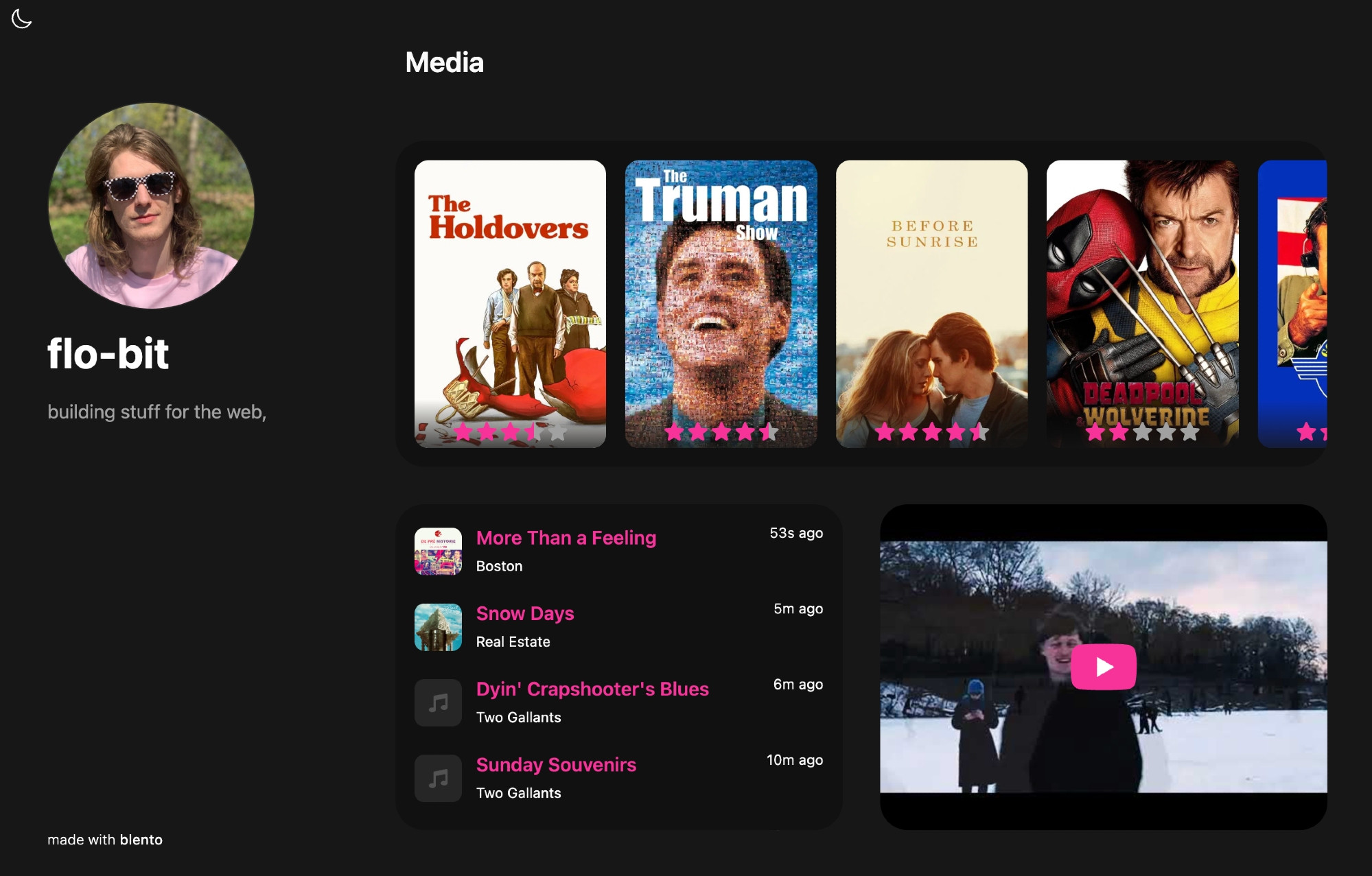
This cross-product blending is straightforward. Blento, for instance, displays your teal.fm plays on a personal homepage—again, without talking to teal.fm itself, since it doesn’t exist yet; it simply reads the relevant files. Blento positions itself as an AT-based alternative to Bento, which is shutting down. Should Blento also disappear, any developer can recreate it from the existing content.
Similarly, custom feed algorithms fit neatly into this architecture. A Bluesky feed is just an endpoint returning a list of at:// URIs. That’s the entire contract. Feeds can serve content other than posts, and the ecosystem has produced effective third-party algorithms like For You by @spacecowboy17.bsky.social, which is notably more responsive to preference signals and has published experiments like A/B tests of feed changes.
[
  { post: 'at://did:example:1234/app.bsky.feed.post/1' },
  { post: 'at://did:example:1234/app.bsky.feed.post/2' },
  { post: 'at://did:example:1234/app.bsky.feed.post/3' }
]
Critics have mocked Bluesky for requiring users to install third-party feeds to get a decent experience. But this misses the point: the architecture is what makes such improvements possible. In the Atmosphere, third-party is first-party. Because everyone builds projections of the same underlying data, someone can simply do a better job of curation. An everything app tries to do everything; an everything ecosystem lets everything get done.



