
A source control client built around the developer, not the repo
Sapling, Meta’s source control client, has been in development for a decade to handle the scale of the company’s massive monorepo — tens of millions of files, commits, and branches. The client is now open source and works with any Git repository, so developers outside Meta can try it on existing projects without waiting for the server-side components to be released.
The project began as a Mercurial extension but evolved into a standalone system with its own storage, protocols, and algorithms. The motivation was twofold: first, to make a monorepo of that size usable; second, to rethink what the everyday experience of version control should feel like.
Removing cognitive load from common workflows
Git and Mercurial users will recognize Sapling’s basic operations — cloning, committing, amending, rebasing, pushing. But the design decisions underneath are aimed at reducing the mental overhead that source control typically demands. Commands are narrow and do one thing. Local branch names are unnecessary. There’s no staging area to manage.
Beyond basics, Sapling puts three workflow improvements at the forefront.
Smartlog: a view of only what matters
The sl command, with no arguments, opens the smartlog: a concise list of local commits, the current position, relevant remote branches, file changes, and any commits that have new versions. It hides what isn’t relevant — thousands of commits in main collapse behind a dashed line, and unrelated remote branches simply don’t appear. For newcomers, this gives a correct mental model immediately; for experienced users, it makes repository state visible rather than something to reconstruct mentally.

For those who prefer a GUI, sl web launches an interactive version in the browser, supporting commit, amend, and checkout actions as well.
Recovery tools instead of fear of mistakes
A key goal in supporting tens of thousands of internal developers with a small team was making self-service error recovery practical. Sapling ships a suite of commands for understanding and undoing actions: sl undo, sl redo, sl uncommit, sl unamend. Hidden commits are safe with sl hide and can be restored with sl unhide. On Mac and Linux, sl undo -i displays an interactive scrollable history of prior smartlog views so you can revert to a specific point or recover a lost commit hash.
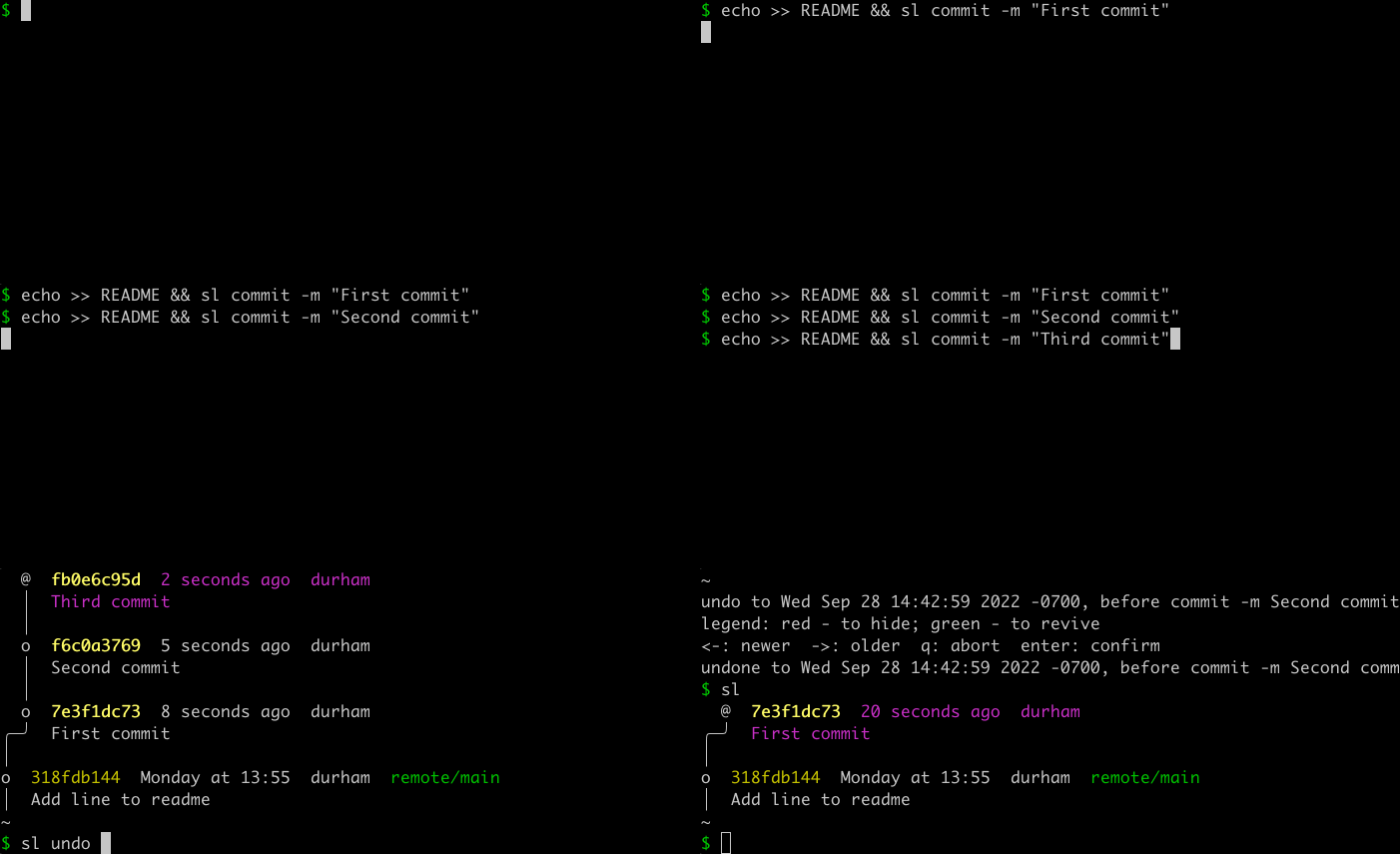
The intent is that no one should need to delete and re-clone a repository to get back to a working state.
Stacks as a first-class workflow
Meta’s developers commonly work in stacks: a feature is broken into small commits, each sent for review as it’s ready, then updated in sequence. Most version control systems make this painful — editing an early commit in the stack often means complex interactive rebasing. Sapling handles it with simple steps: check out the commit with sl goto COMMIT, edit, then sl amend. The commits above it are automatically rebased, and conflicts appear immediately. If a conflict is left for later, sl restack rebuilds the stack when ready. Under the hood, Sapling tracks mutation history for each commit — following Mercurial’s Evolve extension design — so it can rebuild a stack no matter how many edits have happened.
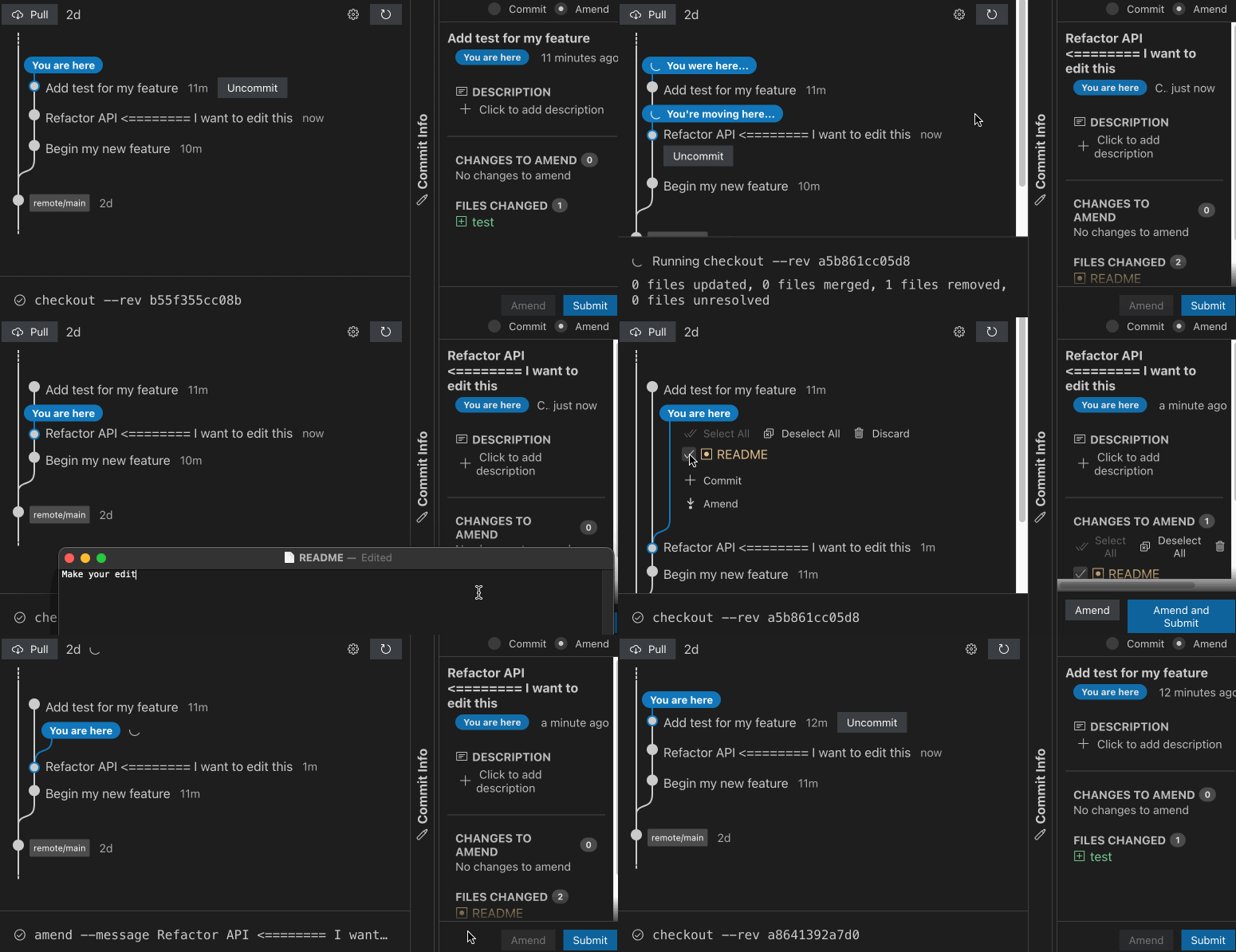
Additional commands cover the complete stack lifecycle: sl next, sl prev, and sl goto top/bottom for navigation; sl fold and sl split for restructuring; and sl absorb or sl amend --to COMMIT for automatically pulling uncommitted changes down into the correct spot in a stack.
A look at stacked code review
Stacks are only useful if review tools treat them well. Most external tools encourage reviewing a pull request in full, which makes per-commit discussion difficult. ReviewStack, a demonstration site from the Sapling team, offers a different approach: a review UI that presents a single commit’s conversation and status on one page, with controls to move through the stack.
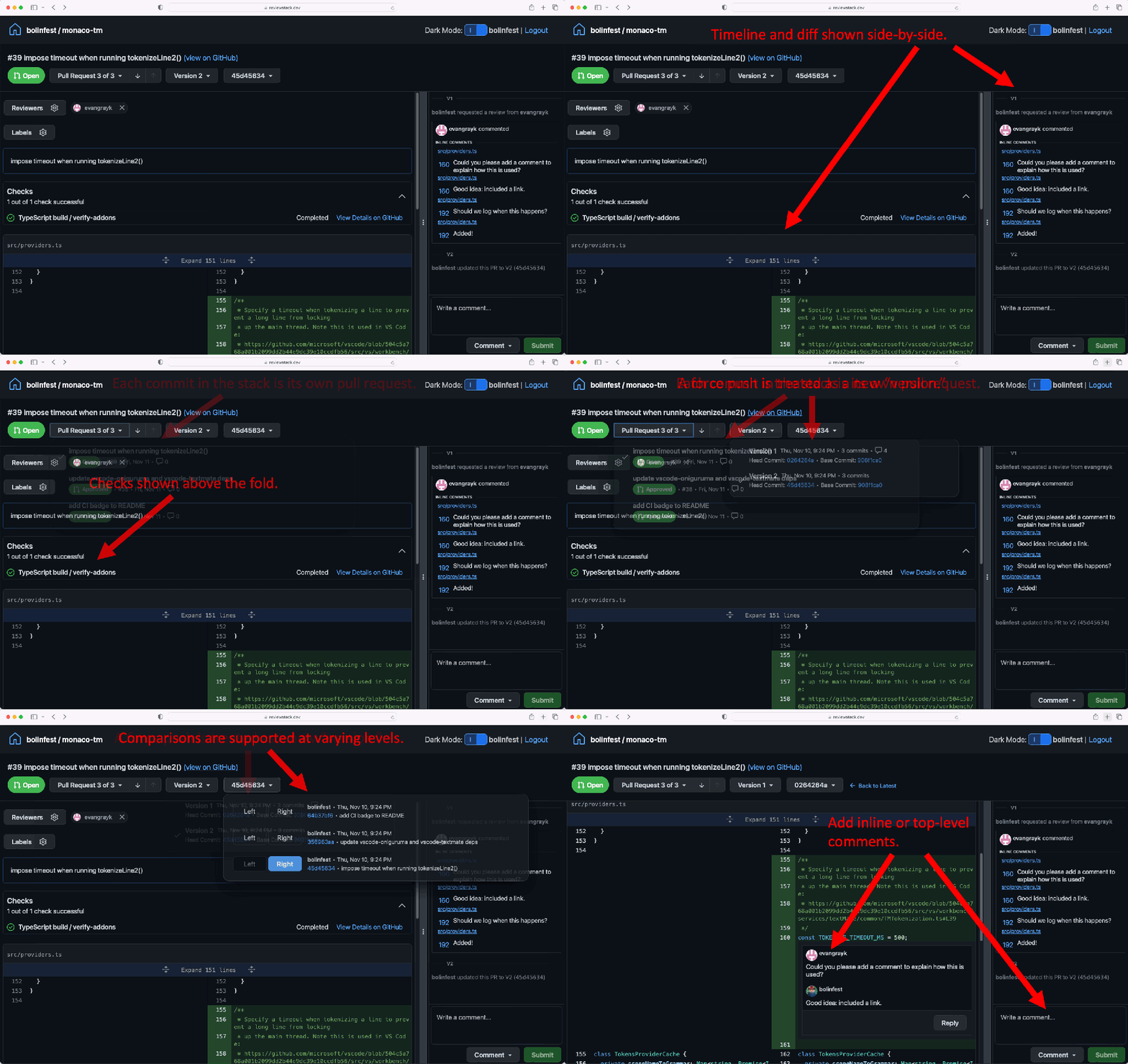
ReviewStack works on GitHub pull requests — developers can try it on their own by visiting the site and entering a PR URL.
History at a Distance
For very large repositories, the historical data can dwarf the working copy. In the Linux kernel repo, for example, roughly three-quarters of the 5.5 GB total is history. Sapling inverts the usual clone behavior here: cloning downloads almost no history at all. Commits, trees, and files are fetched lazily as you actually need them, which makes it possible to operate on a repository that is terabytes in size without ever downloading the whole thing. This approach does require connectivity, but caching and indexing are designed to keep common flows—such as making a commit—usable offline within configurable limits.
Lazy data transfer solves bandwidth, but not query efficiency. Finding the common ancestor of two commits or rendering a Smartlog graph cannot require downloading millions of commits. Sapling's answer is the Segmented Changelog, a compact representation of the commit graph's high-level shape that downloads in a few megabytes. Individual commit details are filled in later, on demand. With this structure, graph relationships between any two commits can be resolved in O(number-of-merges) time using only the segments and the commits' positions within them. In practice, commands like smartlog complete in under a second regardless of repository size.
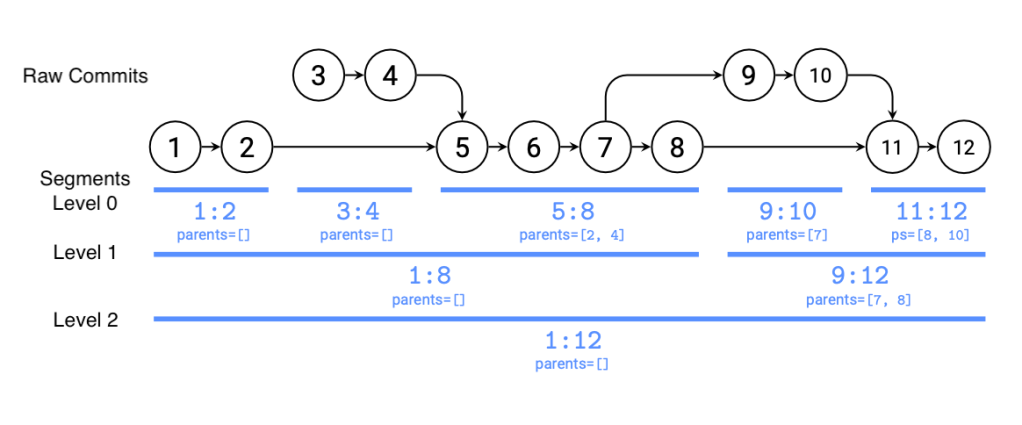
The Segmented Changelog also accelerates file-level operations. Running log or blame on a file can bisect the segment graph, reducing the search from O(n) to O(log n) time, even when working against a plain Git repository. With Sapling's own server, per-file history graphs go further, keeping sl log FILE responsive at under a second no matter how old the file is.
Working Copy, Lightweight
Scaling the working copy is a separate problem, and Sapling approaches it from two angles. The first is a virtual file system (not yet publicly released) that presents the full repository as though it were fully checked out. Clones and checkouts become near-instant; the first access to a file triggers a network fetch, after which access is fast, with prefetching available to warm the cache for specific projects.
Without the virtual file system, Sapling still avoids full scans of the working copy. sl status leverages Meta's Watchman file system monitor to detect changed files, and sparse checkouts are supported for partial repository checkouts. Sparse checkouts are engineered for organization-wide use: rather than each developer maintaining a personal inclusion list, "sparse profiles" can be committed into the repository itself. A developer cloning the repo enables the profile for their product; when dependencies shift, the person changing them updates the profile, and every other engineer picks up the new sparse configuration automatically on the next checkout or rebase. Large files are handled through support for a Git LFS server as well.
Looking Ahead
The client release is only the first step. The Sapling-compatible virtual file system is slated for open-sourcing, which would allow arbitrarily large working copies with fast checkouts regardless of the number of changed files. Also planned is the Sapling-compatible server—the distributed Rust service Meta uses to serve Sapling and, soon, Git repositories.
That server unlocks several new capabilities. Repositories can be incrementally migrated into or out of a monorepo, letting teams experiment before fully committing. It also powers Commit Cloud, which uploads every commit at creation time. Sharing code then shrinks to sending a colleague a commit hash and having them run sl goto HASH.
The full feature set is best seen via the project's armchair walkthrough, and hands-on evaluation starts on the Getting Started page.


