
Turning GitHub Issues into an automation hub
Daily software work is full of repetitive chores: triaging issues, collecting approvals, triggering pipelines. IssueOps is a workflow practice that uses GitHub Issues, GitHub Actions, and pull requests as the control surface for those chores. Comments, labels, and state changes become triggers that can start CI/CD runs, assign work, or deploy applications.
Unlike ChatOps or ClickOps, which rely on chat commands or console clicks, IssueOps keeps the whole interaction inside the repository. The pattern is flexible enough that it is not limited to DevOps concerns. Teams have used it for anything from complex deployment pipelines to a bed-and-breakfast reservation system. If a task can be driven through an API, it can probably be exposed through an issue.
The approach pays off in several concrete ways:
- Event driven: Everyday issue interactions become workflow triggers, removing manual pipeline starts and project-board updates.
- Customizable: Workflows adapt to team conventions, from bug triage to deployment gates, based on event type and user-supplied data.
- Transparent: Every action taken on an issue appears in its timeline, so the process history is easy to follow.
- Auditable: Because issues and pull requests act as the source of truth, every decision leaves a permanent record without chasing logs in separate chat tools.
Modeling IssueOps as a finite-state machine
Most IssueOps workflows follow the same arc. A user opens an issue describing a request. The issue is validated for required information, submitted for processing, and routed to an authorized approver. After approval or denial, the request is handled and the issue is closed.
Consider an organization that wants to automate team membership requests. The core steps look like this:
- A user creates a request to be added to a team.
- The request is validated.
- The request is submitted for approval.
- An administrator approves or denies the request.
- The request is processed — approval adds the user to the team; denial does not.
- The user is notified of the outcome.
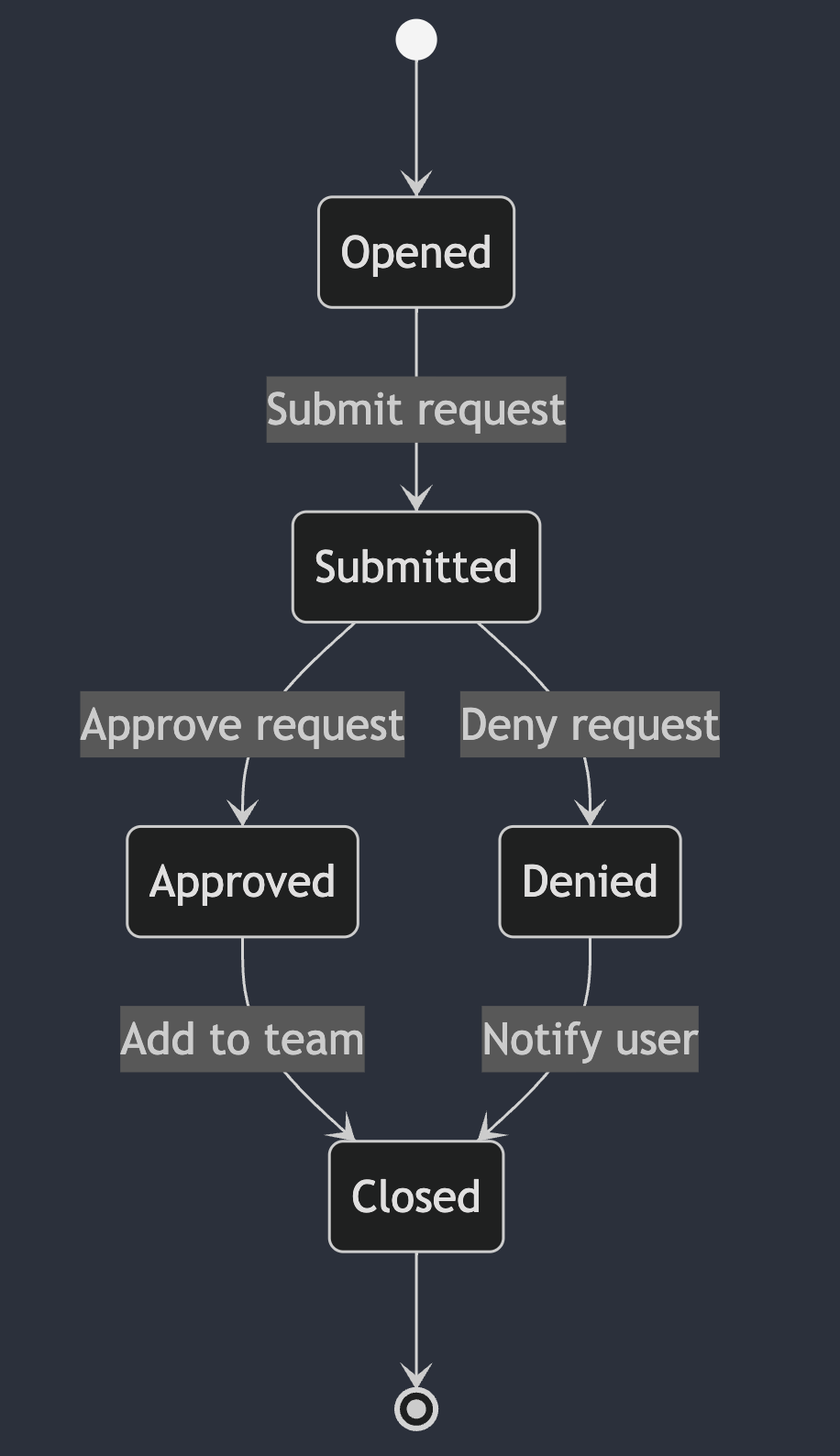
A useful way to design such workflows is to treat them as a finite-state machine: a model where an object moves through states in response to external events, with defined actions running on each transition when conditions are met. (A flow chart is a fine visual shorthand if the formal model feels heavy.)
The issue itself is the object navigating the machine. It changes state on events; conditional logic (guards) decides whether a transition is allowed; each transition can execute atomic actions before the issue reaches an end state and is closed. The key vocabulary:
- State: A point in the lifecycle where the object satisfies particular conditions.
- Event: An external occurrence that can cause a state change.
- Transition: The movement between two states, during which actions fire.
- Action: A small, discrete task performed during a transition.
- Guard: A condition evaluated when a trigger fires; the transition only happens if all guards pass.
Here is the state diagram for the team-membership example.
States and events in practice
A state simply records where an object currently is. In common IssueOps designs the states are opened, submitted, approved, denied, and closed. The events that push the object between those states can come from either the user or from GitHub itself.
For the membership workflow, the user-driven events include creating the issue, commenting .submit to hand it off, and an administrator commenting .approve or .deny. GitHub-side activity — label changes, new comments, milestone edits — can also fire events. The available automation triggers are numerous, and one GitHub event can map to multiple states in the machine.
That overlap is why validation is essential. A workflow must inspect both which event fired and what the user actually wrote. A comment event, for example, needs different handling depending on whether the comment body says .approve versus .deny.
Transitions, guards, and actions
A transition is simply the move from one state to another. Opening an issue is a transition; so is an administrator’s approval comment. Guards are the conditions that must hold before a transition is allowed:
- A request must not move to approved unless an administrator comments
.approve. - A request must not move to denied unless an administrator comments
.deny.
After approval, adding the user to the team is an unguarded transition — it happens immediately, with no further checks. The actions along the way include notifying administrators of a submission, adding the member to the requested team, and notifying the user of the final result.
Building the team membership workflow
The practical build uses GitHub Actions alongside a few supporting settings described in the IssueOps setup guide. The repository needs an issue form, validation logic, and several workflows.
Issue form and validation
GitHub issue forms produce standardized issue bodies. Paired with the issue-ops/parser action, the raw Markdown becomes clean, machine-readable JSON that downstream steps can consume. For this example the form accepts one input: the target team.
name: Team Membership Request
description: Submit a new membership request
title: New Team Membership Request
labels:
  - team-membership
body:
  - type: input
    id: team
    attributes:
      label: Team Name
      description: The team name you would like to join
      placeholder: my-team
    validations:
      required: true
Once the body is parsed into JSON, the issue-ops/validator action runs. It checks the parsed data against a validation script; in this case, verifying that the named team actually exists. Any problems found are posted as a comment on the issue, guiding the user before the request proceeds.
module.exports = async (field) => {
  const { Octokit } = require('@octokit/rest')
  const core = require('@actions/core')

  const github = new Octokit({
    auth: core.getInput('github-token', { required: true })
  })

  try {
    // Check if the team exists
    core.info(`Checking if team '${field}' exists`)

    await github.rest.teams.getByName({
      org: process.env.GITHUB_REPOSITORY_OWNER ?? '',
      team_slug: field
    })

    core.info(`Team '${field}' exists`)
    return 'success'
  } catch (error) {
    if (error.status === 404) {
      // If the team does not exist, return an error message
      core.error(`Team '${field}' does not exist`)
      return `Team '${field}' does not exist`
    } else {
      // Otherwise, something else went wrong...
      throw error
    }
  }
}
Workflow entry points
Processing splits across a few GitHub Actions workflows, each keyed to a different event.
Issue lifecycle workflow: The main entrypoint fires whenever an issue is created or edited. Its job is to validate inputs and decide whether the request is ready. This is where the .submit guard is enforced: even with valid data, the request cannot move forward until the user comments .submit.
Submit workflow: Triggered by an issue comment that says .submit. Its job is to re-validate the issue body against the original form template, guarding against edits that would silently change the request after approval.
Approval workflow: When an administrator comments the approval command, the workflow adds the user to the requested team, notifies them, and closes the issue.
Denial workflow: A .deny comment closes the issue and notifies the requesting user that the request was declined.
Each commands flow is structurally small: inspect the comment content, verify permissions or conditions, perform the action, and close out the issue. Spread across focused workflows or consolidated into one handler is a matter of maintainability preference.
IssueOps takes a familiar object—the GitHub issue—and gives it a clear lifecycle. By mapping states, events, guards, and actions up front, the resulting automation stays predictable, testable, and easy to audit later.
From Issues to Automation: The Full Workflow
The final piece of the puzzle is the workflow file that glues everything together. It listens for theissues event with a labeled action and routes to the appropriate job based on the label applied:
yaml
name: IssueOps
on:
issues:
types: [labeled]
permissions:
contents: read
issues: write
jobs:
add-contributor:
if: github.event.label.name == 'add-contributor'
runs-on: ubuntu-latest
steps:
- name: Set user handle
env:
HANDLE: ${{ github.event.issue.title }}
run: echo "USER_HANDLE=${HANDLE}" >> $GITHUB_ENV
The permissions block is critical here—it grants the workflow token just enough access to read repository contents and comment on the issue. Without it, the process stalls at the first API call.
From there, contributor welcome and infrastructure setup flows follow the same pattern: label triggers logic, the title supplies the user handle, and a distinct working directory keeps each automation isolated.
The Infrastructure Job: Defining Your Stack as Code
Once the user is committed to the contributor team, the infrastructure flow kicks in. The provisioning job checks out the repo, reads the target configuration file from the issue body, and writes that definition into the appropriate directory—envs/ takes precedence for workspace-pinning workflows.
Cleanup follows. Leftover generated files with a tmp/ prefix get removed automatically, keeping the repository tidy without manual intervention. If your infrastructure needs allow-listed IP ranges, the next step extracts the user’s current external IP and submits an approval request before any network rule changes land.
After provisioning succeeds, commenting is optional but recommended. `A new environment has been created for you!` is the kind of confirmation that closes the loop for the requester without requiring them to watch the Actions tab.
Hardening Your IssueOps Implementation
As with any automation that interprets user input, gates matter. Short-lived branches, approval checkpoints, and managed downtime windows are all levers you can pull. The branch-basedapply requires a review from a second pair of eyes in high-stakes environments; the destructive label flips on maintenance mode blocks exactly when you need them.
Logging is another layer worth layering in. If you’re orchestrating cloud credentials or environment variables, I recommend logging actions to an audit-friendly format like JSON or Cloud Audit Logs so downstream systems can consume them. You also want to record every run head: who triggered it, which environment it targeted, and whether approval was requested—it’s invaluable for debugging or compliance reviews.
One practical near-miss I’ve seen: contributors branching off main to run a destructive workflow while downstream CI was mid-release. A simple branch pattern (ci-* for safe changes, protected branch for destructive) would have caught it. GitHub’s built-in branch protection rules are your friend here—enforce them alongside your IssueOps logic, not instead of it.
Picking the Right Platform for Your Control Plane
IssueOps doesn’t have to be GitHub-only. Practically any issue-tracker-plus-CI combination works: your issue tracker drives automation, your CI runner executes it. Linear, Jira, even GitLab issues can be adapted if you swap out the API triggers. The conceptual model is identical: select the control plan you trust most, expose it as a uniform interface for acceptance and change management, then drive the automation through that.A Truly Automated Handoff
No delivery should end with open loops. The final workflow job makes sure the request’s lifecycle terminal state is visible to everyone who cares. On success, GitHub reports `Environment provisioned successfully`—dry runs get a green light with zero side effects. When the rollout finds friction, the error response comes back just as clearly. And yes, theworkspace_mapping.yml handling covers the edge where a second workspace appears in the pull request back half. It’s a detail you don’t want to hand-roll in production.


