
Planning and executing a CI/CD migration to GitHub Actions
GitHub has announced the public preview of GitHub Actions Importer, a tool designed to forecast, plan, and facilitate migrations from existing CI/CD platforms to GitHub Actions. The tool targets organizations with large CI/CD footprints where manual migration is impractical—GitHub reports encountering customers with over 15,000 pipelines in legacy environments.
Migrations with GitHub Actions Importer typically proceed through several well-defined phases: analyzing the existing environment, converting pipelines, validating results, and iterating on edge cases.
Auditing the existing environment
The audit command fetches all pipelines defined in a specified scope, attempts to convert them to equivalent workflows, and generates a summary report with migration statistics. The command can be run locally after installing the GitHub CLI and the GitHub Actions Importer extension.
$ gh actions-importer audit jenkins --output-dir .
The audit report presents statistics at multiple levels: pipeline-level aggregation, build-step details, and an inventory of manual tasks.
Pipeline-level metrics
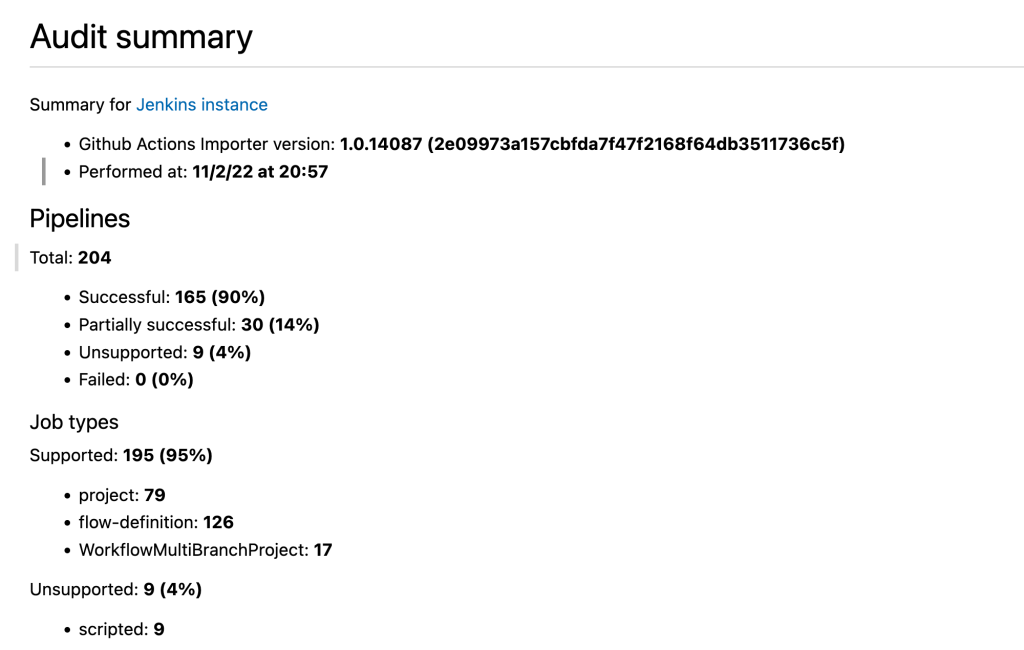
The Pipelines section classifies target pipelines into four categories:
- Successful: all constructs and items convert automatically.
- Partially successful: all constructs convert, but some individual items—such as specific build tasks or triggers—require manual attention.
- Unsupported: the pipeline definition uses constructs unsupported by GitHub Actions Importer.
- Failed: the tool encountered a fatal error during conversion, which can result from misconfigured pipelines, internal errors, or inaccessible pipelines due to network or credential issues.
The Job types summary indicates which pipeline types are in use and whether they are supported.
Build-step details
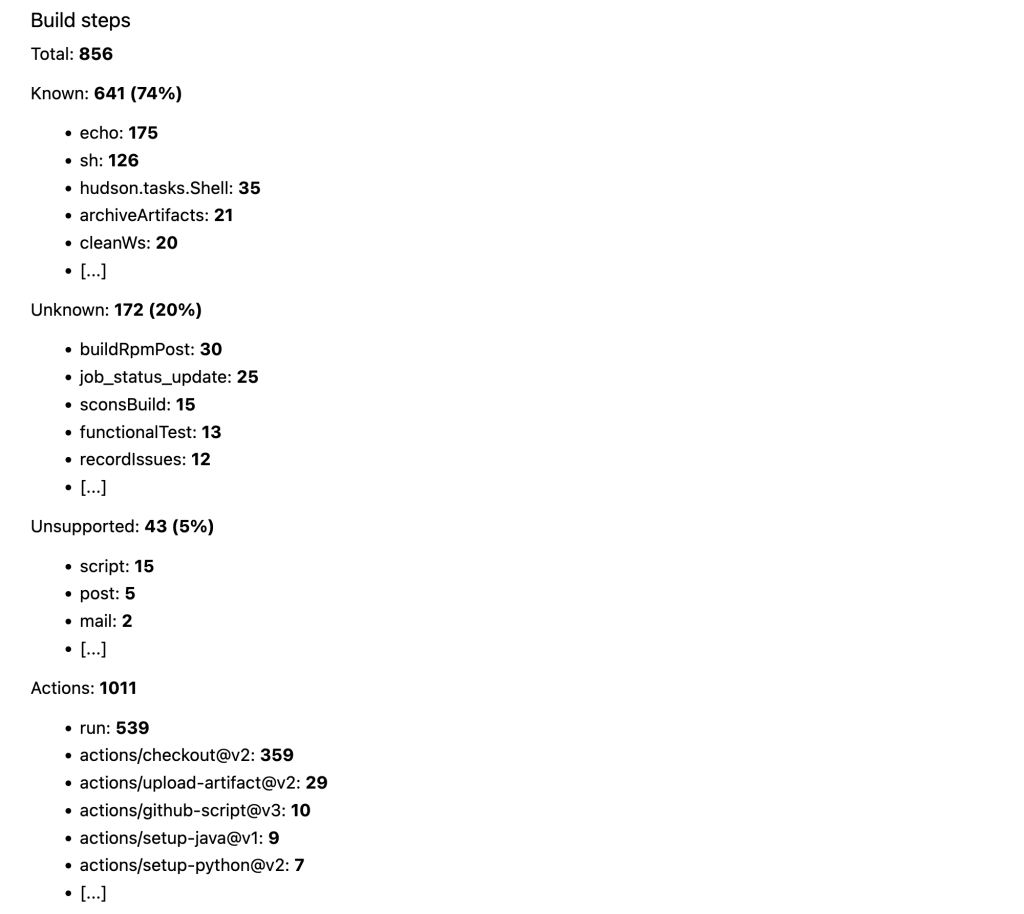
The Build steps section aggregates statistics on the individual build steps across all target pipelines:
- Known steps convert automatically to equivalent actions.
- Unknown steps cannot be mapped to an equivalent action automatically.
- Unsupported steps are either not supported by GitHub Actions or configured incompatibly.
- Actions lists all actions that the converted workflows would use. This list is useful for syncing actions to GitHub Enterprise Server, defining organization-level allowlists, or providing security and compliance teams with an inventory for review.
The report also includes aggregated summaries for build triggers, environment variables, and other uncategorized items.
Manual tasks and file manifest
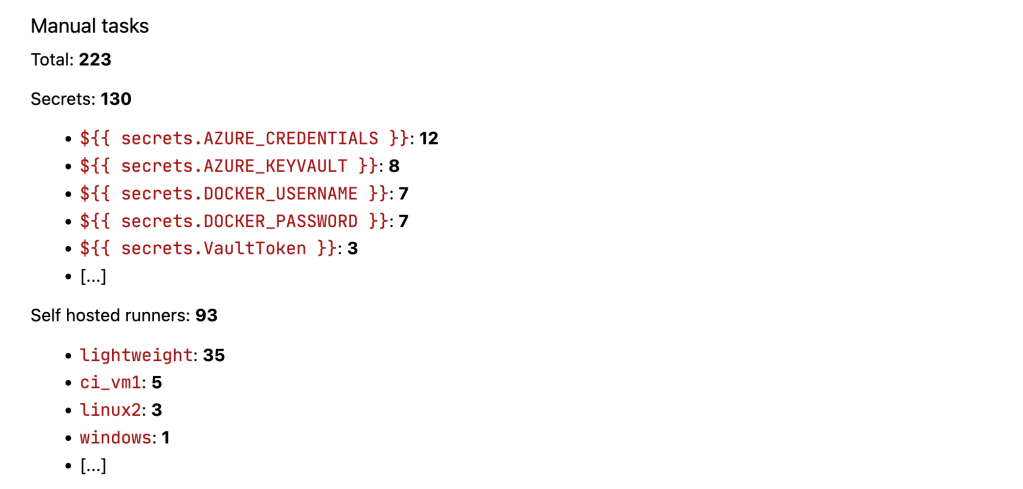
The Manual tasks section highlights items requiring human intervention. This includes a summarized list of secrets used in the converted pipelines—since secrets cannot be migrated automatically, they must be created manually. Self-hosted runners referenced in source pipelines are also identified; teams must decide between GitHub-hosted and self-hosted runners.
The audit report's final section lists all generated files, including original pipeline definitions, network response logs, converted workflow files, and error logs for failed conversions.
Understanding migration limitations
Several important categories of items are not handled automatically:
- Secrets and encrypted values are converted to context expressions, not repository secrets. Populating these values remains a manual task.
- Self-hosted build agents are not converted to self-hosted runners. References are preserved as labels in the resulting workflow's needs statement.
- Historical packages in the source CI/CD platform are not migrated to GitHub Packages; artifact and cache steps map to equivalent actions instead.
- Permissions must be configured manually.
- Less commonly used build steps or triggers may not convert automatically, which can be a factor when migrating from extensible platforms like Azure DevOps, Jenkins, or CircleCI.
Forecasting compute usage
The forecast command analyzes completed jobs over a specified time period to estimate compute capacity requirements for the destination environment.
$ gh actions-importer audit jenkins –start-date 7/1/22 --output-dir .
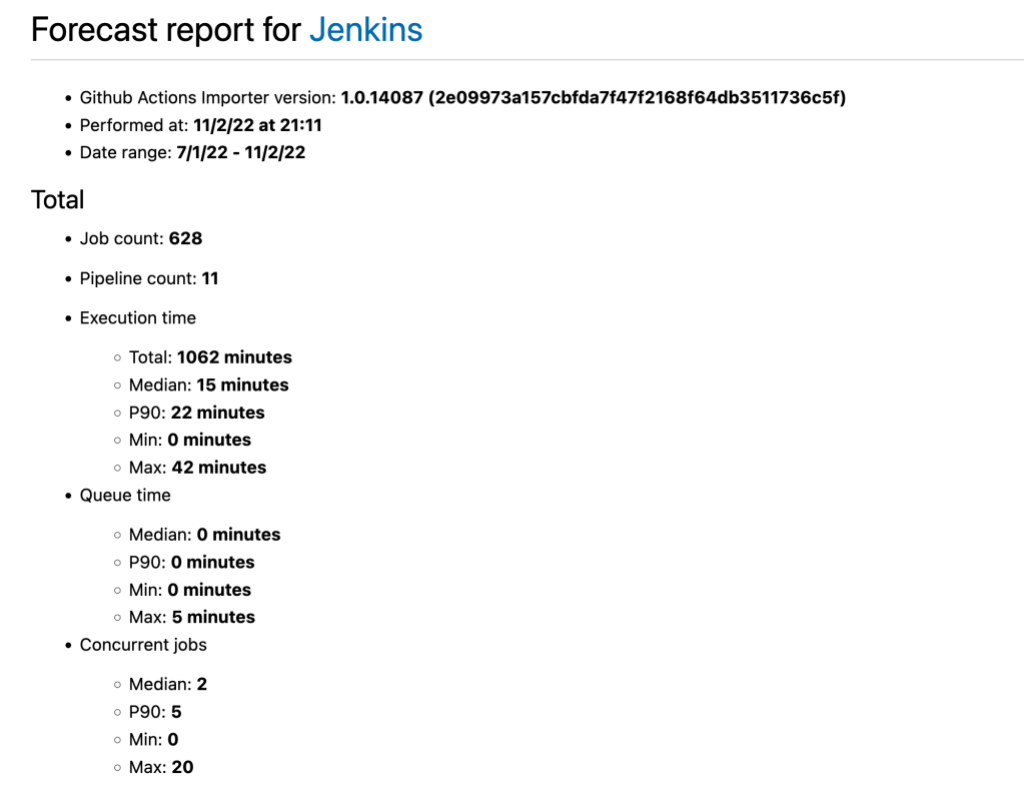
The forecast report provides these metrics:
- Job count: total completed jobs.
- Pipeline count: unique pipelines used.
- Execution time: time a runner spent on a job, useful for estimating GitHub-hosted runner costs.
- Queue time: time jobs waited for available runners.
- Concurrent jobs: peak concurrency, which informs required runner capacity.
Metrics are broken down by runner queue, which helps when planning a mix of hosted and self-hosted runners across different platforms.
Dry runs and custom transformers
The dry-run command converts an existing pipeline to a GitHub Actions workflow file for review before committing to a full migration.
$ gh actions-importer dry-run jenkins --source-url $SOURCE_URL --output-dir
If a pipeline conversion is partially successful, unconverted tasks appear in commented sections of the generated workflow file.
name: ethanis/universe
on:
  workflow_dispatch:
jobs:
  Build:
    runs-on:
      - self-hosted
      - main
    steps:
    - name: checkout
      uses: actions/checkout@v3
#     # This item has no matching transformer
#     - buildJavascriptApp:
#       - key: deploy
#         value:
#           isLiteral: true
#           value: false
When an unconverted task appears in multiple pipelines, GitHub recommends implementing a custom transformer that handles the scenario consistently everywhere. For one-off cases, editing the converted workflow directly is simpler.
The following example shows a transformer for a buildJavascriptApp step that could be replicated with a single shell command:
transform “buildJavascriptApp” do |item|
  {
    name: “Build Javascript App”,
    run: “npm install && npm run build”
  }
end
Transformers are provided to GitHub Actions Importer on the command line. A file named transformers.rb can be loaded with:
$ gh actions-importer dry-run jenkins --source-url $SOURCE_URL --output-dir . --custom-transformers transformers.rb
Production migration with pull requests
The migrate command performs the production conversion and opens a pull request containing the converted workflow files.
$ gh actions-importer migrate jenkins --source-url $SOURCE_URL –target-url $TARGET_URL --output-dir .
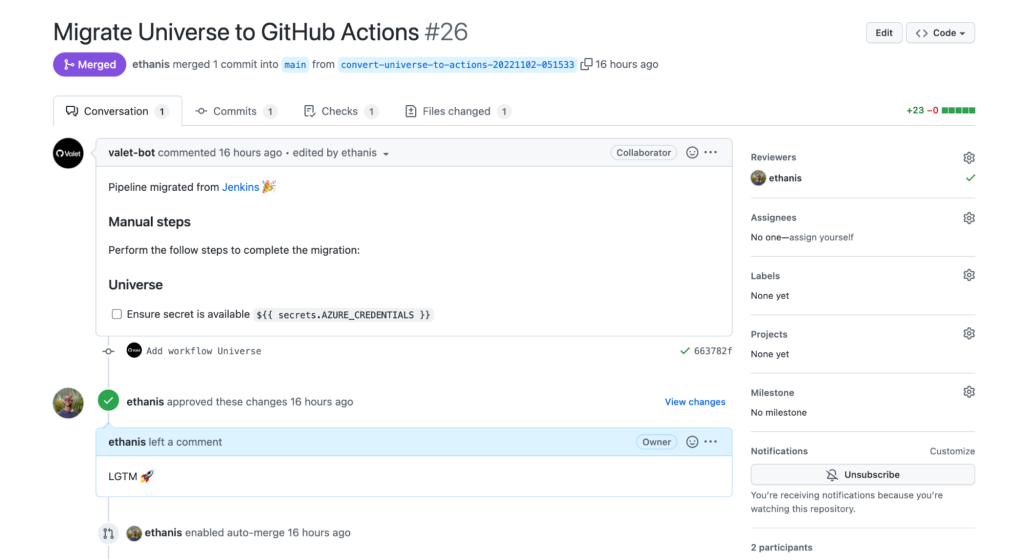
Any required manual tasks are listed in the pull request description. After those tasks are completed and code reviews pass, merging the pull request completes the migration.
Self-serve migrations with IssueOps
Organizations wanting to enable self-service migrations can use the GitHub Actions Importer IssueOps template repository. This approach runs GitHub Actions Importer commands through GitHub Actions and Issues, eliminating the need for local installations of the importer and Docker. The template provides the foundational functionality for teams to trigger and manage migrations directly from GitHub.


