
Removing heavy binaries from source control
Large executables in source control slow down clone and checkout operations, particularly for monorepo-based workflows. DotSlash, now open sourced by Meta, tackles this by replacing platform-specific binaries with a single, lightweight script that contains descriptors for every supported platform. When run, the dotslash CLI fetches, decompresses, verifies, and executes the correct remote artifact for the host's operating system and CPU.
DotSlash is written in Rust for performance and works across platforms. At Meta, it is invoked hundreds of millions of times daily, delivering both first- and third-party tools to end-user developers and hermetic build environments. To support generating DotSlash files outside of Meta, the release also includes a GitHub Action for assembling a comparable automated pipeline.
The tool addresses a common problem: while buck2 run builds executables from source directly inside Meta's monorepo, prebuilt binaries are often necessary for performance. Yet checking those binaries into version control creates its own issues, including I/O-heavy operations and code provenance concerns. DotSlash keeps large files out of the repository entirely while preserving the ability to update tools atomically with their consuming projects.
How a DotSlash file works
A DotSlash file is a text file that starts with #!/usr/bin/env dotslash (even on Windows). By convention, it keeps the same filename as the original executable, creating a transparent wrapper that behaves like the binary it replaces.
Consider a hypothetical DotSlash file named node, designed to run Node.js v18.19.0 across x86 Linux, x86 macOS, and ARM macOS from the same file:
#!/usr/bin/env dotslash

// The data in a DotSlash file is encoded as a loose superset of JSON
// that allows for comments and trailing commas.
{
  "name": "node-v18.19.0",
  "platforms": {
    "linux-x86_64": {
      "size": 11351600,
      "hash": "blake3",
      "digest": "7f83b1657ff1fc53b92dc18148a1d65dfc2d4b1fa3d677284addd200126d9069",
      "format": "zst",
      "providers": [
        {
          "uri": "https://example.com/bin/node/v18.19.0/node-linux.zst"
        }
      ]
    },
    "macos-x86_64": {
      "size": 11360000,
      "hash": "blake3",
      "digest": "94f217b7156fbcdc2285b1b216900b781a71dc19181d52e5477738af7d280f62",
      "format": "zst",
      "providers": [
        {
          "uri": "https://example.com/bin/node/v18.19.0/node-macos-x86_64.zst"
        }
      ]
    },
    "macos-aarch64": {
      "size": 11310000,
      "hash": "sha256",
      "digest": "eb3ede9ff516d6061d859ebdfa8e692255012bc91209946717c2c2e3204b6347",
      "format": "zst",
      "providers": [
        {
          "uri": "https://example.com/bin/node/v18.19.0/node-macos-aarch64.zst"
        }
      ]
    }
  }
}
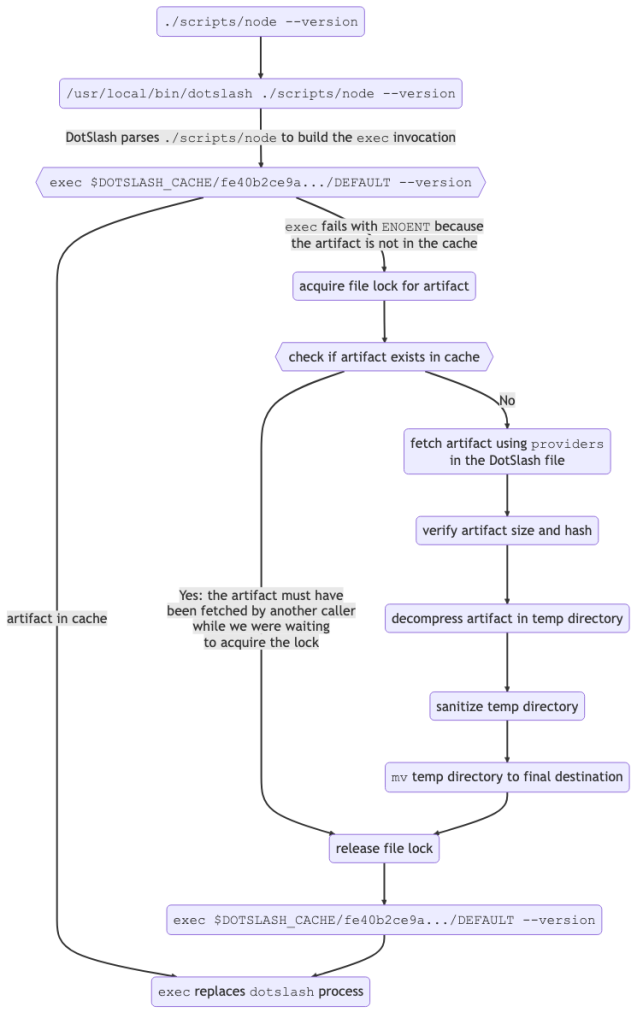
When a user runs ./node --version, the shebang translates this to dotslash ./node --version. DotSlash validates the header, then parses the JSON payload using a lenient JSON parser. It matches the current host to an entry under "platforms", hashes the entry to derive a cache path, and attempts to exec the cached binary directly, replacing argv0 with the DotSlash file's path while forwarding all remaining arguments.
On a cache miss, exec fails with ENOENT. DotSlash then uses the artifact's URL, size, and digest from the DotSlash file to fetch the artifact. It verifies the contents, atomically moves the result into the local cache via mv, and retries the exec. Advisory file locking prevents duplicate downloads when multiple DotSlash files for the same artifact execute concurrently.
Shared artifacts across multiple tools
DotSlash files frequently refer to the same compressed archive, with each file pointing to a distinct entry inside. For instance, node-v18.19.0-darwin-arm64.tar.gz may contain node, npm, and npx. Each DotSlash file differs only in its "path" field:
#!/usr/bin/env dotslash

{
  "name": "node-v18.19.0",
  "platforms": {
    "macos-aarch64": {
      "size": 40660307,
      "hash": "blake3",
      "digest": "6e2ca33951e586e7670016dd9e503d028454bf9249d5ff556347c3d98c347c34",
      // Note the difference from the previous example where "format": "zst" has been
      // replaced with "format": "tar.gz", which specifies what type of decompression
      // logic to use as well as the path within the decompressed archive to run when
      // this DotSlash file is executed.
      "format": "tar.gz",
      // Assuming node-v18.19.0-darwin-arm64.tar.gz contains node, npm, and npx in the
      // node-v18.19.0-darwin-arm64/bin/ folder within the the archive, the following
      // is the only line that has to change in the DotSlash file that represents
      // those other executables.
      "path": "node-v18.19.0-darwin-arm64/bin/node",
      "providers": [
        {
          "url": "https://nodejs.org/dist/v18.19.0/node-v18.19.0-darwin-arm64.tar.gz"
        }
      ]
    },
    /* other platforms omitted for brevity */
  }
}
The first invocation fetches and caches the whole archive; subsequent runs of any of the three files immediately use the cached copy. This pattern also ensures complementary executables ship together. Because the archive decompresses into its own directory, it can carry shared resources such as .dll files on Windows or entire script trees, making DotSlash suitable for distributing tools written in Python or Node.js—not just single binaries.
Generating DotSlash files in CI
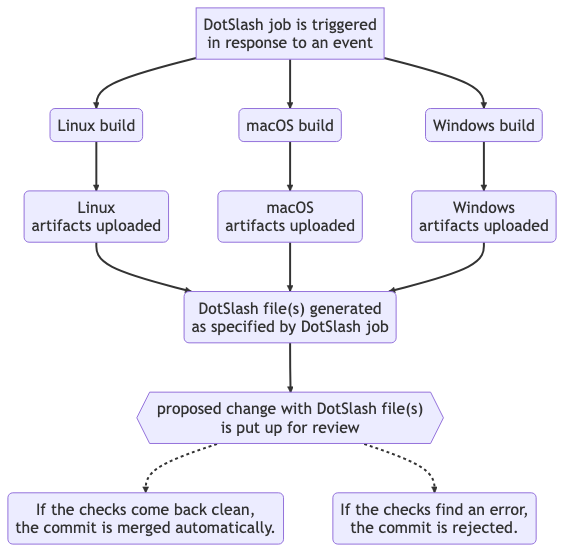
Most DotSlash files at Meta are produced automatically inside the continuous integration pipeline, not authored by hand. A CI job configured for DotSlash generation requires you to specify:
- A set of builds, typically spanning multiple platforms.
- Artifacts to publish to an internal blobstore.
- The DotSlash files in source control to update with new artifact entries.
- Job trigger conditions, analogous to GitHub Actions workflow triggers.
Successful jobs produce a proposed change: a "diff" at Meta, a pull request on GitHub. The change is submitted for review, which invokes linters, tests, and other signals. When all checks pass, the change is committed automatically without human interference.
The generation script injects metadata about the originating build job into each DotSlash file, aiding artifact provenance tracking. These "metadata" entries are ignored by the DotSlash CLI but remain as structured data for programmatic audits:
#!/usr/bin/env dotslash

// @generated SignedSource<<d8621e8ccbd7a595a3018e6a070be9c0>>
// https://yarnpkg.com/package?name=signedsource can be used to
// generate and verify the above signature to flag tampering
// in generated code.

{
  "name": "code-compose-lsp",
  // Added by automation.
  "metadata": {
    "build-info": {
      "job-repo": "fbsource",
      "job-src": "dotslash/code-compose-lsp.star",
      // It is considered best practice to build the artifacts for
      // all platforms from the same commit within a DotSlash file.
      "commit": {
        "repo": "fbsource",
        "scm": "sapling",
        "hash": "0f9e3d9e189bf393f7f9d0b6879361cd76fcdcd0",
        "date": "2024-01-03 20:07:54 PST",
        "timestamp": 1704341274
      }
    }
  },
  "platforms": {
    "linux-x86_64": {
      "size": 2740736,
      "hash": "blake3",
      "digest": "fc8a3ade56a97a6e73469ade1575e8f8e33fda99fbf6df429d555e480d6453d0",
      "format": "zst",
      "providers": [
        {
          "type": "meta-cas",
          "key": "fc8a3ade56a97a6e73469ade1575e8f8e33fda99fbf6df429d555e480d6453d0:2740736"
        }
      ]
      // Added by automation.
      "metadata": {
        "build-command": [
          "buck2",
          "build",
          "--config-file",
          "//buildconfig/clang-opt",
          "//codecompose/lsp/cli:code-compose-lsp"
        ]
      }
    },
    // additional platforms...
  }
}
clang-opt mode. Without DotSlash, a developer would need to run buck2 build --config-file //buildconfig/clang-opt //codecompose/lsp/cli:code-compose-lsp, which may be slow depending on cache state and build size. With DotSlash, the developer fetches and decompresses the optimized LSP directly, which is generally far quicker.
Notice that the "key" in the example is not a standard URL but a concatenation of the artifact's BLAKE3 hash and its size. That's because "type": "meta-cas" references a custom provider — specialized fetching logic built into DotSlash that relies on Meta's in-house content-addressable storage system, keyed by hash and size. The open source release does not ship the meta-cas provider, but it does include one additional custom provider beyond the default http provider for use outside Meta.
Bridging DotSlash and GitHub Releases
DotSlash’s most powerful setup pairs it with CI. For teams already publishing artifacts through GitHub Releases, DotSlash ships with a custom provider and a dedicated GitHub Action that together automate DotSlash file generation while handling authentication for private repositories and GitHub Enterprise instances.
Suppose a project builds linux-release, macos-release, and windows-release workflows and uploads the outputs with gh release upload. A new workflow using the workflow_run trigger can fire after any of those succeed and invoke the facebook/dotslash-publish-release action:
name: Generate DotSlash File

on:
  workflow_run:
    # These must match the names of the workflows that publish
    # artifacts to your GitHub Release.
    workflows: [linux-release, macos-release, windows-release]
    types:
      - completed

jobs:
  create-dotslash-file:
    name: Generating DotSlash File
    runs-on: ubuntu-latest
    if: ${{ github.event.workflow_run.conclusion == 'success' }}
    steps:
      - uses: facebook/dotslash-publish-release@v1
        env:
          # This is necessary because the action uses
          # `gh release upload` to publish the generated DotSlash file(s)
          # as part of the release.
          GITHUB_TOKEN: ${{ secrets.GITHUB_TOKEN }}
        with:
          # Additional file that lives in your repo that defines
          # how your DotSlash file(s) should be generated.
          config: .github/workflows/dotslash-config.json
          # Tag for the release to to target.
          tag: ${{ github.event.workflow_run.head_branch }}
Because GitHub Actions inputs only accept strings, the action takes a config parameter pointing to a JSON file in the repository. The other required input is the release ID, which GitHub defines by its Git tag. The action checks that every artifact listed in the config exists in the release, then generates the DotSlash files and attaches them to the release. One caveat: GitHub documents that workflow_run cannot chain more than three workflow levels, so verify the depth of the workflow graph if the trigger isn’t firing.
For a real-world example, consider the Hermes project, whose releases bundle platform-specific .tar.gz archives holding several executables such as hermes and hdb. The config for generating one DotSlash file per executable looks like:
{
  "outputs": {

    "hermes": {
      "platforms": {
        "macos-x86_64": {
          "regex": "^hermes-cli-darwin-",
          "path": "hermes"
        },
        "macos-aarch64": {
          "regex": "^hermes-cli-darwin-",
          "path": "hermes"
        },
        "linux-x86_64": {
          "regex": "^hermes-cli-linux-",
          "path": "hermes"
        },
        "windows-x86_64": {
          "regex": "^hermes-cli-windows-",
          "path": "hermes.exe"
        }
      }
    },

    "hdb": {
      "platforms": {
        "macos-x86_64": {
          "regex": "^hermes-cli-darwin-",
          "path": "hdb"
        },
        "macos-aarch64": {
          "regex": "^hermes-cli-darwin-",
          "path": "hdb"
        },
        "linux-x86_64": {
          "regex": "^hermes-cli-linux-",
          "path": "hdb"
        },
        "windows-x86_64": {
          "regex": "^hermes-cli-windows-",
          "path": "hdb.exe"
        }
      }
    },

    // Additional entries for hvm, hbcdump, and hermesc...

  }
}'
Each key under "outputs" becomes a DotSlash file added to the release. The "platforms" array determines which platform entries appear in the generated DotSlash file, and "regex" selects the backing archive in the release. Since the artifact is an archive—.tar.gz, .tar.zst, and similar—"path" specifies the executable’s location inside it. Hermes has no separate macOS ARM binary, so the "macos-aarch64" entry reuses the "macos-x86_64" artifact; if that changes, editing the "regex" is enough to split them.
The action handles digest computation itself. The DotSlash file it generates for hermes shows two providers for the Linux entry:
#!/usr/bin/env dotslash

{
  "name": "hermes",
  "platforms": {
    "linux-x86_64": {
      "size": 47099598,
      "hash": "blake3",
      "digest": "8d2c1bcefc2ce6e278167495810c2437e8050780ebb4da567811f1d754ad198c",
      "format": "tar.gz",
      "path": "hermes",
      "providers": [
        {
          "url": "https://github.com/facebook/hermes/releases/download/v0.12.0/hermes-cli-linux-v0.12.0.tar.gz"
        },
        {
          "type": "github-release",
          "repo": "facebook/hermes",
          "tag": "v0.12.0",
          "name": "hermes-cli-linux-v0.12.0.tar.gz"
        }
      ],
    },
    // additional platforms...
  }
}
DotSlash tries providers in order until one succeeds, then verifies the fetched binary against the specified "hash", "digest", and "size". The first provider points at a normal public URL fetched with curl --location. The second uses the custom "type": "github-release" provider, which shells out to the GitHub CLI (gh, installed separately) instead of curl. Public repositories like facebook/hermes work fine with the first provider, but if a release is private, that fetch fails and DotSlash falls back to the GitHub provider. As long as the user ran gh auth login for the repository beforehand, DotSlash can then retrieve the artifact with gh release download.
Publishing DotSlash files alongside GitHub releases lets users vendor a specific tool version into their own repositories by copying a single small file—leaving the large release artifacts untouched in the repo history.
Getting Started
The DotSlash site (docs at dotslash-cli.com/docs/) covers installation and deeper technical reference. The source lives on GitHub under facebook/dotslash; feedback and questions are welcome via the project’s GitHub issues tracker.


