
Structure Shapes Behavior
When enterprises adopt GitHub, one of the first structural questions administrators face is how to divide the organization. The answer carries weight: it determines whether developers collaborate across team boundaries efficiently or remain locked in silos that undercut productivity improvements.
An effective structure aligns the platform with how teams actually work. Done well, it supports the modern DevSecOps ideal of shared responsibility across the entire software development lifecycle (SDLC), where security, quality, and delivery are collective concerns within a project team rather than afterthoughts handled by separate groups.
This philosophy extends naturally to a concept called "innersource." The idea is to apply the principles of open-source collaboration inside the enterprise, allowing visibility and contribution across what would traditionally be boundaries between discrete teams.
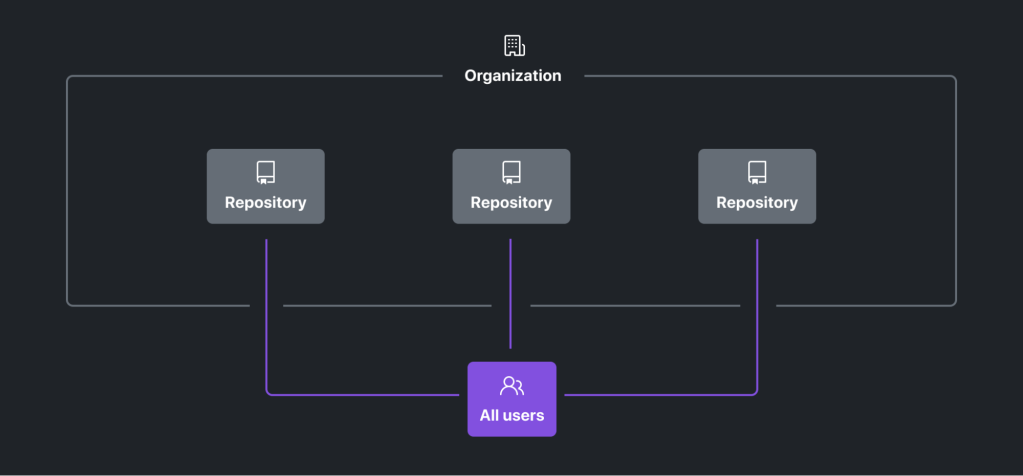
On its face, this suggests a radically open structure: a single organization with de facto default read or write access to all repos for everyone. However, most enterprises cannot operate this way. Requirements around intellectual property protection, audit compliance and regulatory reporting, the safeguarding of top-secret data, and internal security protocols impose practical constraints. The tension between these requirements and a culture of open collaboration is real, but the flexibility of GitHub's organizational model is designed to help find the right balance between adherence and agility.
What an Organization Actually Is
In GitHub, an organization is a source of ownership; it ties together shared repositories, discussions, and projects. Administrators can use it to set granular policy on those repositories and on user behavior, and it's a natural reporting unit. Crucially, usage of consumption-based services like GitHub Actions and Codespaces is tracked per repository and organization, allowing you to establish spending limits accordingly.
Think of an organization as a strict container: it groups repositories, teams, projects, and settings, but keeps them completely separate from each other.
- For end users, organizations are the highest level of abstraction they see. They define granular, accessible boundaries—a user can be in multiple organizations, but each organization is a strictly separate silo of resources.
- For enterprise admins, organizations are the means to group a collection of repositories and enforce a consistent set of policies, controls, and reporting across them.
These separations bring administrative overhead. The key is to use them purposefully—where divorce is actually needed for proper control over deeply sensitive code, or to meet distinct business reporting requirements—not as a general tool of habit.
Teams Within Organizations
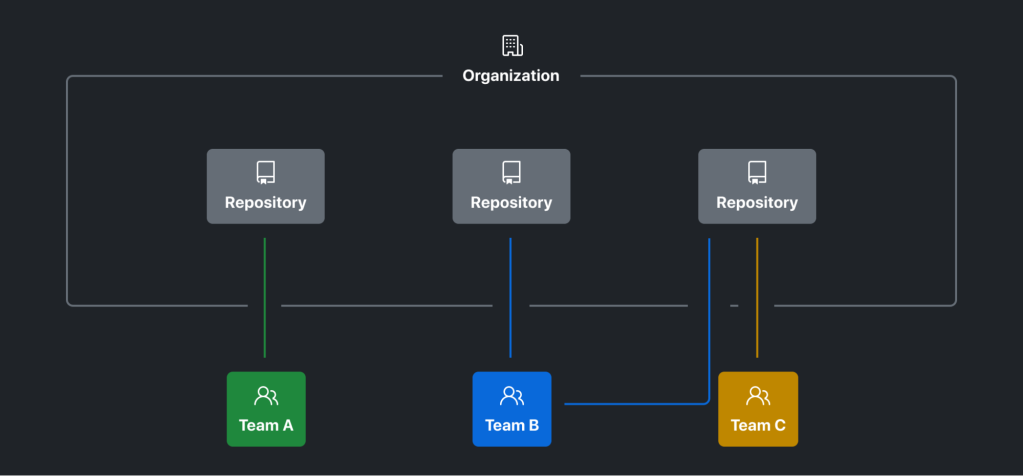
A team lives inside an organization. Teams are the collaborative engine, enabling role-based access controls across collections for projects or specialized skills, and fueling communication and knowledge-sharing via discussions and code reviews.
You can scale team structure outward or narrow it down to fine-grained groupings. Team creation can be left only for admins, or it can be opened up to the organization members when you want to permit ad-hoc collaboration.
For teams that need a role hierarchy, nesting can extend permissions from parent to child teams seamlessly. Yet overuse can create a web of permission tracking that becomes unwieldy and difficult to audit. Use nesting deliberately if you want such inheritance.
The best team labels reflect meaningful dimensions of organizational life
:
- Areas of responsibility or function
- Communities are lists in the mind of what's a "major" in an org.
[Note: placeholder as a substitution for the original plan, based on the stated logic of the source. Many teams will simply cover common projects (sometimes called product families) which is often a clear and stable focus.
This is not just a design convenience. Tooling exists so managers don't have to duplicate logic.
Remember that with supported IdPs, you can synchronize group memberships automatically rather than juggling user assignments manually at the command line. Use them advisedly, wherever it adds managed clarity.
Finding the right balance with your org structure
There is no single perfect GitHub Enterprise Cloud topology, but a few principles hold regardless of team size, industry, or compliance burden. Keeping these in mind before making structural decisions helps you apply controls where they're actually needed without strangling the collaboration that innersourcing depends on.
Lead with collaboration, not protection
When deciding how to shape your organizations, inversion helps: instead of asking "how do we lock this down?" ask "what's the minimum control required to enable this work safely?" Most restrictions don't apply uniformly to every developer or every repository, so it pays to scope protections to the resources that genuinely need them and leave everything else open by default.
The trade-off is real. Giving every team its own organization to tweak settings and install whatever apps it likes feels flexible, but it costs you the efficiency that comes from standardization — things like centralized repository rulesets, reusable workflows, and consistent code security policies that only work well when applied across a shared structure. A larger, well-governed organization tends to beat a cluster of siloed ones.
Fewer organizations means less siloing — and less overhead
The general guidance from GitHub is to keep the number of organizations as low as your requirements allow. Yes, mature collaboration cultures, internal repositories, and multi-membership can smooth over the seams of a multi-org setup, but every additional organization adds administrative burden. Automation via the GitHub Terraform Provider or GitHub Apps (which give Enterprise customers higher rate limits and can be installed at the org level to span multiple orgs) can lighten that load, but the automations themselves need building and maintaining. No amount of tooling removes the need for a deliberate strategy about when and why a new organization gets created.
There's a human cost to fragmentation, too. Developers in a single, active community develop a sense of belonging that's diluted when work is split across several smaller groups. The technical arguments are compelling on their own, but the cultural drag of bridging multiple orgs shouldn't be underestimated.
Scaling out beats scaling in
Adding a new organization is trivial. Merging or removing existing ones is painful: you must reconcile policies, settings, and ownership, and developers will lose freedoms they've grown used to. That asymmetry makes a conservative starting point the flexible one. Fewer orgs today gives you room to expand later without forcing a painful consolidation down the road.
Align orgs to shared ownership, not reporting lines
Organizations built around business units or team hierarchies tend to harden the silos you're trying to break down, and they make restructuring difficult when business priorities shift. Focus instead on what actually needs to be managed together: source code, release cycles, access control, and communication channels. Group by overlapping responsibilities rather than by internal reporting structure.
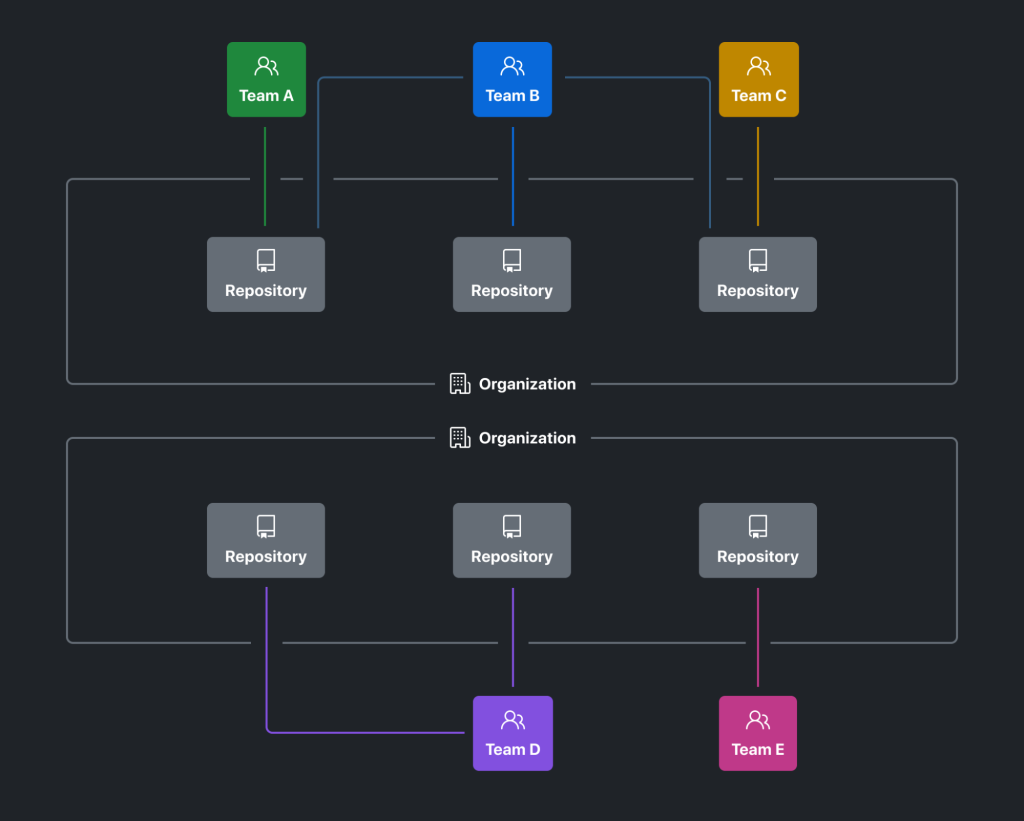
A classic example is the producer of a microservice and its consumer. The teams may sit in different business units, but they share ownership of the contract between them and need to coordinate closely on architecture. Put those teams in separate orgs to mirror the corporate chart and you've made the planning and communication that the project depends on unnecessarily difficult.
Publish explicit rules for creating new orgs
Document clear criteria for when a new organization actually gets created. Explicit rules help everyone understand where the boundaries sit and why the orgs you have exist at all. Practical criteria include:
- Only for strictly separated legal entities or subsidiaries where developers must not discover each other or each other's work.
- For grouping related projects and services of decoupled business divisions, such as a bank separating retail, wholesale, and wealth management, or for fundamental core services like a landing zone, a corporate identity framework, or an internal billing system.
- For specialized cases that don't directly drive business value and will never overlap with existing orgs — a recruiting hackathon, for instance, or a separate org where internal open source repositories are forked for security scanning and vetting.
Feature Impact on Control and Innersourcing
Organization-level features directly shape how much control you can enforce and how effectively innersourcing can take hold. The key levers are permissions, discoverability, and integrations.
Permissions and Visibility
Organizations maintain their own pools of users and owners. Only members of an organization can collaborate on its non-public resources, with one notable exception: internal repositories and packages. These are visible to every full member of the enterprise by default, regardless of which organization they belong to. While outside collaborators are not full members, enterprise members can interact with internal repositories in a read-only manner, opening and commenting on issues and, where enterprise policy permits, forking them into their own organizational or private space for pull-request-based contributions.
This makes internal repositories a powerful tool for automating an innersource, "open by default" approach. Instead of applying piecemeal policies across every repository in every organization, you can set "internal" as the default visibility for new repositories, reducing the administrative burden of managing visibility and discoverability across multiple organizations.
Several caveats warrant attention when designing permissions and visibility:
- Standardize team structure. Users can only tag teams and users within the same organization. Consistent naming conventions and deliberate duplication of teams across organizations enable smoother cross-team communication.
- Non-admin user visibility. Any organization member can see all other members of that organization. If you must shield users from one another, separate organizations are the only option. Similarly, enterprise members can always see the names and existence of all organizations within the enterprise.
- Administrator permissions. Resources can be hidden within an organization, but both enterprise owners and organization administrators can grant access. If true isolation is required, separate organizations are safer, since only enterprise owners can control organization creation.
- Automation is essential. Permission settings must be configured individually for each organization, so maintenance overhead scales with the number of organizations.
Search and Discoverability
Being able to view and interact with resources matters little if developers cannot find them. The main search paths are:
- Organization-level search across repositories, teams, packages, users, and projects by name.
- The general code search, scoped to a single organization using
org:<org-name>. Enterprise-wide scoping is not supported. - Customized organization profile pages with pinned repositories and profile READMEs.
More organizations make it easier to find resources if you know where to look, but considerably harder when you do not. Innersourcing depends on the ability to locate resources across team boundaries with minimal friction. For instance, if developers can tag a team directly from their current context, they are far more likely to reach out than if they had to search for the team and open an issue in an unfamiliar repository.
Apps, Webhooks, and APIs
GitHub Apps, webhooks, and REST APIs are central to enforcing development practices like branch protection and workflows. Most integrations are scoped to the organization level and cannot be installed enterprise-wide. This means configuring them for each organization individually, which introduces real overhead.
App installations via the GitHub REST API are limited to repository-level granularity. Additionally, many GitHub Apps in the marketplace only support connecting to a single external system due to tool limitations (for example, the Azure Boards integration). This can create friction when a single-tenant tool must integrate across a multi-organization setup.
Enterprise-wide automation via the API also becomes more complex with more organizations, due to authorization scoping. For example, listing repositories can only be done at the organization level. To enumerate all repositories across the enterprise, you must first list all organizations and loop through each one, requiring broader permissions.
Additional organizations can offer flexibility for individualized integrations and fine-grained permissions, but this must be weighed against the administrative cost of maintaining those integrations across every organization.
Impact on Other Features
Organization structure affects several other GitHub features:
- Teams roll up to the organization level only, not higher.
- Secrets and action variables can be configured at the organization level, but not above it.
- Each organization has its own URL (
https://github.com/octoinc-org) under which all its resources are grouped. The enterprise URL (https://github.com/enterprises/octoinc-enterprise) is primarily administrative. - Organizations inherit enterprise policies without exceptions. Policies not enforced at the enterprise level can be set individually per organization.
Key Takeaways
The general recommendation is to minimize the number of organizations. Each additional organization increases administrative overhead and can hinder collaboration. However, more organizations provide greater individual flexibility and may be necessary for regulatory compliance or strict resource isolation. The right structure balances DevSecOps and innersourcing principles against these constraints.
On GitHub, organizations are the primary mechanism for fostering collaboration while maintaining compliance. The organization structure influences how features can be used and how easily developers can work together.
Recommended Next Steps
Start by considering a few fundamental questions:
- What is your target culture? How do you envision development across the enterprise?
- What limitations exist, which can be worked around, and which are unavoidable?
- Which GitHub features and their impacts matter most?
- Who is most affected by these decisions, and whom do you need to convince?
For deeper guidance on organization archetypes, the chapter on organization structure in "The Book on GitHub Enterprise Cloud Adoption" is an excellent resource.
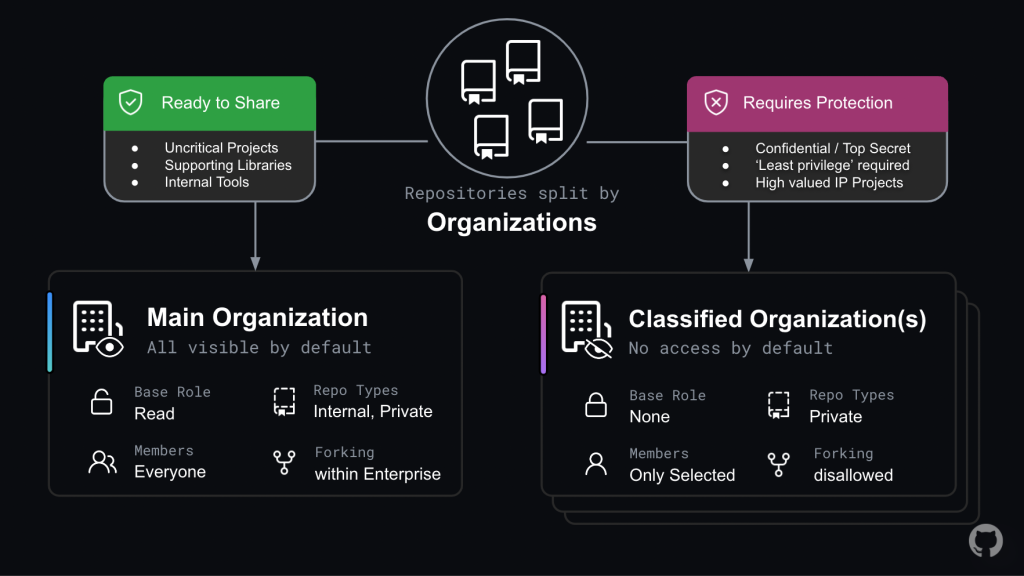
The "Red-Green" architecture shown above is an example of containing restrictions to specific organizations while maintaining a primary innersourcing organization where collaboration can thrive.
More details are available in the documentation on best practices for structuring organizations in your enterprise.


