
From Clicking to Code: Managing AWS Infrastructure Programmatically
When a cloud backend starts small, the AWS Management Console is perfectly adequate. A handful of resources can be created, tweaked, and deleted by hand without much friction. But as an application grows, so does the complexity of its underlying infrastructure. Manually tracking dependencies, permissions, and event triggers across dozens of services becomes error-prone and time-consuming. A single misconfiguration in a console form can leave an environment in a broken state that is difficult to diagnose or reproduce.
The alternative is infrastructure as code (IaC): defining your cloud resources in a descriptive, version-controlled model that the DevOps team can review, test, and deploy just like application source code. For AWS, the established IaC options are AWS CloudFormation and AWS CDK. CloudFormation relies on YAML or JSON templates; CDK lets you define the same resources in a familiar programming language. Google Cloud offers Deployment Manager with YAML templates, and Microsoft Azure uses JSON-based Azure Resource Manager (ARM) templates. Terraform, an open-source tool with configurations written in HashiCorp Configuration Language (HCL), supports AWS, Google Cloud, Azure, and hundreds of other providers.
All of these template-based tools share a drawback: configuration written in YAML, JSON, or HCL does not modularize well. As your infrastructure grows, unstructured template files become difficult to maintain, and developers who are used to writing application code must switch their mindset to a declarative markup language. AWS CDK addresses this gap by providing a truly code-first experience for managing AWS infrastructure.
What Is the AWS CDK?
The AWS Cloud Development Kit (CDK) is an open-source framework that lets you model and provision AWS resources using a programming language such as TypeScript, Python, Java, or .NET. Instead of writing a declarative YAML template, you instantiate classes and call methods in your IDE. Behind the scenes, CDK compiles your code into a YAML template and uses AWS CloudFormation to provision resources safely and repeatedly.
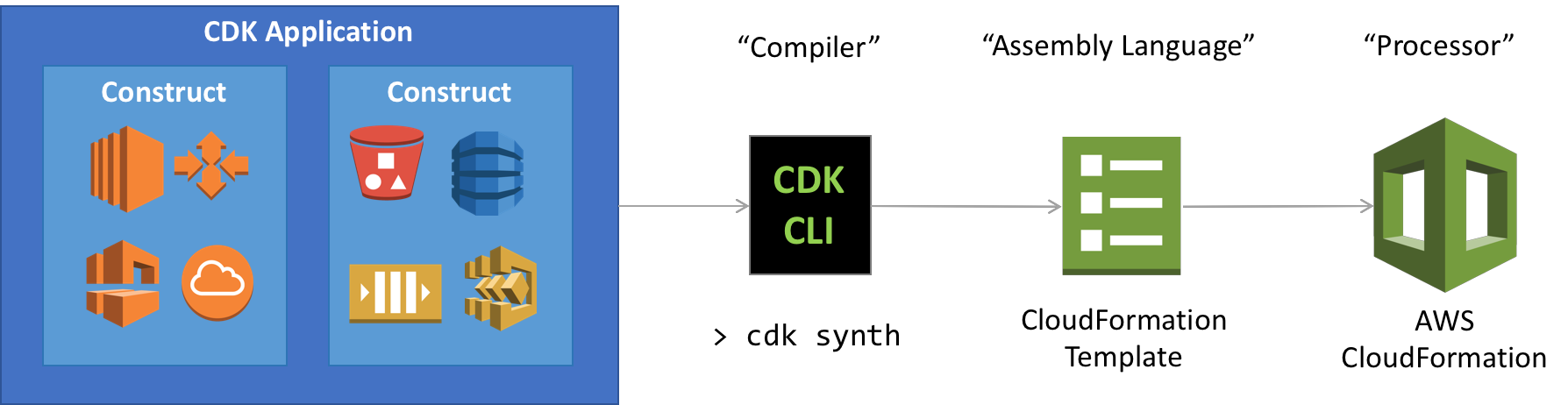
This approach delivers several practical benefits for engineering teams:
- Shorter learning curve for onboarding.
Developers can apply the language and IDE they already know to infrastructure. The CDK construct library comes with high-level components that encode proven defaults, so building on AWS does not require deep domain expertise up front. - Faster iteration.
Programming language features — loops, conditions, objects, and functions — make infrastructure definitions more expressive than static templates. The same tooling you use for unit testing application logic can test infrastructure code, making it safer to change. - Reusable internal components.
Constructs can be extended to encode your organization’s security, compliance, and governance rules. Once packaged, these custom components let teams bootstrap new projects with best practices baked in. - Reduced context switching.
Runtime code and infrastructure definitions live in the same language and IDE. The AWS Toolkit for Visual Studio Code even provides a dedicated experience for visualizing CDK stacks, debugging serverless applications, and deploying directly from the editor.
Constructs: The Building Blocks of CDK
At the center of CDK are constructs. A construct is a cloud component that encapsulates all the configuration detail and glue logic needed to provision one or more AWS services. When CDK objects are initialized in your app, they are compiled into a YAML template and deployed as an AWS CloudFormation stack.
CDK supports TypeScript, JavaScript, Python, Java, C#, and .NET, with Go in developer preview. The construct library dynamically reflects the full API surface of AWS. For example, s3.Bucket represents an Amazon S3 bucket, and sqs.Queue represents an Amazon SQS queue. The library is organized into three levels of abstraction.
L1 Constructs: Direct CloudFormation Pass-Through
L1 constructs are the exact CloudFormation resources, ported class by class. They offer a one-to-one mapping with AWS CloudFormation and provide complete coverage of every available AWS resource. Because they expose every property exactly as CloudFormation expects it, they offer the most granular control but do not include any conveniences.
Example: An S3 Bucket with a Policy
The following code defines an S3 bucket and attaches a policy granting GetObject permission to the AWS account's root user via the addToResourcePolicy method:
import * as s3 from "@aws-cdk/aws-s3";
import * as iam from "@aws-cdk/aws-iam";

const bucket = new s3.Bucket(this, "CdkPlayBucket");
const result = bucket.addToResourcePolicy(
  new iam.PolicyStatement({
    actions: ["s3:GetObject"],
    resources: ["*"],
    principals: [new iam.AccountRootPrincipal()],
  })
);
Example: DynamoDB with Autoscaling
This snippet creates a DynamoDB table and attaches autoscaling rules, demonstrating how L1 constructs can string together a resource and its operational configuration:
import * as dynamodb from "@aws-cdk/aws-dynamodb";

const table = new dynamodb.Table(this, "CdkPlayTable", {
  partitionKey: { name: "id", type: dynamodb.AttributeType.STRING },
  billingMode: dynamodb.BillingMode.PAY_PER_REQUEST,
});

const readScaling = table.autoScaleReadCapacity({
  minCapacity: 1,
  maxCapacity: 50,
});

readScaling.scaleOnUtilization({
  targetUtilizationPercent: 50,
});
L2 Constructs: Higher-Level APIs with Defaults
L2 constructs wrap the L1 layer with an intention-based API. They come with sensible defaults, boilerplate code, and glue logic, so you write less. Common operations are the default rather than something you must configure. For example, L2 gives you bucket.addLifeCycleRule() to attach a lifecycle policy to an existing S3 bucket without re-declaring the resource from scratch:
bucket.addLifecycleRule({
  abortIncompleteMultipartUploadAfter: Duration.days(7),
  enabled: true,
  id: 'BucketLifecycleRule'
})
Security-related configuration is also simpler at this level. CORS access — needed when objects in a bucket are served to external domains — is a single method call via addCorsRule:
bucket.addCorsRule({
  allowedMethods: [
    s3.HttpMethods.GET,
    s3.HttpMethods.POST,
    s3.HttpMethods.PUT,
  ],
  allowedOrigins: ["https://smashingmagazine.com"],
  allowedHeaders: ["*"],
});
L3 Constructs: Patterns for Common Tasks
The most abstract level, known as patterns, bundles multiple CloudFormation resources and L2 constructs into a ready-made architecture for a common use case. A classic example is aws-apigateway.LambdaRestApi, which models an API Gateway endpoint backed by an AWS Lambda function. Instead of standing up and wiring the two services yourself, you do this:
Note: The example defines an inline Lambda function and passes it to LambdaRestApi, which handles all the deeper integration configuration.
const backend = new lambda.Function(this, "CDKPlayLambda", {
  code: lambda.Code.fromInline(
    'exports.handler = function(event, ctx, cb) { return cb(null, "success"); }'
  ),
  handler: "index.handler",
  runtime: lambda.Runtime.NODEJS_14_X,
});
const api = new apigateway.LambdaRestApi(this, "CDKPlayAPI", {
  handler: backend,
  proxy: false,
});

const items = api.root.addResource("items");
items.addMethod("GET"); // GET /items
items.addMethod("POST"); // POST /items
Whether you are wiring individual buckets at the L1 level or launching a full serverless endpoint with L3 patterns, CDK gives you the same flexibility and coverage as CloudFormation — but expressed in code your team can review, test, and refactor like any other software artifact.
Stacks and Apps: CDK’s Deployment Units
In AWS CDK, everything you build is composed of constructs—the basic building blocks of the framework. These constructs are grouped into stacks, which in turn form an app.
Understanding Stacks
A stack is the smallest deployable unit in CDK. All resources defined within a single stack are provisioned together as one atomic operation. Since CDK synthesizes to AWS CloudFormation, each stack carries the same service limits as a CloudFormation stack. You can define as many stacks as needed within a single CDK app. Below is the scaffolding for a basic stack:
import * as cdk from "@aws-cdk/core";
export class CdkPlayStack extends cdk.Stack {
  constructor(scope: cdk.App, id: string, props?: cdk.StackProps) {
    super(scope, id, props);
    // resources
  }
}
Assembling the App
Any construct that represents an AWS resource must live inside a stack’s scope. To make that stack deployable, you initialize it within an App construct. This ties everything together and produces the final CloudFormation template when synthesized. The following snippet shows how to instantiate CdkPlayStack within an app:
import { App } from "@aws-cdk/core";
import { CdkPlayStack } from "./cdk-play-stack";

const app = new App();
new CdkPlayStack(app, "hello-cdk");
app.synth();
Working with the CDK Toolkit
AWS provides the cdk CLI tool as the primary interface for managing your CDK application. It handles building, synthesizing, and deploying the infrastructure defined in your code.
Scaffolding a New Project
Use the cdk init command to start a new application in your language of choice. Each CDK app should live in its own directory, as it maintains its own set of module dependencies. For instance, to initialize a TypeScript project using the sample-app template:
cdk init sample-app --language=typescript
Running this command creates several files. The most important one is lib/cdk-init-stack.ts, which contains a pre-built stack with a few example constructs. The generated stack is shown below:
import * as sns from '@aws-cdk/aws-sns';
import * as subs from '@aws-cdk/aws-sns-subscriptions';
import * as sqs from '@aws-cdk/aws-sqs';
import * as cdk from '@aws-cdk/core';

export class CdkInitStack extends cdk.Stack {
  constructor(scope: cdk.App, id: string, props?: cdk.StackProps) {
    super(scope, id, props);
    const queue = new sqs.Queue(this, 'CdkInitQueue', {
      visibilityTimeout: cdk.Duration.seconds(300)
    });
    const topic = new sns.Topic(this, 'CdkInitTopic');
    topic.addSubscription(new subs.SqsSubscription(queue));
  }
}
Besides the stack definition, cdk init also sets up a Git repository with a .gitignore file, a package.json for dependency management, and a tsconfig.json for TypeScript configuration.
You can manually compile the app with the build command:
npm run build
While not required—the toolkit compiles automatically before deployment—a manual build helps catch syntax errors early. To confirm the structure of your app, list the stacks it contains:
cdk ls
The ls command returns the stack’s name, which matches the app’s directory name. You can also use cdk diff to inspect any changes made since the last deployment.
Producing a CloudFormation Template
After refining your stack, the synth command converts it into an AWS CloudFormation template. If your app has multiple stacks, you must specify which one to synthesize. The command looks like this:
cdk synth
This creates a cdk.out file containing a YAML-formatted template, which maps every CDK resource to its CloudFormation equivalent. The beginning of that output:
Resources:
  CdkPlayQueue78BDD396:
    Type: AWS::SQS::Queue
    Properties:
      VisibilityTimeout: 300
    UpdateReplacePolicy: Delete
    DeletionPolicy: Delete
    Metadata:
      aws:cdk:path: CdkPlayStack/CdkPlayQueue/Resource
The generated YAML is a fully valid CloudFormation template. You can deploy it through the AWS console, third-party tools, or directly via the CDK toolkit as described next.
Deploying Your Stack
Before deploying, ensure the AWS CLI is installed and your credentials are configured. Follow the quick-start guide for setup instructions.
To deploy the stack using CloudFormation:
cdk deploy
As with synth, the stack name is omitted when your app contains only one stack. If the deployment involves sensitive IAM or security changes, the toolkit will ask for confirmation before proceeding, as seen in the prompt below:
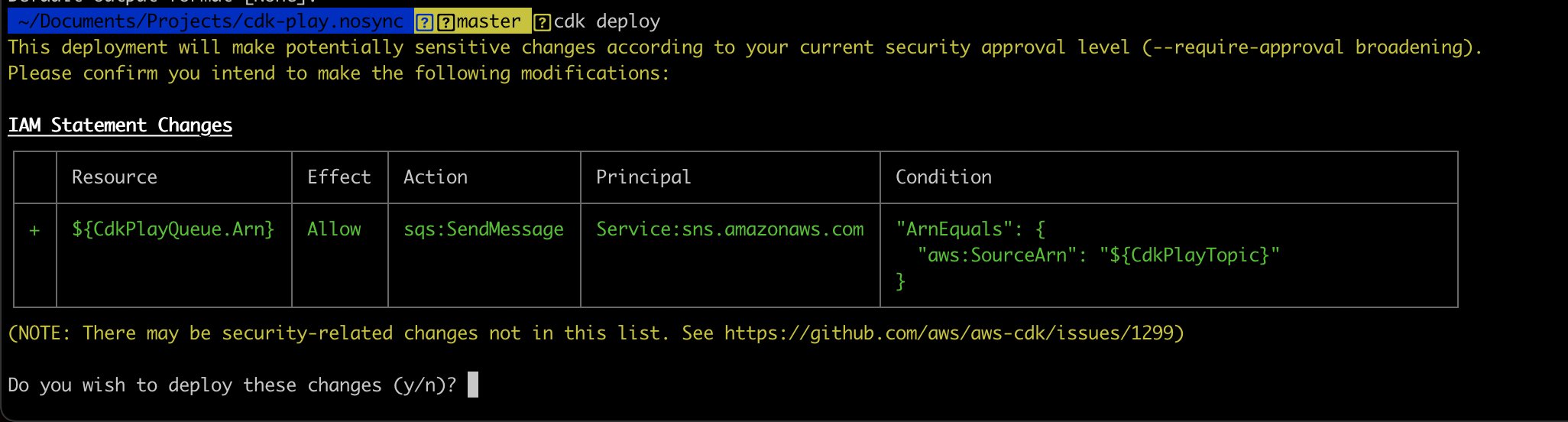
During deployment, the toolkit shows real-time progress. Once successful, the stack and its resources—such as the SNS topic and SQS queue from the examples—appear in their respective consoles. Make sure the region in the AWS console matches the one set in your CLI configuration.
These commands cover the most frequent CDK workflows. A full list of toolkit options is available in the official documentation.
Why Infrastructure as Code with CDK
CDK brings the familiarity of programming languages to cloud infrastructure. You can use logical statements, object-oriented design, and high-level abstractions to model your system. Constructs can be shared as libraries within your team or published publicly. This makes infrastructure code reusable and modular, and because it’s code, it can be tested using standard tools and reviewed through normal pull-request workflows.
The CDK toolkit ties the process together—synthesizing stacks into CloudFormation templates and deploying them to AWS. The example project used here is available on GitHub, with more samples in the cdk-samples repository. Those examples also show how L1, L2, and L3 constructs from the AWS Construct Library simplify integrating various AWS services, reducing the complexity of stitching together architecture.


