

Detecting Solorigate build compromises with CodeQL
Late last year, FireEye disclosed a nation-state attack on SolarWinds' Orion network monitoring product. Attackers backdoored the product before it shipped to customers, including the US government, and then used that foothold to move laterally into networks where Orion was deployed. The campaign is also referred to as Solorigate by Microsoft and Sunburst by FireEye. In response, Microsoft's security team contributed a set of CodeQL queries for C# codebases that can help organizations check their own code and build infrastructure for traces of the malware.
Build hijacking: the attack mechanism
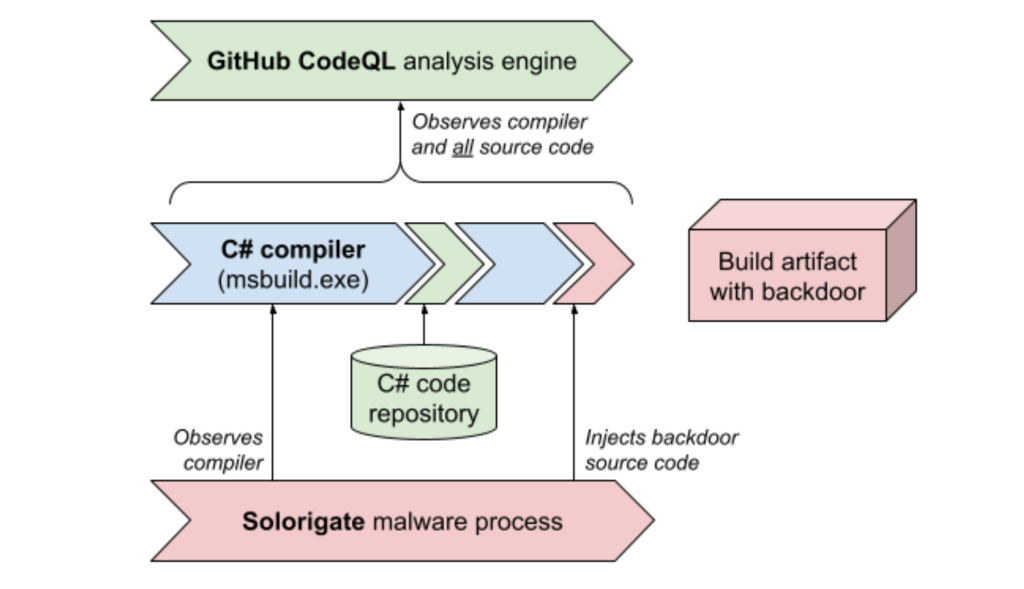
The SolarWinds malware spreads by compromising build systems, not source code repositories. It monitors for invocations of msbuild.exe, the Microsoft Build Engine, and uses debugging privileges to inject additional malicious code into the build process. This means the codebase itself contains no malicious commits — but the products compiled and shipped from that codebase do. CrowdStrike has published a detailed technical analysis of this process.
Because the malware operates at build time, a CodeQL analysis of the source repository can miss it entirely. CodeQL builds a database by observing the compilation process and extracting the source code actually used to produce a binary. If that build happens on an infected server, the injected malware source code is extracted along with the genuine source, and the resulting database will contain its traces. If the database is generated on a clean machine, those traces will be absent.
Running the Solorigate queries in VS Code
The easiest way to analyze a potentially affected build server is to manually create a CodeQL database on that server and examine it with the CodeQL extension for Visual Studio Code. The workflow:
- Install the VS Code plugin for CodeQL and follow the Quick start guide, including setting up the starter workspace.
- Generate a CodeQL database by building your C# source on the potentially infected server.
- Copy the database to your analysis machine. The database contains a plaintext copy of the compiled source code and a relational representation of it — not compilation artifacts or executables.
- Load the database into VS Code.
- In
ql/csharp/ql/src/codeql-suites, locate thesolorigate.qlsquery suite, right-click it, and choose CodeQL: Run Queries in Selected Files.
Repeat these steps for every codebase that could have been built on an infected server.
GitHub Advanced Security customers can skip the manual route and run the queries through CI/CD by referencing a published CodeQL package in the "Initialize CodeQL" step of their workflow:
For codebases requiring custom build commands, refer to the documentation on configuring the CodeQL workflow for compiled languages. This configuration lets developers run code scanning against the systems that execute CI/CD jobs and build release artifacts.
- uses: github/codeql-action/init@v1
  with:
    packs: codeql/csharp-solorigate-queries
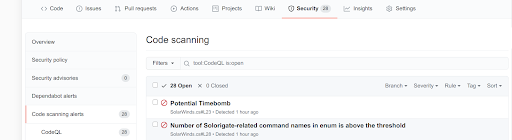
With this configuration, the additional queries run as part of code scanning. If indicators of Solorigate or similar malware are detected, an alert appears in the GitHub web interface. Custom query configuration is covered in the documentation for running additional CodeQL queries in code scanning.
Validation and limitations
If CodeQL flags a suspicious element, manually review the affected area and compare the code seen during the build to the original source code. The queries serve as a heuristic for spotting backdoors — a clean result does not prove a system or network is uncompromised. Use them as one technique in a broader audit, and consult the Microsoft Solorigate Resource Center for additional guidance.
For technical details on the queries themselves, Microsoft has published a blog post on their development.



