
Why GitHub Advanced Security?
Modern applications rely on many different types of code, and each piece of that stack may need a specialized security tool. But assembling a patchwork of scanners with different interfaces creates friction: developers bounce between contexts and inconsistent workflows, and security teams lose the cohesion needed to track risk across repositories.
GitHub Advanced Security (GHAS) was built to avoid that trade-off between security and developer experience. It embeds security testing in the usual GitHub workflow, using the same pull request flow developers already work in every day. GHAS includes native secret scanning, CodeQL code scanning for discovering insecure coding patterns, and supply chain security via Dependabot and Dependency review — with the results visible in security overview dashboards.
For coverage beyond those native tools, GHAS supports more than 60 open source and third-party security integrations via GitHub Actions. That means teams can fill gaps in SAST, DAST, container scanning, infrastructure scanning, and more, without leaving the pull request experience behind. Findings from third-party tools surface in the same format, in the same places, as results from GitHub’s own security products.
Choosing your AppSec toolchain
Which tools you need depends on your codebase. The table below maps common testing types to their use cases and offers some starting points — many of which you can pair with native GHAS capabilities rather than choosing one or the other.
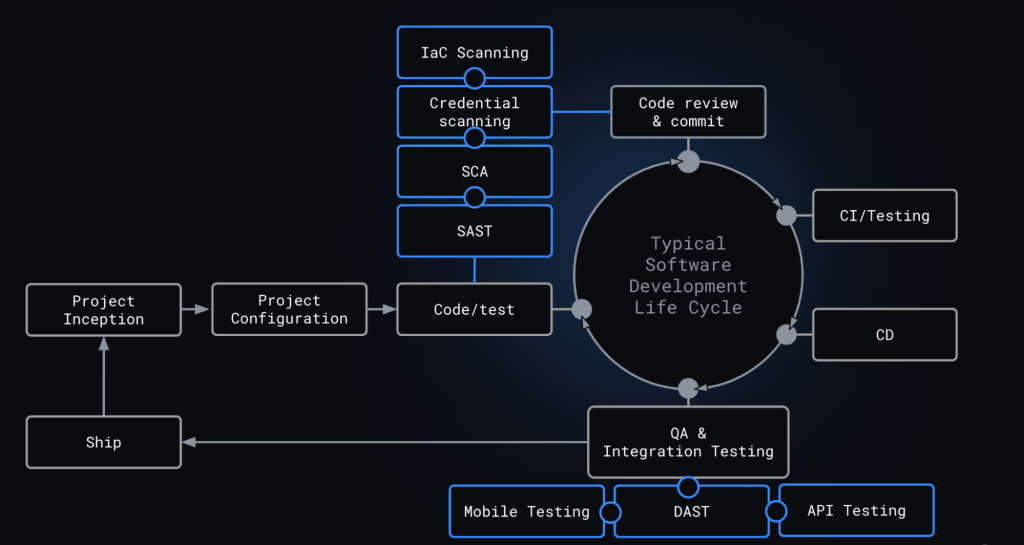
Tools referenced in this section are examples only, not formal GitHub recommendations. Research them before adopting.
Static analysis and extensibility
CodeQL, GitHub’s native SAST engine, powers code scanning and can identify OWASP top-10 issues, hardcoded credentials, and other insecure patterns. But languages like Rust or Elixir that CodeQL doesn’t yet support may need alternative coverage, as may deeper mobile testing. Tools like Sobelow or NowSecure can extend SAST reach via code scanning and Actions, letting you adopt new languages quickly while keeping a consistent interface for developers and security reviewers in the pull request.
Secrets and supply chain
Secret scanning detects API tokens and credentials from more than 100 major providers and developer tools, and with push protection it can stop tokens from entering a repository entirely. You can also define custom regular expressions to catch patterns like personally identifiable information, SSH keys, payment data, or internal API tokens the defaults miss.
For the dependency side, Dependabot alerts on known vulnerabilities and suggests fixes, patches, or updates. Dependency review evaluates dependency changes — including license impact — at every pull request, and can block new dependencies with known vulnerabilities or prioritize alerts based on whether your code actually calls the vulnerable function.
Runtime and infrastructure testing
Container images pull in operating system packages from public registries that may carry vulnerabilities. For that, open source scanners like Trivy from Aquasec or Grype from Anchore can be wired into the code scanning workflow. Similarly, tools like Kubesec and tfsec evaluate Kubernetes configurations and infrastructure as code templates (Terraform, Azure Resource Manager) for configuration errors, again surfacing findings directly in pull requests.
For applications that are already running in staging or QA, DAST solutions such as StackHawk and OWASP ZAP probe web assets from the outside, safely testing thousands of attack vectors. API testing tools like 42Crunch can analyze APIs statically and dynamically, while DAST tools like StackHawk and ZAP can also discover and test APIs. One caveat: DAST results don’t always fit SARIF’s file-and-line model, so those alerts sometimes return as deep links into the provider’s platform.
Fuzz testing
Fuzzing sends invalid, unexpected, or random data to a running program to expose crashes or other abnormal behavior. Mutation-based and directed generation are two common approaches, and they can surface bugs other testing methods miss. Google’s ClusterFuzzLite and OWASP ZAP’s fuzzing add-on are sturdy open source options.
Wiring third-party tools into GitHub
Adding a new scanning type to your pipeline takes only a few steps. Go to the Security tab, select Code Scanning under Vulnerability Alerts, and click Add Scanning Tool. On the Choose a workflow screen, pick from available open source and third-party scanners to begin automating tests on every change. Public repositories get 2,000 free Actions minutes per month and free code scanning.
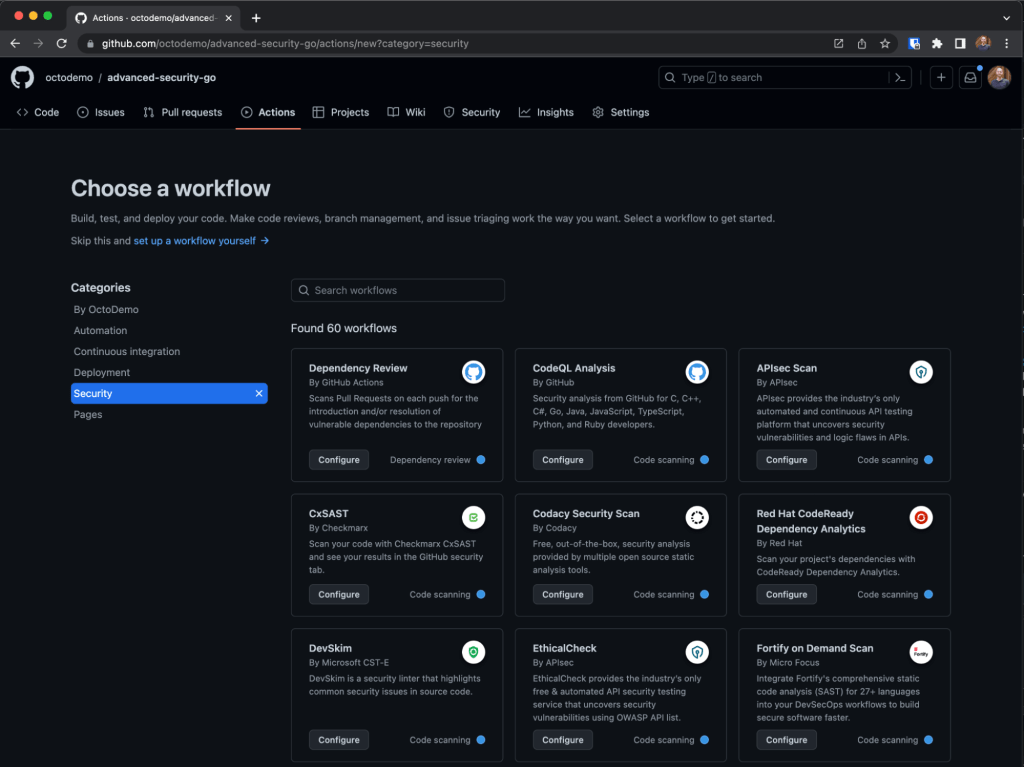
Teams using third-party CI tools like Jenkins or TeamCity can also integrate code scanning; GitHub has published best practices for rolling out code scanning at enterprise scale. And if your preferred tool isn’t listed, code scanning accepts findings from any security tool that emits the JSON SARIF format.
Reading results across repos
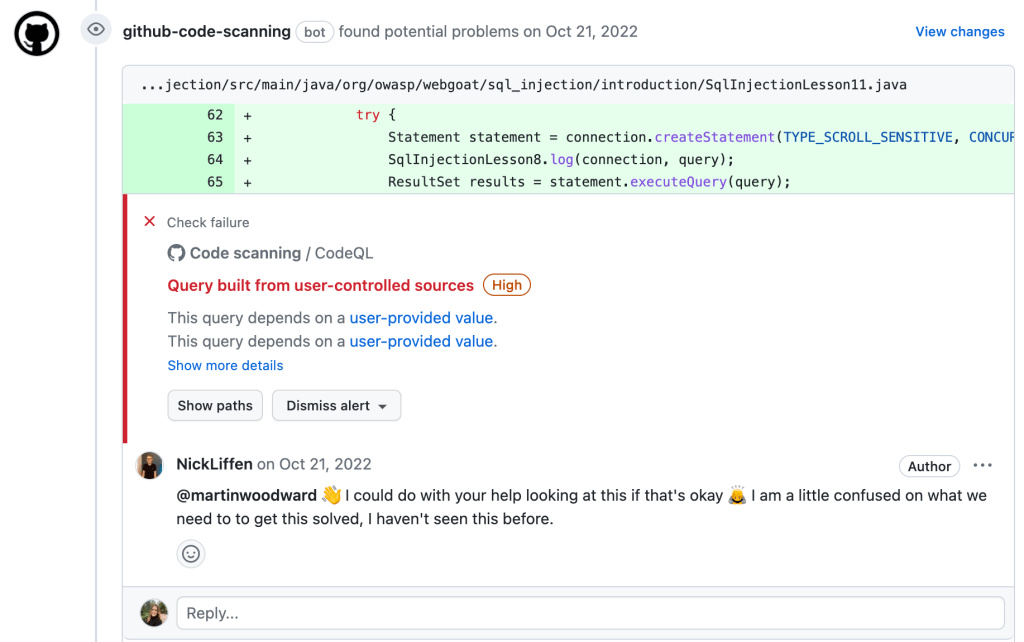
Once your testing runners are in place, every pull request is checked automatically. Findings appear directly on the pull request just like native GitHub security results, with options to remediate, comment, request a review, or flag the item for your security team.
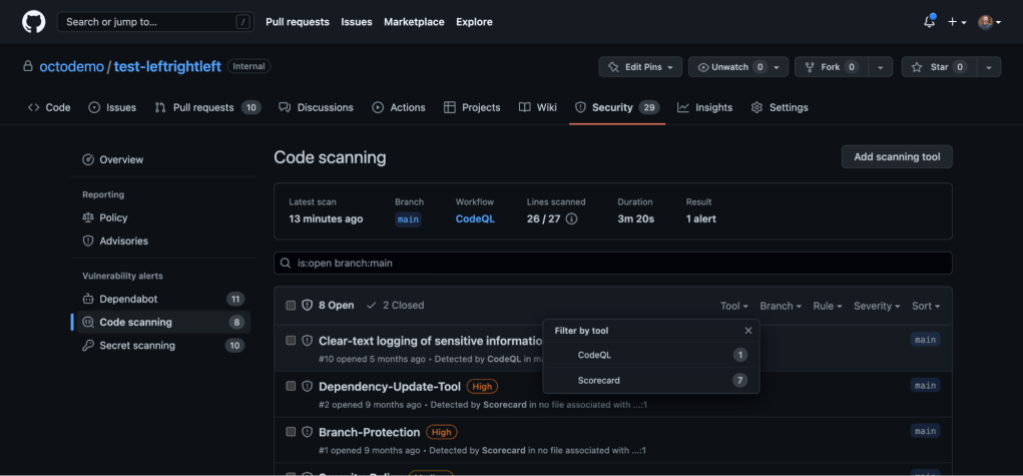
For security teams and engineering leaders managing hundreds or thousands of repositories, security overview aggregates risk into a single dashboard. From the Security tab at the organization, enterprise, or repository level, you can filter by team, severity, tool, rule, branch, or alert type — and even enable a security feature directly if it’s been turned off. To isolate results from your external security tools specifically, open the Code scanning tab.